SupportUkraine
If you experience any problems with the forum (it is not visible, there is no way to post messages, or some functionality does not work), please let us know. If you have problems with registration or you did not receive confirmation letter, let us know and we will activate your account manually.
If you get an "The submitted form was invalid. Try submitting again" error, delete cookies, then try again.
Ad blocker detected: Our website is made possible by displaying online advertisements to our visitors. Please consider supporting us by disabling your ad blocker on our website.
Forum rules
All communication in this branch should only be in English.
To discuss tools that are not in this section, use the “Watchfaces tools (discussion)” forum.
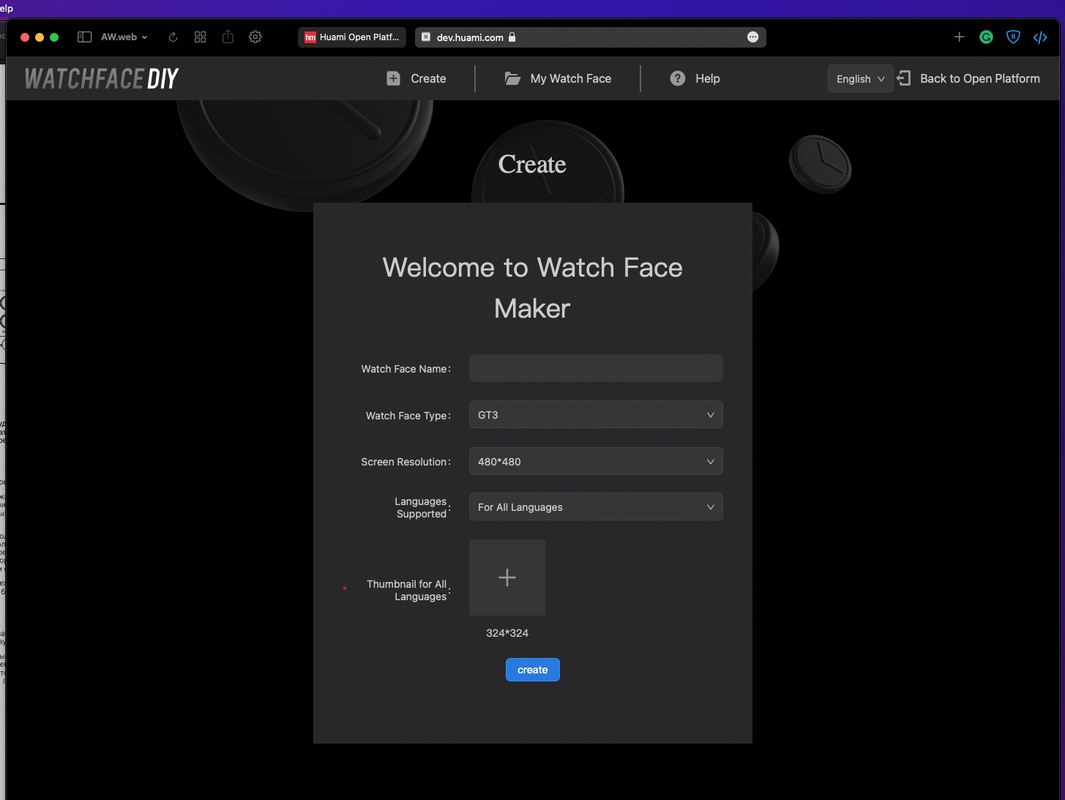
Hi! You can use the official Huami web editor to create watchfaces for these models. It's available on https://dev.huami.com/watchface/index.html#/create. However, this tool requires submitting your personal information (passport, photos, etc.) to get approved. This way isn't good for your privacy, and the approval takes too much time. You can bypass this and access the editor. Sign up on this site (https://dev.huami.com/#/user/register/reg), but don't complete step 2 which requires your personal data. Then enter the code below in your browser's JS console while in the editor:
You will get full access to this editor. It even saves your watchfaces with uploaded resources to your account. The only bad thing in this editor is that you can't unpack existing .bin files.
If you get issues with the editor again, run the code above again. Original post on 4pda (Russian)
Is there a tutorial to help to create a WF for GTS 2 Mini? I've created one, but it's all buged.
I really don't know whats wrong, I used the correct resolution (306x354px).
I'm also having issues with the Huami editor - for me, it refuses to even export my work-in-progress test. Is there documentation of this tool, or a tutorial I can find somewhere? I'm a bit lost.
------------------------------
Edit: I don't think it's possible to actually export watch faces this way, I just got an error having to do with my certification not having been processed yet. I deleted my draft, bit the bullet, and applied for the developer certification. Yuck. I simply don't want to have to upgrade to the GTS 2 non-mini, I don't have that kind of money right now.
Either way, this tool seems rather buggy and confusing and I really, really wish someone would add Mini support to the GTS editor.
Last edited by morganwable on 06 Jul 2021, 20:05, edited 1 time in total.
I bought a GTS 2 mini for my birthday and I'm truly sad.
I tried to edit some casio watch faces and it is IMPOSSIBLE to unpack the .bin files from GTS or Bip. I tried dozen programs (even Amazfit tools ones), spent hours of my birthday in this thing and I couldn't unpack any model.
I know that GTS 2 mini isn't that expensive, but I will miss the money I've spent in this watch.
So a tip: If you wanna buy a smartwatch with great options of watchface, disconsider GTS 2 mini. I'm very, very disappointed with this device.
(first post)... Just a quick one to let people know the original localStorage command is missing a trailing ';'. If posted in the chrome console (and chrome derivative browsers), the command isn't executed.
I noticed that if I returned to the https://dev.huami.com/#/home page, the localStorage value was cleared. To solve this I've created a tampermonkey script that automatically executes the localStorage.setItem command.
Just install the tampermonkey extension,
create a new script,
copy and paste the following.
Hello, anyone out there, who uses this editor have any idea on how to make "Frame Animation"? No matter what i try, editor downloads all the frames in .png format, but doesnt use them. It is apparent by file size when exported (.bin with and .bin w/o anim have the same size) and obviously is not used on watches themselves. I use GTS2mini.
Hello, anyone out there, who uses this editor have any idea on how to make "Frame Animation"? No matter what i try, editor downloads all the frames in .png format, but doesnt use them. It is apparent by file size when exported (.bin with and .bin w/o anim have the same size) and obviously is not used on watches themselves. I use GTS2mini.
I created several, the editor is very picky about the pictures, and their number. I had a set of .png images and only one of them was loaded, which had a small piece of a transparent background and it was displayed in Photoshop as a layer and not as a fixed background. Try to resave pictures
I have seen many watchfaces published here for gts 2 mini with gif preview.
Do anyone know how to make them? On huami site i don't see any option about it, i when i export wf it only gives a bin file, not an image or a gif.
Guys, please, maybe someone knows... I made watchface in the Huami editor, and when I synchronized it with my GTS 2 Mini it's just constantly reboots. To get rid of it I had to charge my watch so they could synchronize with the phone and then manually change watchface from this broken one to any other in the Zepp. Maybe someone knows WHY is this happening and HOW to make my watchface work...
Guys, when I try to select a resolution in Huami editor, it only says "no data".
How can I solve this problem?
GTS 2 Mini is such a headache... I'm almost selling it.
Guys, when I try to select a resolution in Huami editor, it only says "no data".
How can I solve this problem?
GTS 2 Mini is such a headache... I'm almost selling it.
I had such a problem, what is wrong with the cache, it seems to me, it helped me to log out and log in again
Look for my posts, a bin decompiler is work in progress. Contribute on GitHub if you can!
Have you ever tried any of the Amazfit GTS Tools?
In some of then, you can unpack bin files, but I can't remember its name. But you can find tehm on GitHub, if I'm not mistaken.
It is very useful to understand .json codes
(first post)... Just a quick one to let people know the original localStorage command is missing a trailing ';'. If posted in the chrome console (and chrome derivative browsers), the command isn't executed.
I noticed that if I returned to the https://dev.huami.com/#/home page, the localStorage value was cleared. To solve this I've created a tampermonkey script that automatically executes the localStorage.setItem command.
Just install the tampermonkey extension,
create a new script,
copy and paste the following.
(first post)... Just a quick one to let people know the original localStorage command is missing a trailing ';'. If posted in the chrome console (and chrome derivative browsers), the command isn't executed.
I noticed that if I returned to the https://dev.huami.com/#/home page, the localStorage value was cleared. To solve this I've created a tampermonkey script that automatically executes the localStorage.setItem command.
Just install the tampermonkey extension,
create a new script,
copy and paste the following.
There was a point where I thought things had stopped working when I couldn't save anything - I was getting auth errors in the network tab. I resolved that by going to the dev.huami.com home page, logging out and then logging back in. Once I refreshed the auth token, I was able to get back into the editor.
Users browsing this forum: No registered users and 10 guests
Cookie Consent
This website uses cookie or similar technologies, to enhance your browsing experience and provide personalised recommendations. By continuing to use our website, you agree to our Privacy Policy