Rolex Daytona Full Analog [ Steel or Pink Colour Choice ]
Posted: 02 Jan 2020, 22:22
First I apologize for this Post.... received a complaint about "Stolen work" and undone "Credit" just wanna write how i Have done it step by step, and after you will judge me or not.
Reading time & Retrieve File : ~5 minute
Put some Music :
https://youtu.be/r2HyNclBxX4
ARTIST Crossfiyah
TITLE Rage
LABEL Afterlife Recordings
GENRE Hardcore
Now you are ready^^
--------------------------------------------------------------------------------------------------------------------------------------------------------

Background comes from : https://drive.google.com/file/d/0B6xcK8 ... 9Ic1U/view
Where To find this link : https://forum.xda-developers.com/smartw ... k-t3276583
Silver colour : .img1687
Pink Colour : .img1701
Turquoise Colour : .img1673
For original graduation outer circle, Position of sphere, elements you can check it out to Wikimedia if you want to create it from scratch :
https://commons.wikimedia.org/wiki/File ... ematic.svg
https://commons.wikimedia.org/wiki/File ... ematic.svg
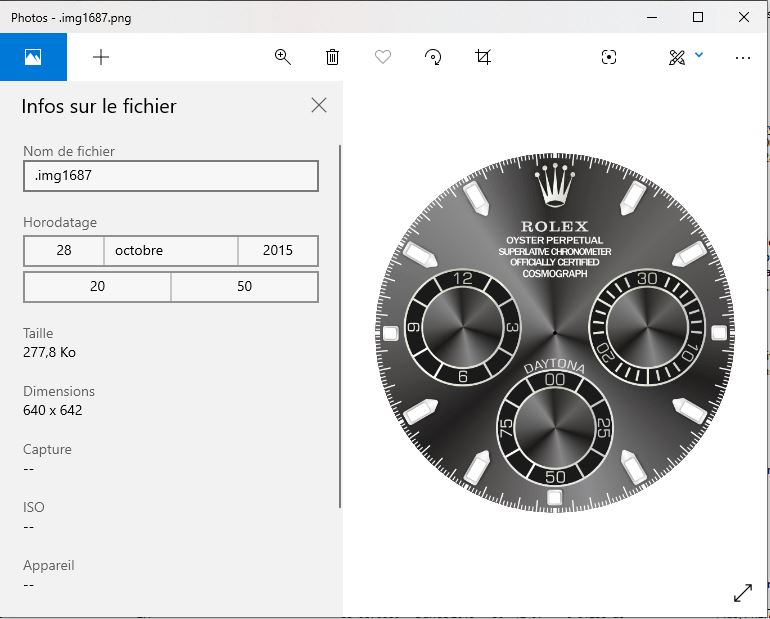
Scaling this down will result on a 455*454 pixel size, let's manually put 454*454... there no difference to the eye.
Everything is aligned and perpendicular [ 3 - 6 - 9 - 12 Hour // position of small discs ]
Just Open your fresh background on Sash^^ Gui and verify yourself with Watch Hand, or Just draw 2 centered perpendicular line...
You Can cut out the small disc and use the Help of photoshop to align [ Purple line will appear once object you are moving are aligned with others, you have also Pixels differences that appear, so move a little to the left etc^^ It's a nice help^^ ] But here you don't have nothing to do... Perfectly align.
Sometimes, I just think about putting some Info on Pics like my name // Tags.... on an invisible way.... like the old Hex Method....
Have a secret.... Let's Hide it in a picture.... No It's not a Police Movie..... Basic Thing works..... Why Short message someone when you can simply talk with someone else this way..... the Underground way.
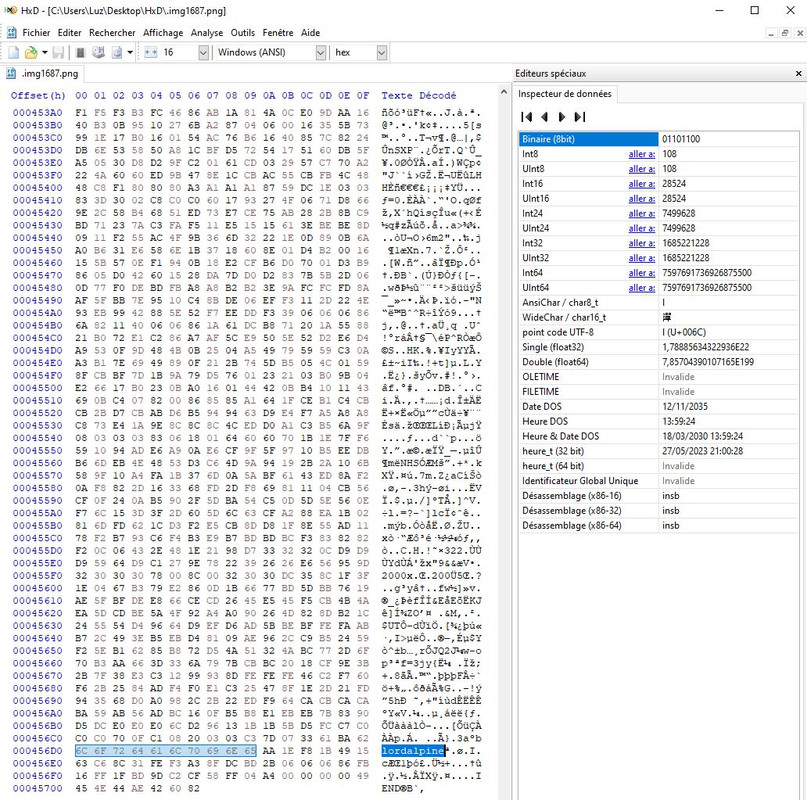
You can still open the PNG and do what you want with it.
On the original Background, original state untouch, there's no Metadata, Hidden Information.....
I make Faces for fun, and honnestly I don't want to waste my time making Hidden Tag on file or checking them, scanning them with tools, opening them with metadata tool or Hexadecimal editor.... i don't have time for this.
It's A face forum, not A rework of a scene release on Video File
Watchand :
Original picture comes from :
http://www.startimesupply.com/product/R ... -W-WH.html
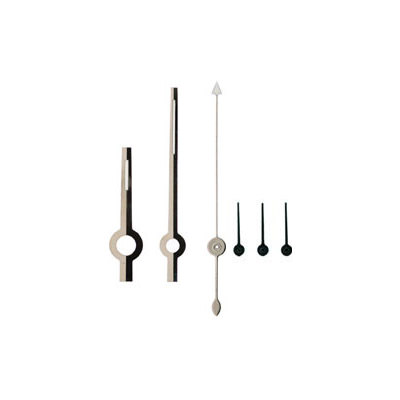
But if you look closer, there's noise on it or rust.... let's clean out this sh*t on Photoshop.
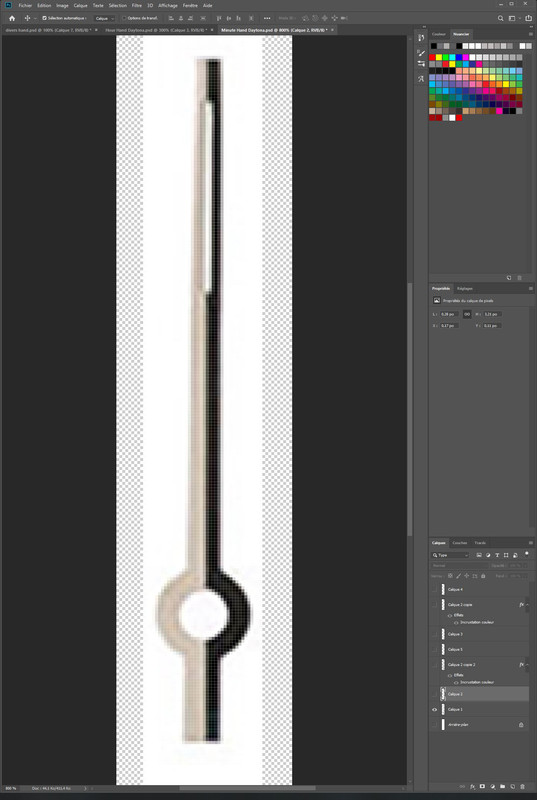
A good advice on Photoshop that save you time, is to work always on 1 side left or right, have the real object you want to reproduce from scratch in front of you, or photo of real object. Why always on one side, becaus you can
->Duplicate Layer
->Transform : Horizontal Symetric
It will put the exact same Pixel // colour [ same object pixelperfect at the right place ] like you are watching you in a mirror, So if you work on background element just work on 1/4 of the watch, duplicate 3 time, Vertical 2 times and horizontal 1 time for symetric fonction. [ Select all the area on the duplicate layer and do the magic Symetric function, Tadaa^^ ]
Step 1:
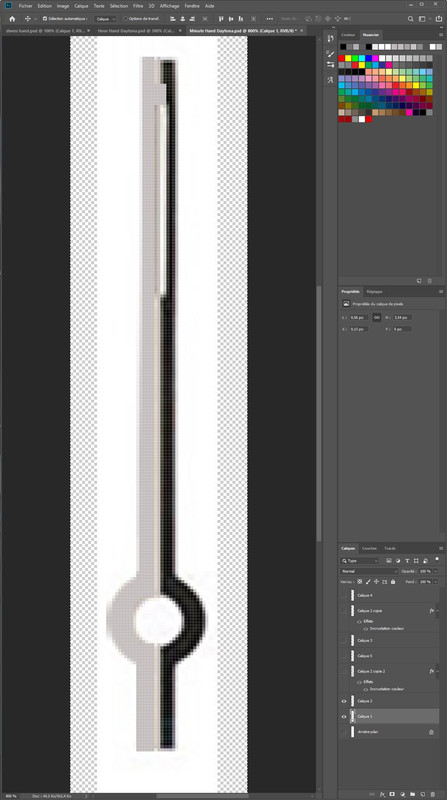
Step 2 :
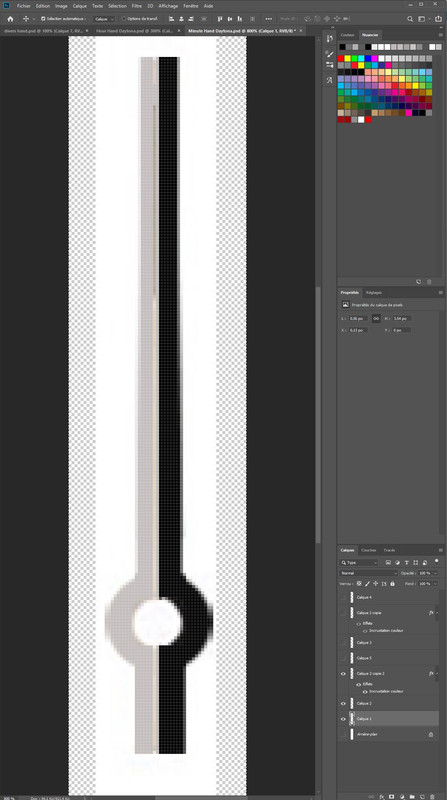
Step 3 & 4 :
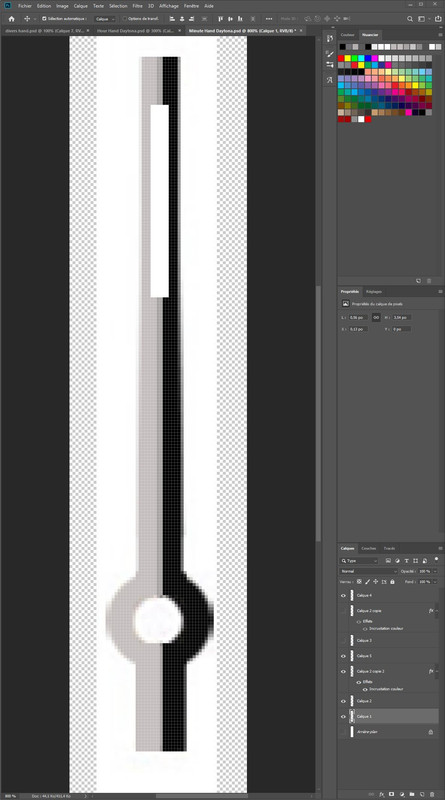
Put the middle line in step 3
Put the White rectangle in step 4 [ Don't have rhe word in english, the thing that is white, the wider square ]
Don't put special effect now like shade, light reflexion..... Do it on Final stage, juste before finishing, because now you have to scale it
[ Scale + Detail + Special effect are not friends^^ ]
Scale :
Have a real watch in front of you or a good pic of it and do the magic.
Advice : Don't transform it to the real size using transform or Manual transform, scale it step by step with Image size [ Picture size, My photoshop software is in French, don't have the exact Menu item in my head, but dont' use transform. ]
If you use transform, You will lose detail on thing, after scaling with transform 3 times, your nice object in small size look like sh*t, precision and detail lost.
And now put the effect. [always resize your psd, not the png. [ PNG = Final state, on your PSD you can make them dynamic object also... ]
]
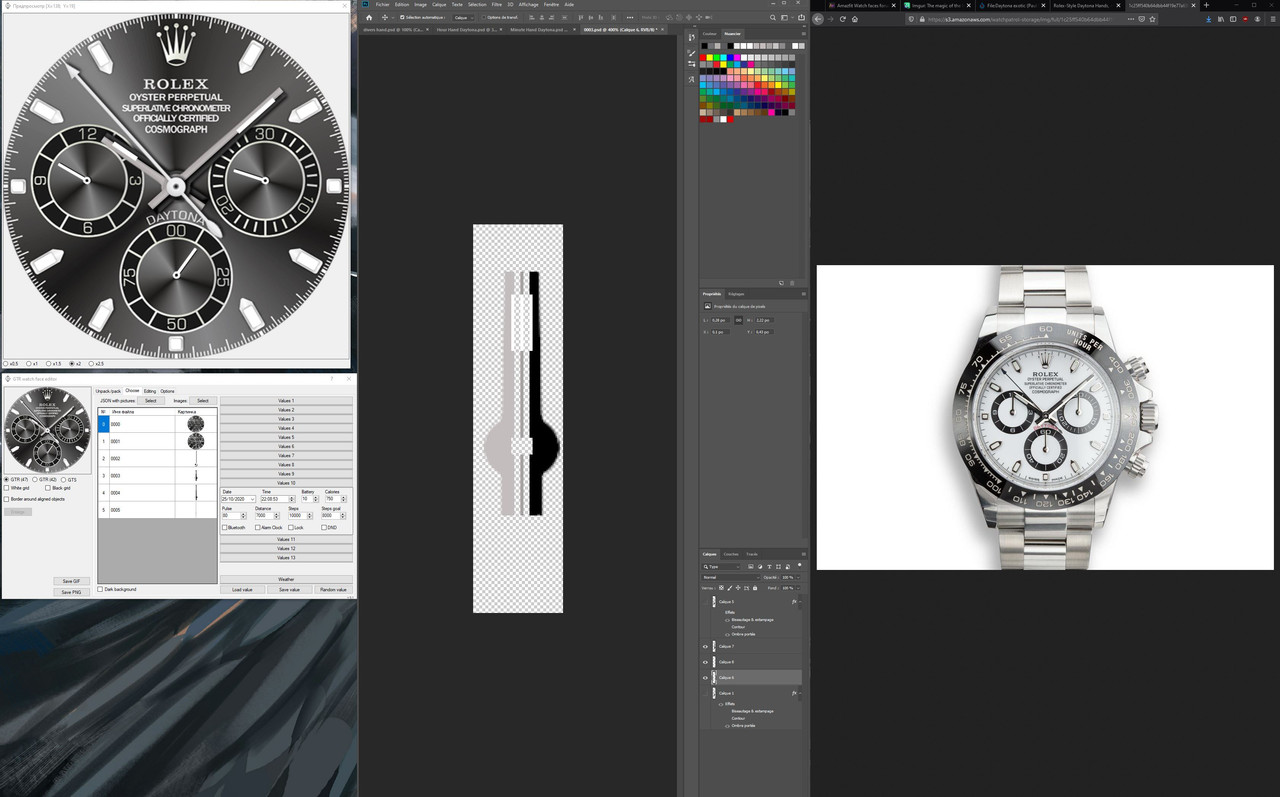
The Daytona posted is on V1.... as you can see, on Hour Hand and Minute, there is an 8 - 9 % difference size
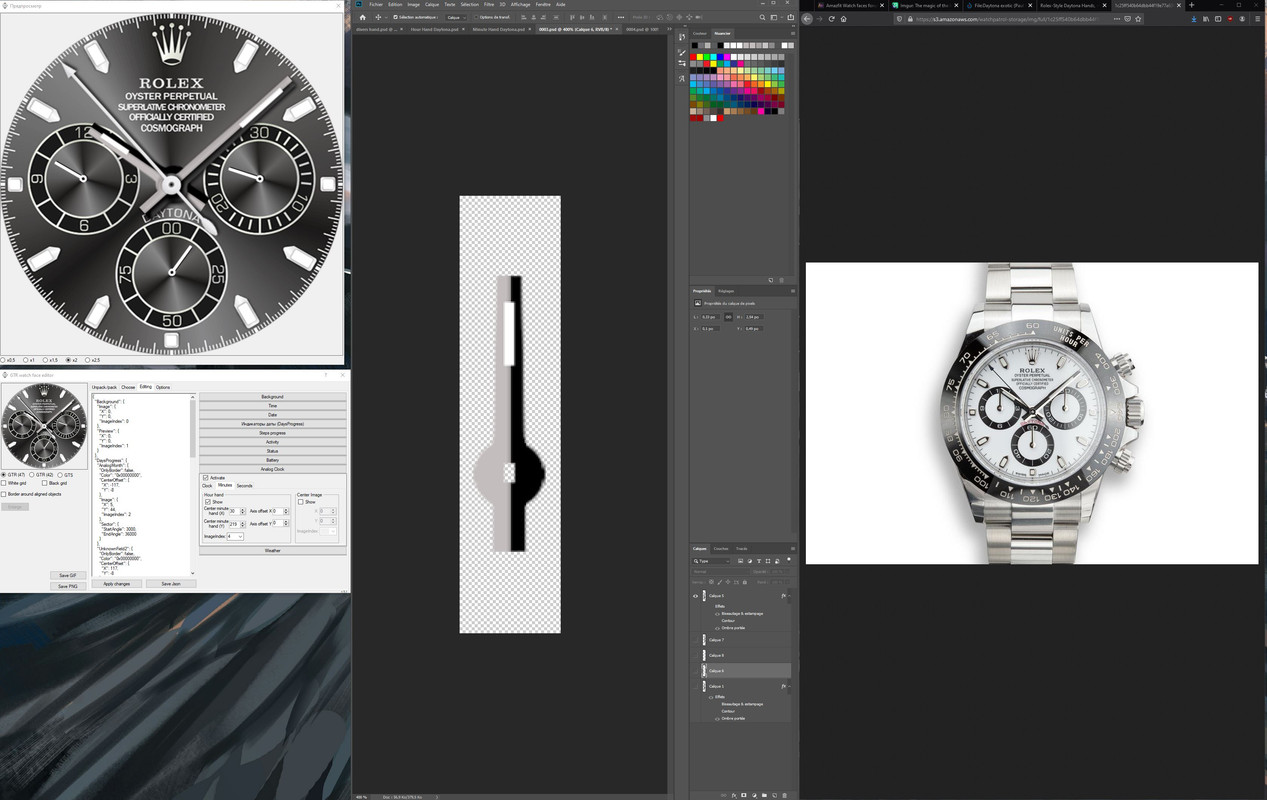
It's better^^
I sugest you before this state , To duplicate once the final object, cut the part left // middle / right, save a copy of this PSD unscale somewhere before doing final adjustment [ because a safe copy is always nice to have ]
Reason : You have the hands in separate object, you can change colour easily, add pixel line to adjust how fat you want, do some modification, do what you want without losing time every time you want to re use your watch hands....
You lose time this time, but you gain time next time^^ [ Maybe it's time to write the sequel ]
Easy thing are easy to made... but when it's 2AM - 3AM, you start doing weird thing in front of screen, or start having bad idea.
Done some^^ I don't f**** second hand, only have it in final state [ but it can happen early......Only have to cut out shade, so it's not important.... go away for making me a cup of coffee.... and who was almost sleepy on my, keyboard.... my cat.... don't know how he managed to erase files..... or simply wipe my group on dungeon when I play the Cleric on MMO... Yes you can smile it happened..... and not 1 time. ]
Repeat this for Minute // Seconds // small hands for data.
All Hands related to this post [ Step 1 - 2 3 + Final state + Background work (add symetric object in 4 easy steps on a Daytona backgound... in this case add jewels )
https://drive.google.com/file/d/106XKgA ... HHQyI/view
Repeat with Minutes and second.
And now the Json File :
Now, I can grant "Credit" to someone who made something i Have not done myself, All source, All Hands in PSD, unscale and scaled state, I have provided a method to gain time [ if you didn't knew about this tip before ] to had things perfectly align the lazier way you can do.....
All I can Say.... now show me proof it's not my work.
I'm french, my english is broken, Hope you understand all
Reminder if you have not see it this post all Hands are Free to Use :
https://drive.google.com/open?id=106XKg ... f8gXTHHQyI
You can download them to check the proof, to work your skill, understand things.... Do what you want with them^^ and be Happy^^
---------------------------------------------------------------------------------------------------------------------------------------------

The best advice I can give is sit down confortably, everything on your desk [ coffee + cookies ], setup your environment, always have the watch you want in front of you to check detail [ if you have a big big big LCD screen^^ It so funny to create thing ] and have fun^^
Reading time & Retrieve File : ~5 minute
Put some Music :
https://youtu.be/r2HyNclBxX4
ARTIST Crossfiyah
TITLE Rage
LABEL Afterlife Recordings
GENRE Hardcore
Now you are ready^^
--------------------------------------------------------------------------------------------------------------------------------------------------------
Background comes from : https://drive.google.com/file/d/0B6xcK8 ... 9Ic1U/view
Where To find this link : https://forum.xda-developers.com/smartw ... k-t3276583
Silver colour : .img1687
Pink Colour : .img1701
Turquoise Colour : .img1673
For original graduation outer circle, Position of sphere, elements you can check it out to Wikimedia if you want to create it from scratch :
https://commons.wikimedia.org/wiki/File ... ematic.svg
https://commons.wikimedia.org/wiki/File ... ematic.svg
Scaling this down will result on a 455*454 pixel size, let's manually put 454*454... there no difference to the eye.
Everything is aligned and perpendicular [ 3 - 6 - 9 - 12 Hour // position of small discs ]
Just Open your fresh background on Sash^^ Gui and verify yourself with Watch Hand, or Just draw 2 centered perpendicular line...
You Can cut out the small disc and use the Help of photoshop to align [ Purple line will appear once object you are moving are aligned with others, you have also Pixels differences that appear, so move a little to the left etc^^ It's a nice help^^ ] But here you don't have nothing to do... Perfectly align.
Sometimes, I just think about putting some Info on Pics like my name // Tags.... on an invisible way.... like the old Hex Method....
Have a secret.... Let's Hide it in a picture.... No It's not a Police Movie..... Basic Thing works..... Why Short message someone when you can simply talk with someone else this way..... the Underground way.
You can still open the PNG and do what you want with it.
On the original Background, original state untouch, there's no Metadata, Hidden Information.....
I make Faces for fun, and honnestly I don't want to waste my time making Hidden Tag on file or checking them, scanning them with tools, opening them with metadata tool or Hexadecimal editor.... i don't have time for this.
It's A face forum, not A rework of a scene release on Video File
Watchand :
Original picture comes from :
http://www.startimesupply.com/product/R ... -W-WH.html
But if you look closer, there's noise on it or rust.... let's clean out this sh*t on Photoshop.
A good advice on Photoshop that save you time, is to work always on 1 side left or right, have the real object you want to reproduce from scratch in front of you, or photo of real object. Why always on one side, becaus you can
->Duplicate Layer
->Transform : Horizontal Symetric
It will put the exact same Pixel // colour [ same object pixelperfect at the right place ] like you are watching you in a mirror, So if you work on background element just work on 1/4 of the watch, duplicate 3 time, Vertical 2 times and horizontal 1 time for symetric fonction. [ Select all the area on the duplicate layer and do the magic Symetric function, Tadaa^^ ]
Step 1:
Step 2 :
Step 3 & 4 :
Put the middle line in step 3
Put the White rectangle in step 4 [ Don't have rhe word in english, the thing that is white, the wider square ]
Don't put special effect now like shade, light reflexion..... Do it on Final stage, juste before finishing, because now you have to scale it
[ Scale + Detail + Special effect are not friends^^ ]
Scale :
Have a real watch in front of you or a good pic of it and do the magic.
Advice : Don't transform it to the real size using transform or Manual transform, scale it step by step with Image size [ Picture size, My photoshop software is in French, don't have the exact Menu item in my head, but dont' use transform. ]
If you use transform, You will lose detail on thing, after scaling with transform 3 times, your nice object in small size look like sh*t, precision and detail lost.
And now put the effect. [always resize your psd, not the png. [ PNG = Final state, on your PSD you can make them dynamic object also...
]The Daytona posted is on V1.... as you can see, on Hour Hand and Minute, there is an 8 - 9 % difference size
It's better^^
I sugest you before this state , To duplicate once the final object, cut the part left // middle / right, save a copy of this PSD unscale somewhere before doing final adjustment [ because a safe copy is always nice to have ]
Reason : You have the hands in separate object, you can change colour easily, add pixel line to adjust how fat you want, do some modification, do what you want without losing time every time you want to re use your watch hands....
You lose time this time, but you gain time next time^^ [ Maybe it's time to write the sequel ]
Easy thing are easy to made... but when it's 2AM - 3AM, you start doing weird thing in front of screen, or start having bad idea.
Done some^^ I don't f**** second hand, only have it in final state [ but it can happen early......Only have to cut out shade, so it's not important.... go away for making me a cup of coffee.... and who was almost sleepy on my, keyboard.... my cat.... don't know how he managed to erase files..... or simply wipe my group on dungeon when I play the Cleric on MMO... Yes you can smile it happened..... and not 1 time. ]
Repeat this for Minute // Seconds // small hands for data.
All Hands related to this post [ Step 1 - 2 3 + Final state + Background work (add symetric object in 4 easy steps on a Daytona backgound... in this case add jewels )
https://drive.google.com/file/d/106XKgA ... HHQyI/view
Repeat with Minutes and second.
And now the Json File :
Code: Select all
{
  "Background": {
    "Image": {
      "X": 0,
      "Y": 0,
      "ImageIndex": 0
    },
    "Preview": {
      "X": 0,
      "Y": 0,
      "ImageIndex": 1
    }
  },
  "DaysProgress": {
    "AnalogMonth": {
      "OnlyBorder": false,
      "Color": "0x00000000",
      "CenterOffset": {
        "X": -117,
        "Y": -8
      },
      "Image": {
        "X": 5,
        "Y": 44,
        "ImageIndex": 2
      },
      "Sector": {
        "StartAngle": 3000,
        "EndAngle": 36000
      }
    },
    "UnknownField2": {
      "OnlyBorder": false,
      "Color": "0x00000000",
      "CenterOffset": {
        "X": 117,
        "Y": -8
      },
      "Image": {
        "X": 5,
        "Y": 44,
        "ImageIndex": 2
      },
      "Sector": {
        "StartAngle": 0,
        "EndAngle": 36000
      }
    }
  },
  "Battery": {
    "Unknown4": {
      "OnlyBorder": false,
      "Color": "0x00000000",
      "CenterOffset": {
        "X": 0,
        "Y": 117
      },
      "Image": {
        "X": 5,
        "Y": 44,
        "ImageIndex": 2
      },
      "Sector": {
        "StartAngle": 0,
        "EndAngle": 36000
      }
    }
  },
  "AnalogDialFace": {
    "Hours": {
      "OnlyBorder": false,
      "Color": "0x00000000",
      "CenterOffset": {
        "X": 0,
        "Y": 0
      },
      "Image": {
        "X": 28,
        "Y": 162,
        "ImageIndex": 3
      }
    },
    "Minutes": {
      "OnlyBorder": false,
      "Color": "0x00000000",
      "CenterOffset": {
        "X": 0,
        "Y": 0
      },
      "Image": {
        "X": 30,
        "Y": 195,
        "ImageIndex": 4
      }
    },
    "Seconds": {
      "OnlyBorder": false,
      "Color": "0x00000000",
      "CenterOffset": {
        "X": 0,
        "Y": 0
      },
      "Image": {
        "X": 22,
        "Y": 221,
        "ImageIndex": 5
      }
    }
  }
}All I can Say.... now show me proof it's not my work.
I'm french, my english is broken, Hope you understand all
Reminder if you have not see it this post all Hands are Free to Use :
https://drive.google.com/open?id=106XKg ... f8gXTHHQyI
You can download them to check the proof, to work your skill, understand things.... Do what you want with them^^ and be Happy^^
---------------------------------------------------------------------------------------------------------------------------------------------
The best advice I can give is sit down confortably, everything on your desk [ coffee + cookies ], setup your environment, always have the watch you want in front of you to check detail [ if you have a big big big LCD screen^^ It so funny to create thing ] and have fun^^
