Page 15 of 20
AmazFit WatchFace editor 2 for Windows
Posted: 07 Mar 2021, 10:37
by SashaCX75
Graphics editor for working with dials Amazfit
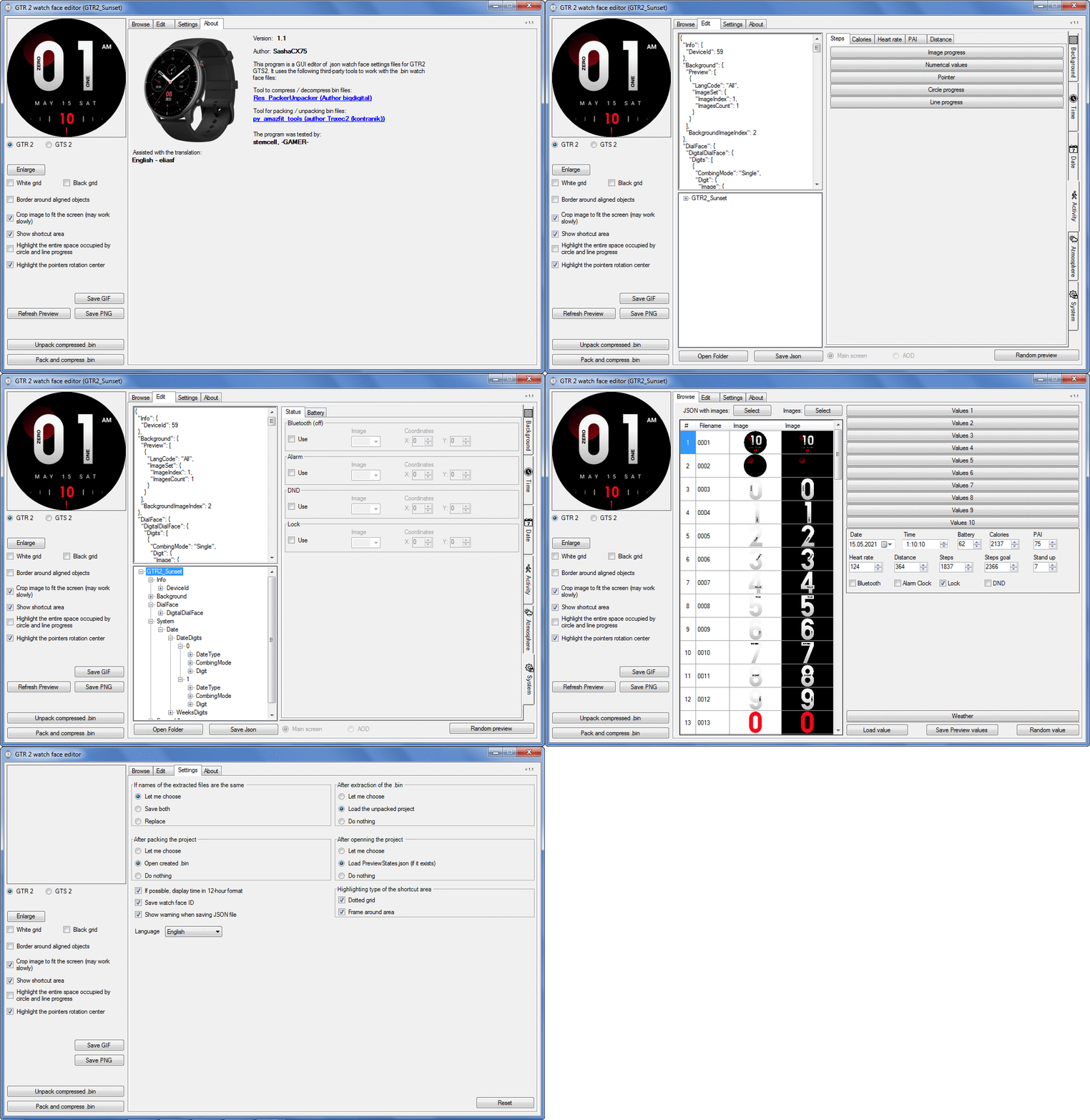
The editor supports watch faces from GTR 2(e), GTS 2 (GTS 2e / Zepp E Square), T-Rex Pro, Zepp E Circle.
Screenshot
Note: It is advisable to unpack the program to the root of the disk.
Not all dials can be unpacked.
The drawing order of elements cannot be changed. The only exception is if you move the second hand from the center, it will be drawn under the hour and minute hands.
If the .bin file is not created, then you need to look for errors in the .log file. Most often this happens when images have the wrong format.
Version 7.3
Fixed known display bugs.
Fixed date display errors in editable zones.
Added support for the Hungarian language.
For distance added support for separate images for miles and kilometers.
Added support for independent coordinates for a set of pictures (segments).
Added support for Zepp E Circle
Added the ability to convert watch faces between different models (GTR 2 (e), Zepp E Circle, T-Rex Pro)
Added the ability to create and update preview images of editable zones.
Added support for editable zones.
Added the ability to display the time in the system font.
Added the ability to display the date in the system font.
Added the ability to change the order of layers.
Added the ability to overlay the clock image on the saved png and gif files (enabled in the settings).
Added support for the system font (inscription at an angle and in a circle).
Added support for the Sunrise parameter (not working correctly for all cities).
Added support for ActivityGoal parameter.
Added the ability to display the goal of steps.
Added support for the Icon parameter.
Added the ability to display circular and linear progress at the same time.
Fixed errors when displaying the distance.
Fixed errors when displaying temperature.
Added French.
Added Italian language.
Added support for T-Rex Pro.
Added support for new elements (StandUp, fat burning, UV index, humidity, wind, pressure).
Found bugs fixed.
Fixed bugs in display AOD.
Fixed bug when using pictures for circular progress.
Added support for AOD.
Added Chinese translation.
It can work with elements: time, date, statuses, weather, battery, steps, calories, heart rate, PAI, path.
Added English translation.
v 1.2 Added Spanish language
Pictures created when unpacking and unpacking bin files are created by the parser and may differ from the images created in the editor. I have nothing to do with these files and am not responsible for their content.
When you turn on the "Follow ..." radio button, the right alignment and center alignment in the editor is displayed incorrectly.
The preview in the editor may differ from the image on the watch. I advise you to check the dial on a real device.
Editable zones do not work on the T-Rex Pro.
The editor does not work with GTS 2 mini (GTS U) watch faces and I do not know how to make such watch faces.
Until the Zepp app has an official watch face with animations or shortcuts, these features cannot be added to the editor.
Shortcuts work on dials converted from GTR (GTS) to GTR 2 (GTS 2). But with this method of creating dials, not all functions work correctly.
GTR (GTS, T-Rex) to GTR2 (GTS 2, T-Rex Pro) converter
GTR (GTS, T-Rex) to GTR2 (GTS 2, T-Rex Pro) Converter & Editor
Because I bought a GTR 3, the program will no longer be updated.
Donate to the author - PayPal:
[email protected].
Re: AmazFit WatchFace editor 2 for Windows
Posted: 02 Nov 2021, 09:34
by Max88
SashaCX75 wrote: 09 Oct 2021, 14:14
If you have any questions about the GTS 2 mini, it is better to contact the @neFAST user. As far as I know, he has made a lot of progress in terms of working with these dials. Maybe he wants to create a separate thread on this forum.
Those who have problems installing python can use this utility. It is based on
this project, but should work without installing python. I can’t check its performance, I don’t have a GTS 2 mini.
I have a gts 2 mini and i can confirm this unpack tool works. I have tested it with some watchfaces i created on huami site and it works perfectly. I have unpacked and repacked one i created.
Thanks to users who created it, you have opened me a world

hope to see a tool one day, one as this of sasha. Thanks again guys!
Re: AmazFit WatchFace editor 2 for Windows
Posted: 04 Nov 2021, 16:34
by Tradis
First of all, SashaCX75, Thanks for this great watch face editing tool!
I have a simple question, there will be in future a GTR 3/3 Pro update?
Thank you for your big work!
Re: AmazFit WatchFace editor 2 for Windows
Posted: 06 Nov 2021, 15:53
by SashaCX75
Tradis wrote: 04 Nov 2021, 16:34
I have a simple question, there will be in future a GTR 3/3 Pro update?
I have not decided yet, but most likely I will make a new editor for GTR 3. But even so, it is unlikely that it will be ready this year.
Re: AmazFit WatchFace editor 2 for Windows
Posted: 07 Nov 2021, 16:54
by demiurg1
It would be nice if there was a converter from GTR 2 to GTR 3 in it. If it will be with some restrictions, then also OK. It is important that the conversion is possible. It would be a pity to make new projects for the GTR 3 again, as if I decided to buy a new smartwatch model. It is good that the possible plan assumes a longer implementation date.
Re: AmazFit WatchFace editor 2 for Windows
Posted: 12 Nov 2021, 18:13
by Max88
SashaCX75 wrote: 09 Oct 2021, 14:14
If you have any questions about the GTS 2 mini, it is better to contact the @neFAST user. As far as I know, he has made a lot of progress in terms of working with these dials. Maybe he wants to create a separate thread on this forum.
Those who have problems installing python can use this utility. It is based on
this project, but should work without installing python. I can’t check its performance, I don’t have a GTS 2 mini.
Sasha could you tell me where to look for updated of this utility for gts2 mini?
I mean.. is there a site or a person to contact to check if there are updates of the tool?
Re: AmazFit WatchFace editor 2 for Windows
Posted: 12 Nov 2021, 19:19
by SashaCX75
Max88
In addition to the information in the quoted message, I have no other
Re: AmazFit WatchFace editor 2 for Windows
Posted: 17 Nov 2021, 17:40
by knorde
Maybe a stupid question, but in "amazfit watchface editor 2" I made a watchface for the GTR2(e). But how do I upload this to my smartwatch now?
Because I want to keep it private, I don't want to put it online but only on my smartwatch. Is that possible?
Re: AmazFit WatchFace editor 2 for Windows
Posted: 17 Nov 2021, 20:35
by Cooperphile
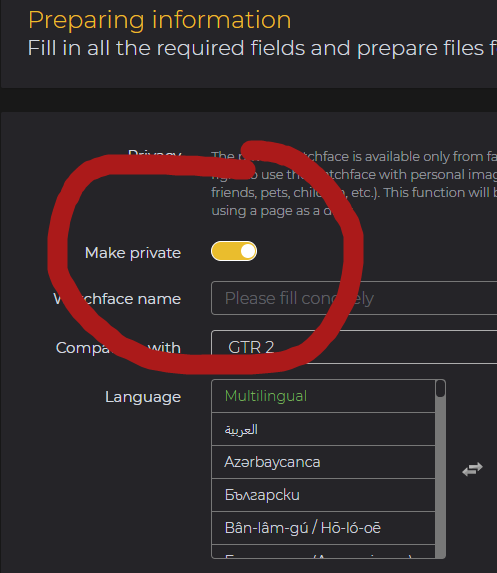
Mark it private when you upload it here. Install on your watch. Delete it from here if you want to.
Re: AmazFit WatchFace editor 2 for Windows
Posted: 18 Nov 2021, 07:06
by knorde
I have no option for that (no trigger).
I see this:
Make private Only one watchface in each section of the catalog can be private. View existing: You do not have any uploaded watch saces.
No option to turn on make private.
Re: AmazFit WatchFace editor 2 for Windows
Posted: 18 Nov 2021, 12:27
by GIK-Team
knorde wrote: 18 Nov 2021, 07:06
I have no option for that (no trigger).
I see this:
Make private Only one watchface in each section of the catalog can be private. View existing: You do not have any uploaded watch saces.
No option to turn on make private.
This option is only available to those who are in the
Watchface makers group.
To enroll in a group, you need to upload several watch faces to the site.
Re: AmazFit WatchFace editor 2 for Windows
Posted: 18 Nov 2021, 13:25
by knorde
I wouldn't want to put watchfaces online right before testing, I still find it very difficult and I still have a lot to learn about it. It is very difficult for me to put a number of watchfaces online before I can start testing and learning.
Is there no other way to upload it to my watch?
Re: AmazFit WatchFace editor 2 for Windows
Posted: 18 Nov 2021, 14:22
by GIK-Team
knorde wrote: 18 Nov 2021, 13:25
I wouldn't want to put watchfaces online right before testing, I still find it very difficult and I still have a lot to learn about it. It is very difficult for me to put a number of watchfaces online before I can start testing and learning.
Is there no other way to upload it to my watch?
viewtopic.php?t=783
Re: AmazFit WatchFace editor 2 for Windows
Posted: 24 Nov 2021, 01:11
by RizkyFz
knorde wrote: 18 Nov 2021, 13:25
I wouldn't want to put watchfaces online right before testing, I still find it very difficult and I still have a lot to learn about it. It is very difficult for me to put a number of watchfaces online before I can start testing and learning.
Is there no other way to upload it to my watch?
If you're on Android you can use Notify for Amazfit. That app allow you to upload custom wf directly into your watch. That's what i'm using for testing wf.
Anyway Sasha, i'm making (convert) a wf
https://amazfitwatchfaces.com/gts/view/6826 and after compiling it with Amazfit WF editor the size became really huge. It's became ~30mb when uncompressed while the resources of that wf are less than 1mb. Making the watch a little slow when using that wf. It is possible to reduce the size?
Initially i make the wf with huami editor but it's failed when exporting, it's says the size is too huge.
Re: AmazFit WatchFace editor 2 for Windows
Posted: 25 Nov 2021, 11:03
by istanbulls
I am Amazfit T-Rex Pro user.
I've done a few WatchFaces and I'm still learning a lot.
Thank you very much to those who made this program, you helped me develop.
I have a little question. I can't do anything for always-on display, am I incompetent or does the program not have this support?
sorry for my bad english, i use google-translate
Re: AmazFit WatchFace editor 2 for Windows
Posted: 25 Nov 2021, 16:47
by SashaCX75
RizkyFz wrote: 24 Nov 2021, 01:11
and after compiling it with Amazfit WF editor the size became really huge. It's became ~30mb when uncompressed while the resources of that wf are less than 1mb. Making the watch a little slow when using that wf. It is possible to reduce the size?
This is a bad example of a watch face. Replace the pictures with circular progress and the size of the dial will be greatly reduced.
Re: AmazFit WatchFace editor 2 for Windows
Posted: 25 Nov 2021, 16:50
by SashaCX75
istanbulls
On the "Editing" tab there is a switch which screen to edit, main or AOD.
Re: AmazFit WatchFace editor 2 for Windows
Posted: 26 Nov 2021, 11:45
by RizkyFz
SashaCX75 wrote: 25 Nov 2021, 16:47
RizkyFz wrote: 24 Nov 2021, 01:11
and after compiling it with Amazfit WF editor the size became really huge. It's became ~30mb when uncompressed while the resources of that wf are less than 1mb. Making the watch a little slow when using that wf. It is possible to reduce the size?
This is a bad example of a watch face. Replace the pictures with circular progress and the size of the dial will be greatly reduced.
I see the .json file from the original maker (gts 2 mini) and he's using image progress, not circle progress. So i tried to replicate it to gts 2 using the same method.
Now i just tried to change it to circle progress. Now the size greatly reduced but i'm kinda confused with how Radius, Width, Start angle, and End angle value works. I'm just guessing the number for now and it works for Steps and Kcal by setting the Radius and Width value to 100, Start angle to 90 and End angle to 360, and X=175 Y=220. But strangely the same values configuration doesn't work for my battery circle progress. I need pointer how these values works.
Re: AmazFit WatchFace editor 2 for Windows
Posted: 26 Nov 2021, 17:54
by SashaCX75
RizkyFz
For your dial for steps, calories and charge X = 174, Y = 221, start angle 180, end angle 360. For charge, radius 31, line width 41.
Re: AmazFit WatchFace editor 2 for Windows
Posted: 26 Nov 2021, 18:01
by SashaCX75
Version 7.3
Fixed known display bugs.
Because I bought a GTR 3, the program will no longer be updated.
Re: AmazFit WatchFace editor 2 for Windows
Posted: 28 Nov 2021, 08:26
by zyfish
thank you very much。sashacx75
Re: AmazFit WatchFace editor 2 for Windows
Posted: 28 Nov 2021, 12:48
by demiurg1
SashaCX75 wrote: 26 Nov 2021, 18:01
Version 7.3
Fixed known display bugs.
Because I bought a GTR 3, the program will no longer be updated.
=================
I congratulate you on your purchase.
I understand that you will now make an editor under GTR 3. Will it also support GTR 3 Pro? Will any conversion of watch faces from GTR 2 to GTR 3 (and Pro) be possible? I am thinking of buying a new model, because I feel sorry for my designs of watch faces, which I made for the GTR 2. I don't want to make them again.
Where do you recommend the purchase?
Re: AmazFit WatchFace editor 2 for Windows
Posted: 29 Nov 2021, 19:18
by Ferrari70m
Hello. Today I created my first watchface with the great editor (thanks SashaCX75).
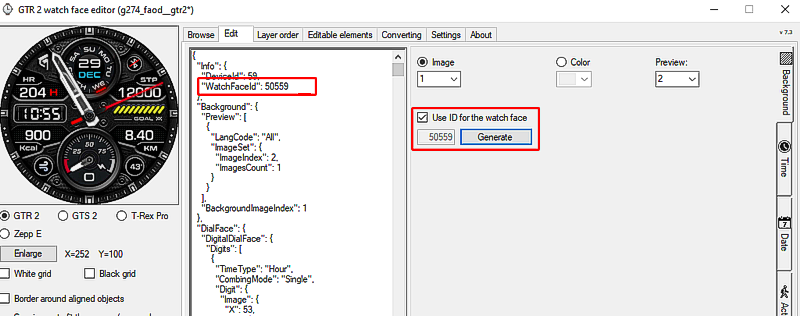
No I have the problem, that my WF were overwritten on watch. I think the problem is the same WF-ID.
How can iÍ creat a unique ID for my own WF?
Could someone help me please?
Re: AmazFit WatchFace editor 2 for Windows
Posted: 29 Nov 2021, 19:43
by asoo
Ferrari70m wrote: 29 Nov 2021, 19:18
Hello. Today I created my first watchface with the great editor (thanks SashaCX75).
No I have the problem, that my WF were overwritten on watch. I think the problem is the same WF-ID.
How can iÍ creat a unique ID for my own WF?
Could someone help me please?
you can use [Generate] to random Generate watchface ID , or edit on json Box and save , after saved go to Browse ---> "[select] json with image" open your .json again.
Re: AmazFit WatchFace editor 2 for Windows
Posted: 06 Dec 2021, 09:26
by Tradis
SashaCX75 wrote: 06 Nov 2021, 15:53
Tradis wrote: 04 Nov 2021, 16:34
I have a simple question, there will be in future a GTR 3/3 Pro update?
I have not decided yet, but most likely I will make a new editor for GTR 3. But even so, it is unlikely that it will be ready this year.
Thank you for your reply and for your work. I'm a .net developer, if i can help you to develop the tool, i'll be glad to do it!
Re: AmazFit WatchFace editor 2 for Windows
Posted: 06 Dec 2021, 10:08
by Superwitschi
Hello, if i add weather and pack an compress bin then there is no watchface bin in the folder. Somone a idea?
Edit: never mind, i finally got it to work.
 Note: It is advisable to unpack the program to the root of the disk.