Page 2 of 3
Huami watchface editor
Posted: 11 Jun 2021, 10:18
by sk1nzz
Hi! You can use the official Huami web editor to create watchfaces for these models. It's available on
https://dev.huami.com/watchface/index.html#/create. However, this tool requires submitting your personal information (passport, photos, etc.) to get approved. This way isn't good for your privacy, and the approval takes too much time. You can bypass this and access the editor. Sign up on this site (
https://dev.huami.com/#/user/register/reg), but don't complete step 2 which requires your personal data. Then enter the code below in your browser's JS console while in the editor:
Code: Select all
localStorage.setItem('examineType', '2')
You will get full access to this editor. It even saves your watchfaces with uploaded resources to your account. The only bad thing in this editor is that you can't unpack existing .bin files.
If you get issues with the editor again, run the code above again.
Original post on 4pda (Russian)
Re: Huami watchface editor
Posted: 09 Dec 2021, 11:47
by mimidudu
Hi, All
Huami has changed the address of the edit page - WatchfaceDIY -
https://user.huami.com/universalLogin/# ... ami.webapp
Displaying the following error:
{"code": "NoSuchKey", "message": "The specified key does not exist.", "requestId": "605c8c03-ec27-4ce3-bb90-bbf73fd24018"}
Does anyone know how to fix this?
Thanks
Re: Huami watchface editor
Posted: 10 Dec 2021, 08:45
by Kakashi-o-o-
the editor isnt working properly
Re: Huami watchface editor
Posted: 10 Dec 2021, 11:47
by GIK-Team
Kakashi-o-o- wrote: 10 Dec 2021, 08:45
the editor isnt working properly
viewtopic.php?t=2671
Re: Huami watchface editor
Posted: 10 Dec 2021, 12:54
by Kakashi-o-o-
The editor isnt working properly and i can make watch faces the topic u send has no realtion with it please help me fix the errors
Re: Huami watchface editor
Posted: 10 Dec 2021, 13:10
by GIK-Team
Kakashi-o-o- wrote: 10 Dec 2021, 12:54
The editor isnt working properly and i can make watch faces the topic u send has no realtion with it please help me fix the errors
The topic I am linking to is about the editor you mentioned and it discusses the problem that is being solved. Provide more clarity by pointing out the errors you are experiencing.
Re: Huami watchface editor
Posted: 10 Dec 2021, 13:29
by Kakashi-o-o-
GIK-Team wrote: 10 Dec 2021, 13:10
Kakashi-o-o- wrote: 10 Dec 2021, 12:54
The editor isnt working properly and i can make watch faces the topic u send has no realtion with it please help me fix the errors
The topic I am linking to is about the editor you mentioned and it discusses the problem that is being solved. Provide more clarity by pointing out the errors you are experiencing.
in the huami awtch face editor i cant select watch name and version
Re: Huami watchface editor
Posted: 10 Dec 2021, 16:27
by GIK-Team
Kakashi-o-o- wrote: 10 Dec 2021, 13:29
GIK-Team wrote: 10 Dec 2021, 13:10
Kakashi-o-o- wrote: 10 Dec 2021, 12:54
The editor isnt working properly and i can make watch faces the topic u send has no realtion with it please help me fix the errors
The topic I am linking to is about the editor you mentioned and it discusses the problem that is being solved. Provide more clarity by pointing out the errors you are experiencing.
in the huami awtch face editor i cant select watch name and version
This is discussed here:
viewtopic.php?t=2671
Re: Bip U / GTS 2 mini watchface editor
Posted: 11 Dec 2021, 03:23
by amazneo
sk1nzz wrote: 25 Jun 2021, 10:12
jazzrock71 wrote: 23 Jun 2021, 13:14
I tried to paste that line into console, but it didn't work.... anyone can help me?
Make sure you reloaded the page after running this code.
I got this error in Chrome
Code: Select all
localStorage.setItem('examineType', '2')
undefined
Re: Huami watchface editor
Posted: 11 Dec 2021, 14:51
by Kakashi-o-o-
how can i add shortcuts in the watchface?
I added a stopwatch shortcut but it didnt work for me .
Re: Huami watchface editor
Posted: 11 Dec 2021, 14:55
by Kakashi-o-o-
Also How to add animations in the watchface ? can anyone give a step by step explaination?
Re: Huami watchface editor
Posted: 12 Dec 2021, 21:26
by sk1nzz
This code works in the new editor
Code: Select all
localStorage.setItem('wf_examineType', '2')
Try to sign in again if it doesn't work
Re: Huami watchface editor
Posted: 03 Jan 2022, 12:44
by Dema
I have a question.
I'm using the tool for make gts3 watchfaces thanks to this guide, but I'm unable to add shortcuts, furthermore i saw some watchface that have shortcuts and also a couple of things that the tool doesn't even show to me.
Searching through some link content in this post, i found a Chinese discussion that -if i understood something- says that using the tool without give data/documents give only access with limitations.
I don't know if i read correctly because i've obviously used Google translate, but seems there is a way to workaround this again using js console.
Is there something true in what i think i have read?
And in this case, Someone is able to explain me how to do it (Maybe not in Chinese

)
Thanks anyway
Re: Huami watchface editor
Posted: 10 Jan 2022, 15:12
by istanbulls
Hi All,
I made a few watch faces for the T-Rex, I've been enjoying using them. I'm having a problem after the new year, I can't export.
I get the error "export failed encoder script file not exists".
Does anyone know about this issue. Am I the only one having this problem?!!
edit:
I did a test for the gts2 mini, it's fine, but the problem persists with the T-Rex.
Re: Huami watchface editor
Posted: 12 Jan 2022, 01:12
by seethebridges
istanbulls wrote: 10 Jan 2022, 15:12
Hi All,
I made a few watch faces for the T-Rex, I've been enjoying using them. I'm having a problem after the new year, I can't export.
I get the error "export failed encoder script file not exists".
Does anyone know about this issue. Am I the only one having this problem?!!
edit:
I did a test for the gts2 mini, it's fine, but the problem persists with the T-Rex.
Bumping this thread because Ive also run into this. have you found anything else regarding it? I cant export GTS or GTR 2 faces. Its always the same error complaining about the encoder script. I tried looking around for an archived page of the tool or SOMETHING, but I came up empty.
Re: Huami watchface editor
Posted: 12 Jan 2022, 11:00
by istanbulls
i have t-rex and gts2 mini watch, i did a few tries to test the issue. I made a very simple digital watch face for gts2 mini and got no error message, exported without any problem.
Re: Huami watchface editor
Posted: 13 Jan 2022, 22:53
by FeRu
Hello. Can somebody tell me because I tried today port my GTR2 face to GTR3 PRO by using this Huami editor (sometimes it's pissed me off) but after I created finaly my first face with this tool it wil export my WF as *.zap file and I don't know this is ok and how use this....
Re: Huami watchface editor
Posted: 14 Jan 2022, 02:40
by asoo
FeRu wrote: 13 Jan 2022, 22:53
Hello. Can somebody tell me because I tried today port my GTR2 face to GTR3 PRO by using this Huami editor (sometimes it's pissed me off) but after I created finaly my first face with this tool it wil export my WF as *.zap file and I don't know this is ok and how use this....
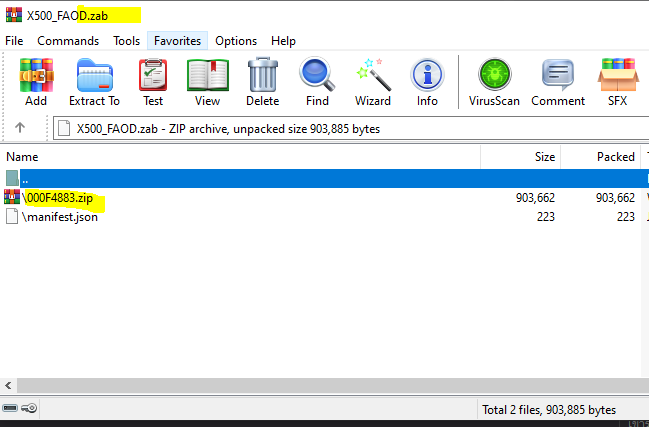
Zap is a zip format you can uncompress this file by use winrar , or winzip after you uncompress you can found your watchface inside that file.
Re: Huami watchface editor
Posted: 15 Jan 2022, 00:29
by FeRu
asoo wrote: 14 Jan 2022, 02:40
FeRu wrote: 13 Jan 2022, 22:53
Hello. Can somebody tell me because I tried today port my GTR2 face to GTR3 PRO by using this Huami editor (sometimes it's pissed me off) but after I created finaly my first face with this tool it wil export my WF as *.zap file and I don't know this is ok and how use this....
Zap is a zip format you can uncompress this file by use winrar , or winzip after you uncompress you can found your watchface inside that file.
Thank you bro for clearing this out

Re: Huami watchface editor
Posted: 15 Jan 2022, 04:57
by Sevens7
Hello.
What do i do with the exported Data since i need a bin file to install the WF on Bip U?
In Release Notes said "exported bin file got the same Name as created WF"
https://docs.huami.com/docs/guides/tool ... features-2
V4.4 (August 2, 2021)

New Features
Adds display of update logs to help pages
Supports multiple languages on help pages
Adds 480480 and 390450 resolutions to upload review of GT2 series
Adds the feature of copying editable components

Optimized Features
Optimizes the preview of editable components and image progress
Allows the BIN file text of an exported watch face to be automatically named after the created project
Another Thing is that i am not able to enter developer mode in zepp app. This option is just not available.
So the install procedure for me is no option to get the created WF forwarded to Bip U.
Re: Huami watchface editor
Posted: 15 Jan 2022, 21:09
by FeRu
I noticed something and can you confirm that Huami WF editor compress png files for watchface and they have worse quality than original? Because When I install WF on my GTR3 Pro all elements are little blurred even when I upload the best possible png quality images in that resolution.
Also how use pointers in this editor? I used the same parameters as I used in SashaCX75 editor and it's not working properly

Anyway I can't wait for SashaCX75 editor because after few days using this editor I can say that It's disabled

Re: Huami watchface editor
Posted: 16 Jan 2022, 06:22
by Sevens7
FeRu wrote: 15 Jan 2022, 21:09
I noticed something and can you confirm that Huami WF editor compress png files for watchface and they have worse quality than original? Because When I install WF on my GTR3 Pro all elements are little blurred even when I upload the best possible png quality images in that resolution.
Also how use pointers in this editor? I used the same parameters as I used in SashaCX75 editor and it's not working properly
Anyway I can't wait for SashaCX75 editor because after few days using this editor I can say that It's disabled
I managed it by myself.
Somehow i found the right Watch Model to get it to work. But it is very complicated because there is no option to choose one of all supported models. I played around with zoom function and randomly i got this LITE model that matches with BIP U.
Thank you.
Re: Huami watchface editor
Posted: 16 Jan 2022, 12:58
by istanbulls
Fixed issue for T-Rex, now everything works perfectly.
I want to thank them here. It's a very nice editor and it continues to evolve.
Re: Huami watchface editor
Posted: 16 Jan 2022, 17:11
by Paulo G
Hi, is this method still working? I mean the js console
Re: Huami watchface editor
Posted: 16 Jan 2022, 21:02
by seethebridges
Just an update in regards to GTS2 watchfaces not being exportable. Reached out via the chinese forum here and they have sorted the exporting issue! Can successfully export GTS2 zipped watchfaces now.
Paulo G wrote: 16 Jan 2022, 17:11
Hi, is this method still working? I mean the js console
So by the looks of it, you dont even need the js console command as far as I can tell. Just access the editor, login with your Zepp account, and you can make and export watch faces.
Re: Huami watchface editor
Posted: 24 Jan 2022, 23:33
by mimidudu
Can anyone tell me why the site
https://watchface.huami.com/create is offline or has the address changed?
 )
)
 New Features
 Optimized Features