分页: 10 / 20
AmazFit WatchFace editor 2 for Windows
发表于 : 07 3月 2021, 10:37
由 SashaCX75
Graphics editor for working with dials Amazfit
The editor supports watch faces from GTR 2(e), GTS 2 (GTS 2e / Zepp E Square), T-Rex Pro, Zepp E Circle.
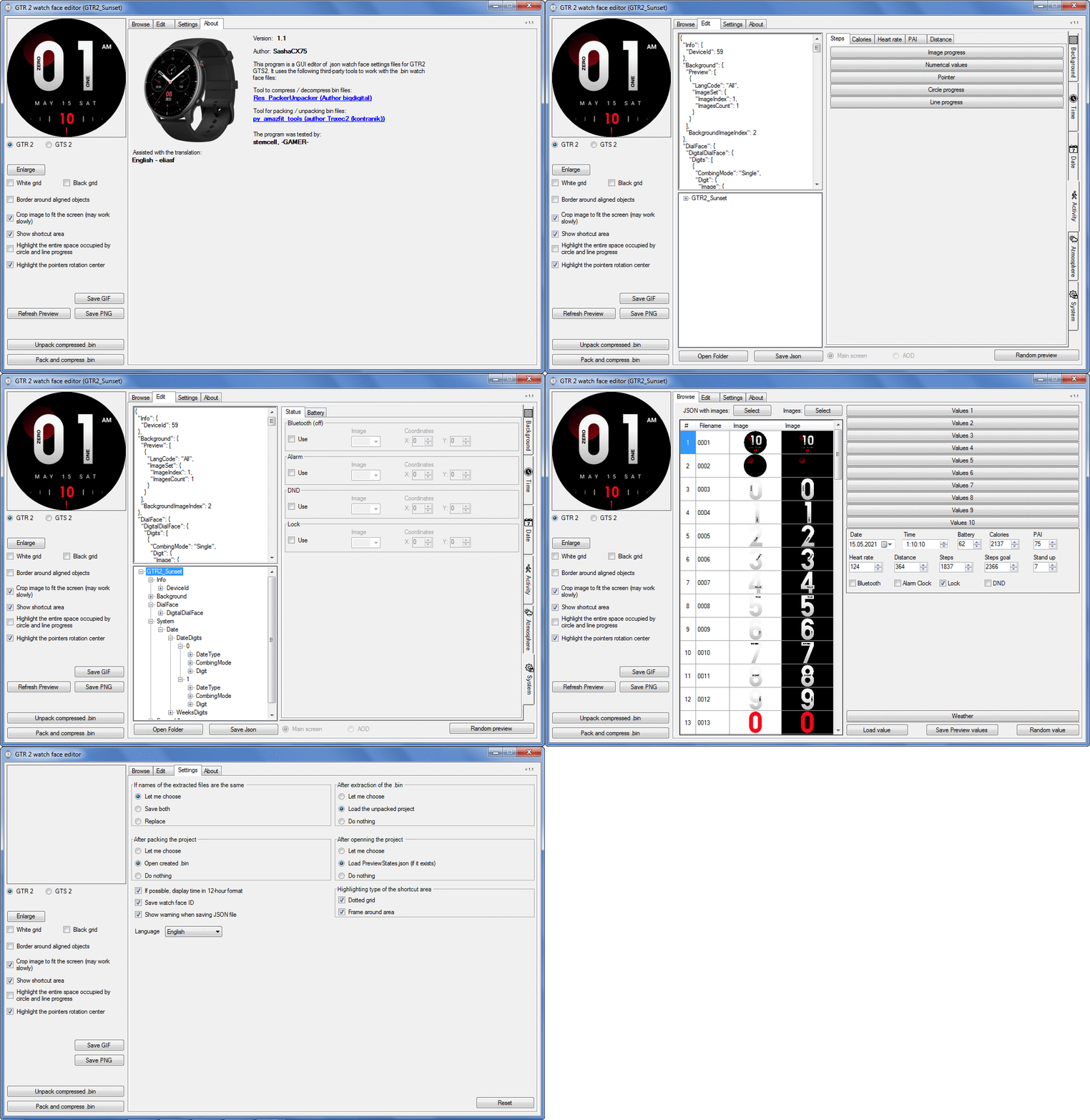
Screenshot
Note: It is advisable to unpack the program to the root of the disk.
Not all dials can be unpacked.
The drawing order of elements cannot be changed. The only exception is if you move the second hand from the center, it will be drawn under the hour and minute hands.
If the .bin file is not created, then you need to look for errors in the .log file. Most often this happens when images have the wrong format.
Version 7.3
Fixed known display bugs.
Fixed date display errors in editable zones.
Added support for the Hungarian language.
For distance added support for separate images for miles and kilometers.
Added support for independent coordinates for a set of pictures (segments).
Added support for Zepp E Circle
Added the ability to convert watch faces between different models (GTR 2 (e), Zepp E Circle, T-Rex Pro)
Added the ability to create and update preview images of editable zones.
Added support for editable zones.
Added the ability to display the time in the system font.
Added the ability to display the date in the system font.
Added the ability to change the order of layers.
Added the ability to overlay the clock image on the saved png and gif files (enabled in the settings).
Added support for the system font (inscription at an angle and in a circle).
Added support for the Sunrise parameter (not working correctly for all cities).
Added support for ActivityGoal parameter.
Added the ability to display the goal of steps.
Added support for the Icon parameter.
Added the ability to display circular and linear progress at the same time.
Fixed errors when displaying the distance.
Fixed errors when displaying temperature.
Added French.
Added Italian language.
Added support for T-Rex Pro.
Added support for new elements (StandUp, fat burning, UV index, humidity, wind, pressure).
Found bugs fixed.
Fixed bugs in display AOD.
Fixed bug when using pictures for circular progress.
Added support for AOD.
Added Chinese translation.
It can work with elements: time, date, statuses, weather, battery, steps, calories, heart rate, PAI, path.
Added English translation.
v 1.2 Added Spanish language
Pictures created when unpacking and unpacking bin files are created by the parser and may differ from the images created in the editor. I have nothing to do with these files and am not responsible for their content.
When you turn on the "Follow ..." radio button, the right alignment and center alignment in the editor is displayed incorrectly.
The preview in the editor may differ from the image on the watch. I advise you to check the dial on a real device.
Editable zones do not work on the T-Rex Pro.
The editor does not work with GTS 2 mini (GTS U) watch faces and I do not know how to make such watch faces.
Until the Zepp app has an official watch face with animations or shortcuts, these features cannot be added to the editor.
Shortcuts work on dials converted from GTR (GTS) to GTR 2 (GTS 2). But with this method of creating dials, not all functions work correctly.
GTR (GTS, T-Rex) to GTR2 (GTS 2, T-Rex Pro) converter
GTR (GTS, T-Rex) to GTR2 (GTS 2, T-Rex Pro) Converter & Editor
Because I bought a GTR 3, the program will no longer be updated.
Donate to the author - PayPal:
[email protected].
Re: AmazFit WatchFace editor 2 for Windows
发表于 : 16 6月 2021, 07:05
由 cjlin
In AmazFit_Watchface_Editor_2_V4.1 have the Show shortcuts area option,
How can I use the Shortcuts in GTR2?
Re: AmazFit WatchFace editor 2 for Windows
发表于 : 16 6月 2021, 08:25
由 SashaCX75
No way. This option is left over from the GTR version. I did not delete it, I hoped that the shortcuts would be fixed. Shortcuts don't work on GTR2.
Re: AmazFit WatchFace editor 2 for Windows
发表于 : 16 6月 2021, 09:34
由 CASIONFAN2021
thank you for the updated version. look forward to installing it tonight.
regarding shortcuts, there are a few watch faces now that have working shortcuts but im still stumped as to how to edit them. the editor has vertical tabs on the side but no option anywhere for editing shortcuts, the only app that has it is the one for t-rex.
with regards to the json editor, can i insert shortcut code into that to make it work?
Re: AmazFit WatchFace editor 2 for Windows
发表于 : 16 6月 2021, 11:32
由 sfreud
when for gtr2, t rex pro to gtr 42/47 ????
Re: AmazFit WatchFace editor 2 for Windows
发表于 : 16 6月 2021, 15:10
由 ilbagatta
Hello...
how I can upload the bin from iOS to my Trex Pro after created the file?
I tried with amaztools but didn't work.
I was thinking to make a mistake, but if I try to "Share to..." AmazTools a downloaded watchface, the result is the same. It didn't work.
Thanks
Re: AmazFit WatchFace editor 2 for Windows
发表于 : 16 6月 2021, 15:58
由 SashaCX75
CASIONFAN2021
If you have a watch face file with working shortcuts, then send it.
ilbagatta
I think you have a better chance of getting an answer in this thread "
How to install watchfaces"
Re: AmazFit WatchFace editor 2 for Windows
发表于 : 16 6月 2021, 16:00
由 SashaCX75
sfreud
If you want a GTR2 to GTR converter then there is no such thing. How do you even imagine this, because the GTR has a lot less functions.
Re: AmazFit WatchFace editor 2 for Windows
发表于 : 16 6月 2021, 16:52
由 ilbagatta
Thank you.... i only tried to send to amaztools, but from amaztools I found "Install custom file" and it worked fine!
Thank you
Re: AmazFit WatchFace editor 2 for Windows
发表于 : 16 6月 2021, 16:59
由 CASIONFAN2021
SashaCX75 写了: 16 6月 2021, 15:58
@CASIONFAN2021
If you have a watch face file with working shortcuts, then send it.
i include one of the few faces that have been done by dragonfly, starlord has also done some faces with working shortcuts.
https://amazfitwatchfaces.com/t-rex/view/5949
this is installed on my t-rex pro and the shortcuts work. hopefully you can work your magic and possibly integrate shortcuts into an update at somepoint.
many thanks for your skills
Re: AmazFit WatchFace editor 2 for Windows
发表于 : 16 6月 2021, 21:29
由 sfreud
SashaCX75 写了: 16 6月 2021, 16:00
@sfreud
If you want a GTR2 to GTR converter then there is no such thing. How do you even imagine this, because the GTR has a lot less functions.
indeed but arent there some simple watchf which probably can be converted?
Re: AmazFit WatchFace editor 2 for Windows
发表于 : 18 6月 2021, 12:49
由 civicdriver80
Why the year and the weekdays Indicator isn‘t showing on the watch? In the gif it is there but on the watch Not.
in editor it looks this way
on the watch like this
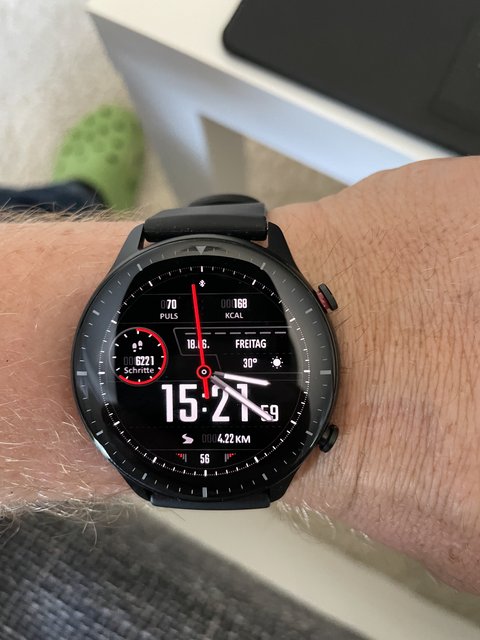
Re: AmazFit WatchFace editor 2 for Windows
发表于 : 20 6月 2021, 14:14
由 SashaCX75
civicdriver80
Due to the lack of information provided, one can only guess about the causes of the error. I can assume that you are converting the dial. And the description for the converter says that not all elements can work.
Re: AmazFit WatchFace editor 2 for Windows
发表于 : 20 6月 2021, 20:14
由 civicdriver80
Yes it‘s converted from the GTR watch i have before. So i have to Write it new if i want the 2 things get to work?
Re: AmazFit WatchFace editor 2 for Windows
发表于 : 23 6月 2021, 14:24
由 CASIONFAN2021
Sunrise and sunset times don't always display properly. Using numbers in the sequence 0-9 is not showing the times correctly, other faces show them correctly and no difference in numbers used and settings the same. Not sure how to fix this problem.
Also number of images used starts at 2, I made a sequence using 12 images, when I select 12 images it only uses 2 images and keeps resetting counter to 2. Is this a bug?
Please help
Re: AmazFit WatchFace editor 2 for Windows
发表于 : 23 6月 2021, 14:46
由 SashaCX75
There are only 10 numbers (from 0 to 9), therefore, for the number of images denoting numbers, you can only set the value 10. For sunrise and sunset images, you can only set the number of images 2 (there are only two states of sunrise or sunset).
Re: AmazFit WatchFace editor 2 for Windows
发表于 : 23 6月 2021, 19:51
由 CASIONFAN2021
Hi thanks for clarity. I was hoping to achieve an animation with the images but if only two are allowed then I'll learn to live with it lol.
Regarding the numbers for the numerical, I have 0-9 and on the editor sunrise shows as 05:30 and sunset shows as 19:30 but when I create the face and it loads on the watch the values Different, they look like 045 for sunrise 214 for sunset, they should read the time as 04:55 and 21:45 I tried adding leading zeros, removing them but it makes no difference it doesn't show the correct time. In another watch face the values show correctly with the same numerical font. I'm not sure why it works on some faces but not others.
I hope you can shed light
Re: AmazFit WatchFace editor 2 for Windows
发表于 : 23 6月 2021, 20:36
由 SashaCX75
CASIONFAN2021
Are you sure you added a separator picture?
Lay out the dial here, I'll see what the problem is.
In the editor, the sunrise and sunset times are always the same (5:30 and 19:30). The clock displayed for sunrise and sunset varies by city and changes every day.
Re: AmazFit WatchFace editor 2 for Windows
发表于 : 23 6月 2021, 21:49
由 CASIONFAN2021
I think you hit the nail on the head there, I missed the separator.. so easily missed. Thank you.
Regarding the sunrise sunset images being x2. Would it be possible to increase that to say 14 images, one image for each hour between 5:30 and 19:30, like a progress for battery, I can use as many images as I like for battery and other things that have a sequencing to them, since the editor always uses the 5:30-19:30 is that something that can be achieved with alteration of the code. I spent 5 hours making a really nice sunrise and reversed the images for sunset using 14 images but like you said only two can be used. I'm hoping you could make it happen but if its not possible i won't loose any sleep lol. One can dream..
P.s I have the rom file for the t rex pro which is in binary format that contains the watch face that has the moon phase but I can't extract the binary section for the face itself. Zepp refuse to make any watch faces that use the moon phase, the one watch face that uses it is so small its ridiculous. I don't know why they won't use this feature.
I'm so rusty with code I can't figure out how to extract it from the bin file, maybe it's a mission impossible.. Could you shed light on whether it's a feasible idea and one that is possible.
Many thanks
David
Re: AmazFit WatchFace editor 2 for Windows
发表于 : 24 6月 2021, 14:38
由 SashaCX75
CASIONFAN2021
After editing the json file in the editor and before creating bin in the json file, you can change the number of sunrise and sunset images from 2 to 14. But I doubt that this will give any result. I think this parameter has only two states day or night. But you can try.
As far as I know, no one has yet managed to get the dial file from the watch firmware.
Re: AmazFit WatchFace editor 2 for Windows
发表于 : 25 6月 2021, 08:18
由 Max88
Hello guys, i don't know if I'm in the right place. I'd like to know if this editor can be used also for gts 2 mini.
Otherwise, if it exists, could someone point me to the right thread?
Thanks in advanced

Re: AmazFit WatchFace editor 2 for Windows
发表于 : 25 6月 2021, 11:38
由 miraksterrik
Max88 写了: 25 6月 2021, 08:18
Hello guys, i don't know if I'm in the right place. I'd like to know if this editor can be used also for gts 2 mini.
Otherwise, if it exists, could someone point me to the right thread?
Thanks in advanced
You can use the official Huami web editor
viewtopic.php?f=29&t=2090
Re: AmazFit WatchFace editor 2 for Windows
发表于 : 29 6月 2021, 05:57
由 wolfgangausw
Unfortunately, you cannot change the alignment when system font is applied.
Re: AmazFit WatchFace editor 2 for Windows
发表于 : 29 6月 2021, 09:30
由 CASIONFAN2021
SashaCX75 写了: 24 6月 2021, 14:38
@CASIONFAN2021
After editing the json file in the editor and before creating bin in the json file, you can change the number of sunrise and sunset images from 2 to 14. But I doubt that this will give any result. I think this parameter has only two states day or night. But you can try.
As far as I know, no one has yet managed to get the dial file from the watch firmware.
i tried amending the number of images from 2 to 14 in the json code but it changes it back to 2 each time.
i think ill end up getting rid of the t rex pro and go with a t rex normal, the t-rex normal has so much more in terms of editing ability, the t rex pro is so hindered its frustrating. in the world of normal, when an upgrade comes along it improves on the original, here it seems they have changed everything rather than adding to.. nevermind eh.. and amazfit/zepp should be ashamed of themselves advertising a watch with moon phase and then only including one watch face with a moon the size of a grain of salt and then not releasing any with the feature.
i keep petering them to release a watch face and in the mean time im still looking for the start and finish of the binary code that is the watchface. im tring a method of comparing the start and finish of a stock file and looking for the same in the file and hoping to extract it.. im a determined sum beaach and one day i will have this file..
Re: AmazFit WatchFace editor 2 for Windows
发表于 : 08 7月 2021, 15:33
由 SashaCX75
Version 5.0
Added support for editable zones.
As far as I know, editable zones do not work on the T-Rex Pro.
Re: AmazFit WatchFace editor 2 for Windows
发表于 : 08 7月 2021, 16:33
由 Reysonk
SashaCX75 写了: 08 7月 2021, 15:33
Version 5.0
Added support for editable zones.
As far as I know, editable zones do not work on the T-Rex Pro.
Tnx for update!
Editable ZONE on trex pro Not supported now due to the firmware, we are waiting for the release of updates.
A proven fact, the WF from the trex with editable zones is installed by gtr2 and works correctly.
 Note: It is advisable to unpack the program to the root of the disk.