SupportUkraine
If you experience any problems with the forum (it is not visible, there is no way to post messages, or some functionality does not work), please let us know. If you have problems with registration or you did not receive confirmation letter, let us know and we will activate your account manually.
If you get an "The submitted form was invalid. Try submitting again" error, delete cookies, then try again.
Ad blocker detected: Our website is made possible by displaying online advertisements to our visitors. Please consider supporting us by disabling your ad blocker on our website.
App version: 3.0.111 Stable
Watch model: GTR
Phone model: iPhone 11
OS version: iOS 14.2

Not able to sync watch faces to zepp
Messages that does not meet these requirements will not be considered.
All information is transmitted to the developer, even if you do not receive a response in this thread.
"sometimes it's scary but it's still just you and me” — Leaving Laurel
Happy to hear you figured it out! No worries at all, it’s an easy mistake to make with watch face compatibility. If you have any more questions or need help finding compatible alternatives for the T-Rex 3, just message us anytime.
So I think this has come about due to me trying to use watch faces that aren’t supported for my T-Rex 3, (my bad) I tried some from the original T-Rex, the GTR 47mm and the GTR 2, so the error in this process has been me, I saw some Bell & Ross watch faces that I wanted and couldn’t install them now not knowing they weren’t compatible, so thanks for the information.
So I think this has come about due to me trying to use watch faces that aren’t supported for my T-Rex 3, (my bad) I tried some from the original T-Rex, the GTR 47mm and the GTR 2, so the error in this process has been me, I saw some Bell & Ross watch faces that I wanted and couldn’t install them now not knowing they weren’t compatible, so thanks for the information.
So I think this has come about due to me trying to use watch faces that aren’t supported for my T-Rex 3, (my bad) I tried some from the original T-Rex, the GTR 47mm and the GTR 2, so the error in this process has been me, I saw some Bell & Ross watch faces that I wanted and couldn’t install them now not knowing they weren’t compatible, so thanks for the information.
Unfortunately, Xiaomi Mi Band 9 is not supported by our app at the moment, which is why it does not appear in the device list (the latest supported model is Mi Band 6). Support for new models may be added in future updates.
App version: 4.8.422 Stable
Watch model: Xiaomi Smart Band 10
Phone model: iPhone SE (2020)
OS version: iOS 26.3.1
Hi, I'm putting a lot of effort into testing my newly created themes because I can't find Smart Band 10 support in the app. When will Band 10 support be available?
App version: 4.8.422 Stable
Watch model: Xiaomi Smart Band 10
Phone model: iPhone SE (2020)
OS version: iOS 26.3.1
Hi, I'm putting a lot of effort into testing my newly created themes because I can't find Smart Band 10 support in the app. When will Band 10 support be available?
App version: 4.8.432
Watch model: Amazfit Balance and BIP 5
Phone model: iPhone 14 Pro MAX
OS version: IOS 26.5
Unfortunately, with the app version mentioned above, I can't install WF via Bluetooth, this worked fine with previous versions.
I've also been having an issue for the past few versions where I keep getting logged out. That used to work fine, too.
So I'd like to stay logged in and install my work via BLE.
App version: 4.8.432
Watch model: Amazfit Balance and BIP 5
Phone model: iPhone 14 Pro MAX
OS version: IOS 26.5
Unfortunately, with the app version mentioned above, I can't install WF via Bluetooth, this worked fine with previous versions.
I've also been having an issue for the past few versions where I keep getting logged out. That used to work fine, too.
So I'd like to stay logged in and install my work via BLE.
Hello,
Could you please try the latest beta version of the app and let us know if the issue persists?
We’ve made several changes related to Bluetooth communication and authentication, so it would be very helpful to know whether BLE installation and the login issue are resolved in the beta version.
"sometimes it's scary but it's still just you and me” — Leaving Laurel
I have iPhone 16 and amazfit bip 6 , the version of aplicación is 4.8.436 , and when I intented to install any caratules never see the anouncement an never download the caratule . How can I do
?
I have iPhone 16 and amazfit bip 6 , the version of aplicación is 4.8.436 , and when I intented to install any caratules never see the anouncement an never download the caratule . How can I do
?
I have iPhone 16 and amazfit bip 6 , the version of aplicación is 4.8.436 , and when I intented to install any caratules never see the anouncement an never download the caratule . How can I do
?
Yes, of course, it installs via Bluetooth, but the file never gets downloaded in the application.
We can see that the issue is related to the advertisement not loading. When the ad is blocked, the watch face file download cannot start.
Please temporarily disable any ad blocker, DNS filtering/blocking service, or similar privacy filter on your device/network, then restart the app and try downloading the watch face again.
We also recommend using the QR code installation method, as it is usually more reliable.
If the issue continues after disabling the blocker, please let us know and we’ll be happy to help further.
I have iPhone 16 and amazfit bip 6 , the version of aplicación is 4.8.436 , and when I intented to install any caratules never see the anouncement an never download the caratule . How can I do
?
Yes, of course, it installs via Bluetooth, but the file never gets downloaded in the application.
Okay, but on iOS it can't be installed via QR code, or at least I'm not sure it can.
I've tried with the 5G network and I think without any DNS ad blocker, and I've also tried with different iPhones and different iOS versions (18, 26, and 27), and it doesn't work on any of them.
Okay, but on iOS it can't be installed via QR code, or at least I'm not sure it can.
Yes, it works on iOS without any problems.
You can enable Developer Mode in the Zepp app on iPhone in the same way. After that, use the QR scanner built into Zepp to scan or open the watch face QR code and install it.
So QR installation is supported on iOS as well.
"sometimes it's scary but it's still just you and me” — Leaving Laurel
Thanks for the details. Could you please check one more thing: do ads show normally for you in other apps or websites on these iPhones, or are ads blocked everywhere? Spoiler
Okay, but on iOS it can't be installed via QR code, or at least I'm not sure it can.
I've tried with the 5G network and I think without any DNS ad blocker, and I've also tried with different iPhones and different iOS versions (18, 26, and 27), and it doesn't work on any of them.
Wow, I didn't know QR code mode worked on iOS. I've enabled it and it works perfectly.
Regarding ad blockers, I have them installed, but even after disabling them all, an app called Wosti still shows ads. However, on Amazon Faces, I can't watch videos or download any cover art.
Great to hear that QR code mode is working perfectly for you!
Ads help us keep the app free, although we completely understand they can sometimes be annoying. There is also a subscription option that removes all ads.
Alternatively, you can temporarily disable your ad blocker only when downloading new watch faces. Once the files are downloaded, installing them again does not require watching ads.
Wow, I didn't know QR code mode worked on iOS. I've enabled it and it works perfectly.
Regarding ad blockers, I have them installed, but even after disabling them all, an app called Wosti still shows ads. However, on Amazon Faces, I can't watch videos or download any cover art.
Thanks for all your help. Even though I've disabled ad blockers, I can't download watch faces in the app. And a second question: how do I view QR codes in the iOS app? The ones I've tried and that have worked were from the website.
Regarding QR codes: they should also work on iOS. Once Developer Mode is enabled in the Zepp app, you can scan/open the QR code using the built-in scanner in Zepp.
If the Lite version works while the main app doesn't, that information will help us narrow down the cause of the problem.
"sometimes it's scary but it's still just you and me” — Leaving Laurel
Yes, the QR codes work, but I don't know how to view them in the app; it only shows me the option to download the watch face.
The QR code is actually always the same for your account. Each user has their own personal QR code.
Here's how it works:
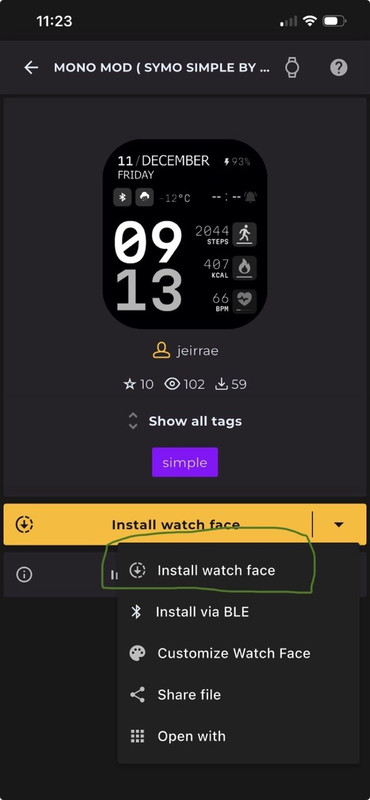
You choose a watch face in the app and tap Install.
The app uploads that watch face to your personal folder on our server.
Your personal QR code always points to that folder.
So every time you install a different watch face, the file in your personal folder is simply replaced, but the QR code itself never changes.
That's why you don't need to view a different QR code for every watch face. The same QR code will always install whichever watch face you selected most recently in the app.
Please note: this is how it works in the app only. On the website, it's different—each watch face has its own unique QR code, so every watch face has a different installation QR.
"sometimes it's scary but it's still just you and me” — Leaving Laurel
Users browsing this forum: No registered users and 0 guests
Cookie Consent
This website uses cookie or similar technologies, to enhance your browsing experience and provide personalised recommendations. By continuing to use our website, you agree to our Privacy Policy