Hello,
Could someone share the "stock" Amazfit X Watchfaces if possible - especially the one called "Technology in Blue" ?
I'd be eager to learn how they are constructed so we could improve the great WatchFace Editor by adding as example:
- the PAI score
- direct links to specific activities (running, cycling etc..)
- direct links to other features (countdown, music etc..)
I was wondering if getting original ".bins" could be achived with a rooted android phone ... but I don't have one unfortunately.
Thank you !
-
- Administrator
-
-
Support Ukraine
If you experience any problems with the forum (it is not visible, there is no way to post messages, or some functionality does not work), please let us know. If you have problems with registration or you did not receive confirmation letter, let us know and we will activate your account manually.
If you get an "The submitted form was invalid. Try submitting again" error, delete cookies, then try again.
Amazfit X Original Watchfaces [Amazfit X]
Forum rules
When adding a new topic, use the template: Topic title [device name]
For example: How to create watch face [Stratos 3]
All communication in this branch should only be in English.
When adding a new topic, use the template: Topic title [device name]
For example: How to create watch face [Stratos 3]
All communication in this branch should only be in English.
-
Inquisitom
- Posts: 20
- Joined: 13 Jan 2021, 16:47
- Location: Brussels
- Has thanked: 11 times
- Been thanked: 14 times
- Contact:
-
SashaCX75

- Posts: 827
- Joined: 26 Oct 2019, 15:18
- Location: Ukraine
- Has thanked: 14 times
- Been thanked: 1044 times
- Contact:
Dials from the Zepp program can be extract. For this, the root not needed.
Dials built into the watch cannot be extract.
Dials built into the watch cannot be extract.
-
Inquisitom
- Posts: 20
- Joined: 13 Jan 2021, 16:47
- Location: Brussels
- Has thanked: 11 times
- Been thanked: 14 times
- Contact:
SashaCX75 : could you please share the dials from Zepp pls, or tell me how could I get them ?
Thanks
Thanks
-
SashaCX75
- Posts: 827
- Joined: 26 Oct 2019, 15:18
- Location: Ukraine
- Has thanked: 14 times
- Been thanked: 1044 times
- Contact:
viewtopic.php?f=14&t=783
/Android/data/com.huami.watch.hmwatchmanager/files/watch_skin_local/
The folder is visible from PC and phone. On a phone with 11 android, not all explorers see it. Dials built into the watch cannot be extract. In order for the dial to appear in the folder, it must be installed on the clock.
/Android/data/com.huami.watch.hmwatchmanager/files/watch_skin_local/
The folder is visible from PC and phone. On a phone with 11 android, not all explorers see it. Dials built into the watch cannot be extract. In order for the dial to appear in the folder, it must be installed on the clock.
-
Inquisitom
- Posts: 20
- Joined: 13 Jan 2021, 16:47
- Location: Brussels
- Has thanked: 11 times
- Been thanked: 14 times
- Contact:
Thanks SashaCX75
Unfortunately, as I mentioned on the first post, I don't have an Android phone - only an Iphone :-/
And I cannot access the folder "/iPhone/Amazfit/watchSkin/" as explained for ios in the post you shared. The Zepp app makes it not possible to share its contents, and my Iphone is not/won't be jailbreaked.
Unfortunately, as I mentioned on the first post, I don't have an Android phone - only an Iphone :-/
And I cannot access the folder "/iPhone/Amazfit/watchSkin/" as explained for ios in the post you shared. The Zepp app makes it not possible to share its contents, and my Iphone is not/won't be jailbreaked.
-
Inquisitom
- Posts: 20
- Joined: 13 Jan 2021, 16:47
- Location: Brussels
- Has thanked: 11 times
- Been thanked: 14 times
- Contact:

-
SashaCX75
- Posts: 827
- Joined: 26 Oct 2019, 15:18
- Location: Ukraine
- Has thanked: 14 times
- Been thanked: 1044 times
- Contact:
Inquisitom
Read the topic from the link in my message. It seems to be written on which way to look for watch faces on iOS
Read the topic from the link in my message. It seems to be written on which way to look for watch faces on iOS
for iOS
First, you need to install one of the stock watch faces available in Amazfit/Mifit (if you have already installed one, you may skip this step).
Open the folder with the downloaded watch face in the file manager with the path:
/iPhone/Amazfit/watchSkin/ - if Amazfit
/iPhone/Mifit/watchSkin/ - if Mifit
-
Inquisitom
- Posts: 20
- Joined: 13 Jan 2021, 16:47
- Location: Brussels
- Has thanked: 11 times
- Been thanked: 14 times
- Contact:
SashaCX75 thanks for the support. It seems this is not possible anymore with the new Zepp application. Maybe this was working before with the Amazfit or Mifit apps
This is why I’m asking if someone could do this from his android phone if possible - thkx
This is why I’m asking if someone could do this from his android phone if possible - thkx
-
Lordalpine
- WF maker
- Posts: 62
- Joined: 09 Oct 2019, 22:09
- Location: Santo Tirso
- Has thanked: 6 times
- Been thanked: 35 times
- Contact:

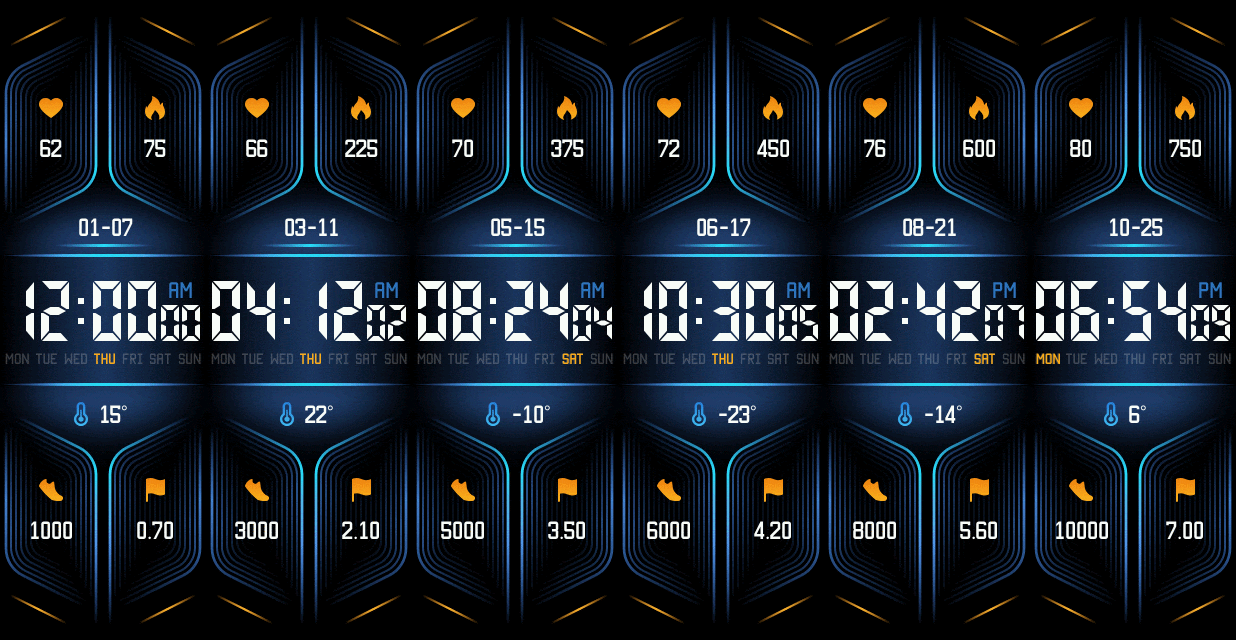
-
Inquisitom
- Posts: 20
- Joined: 13 Jan 2021, 16:47
- Location: Brussels
- Has thanked: 11 times
- Been thanked: 14 times
- Contact:

-
Lordalpine
- WF maker
- Posts: 62
- Joined: 09 Oct 2019, 22:09
- Location: Santo Tirso
- Has thanked: 6 times
- Been thanked: 35 times
- Contact:
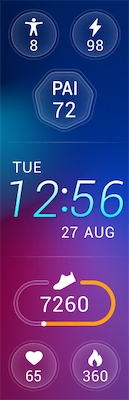

-
Inquisitom
- Posts: 20
- Joined: 13 Jan 2021, 16:47
- Location: Brussels
- Has thanked: 11 times
- Been thanked: 14 times
- Contact:
Lordalpine Great thanks ! I partially got what I wanted
We have now the new "stand" parameter:
Unfortunately for the weather, I was able to unpack the bin with my tools  :
I'll blindly test with:
I will tease a bit
:
I'll blindly test with:
I will tease a bit 
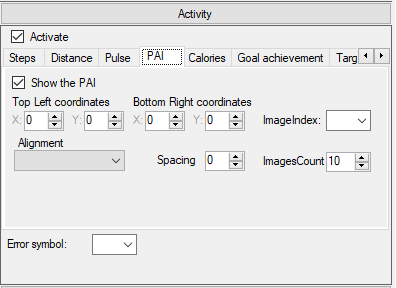
We have now the new "stand" parameter:
Code: Select all
    "Stand": {
      "TopLeftX": 18,
      "TopLeftY": 63,
      "BottomRightX": 90,
      "BottomRightY": 82,
      "Alignment": "Center",
      "Spacing": 0,
      "ImageIndex": 22,
      "ImagesCount": 10
},Code: Select all
2021-02-03 19:28:50,918 - root - WARNING - [ParamConv:parse] currentPath 6\.\10 / Parameter 10 isn't supported for <class 'watchFaceParser.elements.weather.Weather'>
2021-02-03 19:28:50,918 - root - CRITICAL - Parameter 10 isn't supported for <class 'watchFaceParser.elements.weather.Weather'>
Traceback (most recent call last):
  File "program.py", line 164, in parseResources
  File "watchFaceParser\utils\parametersConverter.py", line 190, in parse
  File "watchFaceParser\utils\parametersConverter.py", line 131, in childIsList
IndexError: Parameter 10 isn't supported for <class 'watchFaceParser.elements.weather.Weather'>Code: Select all
  "Sunrise": {
    "Hours": {
      "Tens": {
        "X": -4,
        "Y": 435,
        "ImageIndex": 1,
        "ImagesCount": 10
      },
      "Ones": {
        "X": 38,
        "Y": 435,
        "ImageIndex": 1,
        "ImagesCount": 10
      }
    },
    "Minutes": {
      "Tens": {
        "X": 107,
        "Y": 435,
        "ImageIndex": 1,
        "ImagesCount": 10
      },
      "Ones": {
        "X": 152,
        "Y": 435,
        "ImageIndex": 1,
        "ImagesCount": 10
      }
    },
    "Delimiter": {
      "X": 75,
      "Y": 421,
      "ImageIndex": 27
    }
  },
  "Sunset": {
    "Hours": {
      "Tens": {
        "X": -4,
        "Y": 435,
        "ImageIndex": 1,
        "ImagesCount": 10
      },
      "Ones": {
        "X": 38,
        "Y": 435,
        "ImageIndex": 1,
        "ImagesCount": 10
      }
    },
    "Minutes": {
      "Tens": {
        "X": 107,
        "Y": 435,
        "ImageIndex": 1,
        "ImagesCount": 10
      },
      "Ones": {
        "X": 152,
        "Y": 435,
        "ImageIndex": 1,
        "ImagesCount": 10
      }
    },
    "Delimiter": {
      "X": 75,
      "Y": 421,
      "ImageIndex": 27
    }
},-
Inquisitom
- Posts: 20
- Joined: 13 Jan 2021, 16:47
- Location: Brussels
- Has thanked: 11 times
- Been thanked: 14 times
- Contact:
A tool has been released thanks to your collaboration.
Here's the original thread:
viewtopic.php?p=8036#p8036
Here's the original thread:
viewtopic.php?p=8036#p8036
-
Lordalpine
- WF maker
- Posts: 62
- Joined: 09 Oct 2019, 22:09
- Location: Santo Tirso
- Has thanked: 6 times
- Been thanked: 35 times
- Contact:
Inquisitom
Rotating Shadows 2 : https://amazfitwatchfaces.com/amazfit-x/view/111
Chromatic Compass : https://amazfitwatchfaces.com/amazfit-x/view/110
Rotating Shadows 2 : https://amazfitwatchfaces.com/amazfit-x/view/111
Chromatic Compass : https://amazfitwatchfaces.com/amazfit-x/view/110
Who is online
Users browsing this forum: No registered users and 3 guests