• Administrator
  •  
    Support Ukraine
    If you experience any problems with the forum (it is not visible, there is no way to post messages, or some functionality does not work), please let us know. If you have problems with registration or you did not receive confirmation letter, let us know and we will activate your account manually.
    If you get an "The submitted form was invalid. Try submitting again" error, delete cookies, then try again.
     

MiBandWFTool

This forum is designed to discuss and develop tools creating watch faces.

Moderators: asoo, lvpokka, Internal error, Watchmens

Forum rules
All communication in this branch should only be in English.
To discuss tools that are not in this section, use the “Watchfaces tools (discussion)” forum.
lvpokka
Posts: 178
Joined: 07 Jul 2019, 20:22
Location: L1
Has thanked: 19 times
Been thanked: 152 times
Contact:

MiBandWFTool

Post by lvpokka »

Author
lvpokka

Tool Description
1. The tool is based on a modified version of AmazfitBipTools, thanks to the original open source .
2. The tool supports unpacking, packing of the official watch face bin file.
3. Mi band 4 supports 16,581,375 colors.
4. Mi band 5 supports 15,499,008 colors.

How to
1. Unzip MiBandWFTool_X.X.zip.
2. Download .bin file from catalog or get standard watchface file.
3. Drag the .bin file to WatchFace.exe (in step 1. , get the decompressed file)
(if there is only one log file, the decompression failed).

4. There are two ways to modify the dial.
  • is to modify the corresponding image file and replace it with what we want.
  • is to modify the corresponding json file and modify the position of the image.
5. After all the modifications are completed, drag the modified json into WatchFace.exe in step 1 to get the corresponding bin file
(the file name depends on the name of the bin. If the .bin file is not generated, the package is wrong)

6. Copy the newly generated bin file to the corresponding directory of the mobile phone, and the synchronization will be completed. (This step is not very clear, you can refer to the original tutorial) above, you're done!
History log
What's new
  • added animation support
  • fixed pulse and weather
  • removed color restrictions for images
  • analog clock support
ver1.2
- Added compatibility for Pulse progress bar

ver1.3
- added full support for transparent images
- drawing 20 frames for preview GIF

ver1.3.2
- bug fixes
- added 2 versions, both with transparency but Palette version uses less memory if images are simple.

ver1.3.3
- Added circular/linear step progress on preview

Stable v1.3.6
- locked transparency for palette mode, support only (0 and 255) values
- palette mode fix

Stable v1.3.7
v1.3.7 (cosmetic changes, you can use 1.3.6 if everything suits)
- Fixed GIF preview (Pulse rendering, Step segments, Kilometer drawing, Calories)
- Added the ability to choose which Set of images to use for WeekDays. (Config file WatchFace.exe.config)
- STRONGLY fixed json examples in README.
(to avoid problems, pack 1.3.6 and unpack 1.3.7 for a smooth transition)

Stable v1.3.8
- Removed image order dependency for json (sorting images no longer required)
- Fixed display bugs
Important: the order of the images should be from 0000 to XXXX without gaps.

v1.3.9
- Removed dependence on images order 0000->XXXX
- Calories rendering fixed
- Added ability to change Preview Speed (available from 50ms - 1000ms)
- TimeElement DrawingOrder hardcoded to 1234 (not used by MiBand4)

v1.4.1
- Other bugfixes
- New WF support
- Added new elements (time delimiter / step icon / linear progress )

v2.1.4
- Added support Mi Band 5 wfaces
- Pandafix (new unknown element)
- BugFixes

v2.1.5
- Preview bugfixes
- [WFPreview] Added Copy/Paste/Save ability
- [WFPreview] Added ability to replace watchface header
Mi Band 4 WF Tool
v1.4.2
- Added miles image support
NOTE:
- if your using image for MilesSuffixImageIndex, then KmSuffixImageIndex is required! you can use the same image for it

Mi Band 5 WF Tool
v2.1.6
- Preview bugfixes
- Watchfaces generating with random header identifier
- Fixed problem with Windows scaling, DPI is tied to 96
- [WFPreview] Removed ability to clone watchface header

Mi Band 6 WF Tool
v4.1.0
- Added Lunar calendar
- Bug fixes
- New preview generator, should be pixel perfect (big thx to Johnson070)

MiBandWFTool_4.1.0.zip

MiBandWFTool_2.1.6.zip [alt url] [alt url 2]

MiBandWFTool_1.4.2.zip [alt url] [alt url 2]
Last edited by lvpokka on 02 Aug 2020, 19:41, edited 24 times in total.
schmitty782
Posts: 2
Joined: 09 Sep 2020, 08:25
Location: Essen
Contact:

Post by schmitty782 »

Thanks, it works!
green_biri
WF maker
Posts: 1
Joined: 10 Sep 2020, 21:53
Location: Lisbon
Contact:

Post by green_biri »

lvpokka I am interested on using your tool but several engines (virustotal. com/gui/file/4d33f61a09d2d48db850bf7a2d2160563fb0f2128a24274696bbb7c3dba1eb96/detection) report a trojan within WFPreview.exe and WatchFace.exe in v2.1.6. Is there any good reason for it or is it just a false positive?
lvpokka
Posts: 178
Joined: 07 Jul 2019, 20:22
Location: L1
Has thanked: 19 times
Been thanked: 152 times
Contact:

Post by lvpokka »

Probably previewer is marked because of Browse button. Anyway 7/70 is not a good score for virus program... Code is the same as mi band 4 app
franluciani
Posts: 43
Joined: 04 Oct 2019, 16:55
Location: Argentina
Has thanked: 9 times
Been thanked: 6 times
Contact:

Post by franluciani »

Bug report: the comands TopCenter and BottomCenter to align numbers doesn't work properly, allways align as i put Center. I don't know if this problem from the tool or MiBand5 but doesn't work.
Also the comand TopRight and BottomRight move the text in y-y when the number increase one digit (for example when the steps goes from 99 to 100, the text goes down or up). With TopLeft and BottomLeft the align works well.
franluciani
Posts: 43
Joined: 04 Oct 2019, 16:55
Location: Argentina
Has thanked: 9 times
Been thanked: 6 times
Contact:

Post by franluciani »

Other bug: in Pallet Mode the weather doesn't working (Temp current, day, night, wind). Everything displays ok on the gif but when i install the WF nothing it's displayed
lvpokka
Posts: 178
Joined: 07 Jul 2019, 20:22
Location: L1
Has thanked: 19 times
Been thanked: 152 times
Contact:

Post by lvpokka »

Sorry but its all Miband5 band bugs... need to deal with it some how
ugrcn06
WF maker
Posts: 4
Joined: 13 Aug 2020, 16:19
Location: türkiye
Contact:

Post by ugrcn06 »

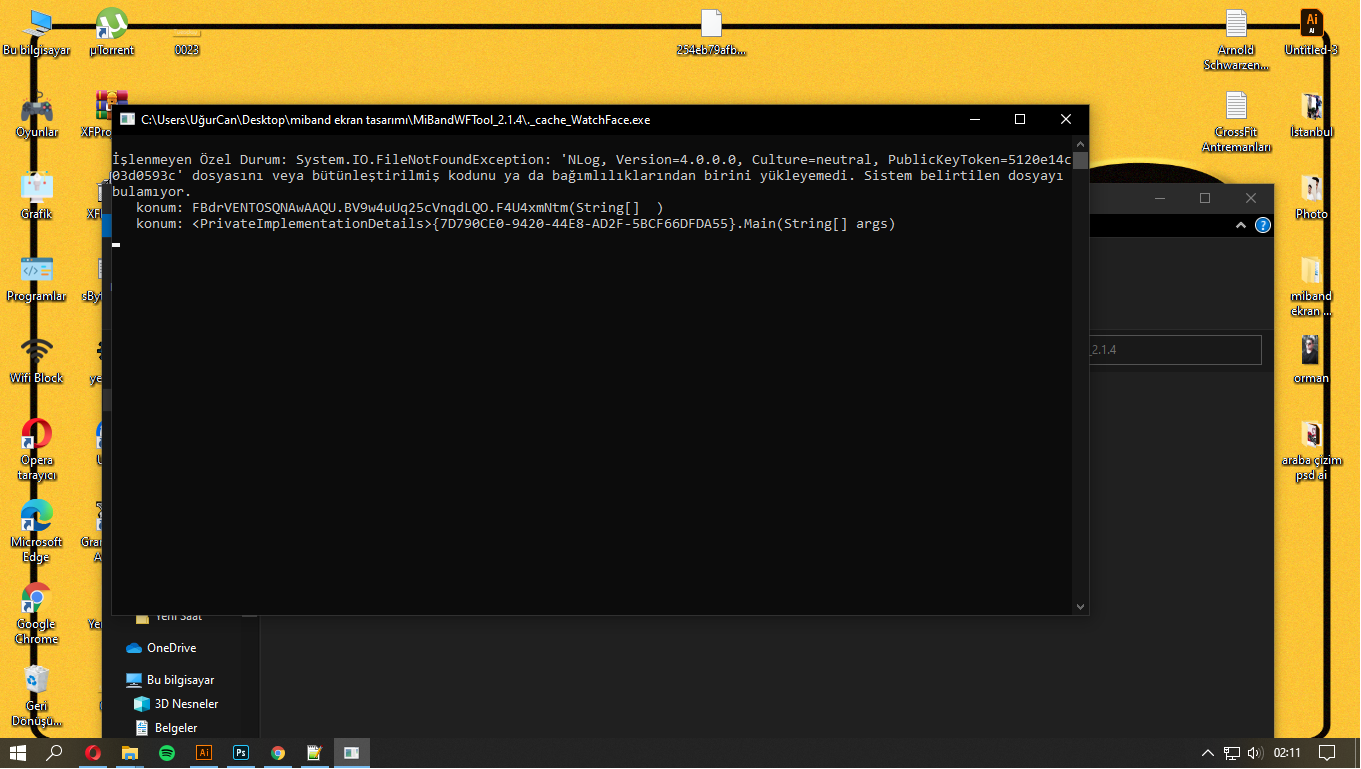
i am getting an error
Spoiler
Image
lvpokka
Posts: 178
Joined: 07 Jul 2019, 20:22
Location: L1
Has thanked: 19 times
Been thanked: 152 times
Contact:

Post by lvpokka »

Download, unzip, don't move any files... i cant read Turkish but there is a normal error test which is not connected with my program
theasis
Posts: 2
Joined: 24 Sep 2020, 18:00
Location: Belgrade, Serbia
Contact:

Post by theasis »

Would someone help me out i spent 3 hours making an watchface that is 455kb and it wont make bin file out of it. How do I make it smaller?
theasis
Posts: 2
Joined: 24 Sep 2020, 18:00
Location: Belgrade, Serbia
Contact:

Post by theasis »

I am very interested to mix 2 gifs into one watchface one as intro : https://amazfitwatchfaces.com/mi-band-4/view/6291
And the other one as it gets into the screen with watch itself: https://amazfitwatchfaces.com/mi-band-4/view/9677
I don't know if its even possible and if it is idk how to format the code then?
Now I cant seem to find a solution for this or anyone that says its possible... if it is... i politely ask whoever knows how to do it to contact me via instagram dm: @markovucic.exe
Thanks in advance!!!
abofaris014
WF maker
Posts: 3
Joined: 25 Sep 2020, 04:56
Location: Qassim
Has thanked: 1 time
Contact:

Post by abofaris014 »

I have installed MiBandWFTool_2.1.6.zip

and I unzipped it

But it doesn't work!

note: I have windows 10 64bit.
abcd840322
WF maker
Posts: 13
Joined: 01 Aug 2020, 04:01
Location: 台灣
Has thanked: 1 time
Been thanked: 5 times
Contact:

Post by abcd840322 »

theasis wrote: 24 Sep 2020, 19:44
Would someone help me out i spent 3 hours making an watchface that is 455kb and it wont make bin file out of it. How do I make it smaller?
Set "UsePaletteMode" value="1" in file WatchFace.exe.config
abcd840322
WF maker
Posts: 13
Joined: 01 Aug 2020, 04:01
Location: 台灣
Has thanked: 1 time
Been thanked: 5 times
Contact:

Post by abcd840322 »

abofaris014 wrote: 26 Sep 2020, 03:35
I have installed MiBandWFTool_2.1.6.zip

and I unzipped it

But it doesn't work!

note: I have windows 10 64bit.
You can try to drag the bin file directly to the .exe file. It will unzip automatically.
Janmib5
Posts: 1
Joined: 28 Sep 2020, 22:05
Location: Rome
Contact:

Post by Janmib5 »

lvpokka
I downloaded version 2.1.6 for Mi Band 5, but problem with Windows scaling not solved.
I have windows7 scaled to 125% and the preview is not generated correctly.
Only if I return to 100%, the preview is generated correctly.

Thank you for your work ;)
abofaris014
WF maker
Posts: 3
Joined: 25 Sep 2020, 04:56
Location: Qassim
Has thanked: 1 time
Contact:

Post by abofaris014 »

abcd840322 wrote: 26 Sep 2020, 07:18
abofaris014 wrote: 26 Sep 2020, 03:35
I have installed MiBandWFTool_2.1.6.zip

and I unzipped it

But it doesn't work!

note: I have windows 10 64bit.
You can try to drag the bin file directly to the .exe file. It will unzip automatically.
Perfect.
guaynaa
Posts: 2
Joined: 29 Aug 2020, 02:08
Location: col
Contact:

Post by guaynaa »

It works great but I think this has a virus or bug, maybe unintentional.
Aside from windows defender alerts, after using this software my browser started to randomly freeze
Is anyone else experiencing the same?
lvpokka
Posts: 178
Joined: 07 Jul 2019, 20:22
Location: L1
Has thanked: 19 times
Been thanked: 152 times
Contact:

Post by lvpokka »

guaynaa wrote: 01 Oct 2020, 21:23
It works great but I think this has a virus or bug, maybe unintentional.
Aside from windows defender alerts, after using this software my browser started to randomly freeze
Is anyone else experiencing the same?
Yes, read this topic
Ross85
WF maker
Posts: 2
Joined: 24 Sep 2020, 09:36
Location: Hungary
Has thanked: 3 times
Contact:

Post by Ross85 »

I modified a watchface. Everything seems to be OK and rendered as I expected on my Mi Band 5.
But, the preview image of my watchface shows a black blank preview in the "Band display" option.
Can somebody help me to identify the reason of this issue?

Link of watchface: /mi-band-5/view/815
abcd840322
WF maker
Posts: 13
Joined: 01 Aug 2020, 04:01
Location: 台灣
Has thanked: 1 time
Been thanked: 5 times
Contact:

Post by abcd840322 »

theasis wrote: 24 Sep 2020, 23:13
I am very interested to mix 2 gifs into one watchface one as intro : https://amazfitwatchfaces.com/mi-band-4/view/6291
And the other one as it gets into the screen with watch itself: https://amazfitwatchfaces.com/mi-band-4/view/9677
I don't know if its even possible and if it is idk how to format the code then?
Now I cant seem to find a solution for this or anyone that says its possible... if it is... i politely ask whoever knows how to do it to contact me via instagram dm: @markovucic.exe
Thanks in advance!!!
Copy the intro part of the code in the first watchface to the jason file in the second wathcface. Copy the gif to the file of the second watchface and renumber the pictures. Don't forget to change the code as well according to your picture number.
urieleugenio
WF maker
Posts: 34
Joined: 21 Jan 2020, 12:30
Location: Madrid
Has thanked: 6 times
Been thanked: 7 times
Contact:

Post by urieleugenio »

Ross85 wrote: 06 Oct 2020, 19:05
I modified a watchface. Everything seems to be OK and rendered as I expected on my Mi Band 5.
But, the preview image of my watchface shows a black blank preview in the "Band display" option.
Can somebody help me to identify the reason of this issue?

Link of watchface: /mi-band-5/view/815
Usually, image number 1 is the band display preview, which should be replaced by the preview created by the tool (then you need to pack the BIN file once again).
Ross85
WF maker
Posts: 2
Joined: 24 Sep 2020, 09:36
Location: Hungary
Has thanked: 3 times
Contact:

Post by Ross85 »

urieleugenio wrote: 07 Oct 2020, 12:08
Ross85 wrote: 06 Oct 2020, 19:05
I modified a watchface. Everything seems to be OK and rendered as I expected on my Mi Band 5.
But, the preview image of my watchface shows a black blank preview in the "Band display" option.
Can somebody help me to identify the reason of this issue?

Link of watchface: /mi-band-5/view/815
Usually, image number 1 is the band display preview, which should be replaced by the preview created by the tool (then you need to pack the BIN file once again).
Actually I've found the solution in contribution with @ilidio.martins.
There need to be three "Preview" parameter inside .json file that links to the preview image.
Spoiler

Code: Select all

    "Preview1": {
      "X": 18,
      "Y": 17,
      "ImageIndex": 93
    },
    "Preview2": {
      "X": 18,
      "Y": 17,
      "ImageIndex": 93
    },
    "Preview3": {
      "X": 18,
      "Y": 17,
      "ImageIndex": 93
    }
Last edited by Ross85 on 10 Oct 2020, 16:18, edited 1 time in total.
urieleugenio
WF maker
Posts: 34
Joined: 21 Jan 2020, 12:30
Location: Madrid
Has thanked: 6 times
Been thanked: 7 times
Contact:

Post by urieleugenio »

Ross85 wrote: 07 Oct 2020, 15:47
Actually I find the solution in contribution with @ilidio.martins.
There need to be three "Preview" parameter inside .json file that links to the preview image.
Yup, one for each language (EN, CN simplified, CN standard), just like with weekdays.
Nestdot
Posts: 1
Joined: 09 Oct 2020, 15:06
Location: Asuncion
Has thanked: 1 time
Contact:

Post by Nestdot »

I finished making my watch face with this tool, but when I want to compile it it says it is greater than 615kb, it says it is 1093 kb, but in reality is just 511kb, the problem seems to be a gif included in the watchface (it has 30 frames) and when I set it to 10, it can compile it, I'm not really sure why though, here's the log error part, I can't include the pastebin link :/
Attachments
dbf0cd895f7ea6b50d1259d78a6f85a6.png
dbf0cd895f7ea6b50d1259d78a6f85a6.png (53.76 KiB) Viewed 50510 times
Rky
WF maker
Posts: 1
Joined: 10 Oct 2020, 14:39
Location: India
Has thanked: 1 time
Contact:

Post by Rky »

I created a watchface abd compiled it successfully, evrything looks at its exact place but when I sync it the weather icon moves to the bottom right of the screen on mi band5. What might be the issue?
abcd840322
WF maker
Posts: 13
Joined: 01 Aug 2020, 04:01
Location: 台灣
Has thanked: 1 time
Been thanked: 5 times
Contact:

Post by abcd840322 »

Rky wrote: 10 Oct 2020, 14:42
I created a watchface abd compiled it successfully, evrything looks at its exact place but when I sync it the weather icon moves to the bottom right of the screen on mi band5. What might be the issue?
There are unknown values. Check the existed watch faces with the weather monitoring function, and you can see two unknown values under the weather category in the json file. Set the both values as same as your coordinate of your weather icon.
Post Reply

Return to “Watchfaces tools”

Who is online

Users browsing this forum: No registered users and 1 guest