• Administrator
  •  
    Support Ukraine
    If you experience any problems with the forum (it is not visible, there is no way to post messages, or some functionality does not work), please let us know. If you have problems with registration or you did not receive confirmation letter, let us know and we will activate your account manually.
    If you get an "The submitted form was invalid. Try submitting again" error, delete cookies, then try again.
     

WF_Builder (watchfaces for Mi Band 4)

This forum is designed to discuss and develop tools creating watch faces.

Moderators: asoo, lvpokka, Internal error, Watchmens

Forum rules
All communication in this branch should only be in English.
To discuss tools that are not in this section, use the “Watchfaces tools (discussion)” forum.
User avatar
lumenvindex
Posts: 114
Joined: 08 Sep 2019, 19:01
Has thanked: 2 times
Been thanked: 49 times
Contact:

WF_Builder (watchfaces for Mi Band 4)

Post by lumenvindex »

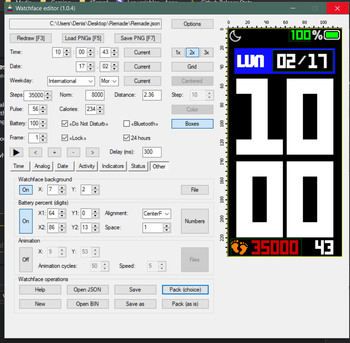
Translated my Mi Band 4 watchface editor into English. Maybe someone will find it useful. (Works on Windows 7+)

Download WF_Builder 1.0.4
Screenshot
WFB_104_2.png
WFB_104_2.png (88.5 KiB) Viewed 656990 times
Changelog

Code: Select all

1.0.4
Fixed the order of controls for [Tab] switching.
Removed "Pulse norm" parameter.
Added [F9] hotkey for fast switching to/from Selective palette packing.
1.0.3
Numeric values can now be changed with keyboard arrows.
Pulse indicator behaves similar to Mi Band's original behaviour:
- You can choose up to 7 images, 7th image will appear if the Pulse isn't defined (-1);
- First image appears up to 93 bpm. Other images appear on every next 20 bpm.
1.0.2
Fixed raw.cfg generation function. Selective palette mode is now working.
1.0.1
Added feature of choosing where to save preview (F7) in Options dialog.
Added selective palette mode feature (enable in Options to generate raw.cfg during Palette packing).
Program can now be associated with bin and json files (tries to unpack and open a file from command line parameters).
Inputboxes now show previous value.
1.0.0
Added boxes feature for sections with two pairs of coordinates. It's green if X2>X1 and Y2>Y1, otherwise it's red.
Added magnitude feature. Preview can now have double and triple size.
0.9.8
Added a ruler near preview which is replaced to the right upper corner of a window.
Added grid feature - changeable alignment (left/center), color, size. Don't forget to turn it off before saving to PNG.
Fixed some bugs
0.9.7
Added button highlighting: red button means you need to choose files for this section before packing, yellow button means this feature is optional.
Added optional section [PackingOptions] in Lib\WF_Builder.ini (for advanced user who need to change these options).
Switched to Mi Band 4 WF Tool 1.4.1 - added new sections: time separator, steps icon (it's placing depends on alignment), line progress bar of steps (I know, it works really weird for now, but it works the same way on Mi Band).
Images are now drawn by pixels, ignoring DPI (like they do in Mi Band). But Mi Band 4 WF Tool still needs 96 DPI to draw correct gif.
0.9.6
Fixed color saving in Steps indicator (circle).
Optimized redrawing operation during creating/saving/packing watchfaces.
Changed battery icon preview states to match Mi Band 4 behaviour.
WF_builder allows you to change all known parameters of a watchface. It shows how watchface will look like with different data on it. Program uses Mi Band 4 WF Tool for packing\unpacking watchfaces and has it inside Lib subdirectory. Lots of thanks to @lvpokka for this tool.
Previous versions
1.0.3
WFB_103_2.png
WFB_103_2.png (66.52 KiB) Viewed 658015 times
Download
1.0.2
WFB_102_2.png
WFB_102_2.png (97.89 KiB) Viewed 658428 times
Download
1.0.1
WFB_101_2.png
WFB_101_2.png (66.42 KiB) Viewed 659603 times
Download
1.0.0
WFB_100_2.png
WFB_100_2.png (95.65 KiB) Viewed 659879 times
Download
0.9.8
WFB_098_2.png
WFB_098_2.png (83.54 KiB) Viewed 660045 times
Download
0.9.7
WFB_097_2.png
WFB_097_2.png (71.41 KiB) Viewed 660694 times
Download
0.9.6
WFP_096_2.png
WFP_096_2.png (132.52 KiB) Viewed 661686 times
Download
0.9.5
WFB_095_1.png
WFB_095_1.png (57.03 KiB) Viewed 662518 times
Download
Recommendations
Turned section on? First of all choose all images for it (digits, suffixes, delimiters etc.).
You can choose images from any available directory. The only thing that matters is their order (0, 1, 2, 3, etc.). When saving watchface, images will be written into json-config directory.
When saving json, a backup file is created (file.json turns into file.json_HHMMSS.bak, where HHMMSS is the timestamp).
When packing, binary is renamed with suffix _Palette or _Raw, depending on the chosen mode.
There should be 21 images of weekdays (3 sets of 7 days: 2 chineese sets and 1 international set).
If your weekday sets make watchface too heavy, you may replace first 14 images with one transparent pixel images.
Virus?
There are no viruses in my program, but some antiviruses may see a threat because program is written on Autoit script language.
Program doesn't need admin permissions to work - it only needs write permissions to watchface directory.
But still. Use program at your own risk.

Last edited by lumenvindex on 12 Aug 2020, 15:42, edited 13 times in total.
MESS WITH THE BEST
DIE LIKE THE REST
Caz
WF maker
Posts: 30
Joined: 20 Oct 2019, 19:21
Contact:

Post by Caz »

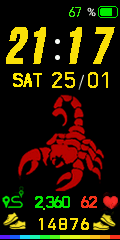
Image
Caz
WF maker
Posts: 30
Joined: 20 Oct 2019, 19:21
Contact:

Post by Caz »

Image
Caz
WF maker
Posts: 30
Joined: 20 Oct 2019, 19:21
Contact:

Post by Caz »

{
"Background": {
"Image": {
"X": 0,
"Y": 0,
"ImageIndex": 0
}
},
"Time": {
"Hours": {
"Tens": {
"X": 6,
"Y": 27,
"ImageIndex": 1,
"ImagesCount": 3
},
"Ones": {
"X": 29,
"Y": 27,
"ImageIndex": 1,
"ImagesCount": 10
}
},
"Minutes": {
"Tens": {
"X": 65,
"Y": 27,
"ImageIndex": 1,
"ImagesCount": 6
},
"Ones": {
"X": 93,
"Y": 27,
"ImageIndex": 1,
"ImagesCount": 10
}
}
},
"Activity": {
"Steps": {
"Number": {
"TopLeftX": 10,
"TopLeftY": 128,
"BottomRightX": 116,
"BottomRightY": 229,
"Alignment": "BottomCenter",
"Spacing": 3,
"ImageIndex": 11,
"ImagesCount": 10
}
},
"Pulse": {
"Number": {
"TopLeftX": 81,
"TopLeftY": 196,
"BottomRightX": 0,
"BottomRightY": 0,
"Alignment": "TopLeft",
"Spacing": 0,
"ImageIndex": 21,
"ImagesCount": 10
},
"NoDataImageIndex": 21
},
"Distance": {
"Number": {
"TopLeftX": 35,
"TopLeftY": 196,
"BottomRightX": 0,
"BottomRightY": 0,
"Alignment": "TopLeft",
"Spacing": 0,
"ImageIndex": 31,
"ImagesCount": 10
},
"SuffixImageIndex": 31,
"DecimalPointImageIndex": 111
}
},
"Date": {
"MonthAndDay": {
"Separate": {
"Month": {
"TopLeftX": 88,
"TopLeftY": 72,
"BottomRightX": 125,
"BottomRightY": 210,
"Alignment": "TopLeft",
"Spacing": 3,
"ImageIndex": 41,
"ImagesCount": 10
},
"Day": {
"TopLeftX": -2,
"TopLeftY": 72,
"BottomRightX": 74,
"BottomRightY": 210,
"Alignment": "TopRight",
"Spacing": 3,
"ImageIndex": 41,
"ImagesCount": 10
}
},
"TwoDigitsMonth": true,
"TwoDigitsDay": true
},
"WeekDay": {
"X": 12,
"Y": 73,
"ImageIndex": 89,
"ImagesCount": 21
}
},
"StepsProgress": {
"Linear": {
"StartImageIndex": 51,
"Segments": [
{
"X": 0,
"Y": 235
},
{
"X": 10,
"Y": 235
},
{
"X": 20,
"Y": 235
},
{
"X": 30,
"Y": 235
},
{
"X": 40,
"Y": 235
},
{
"X": 50,
"Y": 235
},
{
"X": 60,
"Y": 235
},
{
"X": 70,
"Y": 235
},
{
"X": 80,
"Y": 235
},
{
"X": 90,
"Y": 235
},
{
"X": 100,
"Y": 235
},
{
"X": 110,
"Y": 235
}
]
}
},
"Status": {
"Bluetooth": {
"Coordinates": {
"X": 41,
"Y": 6,
"BoxWidth": 15,
"Alignment": "Left",
"Order": 1
},
"ImageIndexOff": 110
},
"Battery": {
"BatteryConfig": {
"BoxWidth": 1,
"Alignment": 0,
"Order": 1
},
"Text": {
"TopLeftX": 69,
"TopLeftY": 7,
"BottomRightX": 0,
"BottomRightY": 0,
"Alignment": "TopLeft",
"Spacing": 0,
"ImageIndex": 63,
"ImagesCount": 10
},
"Icon": {
"X": 98,
"Y": 6,
"ImageIndex": 73,
"ImagesCount": 9
}
}
},
"Other": {
"Animation": {
"AnimationImage": {
"X": 0,
"Y": 0,
"ImageIndex": 82,
"ImagesCount": 7,
"x3": 0
},
"Speed": 0,
"RepeatCount": 0,
"x2": 100
}
}
}
Caz
WF maker
Posts: 30
Joined: 20 Oct 2019, 19:21
Contact:

Post by Caz »

bin file
Attachments
SCORPIO_BOLT2_Palette.bin
(140.67 KiB) Downloaded 287 times
User avatar
lumenvindex
Posts: 114
Joined: 08 Sep 2019, 19:01
Has thanked: 2 times
Been thanked: 49 times
Contact:

Post by lumenvindex »

Caz wrote: 26 Jan 2020, 12:26
"Speed": 0,
"RepeatCount": 0,
"I play animation 0 times at 0 speed. Why isn't animation working?"
You should have RepeatCount = 1 and the speed should be at least 4 (or the animation won't move, it's a firmware bug).

You should read something about watchface making. All of your questions aren't about WF_Builder. :D
MESS WITH THE BEST
DIE LIKE THE REST
Caz
WF maker
Posts: 30
Joined: 20 Oct 2019, 19:21
Contact:

Post by Caz »

Thanks that worked, great stuff

thats the thing see, when i ask you a question, i can understand your answer, i carry it out and it works lol

i have been reading up on WF making but its a lot to take in and if i am honest i only understand a quater of it :oops:

i find i learn more by trial and error it sinks in and means something, thanks to you i have now found out how to add miles, to make PNG files for animation small and to use pngquant and to check animation is set to run 1 time and to set speed to at least 4

thanks again for your help
caz
Dragos
WF maker
Posts: 2
Joined: 05 Aug 2019, 07:39
Contact:

Post by Dragos »

Can add weather in this builder..?
\
User avatar
lumenvindex
Posts: 114
Joined: 08 Sep 2019, 19:01
Has thanked: 2 times
Been thanked: 49 times
Contact:

Post by lumenvindex »

Dragos wrote: 31 Jan 2020, 13:16
Can add weather in this builder..?
No. Weather cannot be displayed on Mi Band 4. Hence there is no need to add weather to watchface.
MESS WITH THE BEST
DIE LIKE THE REST
Soaresden
Posts: 1
Joined: 17 Feb 2020, 13:45
Location: FRANCE
Contact:

Post by Soaresden »

Hi,

First I want to thanks you for making this tool.
I begin learning VB net only for this purpose, and you did it very better than me ^^
(just you to see my horrible thing : https://geekdoing.com/threads/mi-band-4 ... -net.1127/)

So i started editing it and was good looking for me.
Image

The only thing is, I don't know why informations keeps "disappearing" after 2 seconds.
See the vid below in action :
https://streamable.com/pcvlo

Thanks for any answer or piece of explanations
I'll join the project too
Attachments
My Exemple.zip
Here the file
(71.07 KiB) Downloaded 277 times
User avatar
lumenvindex
Posts: 114
Joined: 08 Sep 2019, 19:01
Has thanked: 2 times
Been thanked: 49 times
Contact:

Post by lumenvindex »

Soaresden wrote: 17 Feb 2020, 13:51
The only thing is, I don't know why informations keeps "disappearing" after 2 seconds.
Hi. Read here.
MESS WITH THE BEST
DIE LIKE THE REST
tigre652
WF maker
Posts: 11
Joined: 12 Oct 2019, 21:39
Contact:

Post by tigre652 »

Is there always a MI BAND firmware bug that after 1 second the information disappears? The time is always displayed but the heartbeats, steps, the day of the week and the logo disappear. It cannot be resolved. Other watchfaces don't have this problem.
I put 2 versions of the video, in the most recent one the battery remains on the screen. Thank you

old video https://youtu.be/TTTPZTc50R4

new video https://youtu.be/1kxYiDUPoNU
User avatar
lumenvindex
Posts: 114
Joined: 08 Sep 2019, 19:01
Has thanked: 2 times
Been thanked: 49 times
Contact:

Post by lumenvindex »

tigre652 wrote: 03 Mar 2020, 10:04
battery remains on the screen
Don't know anything about most recent firmwares.
Maybe the order of elements has changed. Seconds redrawing wipes out data that is drawn after it.
MESS WITH THE BEST
DIE LIKE THE REST
tigre652
WF maker
Posts: 11
Joined: 12 Oct 2019, 21:39
Contact:

Post by tigre652 »

Ok, Thank's
Vojta_CZE
WF maker
Posts: 2
Joined: 01 Feb 2019, 16:20
Location: Prostějov
Has thanked: 1 time
Been thanked: 1 time
Contact:

Post by Vojta_CZE »

How to download watchface builder
User avatar
GIK-Team
root
Posts: 1016
Joined: 22 Mar 2018, 10:00
Location: Ukraine
Has thanked: 1122 times
Been thanked: 267 times
Contact:

Post by GIK-Team »

Vojta_CZE wrote: 05 Mar 2020, 16:08
How to download watchface builder
https://yadi.sk/d/FrdIdbQSudu9eg
"sometimes it's scary but it's still just you and me” — Leaving Laurel
Sam70077
Posts: 1
Joined: 17 Feb 2020, 09:13
Location: India
Contact:

Post by Sam70077 »

How to make watchface server?
User avatar
lumenvindex
Posts: 114
Joined: 08 Sep 2019, 19:01
Has thanked: 2 times
Been thanked: 49 times
Contact:

Post by lumenvindex »

Sam70077 wrote: 08 Mar 2020, 05:40
How to make watchface server?
Don't know what you are talking about. This program helps building a watchface, that's all.
MESS WITH THE BEST
DIE LIKE THE REST
yummykoreans
WF maker
Posts: 1
Joined: 04 Jul 2018, 14:37
Contact:

Post by yummykoreans »

Hello! Can You help me?
I tried to open this Program: WF_Builder 1.0.4 .exe
But Shows "Windows cannot access the specified device, path, or file" So i turn off Some windows Antivirus firewall and virus detector.
but still not work. what can I do? Even Administrator Access not work...
User avatar
lumenvindex
Posts: 114
Joined: 08 Sep 2019, 19:01
Has thanked: 2 times
Been thanked: 49 times
Contact:

Post by lumenvindex »

How can I help you?

Program works just fine on any OS from Windows XP to Windows 10. The message you get looks like the result of some antivirus activity which holds the exe-file.
MESS WITH THE BEST
DIE LIKE THE REST
missmolotov
Posts: 1
Joined: 31 Mar 2020, 02:58
Location: UK
Contact:

Post by missmolotov »

Is there more to this error than pure filesize?
Fatal|System.ArgumentException: [ERROR] Watchface is greater than 321kb, it will not be accepted by Mi Band 4, please reduce size! Current size:337kb
I started making a watchface, using the Raw Image Mode tool. My first background image was 3.34kb and the .bin file was packed fine.

My second background image had a tiny amount more text added (the word 'steps') and was also 3.34kb in size, but this error was thrown.

If I use the pngquant tool as suggest by another use, I can get the filesize down to 1.9kb, but the same error is still thrown by the Raw Image Tool.

I can get the .bin file to pack if I use the Pallet Tool, but the edges of the image come out all jaggy.

If I put the image onto a black background instead of making it transparent, the filesize goes up to 4.61kb, but the .bin file will pack with the Raw Image Tool just fine!

It doesn't seem to be a size vs file size on disk issue, because all the files are counted as 4kb on disk.

I feel like the error message being thrown isn't accurate or isn't describing the exact issue. I am wondering, what specifically is the tool looking at when it creates that error? I wonder if there is something else more to know which would help with deciding how best to make background image files?

Thanks for reading and too the tool maker for all your hard work on this tool. I have been enjoying using it a lot up until this point.
User avatar
lumenvindex
Posts: 114
Joined: 08 Sep 2019, 19:01
Has thanked: 2 times
Been thanked: 49 times
Contact:

Post by lumenvindex »

missmolotov wrote: 31 Mar 2020, 03:07
If I use the pngquant tool as suggest by another use, I can get the filesize down to 1.9kb, but the same error is still thrown by the Raw Image Tool.
Pngquant is good for reducing the image's total colors count. It is good for Palette, but It's totally useless if you pack it Raw.
And forget about the PNG sizes. Images aren't stored in PNG format inside the resulting BIN.

If you want to pack a watchface in Palette mode having numbers with transparent background, you can try using Stroke effect (outer, 1px, pick a colour similar to background) on each number image. The edge will still get jaggy after Palette packing, but you will hardly notice it on Mi Band.
MESS WITH THE BEST
DIE LIKE THE REST
hellllllooooooo
WF maker
Posts: 1
Joined: 22 Mar 2020, 16:58
Location: England
Contact:

Post by hellllllooooooo »

Dandow wrote: 09 Sep 2019, 12:44
That's awesome!
Thanks a lot, i'll test it today.
I was wondering, did you contemplated "gif"?

How do i make a honor band 5 face plz help
Benjamin1983
WF maker
Posts: 1
Joined: 09 Jun 2020, 21:20
Location: Andalucia
Contact:

Post by Benjamin1983 »

buenas, ay alguna manera de poner capas delante o detras segun gusto de cada uno
User avatar
lumenvindex
Posts: 114
Joined: 08 Sep 2019, 19:01
Has thanked: 2 times
Been thanked: 49 times
Contact:

Post by lumenvindex »

Benjamin1983 wrote: 10 Jun 2020, 21:29
buenas, ay alguna manera de poner capas delante o detras segun gusto de cada uno
No se puede cambiar el orden de las capas.
There is no way to change the order of layers.
MESS WITH THE BEST
DIE LIKE THE REST
anhtu7596
Posts: 2
Joined: 22 Jul 2020, 15:17
Location: Hà Nội
Has thanked: 1 time
Contact:

Post by anhtu7596 »

Please create a tool like this for miband5
Post Reply

Return to “Watchfaces tools”

Who is online

Users browsing this forum: No registered users and 22 guests