• Адміністратор
  •  
    Support Ukraine
    If you experience any problems with the forum (it is not visible, there is no way to post messages, or some functionality does not work), please let us know. If you have problems with registration or you did not receive confirmation letter, let us know and we will activate your account manually.
    If you get an "The submitted form was invalid. Try submitting again" error, delete cookies, then try again.
     

Create Bip S watchface or convert from Bip

This forum is designed to discuss and develop tools creating watch faces.

Модератори: asoo, lvpokka, Internal error, Watchmens

Правила форуму
All communication in this branch should only be in English.
To discuss tools that are not in this section, use the “Watchfaces tools (discussion)” forum.
Upo
WF maker
Повідомлень: 10
З нами з: 24 квітня 2018, 09:55
Been thanked: 12 times
Контактна інформація:

Create Bip S watchface or convert from Bip

Повідомлення Upo »

Few informations for converting Bip watchfaces to Bip S
Infos and Bip S tool taken from here:

Код: Виділити все

4pda.ru/forum/index.php?showtopic=988136
Bip S Tools Alpha 230420 mirrored to my yadisk:

Код: Виділити все

yadi.sk/d/I1tDQ3PbDIupWA
Converting from Bip or creating new is nearly the same. No Bip S watchface editor as I know, but Bip editor exists. So create it as a new Bip watchface and "convert" it.
Editor here: https://amazfitwatchfaces.com/editor/wa ... ditor/?bip

Always compress/decompress Bip watchfaces with original Bip Tool and Bip S watchfaces with Bip S tool.
Bip S tool does not handle Bip watchfaces, throws error or produce erratic json data.
So for convert, unpack bip watchface with Bip tool, edit json, add preview, and finally pack with Bip S tool.

Bip S watchfaces are not fully decrypted yet, there are many unknown options that we don't know. Eg. there is shortcut support in factory watchfaces and editable watchfaces, but it is unknown how to make them in a new watchface.
Currently known things are nearly the same as original Bip, just some syntax differences, and there is a preview option for background section that will show up in Settings - Watch face menu.
This is a preview of the watchface. I use the static PNG that watchface tool creates, but have to resize to 110x110 pixel to fit to the menu frame.
For the convert, the simplest thing is to put this picture to the last index, so no need to rearrange existing picture numbers. Eg. if last picture is 0074.png then it will be 0075.png and change in json is the following:

Old (Bip) json:

Код: Виділити все

"Background": {
    "Image": {
      "X": 0,
      "Y": 0,
      "ImageIndex": 0
    }
},
New (Bip S) json:

Код: Виділити все

"Background": {
    "Image": {
      "X": 0,
      "Y": 0,
      "ImageIndex": 0
    },
    "Preview": {
      "X": 0,
      "Y": 0,
      "ImageIndex": 75
    }
},
wfmenu.jpg
wfmenu.jpg (22.1 Кіб) Переглянуто 50366 разів
Above picture shows Preview in watch menu. It has to be 110x110 resolution to fit to the frame in settings menu. Usually I use Bip unpack tool's static preview png and resize it to 110x110 because Bip S unpack tool is early alpha, and does not put pulse and steps numbers to preview pictures png & gif (but will show on real watchface).

Next we have to adjust syntax for Battery, Steps, Pulse, Calories numerical values (no need for images). We have to insert a number section after text section.
Example of battery:

Old:

Код: Виділити все

"Battery": {
    "Text": {
      "TopLeftX": 96,
      "TopLeftY": 6,
      "BottomRightX": 121,
      "BottomRightY": 19,
      "Alignment": "TopRight",
      "Spacing": 1,
      "ImageIndex": 21,
      "ImagesCount": 10
    }
},
New:

Код: Виділити все

"Battery": {
    "Text": {
	"Number": {
           "TopLeftX": 96,
           "TopLeftY": 6,
           "BottomRightX": 121,
           "BottomRightY": 19,
           "Alignment": "TopRight",
           "Spacing": 1,
           "ImageIndex": 21,
           "ImagesCount": 10
	}
    }
},
Activity:

Old:

Код: Виділити все

"Activity": {
   "Steps": {
      "TopLeftX": 28,
      "TopLeftY": 114,
      "BottomRightX": 94,
      "BottomRightY": 132,
      "Alignment": "TopRight",
      "Spacing": 3,
      "ImageIndex": 11,
      "ImagesCount": 10
   },
   "Calories": {
      "TopLeftX": 28,
      "TopLeftY": 157,
      "BottomRightX": 62,
      "BottomRightY": 170,
      "Alignment": "TopRight",
      "Spacing": 1,
      "ImageIndex": 21,
      "ImagesCount": 10
   },
   "Pulse": {
      "TopLeftX": 134,
      "TopLeftY": 113,
      "BottomRightX": 168,
      "BottomRightY": 131,
      "Alignment": "TopCenter",
      "Spacing": 1,
      "ImageIndex": 11,
      "ImagesCount": 10
   },
   "Distance": {
      "Number": {
        "TopLeftX": 27,
        "TopLeftY": 138,
        "BottomRightX": 94,
        "BottomRightY": 151,
        "Alignment": "TopLeft",
        "Spacing": 2,
        "ImageIndex": 22,
        "ImagesCount": 10
      },
      "SuffixImageIndex": 32,
      "DecimalPointImageIndex": 33
   }
}
New:

Код: Виділити все

"Activity": {
    "Steps": {
       "Number": {
          "TopLeftX": 28,
          "TopLeftY": 114,
          "BottomRightX": 94,
          "BottomRightY": 132,
          "Alignment": "TopRight",
          "Spacing": 3,
          "ImageIndex": 11,
          "ImagesCount": 10
       }
    },
    "Calories": {
       "Number": {
          "TopLeftX": 28,
          "TopLeftY": 157,
          "BottomRightX": 62,
          "BottomRightY": 170,
          "Alignment": "TopRight",
          "Spacing": 1,
          "ImageIndex": 21,
          "ImagesCount": 10
       }
    },
    "Pulse": {
       "Number": {
          "TopLeftX": 134,
          "TopLeftY": 113,
          "BottomRightX": 168,
          "BottomRightY": 131,
          "Alignment": "TopCenter",
          "Spacing": 1,
          "ImageIndex": 11,
          "ImagesCount": 10
	}
    },
    "Distance": {
       "Number": {
            "TopLeftX": 27,
            "TopLeftY": 138,
            "BottomRightX": 94,
            "BottomRightY": 151,
            "Alignment": "TopLeft",
            "Spacing": 2,
            "ImageIndex": 22,
            "ImagesCount": 10
        },
        "SuffixImageIndex": 32,
        "DecimalPointImageIndex": 33
    }
}
Distance is the same, there is a "Number" section on original Bip so no need to alter it.

I hope this will be a good starting point to make/edit.
Thanks to the russian guys at 4pda and lmaxwell @ 4pda for Bip S tool.

If you have further infos about Bip S watchfaces, feel free to add to this topic.
Вкладення
AmazfitBipS_Tools_alpha_230420.zip
Bip S tool
(11.17 МіБ) Завантажено 3360 разів
Востаннє редагувалось 25 червня 2020, 14:04 користувачем Upo, всього редагувалось 1 раз.
Milo
WF maker
Повідомлень: 6
З нами з: 28 травня 2019, 13:15
Звідки: unknown
Has thanked: 1 time
Been thanked: 1 time
Контактна інформація:

Повідомлення Milo »

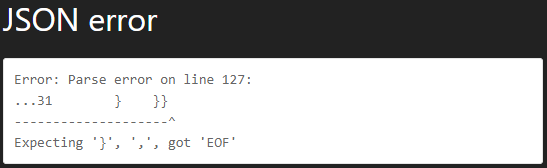
I think I did everything correctly until editing the JSON file and adding the " "Number": { " thing, something goes wrong there...
When I try to copy paste it EXACTLY as mentioned above in 2 different WF editors it gives an error.

Via the Online WF editor it gives me the following error:

Зображення

or Зображення


And when I try to do the same thing in the Bip WF Editor by ilGruppoTester it says that the JSON file corrupted and can't save...

Can you help me out please? I really want my custom made WF on my Bip S! :cry:
ntelas
WF maker
Повідомлень: 5
З нами з: 04 серпня 2019, 09:13
Has thanked: 2 times
Контактна інформація:

Повідомлення ntelas »

Hi [mention]Milo[/mention], can you provide me the json file that you described, so maybe I can see where the error is and let you know?
Milo
WF maker
Повідомлень: 6
З нами з: 28 травня 2019, 13:15
Звідки: unknown
Has thanked: 1 time
Been thanked: 1 time
Контактна інформація:

Повідомлення Milo »

[mention]ntelas[/mention] It's in the attachment (zipped, JSON wasn't allowed), thnx allot!
Вкладення
Milo.zip
(709 байт) Завантажено 527 разів
Upo
WF maker
Повідомлень: 10
З нами з: 24 квітня 2018, 09:55
Been thanked: 12 times
Контактна інформація:

Повідомлення Upo »

There is no watchface editor for Bip S as i mentioned. If you put Bip S format json to Bip editor, it will throw errors because they are not compatible.
Make normal Bip watchface with Bip editor, save json, and finally edit json manually to add "number" things with Notepad++ or similar editor.
Then compile it with Bip S tool attached.
You can not edit Bip S watchfaces with online bip tool or ilgruppotester bip tool. You have to "convert" bip s watchface to bip watchface, edit, and convert back to bip s.
Hope hat bip tools will be updated to support bip s format for direct editing, until that we should do those convert thingies.
Milo
WF maker
Повідомлень: 6
З нами з: 28 травня 2019, 13:15
Звідки: unknown
Has thanked: 1 time
Been thanked: 1 time
Контактна інформація:

Повідомлення Milo »

Okay, I did it once, but I can not seem to do it again succesfully....
I don't know what I'm doing wrong, but I wanted to edit my current selfmade WF but I can't seem to succesfully convert it anymore.

When I edit the JSON in Notepad++ and put it into the AmazfitBipS_Tools_alpha_230420 tool, it produces me everything but it shows me an animated GIF without Steps and Pulse.
It's the same when I upload it onto my Bip S, can someone please check it out and explain what I am doing wrong? :roll:
Вкладення
(BIP S) MiloZonderTemp.rar
(32.77 Кіб) Завантажено 449 разів
Аватар користувача
kln
WF maker
Повідомлень: 1
З нами з: 29 травня 2018, 08:52
Контактна інформація:

Повідомлення kln »

I have a little problem with linear steps ...don't work
Number and circle work well but linear on bip s is not displayed
Any suggestions ?
Upo
WF maker
Повідомлень: 10
З нами з: 24 квітня 2018, 09:55
Been thanked: 12 times
Контактна інформація:

Повідомлення Upo »

Milo писав: 16 червня 2020, 06:14
When I edit the JSON in Notepad++ and put it into the AmazfitBipS_Tools_alpha_230420 tool, it produces me everything but it shows me an animated GIF without Steps and Pulse.
It's the same when I upload it onto my Bip S, can someone please check it out and explain what I am doing wrong? :roll:
I don't know what is wrong. Uploaded your bin in rar to the watch and it shows step and pulse.
AmazfitBipS_Tools_alpha_230420 has a bug, it does not show steps and pulse in preview gif and png but watchface will work ok.
If it is wrong with your watch, try to upload again.
2020-06-19 01-46-09_01-49-49.jpg
2020-06-19 01-46-09_01-49-49.jpg (19.07 Кіб) Переглянуто 37233 разів
Alltime
WF maker
Повідомлень: 2
З нами з: 24 червня 2018, 20:54
Контактна інформація:

Повідомлення Alltime »

Hi,

thanks Upo for the explanations!
I was able to create a watchface out of an existing BIP watchface.
The bin-file was created successfully. But somehow I am not able to synchonize this watchface with my BIP S.
You can find it here:
https://amazfitwatchfaces.com/bip/view/36139

Attached you can find all sources. Maybe the size is too big or there are other settings, which have to be updated...
Is anyone of you able to set it as a watchface?
Вкладення
weatherland_v_0_1.zip
(126.35 Кіб) Завантажено 413 разів
Alltime
WF maker
Повідомлень: 2
З нами з: 24 червня 2018, 20:54
Контактна інформація:

Повідомлення Alltime »

Ok, I figured it out by my self:
It looks like the maximum file size is ~125 KB now. For BIP it was 200 KB.
And "StepProgress - Linear" seems not working anymore. I need to use "Activity - Steps" instead...
abortega
Повідомлень: 2
З нами з: 22 червня 2020, 07:00
Звідки: Brunei
Контактна інформація:

Повідомлення abortega »

i unpacked using the bip s tools... only edited the background so i have preview on my bip s... then packed again using the same tools... but throw 10 bit error...

---------------------------------------------------
Reading config...
Reading referenced images from 'bips'
Generating previews...
Writing watch face to 'bips\bips_packed.bin'
Encoding resource 0...
Encoding resource 1...
System.ArgumentException: The image has 10 bit/pixel and can't be packed for using on the watches. Looks like dithering works incorrectly on the image.
at Resources.Image.Writer.Write(Bitmap image)
at Resources.Models.Image.WriteTo(Stream stream)
at Resources.Writer.Write(List`1 resources)
at WatchFace.Parser.Writer.Write(IList`1 descriptor)
at WatchFace.Program.WriteWatchFace(String outputDirectory, String outputFileName, String imagesDirectory, WatchFace watchFace)
---------------------------------------------------
abortega
Повідомлень: 2
З нами з: 22 червня 2020, 07:00
Звідки: Brunei
Контактна інформація:

Повідомлення abortega »

Okay its work now... Need to convert the image to index color for the preview images... Thanks.
hhan
WF maker
Повідомлень: 1
З нами з: 29 червня 2020, 20:04
Звідки: San Jose, CA, USA
Контактна інформація:

Повідомлення hhan »

Okay, I swear I am doing everything correct, but what's happening is that I have a huge blank spot on the top left corner of the screen most of the time. It will intermittently work correctly (usually when the seconds reach 00 or when you push the button on the side) but will fail all other times.

Does anyone have any clue as to what's wrong? Here's my watchface: https://amazfitwatchfaces.com/bip/view/36259
Вкладення
Error.jpg
Error.jpg (2.47 МіБ) Переглянуто 36889 разів
Аватар користувача
Don MC
WF maker
Повідомлень: 11
З нами з: 17 грудня 2018, 11:48
Has thanked: 1 time
Been thanked: 1 time
Контактна інформація:

Повідомлення Don MC »

Thanks for all the great info, Upo. There is still something odd with the tool, though. My "low energy" WF sucks battery like hell. Between 10 to 20% a day. I put my Bip S aside for the time being and use my trusty ol' Bip instead. I'll check it out again when a new tool arrives. With the good ol' Bip its more like 10% a week.
Upo
WF maker
Повідомлень: 10
З нами з: 24 квітня 2018, 09:55
Been thanked: 12 times
Контактна інформація:

Повідомлення Upo »

hhan писав: 29 червня 2020, 22:16
Does anyone have any clue as to what's wrong? Here's my watchface: https://amazfitwatchfaces.com/bip/view/36259
Watchface on this link is not the same as in picture. Linked watchface is OK for me. One thing to note, background preview is 176x176 picture now. On the watch, look settings - watchface, mini preview picture is not correct. You have to resize preview png to 110x110 and compile again and it will be correct there.

Pictured watchface has probably seconds at top right (eats battery as hell, 60 times more screen refreshes than without seconds!), AMPM shifted, and weekdays, day, month missing (probably positioned incorrectly or imageindex error or other error). That blank spot could be a shifted weekday with missing/incorrect images. If you give access to the bin file of that watchface pictured, i will look at it.
huesitos
Повідомлень: 2
З нами з: 20 травня 2018, 06:21
Контактна інформація:

Повідомлення huesitos »

Hello if the bin file created with amazfittools_bips_ alpha_230420 does not give error can your watch without problem to the clock.???
viennes
Повідомлень: 2
З нами з: 22 липня 2020, 18:14
Звідки: Brazil
Контактна інформація:

Повідомлення viennes »

Hello! I'm new user here and I choose the Bip S as my first fitness tracker/smartwatch. I bought few days ago and I liked 4 or 5 watchfaces that are for Bip. I dont know how to convert, can someone that have experience can do it, please?
Pdasnews
Повідомлень: 6
З нами з: 19 липня 2018, 14:40
Звідки: Greece
Been thanked: 3 times
Контактна інформація:

Повідомлення Pdasnews »

New Bip s only supports 10 steps for analog hand and not 12 like original bip. Delete 2 and it will work
wdschei
Повідомлень: 3
З нами з: 24 липня 2020, 02:00
Звідки: San Antonio, TX
Контактна інформація:

Повідомлення wdschei »

This seems to be the thread for asking these kinds of questions, so here goes.

These are the steps I have performed based on the instructions in [mention]Upo[/mention]'s original post:
  • decompiled the 5ba38273c2fb3_20092018.bin with AmazfitBipTools-1.0.3.1
  • scaled a copy of 5ba38273c2fb3_20092018_static.png to be 110x110 and saved it as 0113.png
  • edited 5ba38273c2fb3_20092018.json to add the /Background/Preview section referencing the new scaled image
  • edited 5ba38273c2fb3_20092018.json to add the Number section wrappers to:
    • /Activity/Steps
    • /Activity/Calories
    • /Activity/Pulse
    • /Battery/Text
  • compiled 5ba38273c2fb3_20092018.json with AmazfitBipS_Tools_alpha_230420
I received the following output:

Код: Виділити все

$ mono ~/bin/AmazfitBipS_Tools_alpha_230420/WatchFace.exe 5ba38273c2fb3_20092018.json 
Processing file '5ba38273c2fb3_20092018.json'
Reading config...
Reading referenced images from ''
Generating previews...
Writing watch face to '5ba38273c2fb3_20092018_packed.bin'
Encoding resource 0...
Encoding resource 1...
System.ArgumentException: The image has 10 bit/pixel and can't be packed for using on the watches. Looks like dithering works incorrectly on the image.
  at Resources.Image.Writer.Write (System.Drawing.Bitmap image) [0x00093] in <372f70d474bf46ea95be24f81c190983>:0 
  at Resources.Models.Image.WriteTo (System. IO.Stream stream) [0x0000d] in <372f70d474bf46ea95be24f81c190983>:0 
  at Resources.Writer.Write (System.Collections.Generic.List`1[T] resources) [0x00067] in <372f70d474bf46ea95be24f81c190983>:0 
  at WatchFace.Parser.Writer.Write (System.Collections.Generic.IList`1[T] descriptor) [0x002b3] in <4c1d191b02b6446198b5685b1001850b>:0 
  at WatchFace.Program.WriteWatchFace (System.String outputDirectory, System.String outputFileName, System.String imagesDirectory, WatchFace.Parser.WatchFace watchFace) [0x00080] in <40ceb3628d8b47c39768a80080177ea6>:0
What am I missing?
Вкладення
5ba38273c2fb3_20092018.txt
Converted JSON
(4.4 Кіб) Завантажено 363 разів
wdschei
Повідомлень: 3
З нами з: 24 липня 2020, 02:00
Звідки: San Antonio, TX
Контактна інформація:

Повідомлення wdschei »

Ok. As [mention]abortega[/mention] mentioned, it was the image needing to be converted to indexed after being scaled. I did this in GIMP by installing the attached GIMP Palette file (rename the extension from .txt to .gpl before installing). I then went to: Image -> Mode -> Indexed..., set the Colormap to "Use custom palette", and selected the newly installed GPL.
Вкладення
BipS_palette.txt
GIMP Palette file
(918 байт) Завантажено 487 разів
verblep
Повідомлень: 1
З нами з: 24 липня 2020, 14:13
Звідки: Sassari
Контактна інформація:

Повідомлення verblep »

I created a watchface from an existing Bip watchface, the problem is I can't convert it for Bip S. When I try to unpack it with AmazfitBipS_Tools_alpha_230420 it gives me the error

Код: Виділити все

Fatal|Newtonsoft.Json.JsonSerializationException: Could not find member 'TopLeftX' on object of type 'FormattedNumber'. Path 'Activity.Steps.TopLeftX', line 42, position 23.
I tried to add "Numbers" and "Preview" and unpack it with Bip S Tools and:

Код: Виділити все

Debug|Reading config...
Fatal|Newtonsoft.Json.JsonSerializationException: Could not find member 'Preview' on object of type 'WatchFace'. Path 'Preview', line 9, position 10.
I tried to install the Bip watchface on my Amazfit Bip S, but pulse and steps are not working. Also corrent weather doesn't always appear.
Вкладення
Pokewalker_packed.rar
(1.68 Кіб) Завантажено 345 разів
photo_2020-07-24_16-28-47.jpg
photo_2020-07-24_16-28-47.jpg (91.51 Кіб) Переглянуто 36667 разів
wdschei
Повідомлень: 3
З нами з: 24 липня 2020, 02:00
Звідки: San Antonio, TX
Контактна інформація:

Повідомлення wdschei »

verblep писав: 24 липня 2020, 14:35
I created a watchface from an existing Bip watchface, the problem is I can't convert it for Bip S. When I try to unpack it with AmazfitBipS_Tools_alpha_230420 it gives me the error
You have to unpack/decompile/decompress the old Bip watchface .bin with the old AmazfitBipTools-1.0.3.1 tool.
You only use the new AmazfitBipS_Tools_alpha_230420 tool to pack/compile/compress the .json into the new Bip S watchface.
Upo
WF maker
Повідомлень: 10
З нами з: 24 квітня 2018, 09:55
Been thanked: 12 times
Контактна інформація:

Повідомлення Upo »

wdschei писав: 24 липня 2020, 02:39
I received the following output:

Код: Виділити все

System.ArgumentException: The image has 10 bit/pixel and can't be packed for using on the watches. Looks like dithering works incorrectly on the image.
What am I missing?
I usually resize preview image with paint.net and at the save as dialog if I leave bit depth auto then sometimes this error occurs. So I choose 4 bit there and compile is errorless now.
Willy_hu
Повідомлень: 2
З нами з: 27 серпня 2018, 08:16
Контактна інформація:

Повідомлення Willy_hu »

Hi,
I've edited an original Bip S watchface for my doughter. Surprisingly everything new I did works fine, exept the original clock isn't shown.

The code is:

Код: Виділити все

    "Time": {
        "Hours": {
            "Tens": {
                "X": 15,
                "Y": 12,
                "ImageIndex": 2,
                "ImagesCount": 10,
                "Unknown5": 0,
                "Unknown6": 0
            },
            "Ones": {
                "X": 49,
                "Y": 12,
                "ImageIndex": 2,
                "ImagesCount": 10,
                "Unknown5": 0,
                "Unknown6": 0
            }
        },
        "Minutes": {
            "Tens": {
                "X": 100,
                "Y": 12,
                "ImageIndex": 2,
                "ImagesCount": 10,
                "Unknown5": 0,
                "Unknown6": 0
            },
            "Ones": {
                "X": 134,
                "Y": 12,
                "ImageIndex": 2,
                "ImagesCount": 10,
                "Unknown5": 0,
                "Unknown6": 0
            }
        },
        "Unknown9": 0
    },


Anyway, what's that unknown part in the code? ,There is a lot...
mikebounds
WF maker
Повідомлень: 12
З нами з: 07 січня 2019, 11:25
Контактна інформація:

Повідомлення mikebounds »

How do you get bin file onto watch - can you use open file with gadget bridge like you can do for normal Bip?
Відповісти

Повернутись до “Watchfaces tools”

Хто зараз онлайн

Зараз переглядають цей форум: Немає зареєстрованих користувачів і 1 гість