Desde la última actualización me sale eso al ir a descargar para instalar.
Cada vez que actualizan la lian.
Alguien sabe la solución ya he probado todas las sugerencias de la aplicación.
-
- Administrator
-
-
Support Ukraine
If you experience any problems with the forum (it is not visible, there is no way to post messages, or some functionality does not work), please let us know. If you have problems with registration or you did not receive confirmation letter, let us know and we will activate your account manually.
If you get an "The submitted form was invalid. Try submitting again" error, delete cookies, then try again.
Not connected desde la última actualizacion
Moderators: Internal error, Watchmens
-
GIK-Team

- root
- Posts: 1023
- Joined: 22 Mar 2018, 10:00
- Location: Ukraine
- Has thanked: 1149 times
- Been thanked: 276 times
- Contact:
Since the last update of what?Jcatleti wrote: 24 Dec 2019, 00:11Desde la última actualización me sale eso al ir a descargar para instalar.
Cada vez que actualizan la lian.
Alguien sabe la solución ya he probado todas las sugerencias de la aplicación.
"sometimes it's scary but it's still just you and me” — Leaving Laurel
Same problem here with GTR 47. Not sure if it cames with the last update. Now when I try to download a new face, the app shows a button with the "Start discovery" text on it. When you push it you have a error msg & nothing more
-
bhavik1311
- Posts: 1
- Joined: 06 Aug 2019, 10:32
- Contact:
Yes, same thing happens, it is going for discovery, an error comes and then nothing more
-
Lordalpine
- WF maker
- Posts: 62
- Joined: 09 Oct 2019, 22:09
- Location: Santo Tirso
- Has thanked: 6 times
- Been thanked: 35 times
- Contact:

Haz la etapa 7 de las imagenes en primeiro, solo una vez para tener un cara amazfit official y despues sigie de la primeira etapa hasta la ultima.
-> En primeiro porque es necessario[ 4 - 5 - 6 - 7 -8 ]
-> y despues [ 1 - 2 - 3 - 4 - 5 - 6 - 7 - 8 ]
You got to make the step 7 one time tu put an official huami face, and after that just do all the steps.
Step 7 in necessary before one time, because all the face coming from amazfit watchfaces [ this site ] will replace the face of huami every time you download a new one and sync it to your watch.
-> First time [ 4 - 5 - 6 - 7 -8 ]
-> And After...... everytime you download and sync a new watchface from this site or the site App [ 1 - 2 - 3 - 4 - 5 - 6 - 7 - 8 ]
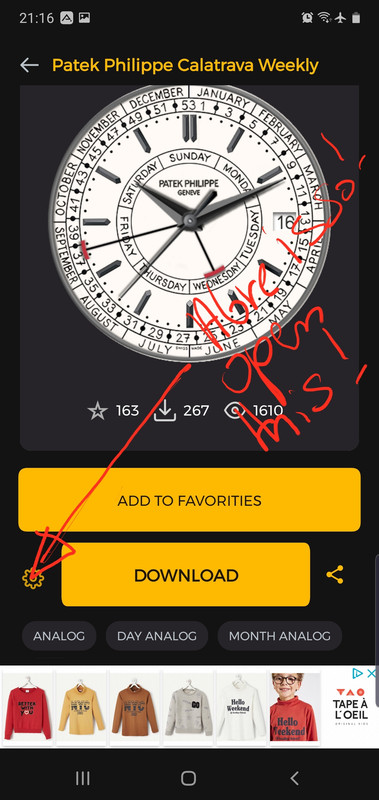
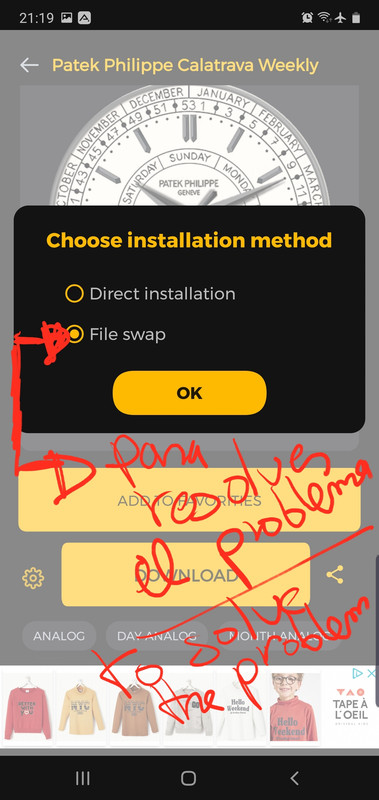
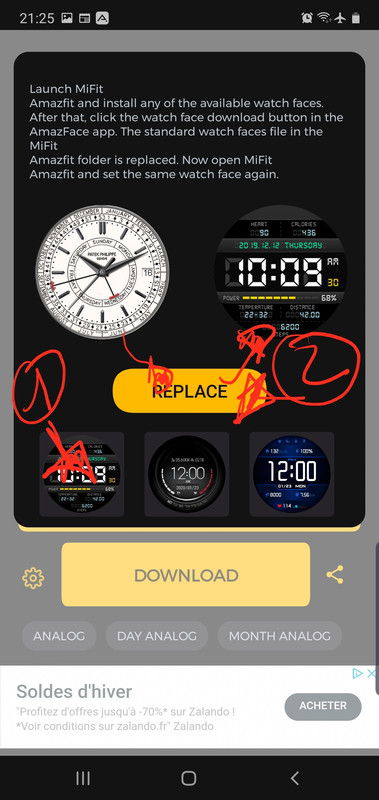
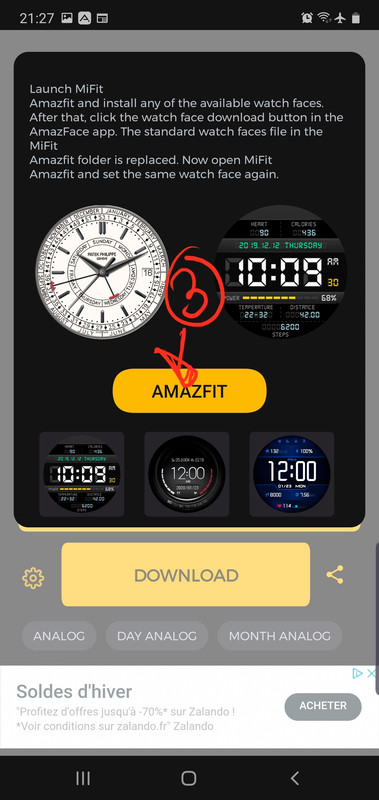
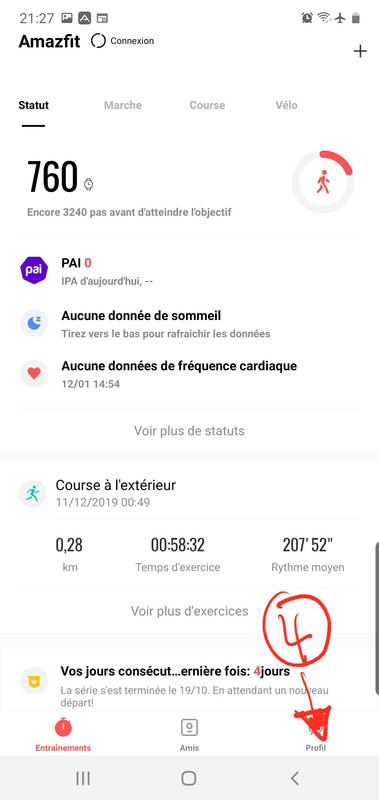
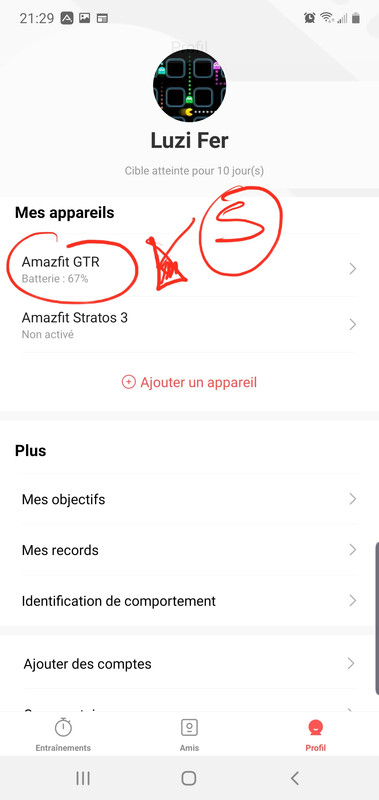
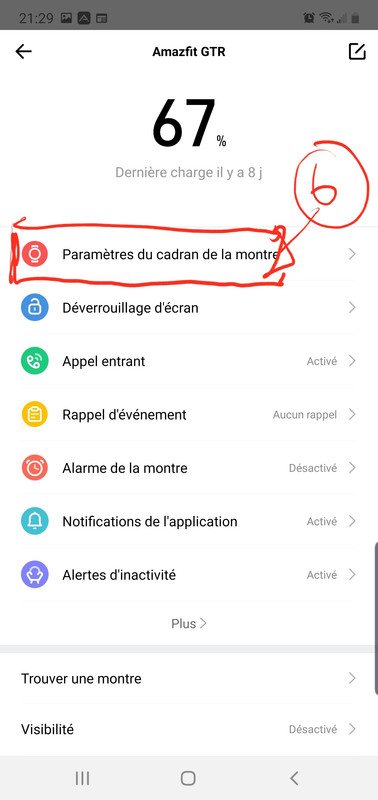
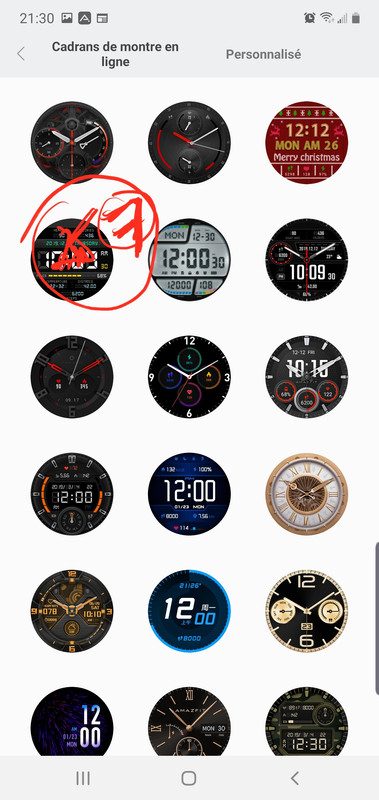
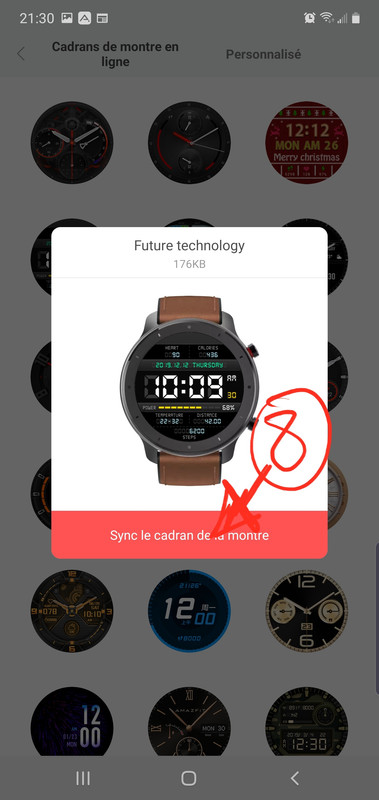
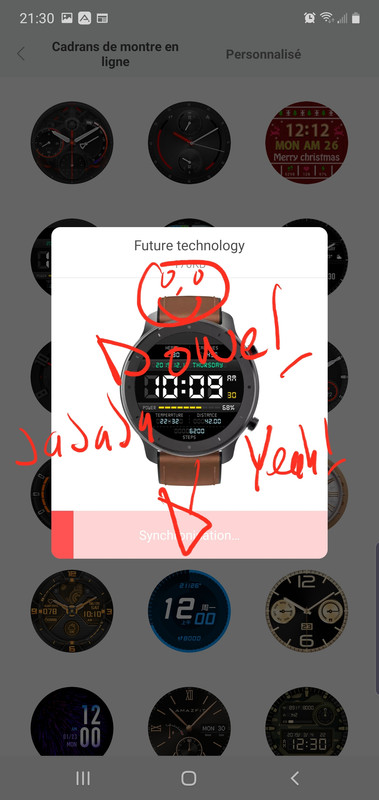
-> En primeiro porque es necessario[ 4 - 5 - 6 - 7 -8 ]
-> y despues [ 1 - 2 - 3 - 4 - 5 - 6 - 7 - 8 ]
You got to make the step 7 one time tu put an official huami face, and after that just do all the steps.
Step 7 in necessary before one time, because all the face coming from amazfit watchfaces [ this site ] will replace the face of huami every time you download a new one and sync it to your watch.
-> First time [ 4 - 5 - 6 - 7 -8 ]
-> And After...... everytime you download and sync a new watchface from this site or the site App [ 1 - 2 - 3 - 4 - 5 - 6 - 7 - 8 ]
Tx for the try, but the problem is in the app, not in the way we use it. Please see t
My device screen in point 3
My device screen in point 3
- Attachments
-
- Screenshot_2020-01-17-07-53-15-387_com.amazfitwatchfaces.st.jpg (283.12 KiB) Viewed 3063 times
I have amazfit installed, and a huami face sincronyzed with the watch, before trying to use the amazfaces app
-
vilem.roth
- WF maker
- Posts: 1
- Joined: 29 Oct 2019, 19:09
- Contact:
Hello,
I have same issue.
Amazfit and original watchfaces instaled.
Amazfaces can not find face from amazfit and replace screen is empty.
Samsung s10e, Android 10.
I have same issue.
Amazfit and original watchfaces instaled.
Amazfaces can not find face from amazfit and replace screen is empty.
Samsung s10e, Android 10.
Hi.
I've received some support from the app guys, & it worked!
You have to:
- Enable device visibility in Amazfit (you can turn it off after installing the watchface).
- Use direct installation without spoofing the file.
Tx again.
I've received some support from the app guys, & it worked!
You have to:
- Enable device visibility in Amazfit (you can turn it off after installing the watchface).
- Use direct installation without spoofing the file.
Tx again.
-
Lordalpine
- WF maker
- Posts: 62
- Joined: 09 Oct 2019, 22:09
- Location: Santo Tirso
- Has thanked: 6 times
- Been thanked: 35 times
- Contact:
[mention]Gus0[/mention] It takes so long to sync the face with direct installation
All I said on Android 9 was true On my Galaxy Note 10+: Screen steps by steps Pics [ Files swap ]
It was true on Android 9... Yesterday I Have updated to Android 10 with OneUI 2.0 and the Pic with nothing to replace is true on Android 10.
Direct installation takes too much time to finish, and it works on my side only one time... after sync another face will miserably fail. Got to Manually Kill the App, Clean Data and Cache, Put to trash the Bluetooth Mac adress
and make the phone discover once again the watch to sync only one face before error on sync, and the watch after this fail will reset after multiple try.
Hopefully I have a spare phone to make the watchface swap file method when Home or creating face.
Hope the GIK-Team are Hard working on this problem
All I said on Android 9 was true On my Galaxy Note 10+: Screen steps by steps Pics [ Files swap ]
It was true on Android 9... Yesterday I Have updated to Android 10 with OneUI 2.0 and the Pic with nothing to replace is true on Android 10.
Direct installation takes too much time to finish, and it works on my side only one time... after sync another face will miserably fail. Got to Manually Kill the App, Clean Data and Cache, Put to trash the Bluetooth Mac adress
and make the phone discover once again the watch to sync only one face before error on sync, and the watch after this fail will reset after multiple try.
Hopefully I have a spare phone to make the watchface swap file method when Home or creating face.
Hope the GIK-Team are Hard working on this problem
R U sure about your last words?Yes, it takes a lot of time, but works. At least for me is a solution until a new-well-done version will be released.
Not sure if the problem cames from Android 10. Mi MI9 works with A10 since first day & I can manage the watchfaces normally till Christmas time
-
osmat

- Admin
- Posts: 278
- Joined: 22 Mar 2018, 10:09
- Location: Ukraine
- Has thanked: 35 times
- Been thanked: 73 times
- Contact:
For a successful installation, you need to provide all permissions to the AmazFace application.
On Miui, you need to allow the launch of other applications. For direct installation, turn on device visibility in Amazfit, wait for synchronization, and try again.
Try the latest beta version; most bugs fixed in it
On Miui, you need to allow the launch of other applications. For direct installation, turn on device visibility in Amazfit, wait for synchronization, and try again.
Try the latest beta version; most bugs fixed in it
Who is online
Users browsing this forum: Bing [Bot] and 1 guest