-
- Адміністратор
-
-
Support Ukraine
If you experience any problems with the forum (it is not visible, there is no way to post messages, or some functionality does not work), please let us know. If you have problems with registration or you did not receive confirmation letter, let us know and we will activate your account manually.
If you get an "The submitted form was invalid. Try submitting again" error, delete cookies, then try again.
Weather Available Now
Модератори: Internal error, Watchmens
-
BigDaddy

- WF maker
- Повідомлень: 15
- З нами з: 28 липня 2019, 16:48
- Звідки: Great Britain
- Has thanked: 5 times
- Been thanked: 9 times
- Контактна інформація:
Weather Available Now
Weather Available now on stock watch faces! I hope soon it will be on custom faces!!
| Samsung Galaxy S20 Ultra 5G | Samsung Galaxy Watch 3 BT 45mm | Amazfit Bip U Pro |
-
davidcheok
- Повідомлень: 3
- З нами з: 29 серпня 2019, 03:10
- Has thanked: 1 time
- Been thanked: 1 time
- Контактна інформація:
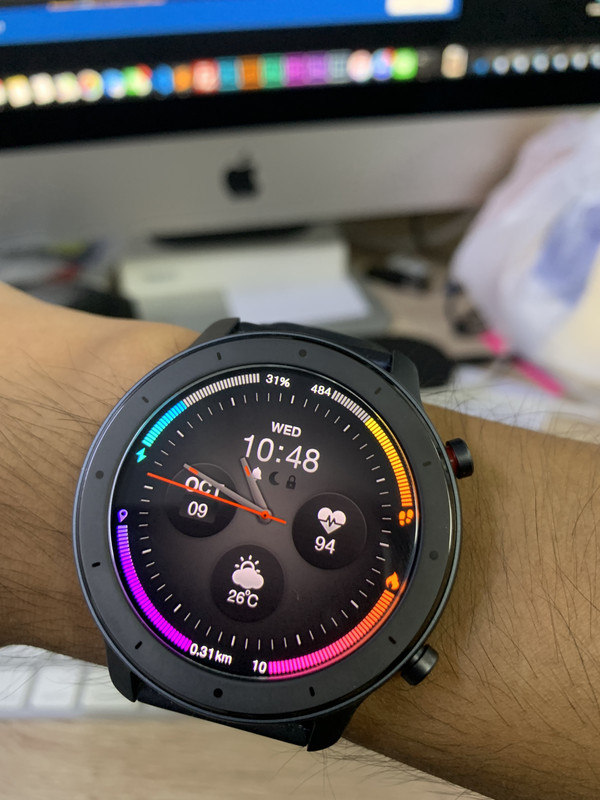
How did you pack the dial ??
For me json is ok, but after packing does'nt show on the watch.
For me json is ok, but after packing does'nt show on the watch.
-
siddartha001

- WF maker
- Повідомлень: 12
- З нами з: 17 грудня 2018, 15:43
- Has thanked: 4 times
- Been thanked: 2 times
- Контактна інформація:
Wow, can you share pls files & code?

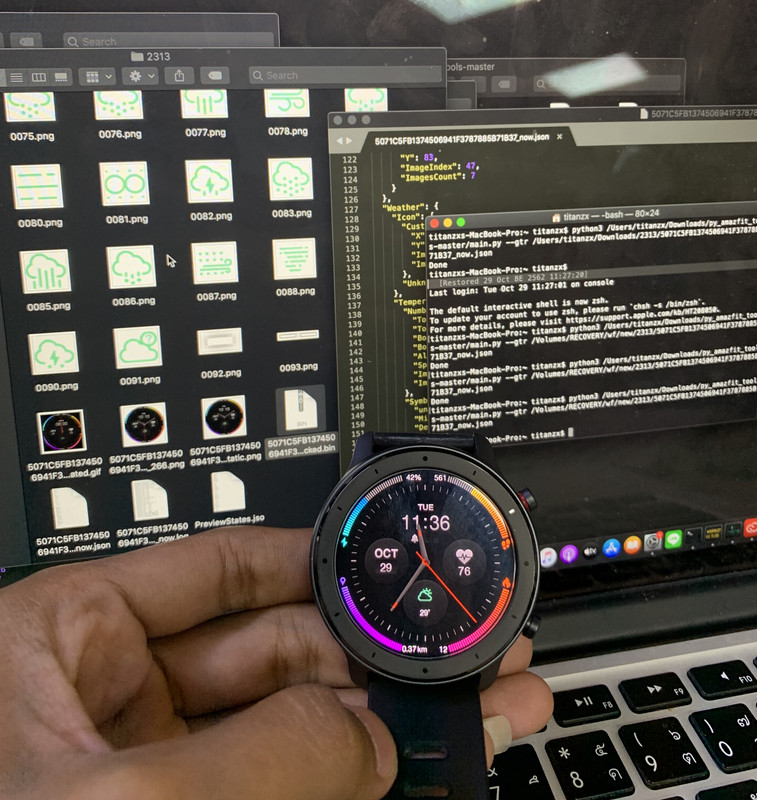
Great work.
What's the bug?
Can you send or post the bin?
(btw: there is an update waiting for you on your Mac... )
)
What's the bug?
Can you send or post the bin?
(btw: there is an update waiting for you on your Mac...
)-
Maikeldevil

- Повідомлень: 64
- З нами з: 17 серпня 2019, 12:05
- Звідки: unknown
- Has thanked: 3 times
- Been thanked: 44 times
- Контактна інформація:
Do you have a github link availible? Or do you have an est. time of adding the sources?
-
Bang.ch.t.c
- WF maker
- Повідомлень: 1
- З нами з: 25 вересня 2019, 15:17
- Контактна інформація:

-
llppzz
You just stole the code from the Russian forum. Don't say what is yours...
-
siddartha001
- WF maker
- Повідомлень: 12
- З нами з: 17 грудня 2018, 15:43
- Has thanked: 4 times
- Been thanked: 2 times
- Контактна інформація:
Is it possible to create a tutorial with screenshots step by step in english for non developers? So that we also can create our watchfaces with weather now and can unpack and pack the bin files please? 

-
murigny64
- WF maker
- Повідомлень: 11
- З нами з: 03 листопада 2019, 17:12
- Been thanked: 4 times
- Контактна інформація:
Install python and pillowsiddartha001 писав: 04 листопада 2019, 17:25Is it possible to create a tutorial with screenshots step by step in english for non developers? So that we also can create our watchfaces with weather now and can unpack and pack the bin files please?
You have to use github.c o m/lolyinseo/py_amazfit_tools/tree/dev_gtr
weather synthax:
Код: Виділити все
  "Weather": {
    "Icon": {
      "Images": {
        "X": 227,
        "Y": 88,
        "ImageIndex": 16,
        "ImagesCount": 25
      },
      "NoWeatherImageIndex": 41
    },
    "Temperature": {
	  "Current": {
        "TopLeftX": 220,
        "TopLeftY": 126,
        "BottomRightX": 271,
        "BottomRightY": 143,
        "Alignment": "Center",
        "Spacing": 0,
        "ImageIndex": 42,
        "ImagesCount": 10
      },
	  "Today": {
		"Separate": {
		  "Day": {
			"TopLeftX": 120,
			"TopLeftY": 126,
			"BottomRightX": 171,
			"BottomRightY": 143,
			"Alignment": "Left",
			"Spacing": 0,
			"ImageIndex": 42,
			"ImagesCount": 10
		  },
		  "Night": {
			"TopLeftX": 250,
			"TopLeftY": 126,
			"BottomRightX": 290,
			"BottomRightY": 143,
			"Alignment": "Right",
			"Spacing": 0,
			"ImageIndex": 42,
			"ImagesCount": 10
		  }
		},
		"AppendDegreesForBoth":1
      },
      "Symbols": {
        "Unknown0800": 0,
        "MinusImageIndex": 52,
        "DegreesImageIndex": 53,
        "NoDataImageIndex": 54
      }
    }
  }
-
siddartha001
- WF maker
- Повідомлень: 12
- З нами з: 17 грудня 2018, 15:43
- Has thanked: 4 times
- Been thanked: 2 times
- Контактна інформація:
Thank you very much! Will try.murigny64 писав: 06 листопада 2019, 17:40Install python and pillowsiddartha001 писав: 04 листопада 2019, 17:25Is it possible to create a tutorial with screenshots step by step in english for non developers? So that we also can create our watchfaces with weather now and can unpack and pack the bin files please?
You have to use github.c o m/lolyinseo/py_amazfit_tools/tree/dev_gtr
weather synthax:
Код: Виділити все
  "Weather": {
    "Icon": {
      "Images": {
        "X": 227,
        "Y": 88,
        "ImageIndex": 16,
        "ImagesCount": 25
      },
      "NoWeatherImageIndex": 41
    },
    "Temperature": {
	  "Current": {
        "TopLeftX": 220,
        "TopLeftY": 126,
        "BottomRightX": 271,
        "BottomRightY": 143,
        "Alignment": "Center",
        "Spacing": 0,
        "ImageIndex": 42,
        "ImagesCount": 10
      },
	  "Today": {
		"Separate": {
		  "Day": {
			"TopLeftX": 120,
			"TopLeftY": 126,
			"BottomRightX": 171,
			"BottomRightY": 143,
			"Alignment": "Left",
			"Spacing": 0,
			"ImageIndex": 42,
			"ImagesCount": 10
		  },
		  "Night": {
			"TopLeftX": 250,
			"TopLeftY": 126,
			"BottomRightX": 290,
			"BottomRightY": 143,
			"Alignment": "Right",
			"Spacing": 0,
			"ImageIndex": 42,
			"ImagesCount": 10
		  }
		},
		"AppendDegreesForBoth":1
      },
      "Symbols": {
        "Unknown0800": 0,
        "MinusImageIndex": 52,
        "DegreesImageIndex": 53,
        "NoDataImageIndex": 54
      }
    }
  }
-
ahmedraije
- WF maker
- Повідомлень: 2
- З нами з: 07 листопада 2019, 19:04
- Контактна інформація:
ive tried to unpack a watchface for gtr 47 with both brances gtr and gtr_devsiddartha001 писав: 08 листопада 2019, 15:54Thank you very much! Will try.murigny64 писав: 06 листопада 2019, 17:40Install python and pillowsiddartha001 писав: 04 листопада 2019, 17:25Is it possible to create a tutorial with screenshots step by step in english for non developers? So that we also can create our watchfaces with weather now and can unpack and pack the bin files please?
You have to use github.c o m/lolyinseo/py_amazfit_tools/tree/dev_gtr
weather synthax:
Код: Виділити все
  "Weather": {
    "Icon": {
      "Images": {
        "X": 227,
        "Y": 88,
        "ImageIndex": 16,
        "ImagesCount": 25
      },
      "NoWeatherImageIndex": 41
    },
    "Temperature": {
	  "Current": {
        "TopLeftX": 220,
        "TopLeftY": 126,
        "BottomRightX": 271,
        "BottomRightY": 143,
        "Alignment": "Center",
        "Spacing": 0,
        "ImageIndex": 42,
        "ImagesCount": 10
      },
	  "Today": {
		"Separate": {
		  "Day": {
			"TopLeftX": 120,
			"TopLeftY": 126,
			"BottomRightX": 171,
			"BottomRightY": 143,
			"Alignment": "Left",
			"Spacing": 0,
			"ImageIndex": 42,
			"ImagesCount": 10
		  },
		  "Night": {
			"TopLeftX": 250,
			"TopLeftY": 126,
			"BottomRightX": 290,
			"BottomRightY": 143,
			"Alignment": "Right",
			"Spacing": 0,
			"ImageIndex": 42,
			"ImagesCount": 10
		  }
		},
		"AppendDegreesForBoth":1
      },
      "Symbols": {
        "Unknown0800": 0,
        "MinusImageIndex": 52,
        "DegreesImageIndex": 53,
        "NoDataImageIndex": 54
      }
    }
  }
both i get the error
actually ive tried all the tools in the website
all return same errors that some parameters are not supportedthe watchfaces that i try to unpack contain weather , analog watchfaes are working well
any solution?
-
ahmedraije
- WF maker
- Повідомлень: 2
- З нами з: 07 листопада 2019, 19:04
- Контактна інформація:
this is the error i get
2019-11-08 19:05:19,067 - root - WARNING - [ParamConv: pars e] currentPath 6 / Parameter 6 isn't supported for <class 'watchFaceParser.watchFace .WatchFace'>
2019-11-08 19:05:19,067 - root - CRITICAL - Parameter 6 isn't supported for <class 'watchFacePa rser .watchF ace .Wat chFa ce'>
Traceback (most recent call last):
File "program .py ", line 160, in parseResources
File " watchFaceParser\utils\parametersConv erter. py", line 79, in parse
IndexEr ror: Parameter 6 isn't supported for <class 'watc hFacePar ser.watchF ace.Wat chFdace'>
Хто зараз онлайн
Зараз переглядають цей форум: Немає зареєстрованих користувачів і 2 гостей