-
- Administrator
-
-
Support Ukraine
If you experience any problems with the forum (it is not visible, there is no way to post messages, or some functionality does not work), please let us know. If you have problems with registration or you did not receive confirmation letter, let us know and we will activate your account manually.
If you get an "The submitted form was invalid. Try submitting again" error, delete cookies, then try again.
Weather Available Now
Moderators: Internal error, Watchmens
-
BigDaddy

- WF maker
- Posts: 15
- Joined: 28 Jul 2019, 16:48
- Location: Great Britain
- Has thanked: 5 times
- Been thanked: 9 times
- Contact:
Weather Available Now
Weather Available now on stock watch faces! I hope soon it will be on custom faces!!
| Samsung Galaxy S20 Ultra 5G | Samsung Galaxy Watch 3 BT 45mm | Amazfit Bip U Pro |
-
davidcheok
- Posts: 3
- Joined: 29 Aug 2019, 03:10
- Has thanked: 1 time
- Been thanked: 1 time
- Contact:
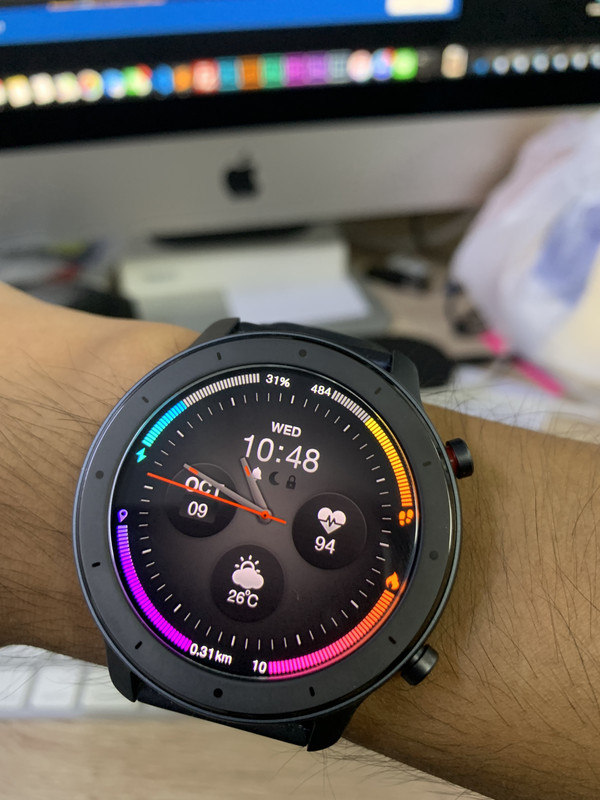
How did you pack the dial ??
For me json is ok, but after packing does'nt show on the watch.
For me json is ok, but after packing does'nt show on the watch.
-
siddartha001

- WF maker
- Posts: 12
- Joined: 17 Dec 2018, 15:43
- Has thanked: 4 times
- Been thanked: 2 times
- Contact:
Wow, can you share pls files & code?

It's fake ?? LOL, I've to fix bug before I patch to github.
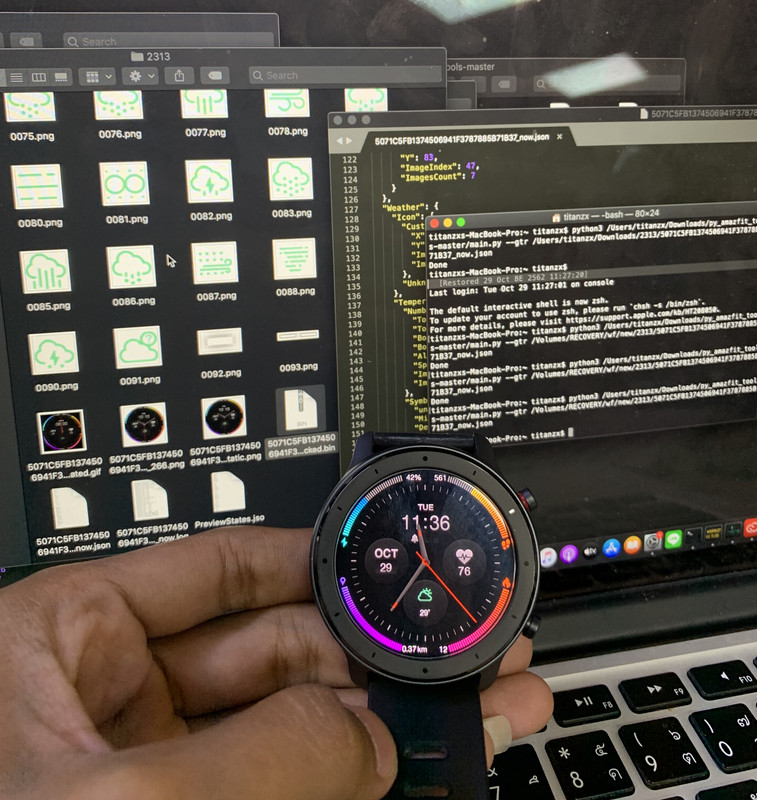
Great work.
What's the bug?
Can you send or post the bin?
(btw: there is an update waiting for you on your Mac... )
)
What's the bug?
Can you send or post the bin?
(btw: there is an update waiting for you on your Mac...
)-
Maikeldevil

- Posts: 64
- Joined: 17 Aug 2019, 12:05
- Location: unknown
- Has thanked: 3 times
- Been thanked: 44 times
- Contact:
Do you have a github link availible? Or do you have an est. time of adding the sources?
-
Bang.ch.t.c
- WF maker
- Posts: 1
- Joined: 25 Sep 2019, 15:17
- Contact:

-
llppzz
You just stole the code from the Russian forum. Don't say what is yours...
Hello
github lolyinseo/py_amazfit_tools
is now updated with new parameters for weather:
current, max day and night
very usefull for us.
github lolyinseo/py_amazfit_tools
is now updated with new parameters for weather:
current, max day and night
very usefull for us.
-
siddartha001
- WF maker
- Posts: 12
- Joined: 17 Dec 2018, 15:43
- Has thanked: 4 times
- Been thanked: 2 times
- Contact:
Is it possible to create a tutorial with screenshots step by step in english for non developers? So that we also can create our watchfaces with weather now and can unpack and pack the bin files please?
Hello
I try to had both current weather and day/night weather in json but It's not working
Only "current" OR "day/night" is working
I miss something ?
I try to had both current weather and day/night weather in json but It's not working
Only "current" OR "day/night" is working
I miss something ?
Install python and pillowsiddartha001 wrote: 04 Nov 2019, 17:25Is it possible to create a tutorial with screenshots step by step in english for non developers? So that we also can create our watchfaces with weather now and can unpack and pack the bin files please?
You have to use github.c o m/lolyinseo/py_amazfit_tools/tree/dev_gtr
weather synthax:
Code: Select all
  "Weather": {
    "Icon": {
      "Images": {
        "X": 227,
        "Y": 88,
        "ImageIndex": 16,
        "ImagesCount": 25
      },
      "NoWeatherImageIndex": 41
    },
    "Temperature": {
	  "Current": {
        "TopLeftX": 220,
        "TopLeftY": 126,
        "BottomRightX": 271,
        "BottomRightY": 143,
        "Alignment": "Center",
        "Spacing": 0,
        "ImageIndex": 42,
        "ImagesCount": 10
      },
	  "Today": {
		"Separate": {
		  "Day": {
			"TopLeftX": 120,
			"TopLeftY": 126,
			"BottomRightX": 171,
			"BottomRightY": 143,
			"Alignment": "Left",
			"Spacing": 0,
			"ImageIndex": 42,
			"ImagesCount": 10
		  },
		  "Night": {
			"TopLeftX": 250,
			"TopLeftY": 126,
			"BottomRightX": 290,
			"BottomRightY": 143,
			"Alignment": "Right",
			"Spacing": 0,
			"ImageIndex": 42,
			"ImagesCount": 10
		  }
		},
		"AppendDegreesForBoth":1
      },
      "Symbols": {
        "Unknown0800": 0,
        "MinusImageIndex": 52,
        "DegreesImageIndex": 53,
        "NoDataImageIndex": 54
      }
    }
}no, use "dev_gtr" branchjetherson wrote: 08 Nov 2019, 07:48I can't seem to unpack these new WF with weather data using the latest py_amazfit_tools-gtr. Any ideas? Thanks.

-
siddartha001
- WF maker
- Posts: 12
- Joined: 17 Dec 2018, 15:43
- Has thanked: 4 times
- Been thanked: 2 times
- Contact:
Thank you very much! Will try.murigny64 wrote: 06 Nov 2019, 17:40Install python and pillowsiddartha001 wrote: 04 Nov 2019, 17:25Is it possible to create a tutorial with screenshots step by step in english for non developers? So that we also can create our watchfaces with weather now and can unpack and pack the bin files please?
You have to use github.c o m/lolyinseo/py_amazfit_tools/tree/dev_gtr
weather synthax:
Code: Select all
  "Weather": {
    "Icon": {
      "Images": {
        "X": 227,
        "Y": 88,
        "ImageIndex": 16,
        "ImagesCount": 25
      },
      "NoWeatherImageIndex": 41
    },
    "Temperature": {
	  "Current": {
        "TopLeftX": 220,
        "TopLeftY": 126,
        "BottomRightX": 271,
        "BottomRightY": 143,
        "Alignment": "Center",
        "Spacing": 0,
        "ImageIndex": 42,
        "ImagesCount": 10
      },
	  "Today": {
		"Separate": {
		  "Day": {
			"TopLeftX": 120,
			"TopLeftY": 126,
			"BottomRightX": 171,
			"BottomRightY": 143,
			"Alignment": "Left",
			"Spacing": 0,
			"ImageIndex": 42,
			"ImagesCount": 10
		  },
		  "Night": {
			"TopLeftX": 250,
			"TopLeftY": 126,
			"BottomRightX": 290,
			"BottomRightY": 143,
			"Alignment": "Right",
			"Spacing": 0,
			"ImageIndex": 42,
			"ImagesCount": 10
		  }
		},
		"AppendDegreesForBoth":1
      },
      "Symbols": {
        "Unknown0800": 0,
        "MinusImageIndex": 52,
        "DegreesImageIndex": 53,
        "NoDataImageIndex": 54
      }
    }
  }
-
ahmedraije
- WF maker
- Posts: 2
- Joined: 07 Nov 2019, 19:04
- Contact:
ive tried to unpack a watchface for gtr 47 with both brances gtr and gtr_devsiddartha001 wrote: 08 Nov 2019, 15:54Thank you very much! Will try.murigny64 wrote: 06 Nov 2019, 17:40Install python and pillowsiddartha001 wrote: 04 Nov 2019, 17:25Is it possible to create a tutorial with screenshots step by step in english for non developers? So that we also can create our watchfaces with weather now and can unpack and pack the bin files please?
You have to use github.c o m/lolyinseo/py_amazfit_tools/tree/dev_gtr
weather synthax:
Code: Select all
  "Weather": {
    "Icon": {
      "Images": {
        "X": 227,
        "Y": 88,
        "ImageIndex": 16,
        "ImagesCount": 25
      },
      "NoWeatherImageIndex": 41
    },
    "Temperature": {
	  "Current": {
        "TopLeftX": 220,
        "TopLeftY": 126,
        "BottomRightX": 271,
        "BottomRightY": 143,
        "Alignment": "Center",
        "Spacing": 0,
        "ImageIndex": 42,
        "ImagesCount": 10
      },
	  "Today": {
		"Separate": {
		  "Day": {
			"TopLeftX": 120,
			"TopLeftY": 126,
			"BottomRightX": 171,
			"BottomRightY": 143,
			"Alignment": "Left",
			"Spacing": 0,
			"ImageIndex": 42,
			"ImagesCount": 10
		  },
		  "Night": {
			"TopLeftX": 250,
			"TopLeftY": 126,
			"BottomRightX": 290,
			"BottomRightY": 143,
			"Alignment": "Right",
			"Spacing": 0,
			"ImageIndex": 42,
			"ImagesCount": 10
		  }
		},
		"AppendDegreesForBoth":1
      },
      "Symbols": {
        "Unknown0800": 0,
        "MinusImageIndex": 52,
        "DegreesImageIndex": 53,
        "NoDataImageIndex": 54
      }
    }
  }
both i get the error
actually ive tried all the tools in the website
all return same errors that some parameters are not supportedthe watchfaces that i try to unpack contain weather , analog watchfaes are working well
any solution?
-
ahmedraije
- WF maker
- Posts: 2
- Joined: 07 Nov 2019, 19:04
- Contact:
this is the error i get
2019-11-08 19:05:19,067 - root - WARNING - [ParamConv: pars e] currentPath 6 / Parameter 6 isn't supported for <class 'watchFaceParser.watchFace .WatchFace'>
2019-11-08 19:05:19,067 - root - CRITICAL - Parameter 6 isn't supported for <class 'watchFacePa rser .watchF ace .Wat chFa ce'>
Traceback (most recent call last):
File "program .py ", line 160, in parseResources
File " watchFaceParser\utils\parametersConv erter. py", line 79, in parse
IndexEr ror: Parameter 6 isn't supported for <class 'watc hFacePar ser.watchF ace.Wat chFdace'>
Who is online
Users browsing this forum: No registered users and 1 guest