• Administrador
  •  
    Support Ukraine
    If you experience any problems with the forum (it is not visible, there is no way to post messages, or some functionality does not work), please let us know. If you have problems with registration or you did not receive confirmation letter, let us know and we will activate your account manually.
    If you get an "The submitted form was invalid. Try submitting again" error, delete cookies, then try again.
     

Amazfit watchfaces Tool

Archive closed topics

Moderadores: Internal error, Watchmens

manelto

Mensagem por manelto »

osmat escreveu: 23 Ago 2019, 11:20
A new version
AmazTool All 0.1.0.11.7z
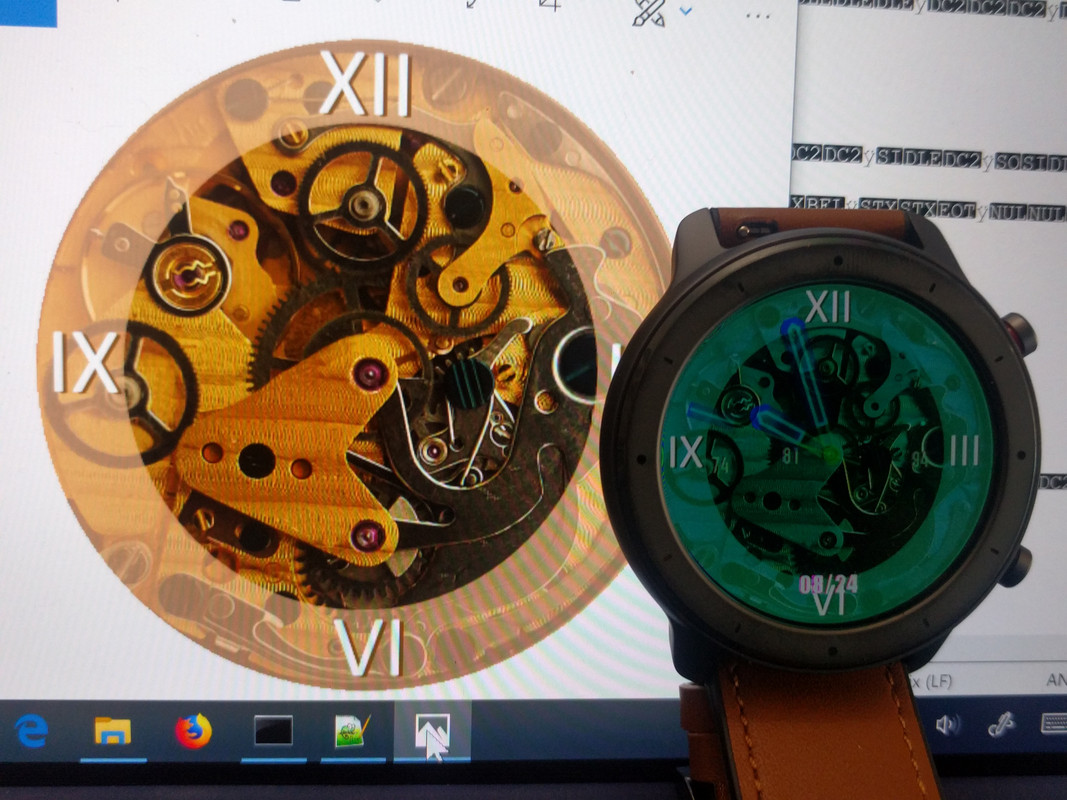
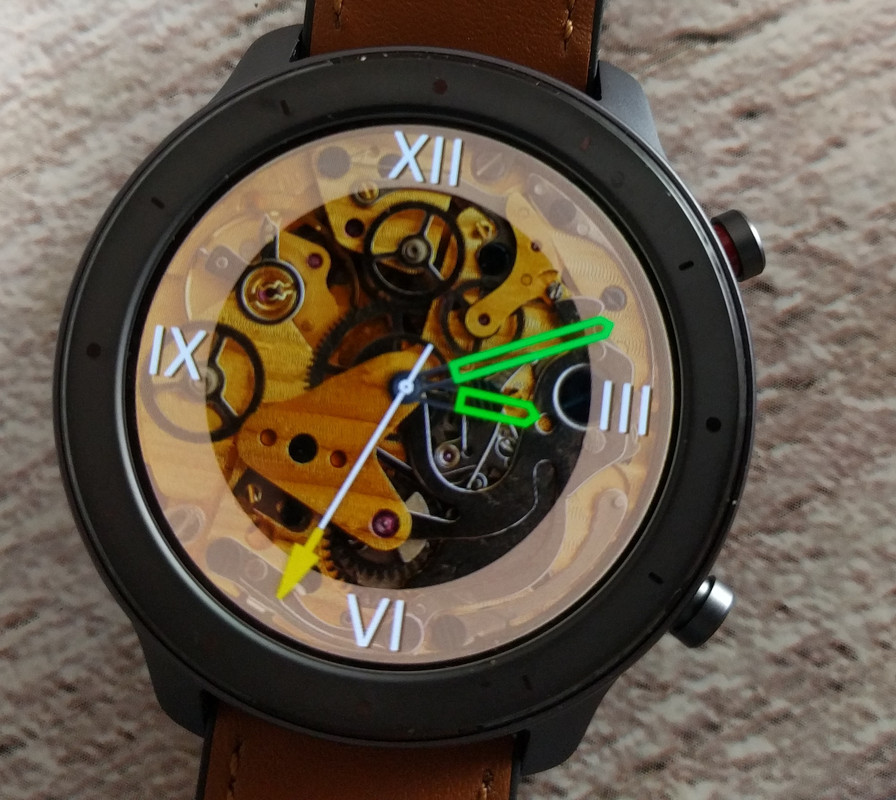
Well, I checked and we still have the color problem.

Thank you for the efforts and time you dedicate to us.
Spoiler
Imagem
I don't know how other users solve it and it seems they don't really want to share the solution. :?
Avatar do usuário
nightwatch
Mensagens: 3
Registrado em: 23 Ago 2019, 13:39
Been thanked: 1 time
Contato:

Mensagem por nightwatch »

manelto escreveu: 24 Ago 2019, 08:22
osmat escreveu: 23 Ago 2019, 11:20
A new version
AmazTool All 0.1.0.11.7z
Well, I checked and we still have the color problem.

Thank you for the efforts and time you dedicate to us.


I don't know how other users solve it and it seems they don't really want to share the solution. :?
I think they are using another tool to pack/unpack the. bin file... based on python
manelto

Mensagem por manelto »

In the right way...

Imagem

I take the tool from here: https://github.com/ghtalpo/amazfit_verge_lite_tools (thanks afwafwafw).

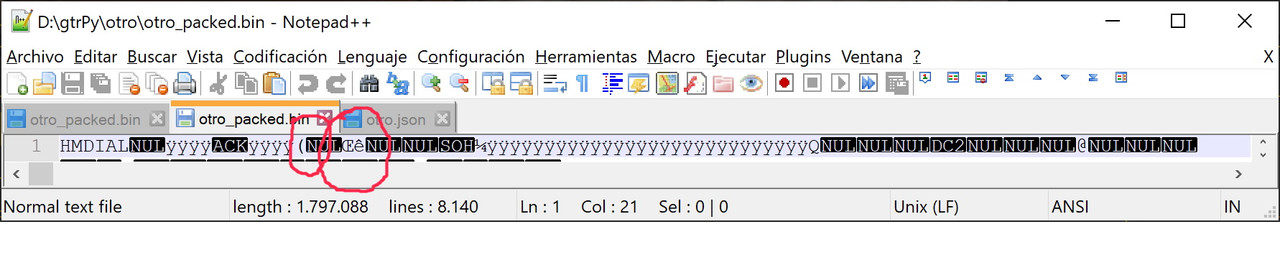
With this tool you can work almost directly, you just have to change a couple of bytes at the beginning of the bin file.


Imagem

The parentheses and the symbol between the NULs are what they should be. Maybe afwafwafw can change the program to do it directly. I can do it, but the author is him and the merit is his.
Bhoken
WF maker
Mensagens: 3
Registrado em: 22 Ago 2019, 16:40
Contato:

Mensagem por Bhoken »

I can use it? can you explain?
manelto

Mensagem por manelto »

Bhoken escreveu: 24 Ago 2019, 14:25
I can use it? can you explain?
Off

Of course.
first download from github the awfawfawf code.
then you need Python version 3.7.4 and install it. finally download the 6.1 version of pillow and install it.

once you have everything you just need to modify a line of one of the files.
manelto

Mensagem por manelto »

Pasos que he seguido para poder editar los ficheros del reloj GTR:
Steps that I have followed to be able to edit the GTR clock files:

descargar el código que ha compartido el usuario afwafwafw (gracias de nuevo) de este enlace:
Download the code shared by the user afwafwafw (thanks again) from this link:

https://github.com/ghtalpo/amazfit_verge_lite_tools

Descargar e instalar la versión 3.7.4 de python ...
Download and install version 3.7.4 of python...
(https://www.python.org/downloads/).

En mi caso he utilizado la versión de 64bits para windows.
In my case I used the 64bit version for windows.

Descargar e instalar la versión 6.1 de pillows...
Download and install version 6.1 of pillows...
(https://pypi.org/project/Pillow/#files).
En mi caso he seleccionado la última versión para windows...
In my case I have selected the latest version for windows ...
(https://files.pythonhosted.org/packages ... -py3.7.exe).

Después de instalar lo anterior, he modificado el fichero header.py del código python de afwafwafw. En concreto he sustituido la línea:
After installing the above, I modified the header.py file of the afwafwafw python code. Specifically I replaced the line:

Código: Selecionar todos

1 : [0x20, 0x00, 0x6e, 0xea, 0x00, 0x00, 0x01, 0xbc],
por esta otra:
for this one:

Código: Selecionar todos

1 : [0x28, 0x00, 0x8c, 0xea, 0x00, 0x00, 0x01, 0xbc],
Se puede ver que sólo he cambiado el primer y tercer caracter hexadecimal.
You can see that I have only changed the first and third hexadecimal characters.

Al final me descargo un fichero GTR bin de los de está página para utilizarlo como modelo o, si se desea, y tienes ganas, comienzas uno desde cero. Se necesita un fichero json con la definición de las imágenes y las imágenes mismas. (Yo las imágenes las genero o modifico con el aplicativo gratuito paintnet (https://www.getpaint.net/). Las grabo con 32 bits en png.

In the end I download a GTR bin file from those on this page to use it as a model or, if desired, and you feel like it, you start one from scratch. A json file is needed with the definition of the images and the images themselves. (I generate the images or modify them with the free paintnet application (https://www.getpaint.net/). I record them with 32 bits in png.

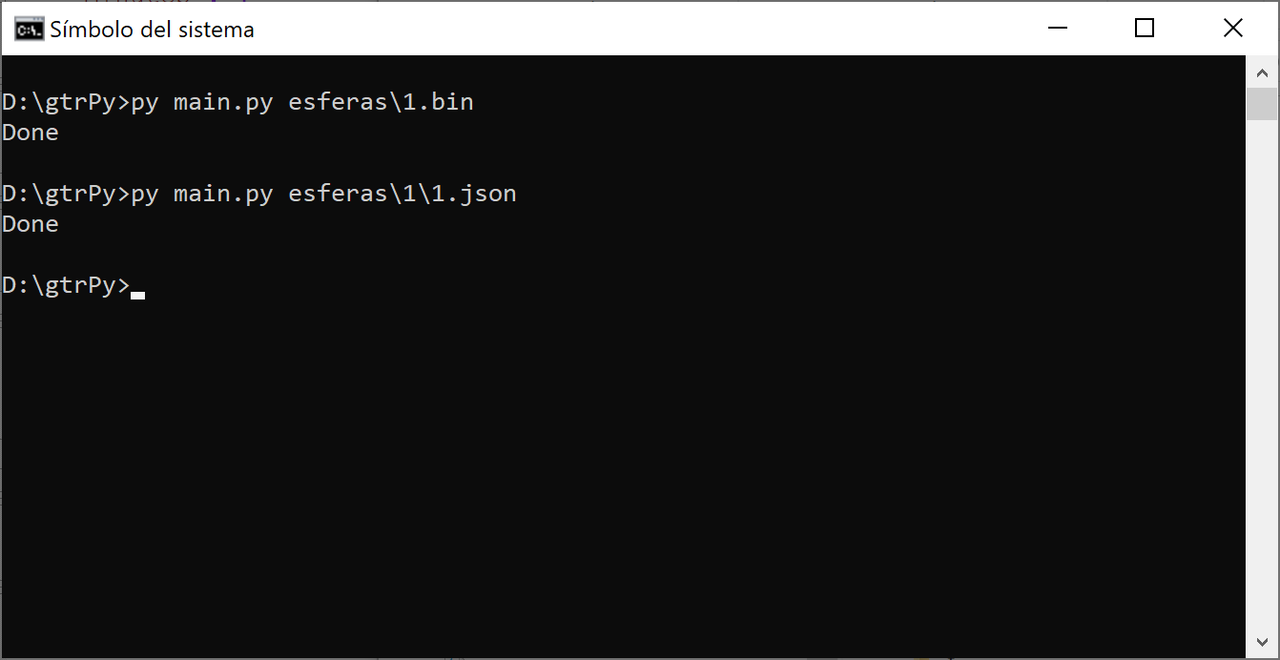
Finalmente utilizo la instrucción, py main.py nombrefichero.bin para descomprimir y py main.py nombrefichero.json para comprimir.
Finally I use the instruction, py main.py filename.bin to decompress and py main.py filename.json to compress.


Para subir el fichero al reloj ya hay un tutorial o explicación en esta página.
To upload the file to the clock there is already a tutorial or explanation on this page.
koolgao
WF maker
Mensagens: 16
Registrado em: 15 Abr 2018, 06:25
Has thanked: 2 times

Mensagem por koolgao »

una pregunta asi de novato como yo ....... como edito el header ese?
manelto

Mensagem por manelto »

A good editor and free is notepad++
https://www.google.com/url?sa=t&source= ... 063HXzmla7
manelto

Mensagem por manelto »

koolgao escreveu: 24 Ago 2019, 23:29
una pregunta asi de novato como yo ....... como edito el header ese?
El notepad++ es bbb
Avatar do usuário
Kolomnych
WF maker
Mensagens: 2
Registrado em: 23 Ago 2019, 14:46
Localização: Kolomna, Russia
Contato:

Mensagem por Kolomnych »

manelto, good instruction! But i have error while i unpack bin file:

Código: Selecionar todos

G:\Clock\amazfit_verge_lite_tools-master>py main py 01.bin
  File "main py", line 28, in <module>
    program.Parser.unpackWatchFace(inputFileName)
  File "G:\Clock\amazfit_verge_lite_tools-master\program py", line 123, in unpackWatchFace
    reader = Parser.readWatchFace(inputFileName)
  File "G:\Clock\amazfit_verge_lite_tools-master\program py", line 89, in readWatchFace
    traceback.print_stack()
Done
Also included log file. What's wrong?

P.S. i remove here "." in code "main py" and "program py", because: "You can’t post image, email or url links that are external to this domain. Please remove main py"
Anexos
01.log
(9.2 KiB) Baixado 658 vezes
w0mbat
WF maker
Mensagens: 9
Registrado em: 13 Jul 2019, 15:37
Localização: France
Has thanked: 3 times
Been thanked: 1 time
Contato:

Mensagem por w0mbat »

manelto escreveu: 24 Ago 2019, 20:34
Pasos que he seguido para poder editar los ficheros del reloj GTR:
Steps that I have followed to be able to edit the GTR clock files:
...
Thx for the recap!

In the previewGenerator python file (watchFaceParser directory), change the size to 454 also.
glenan
Mensagens: 10
Registrado em: 24 Ago 2019, 16:35
Localização: France
Has thanked: 2 times
Been thanked: 2 times
Contato:

Mensagem por glenan »

Hi

I downloaded and used AmazTool All 0.1.0.11.zip with an Amazfit GTR
unpack and packed (after adding a logo on one existing watchface)
I installed new bin file with Notify and Fitness for Amazfit
It worked but with problems of colors as said above.

Thanks a lot for your job and I hope you will solved it.

[EDIT] I don't know what is the use of Watchface.exe because I only used pack.cmd and repack.cmd
Bhoken
WF maker
Mensagens: 3
Registrado em: 22 Ago 2019, 16:40
Contato:

Mensagem por Bhoken »

[mention]manelto[/mention]Thank you ! A couple of questions. Why you modify the header? Works also for verge lite? I use image that I create with illustrator in the same resolution of a watchface that I have use as a model, it works fine?
manelto

Mensagem por manelto »

Kolomnych escreveu: 25 Ago 2019, 07:30
manelto, good instruction! But i have error while i unpack bin file:

Código: Selecionar todos

G:\Clock\amazfit_verge_lite_tools-master>py main py 01.bin
  File "main py", line 28, in <module>
    program.Parser.unpackWatchFace(inputFileName)
  File "G:\Clock\amazfit_verge_lite_tools-master\program py", line 123, in unpackWatchFace
    reader = Parser.readWatchFace(inputFileName)
  File "G:\Clock\amazfit_verge_lite_tools-master\program py", line 89, in readWatchFace
    traceback.print_stack()
Done
Also included log file. What's wrong?

P.S. i remove here "." in code "main py" and "program py", because: "You can’t post image, email or url links that are external to this domain. Please remove main py"


I can't understand you. You don't put points between main and py?
I do. I need to put them so that the instruction is recognized. At least in windows.


Imagem
manelto

Mensagem por manelto »

Bhoken escreveu: 25 Ago 2019, 10:43
@maneltoThank you ! A couple of questions. Why you modify the header? Works also for verge lite? I use image that I create with illustrator in the same resolution of a watchface that I have use as a model, it works fine?
The author of the program is afwafwafw. And the original program is to work directly with the verge lite. So, if you have that watch you don't have to change anything.
The modification that I detail above is to adapt the code for the GTR watch
manelto

Mensagem por manelto »

w0mbat escreveu: 25 Ago 2019, 08:21
manelto escreveu: 24 Ago 2019, 20:34
Pasos que he seguido para poder editar los ficheros del reloj GTR:
Steps that I have followed to be able to edit the GTR clock files:
...
Thx for the recap!

In the previewGenerator python file (watchFaceParser directory), change the size to 454 also.
Thanks!

Muchas gracias!
PavlinBecks
WF maker
Mensagens: 3
Registrado em: 13 Jul 2019, 12:04
Contato:

Mensagem por PavlinBecks »

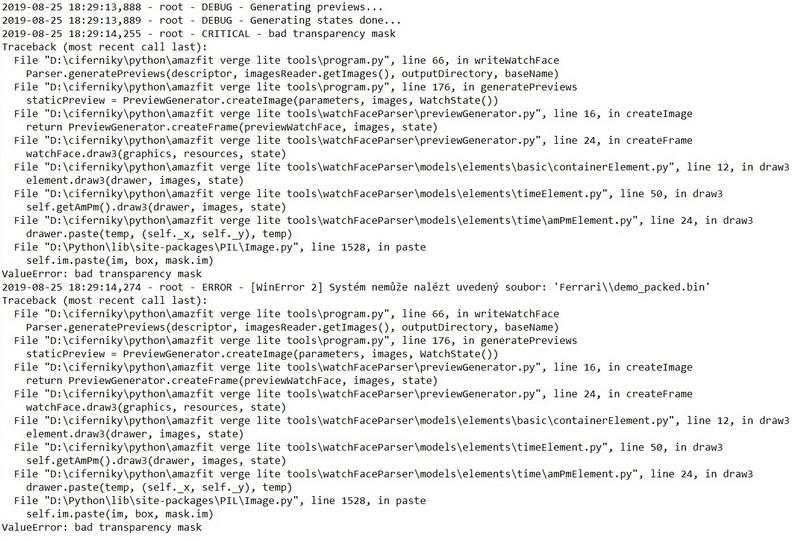
Please help me, when using Python tool from GitHub, I always get this error. What am I doing wrong? In Log I found a bug about transparency but I don't know how to fix it. Thank you.
Imagem
Editado pela última vez por PavlinBecks em 25 Ago 2019, 16:46, em um total de 1 vez.
manelto

Mensagem por manelto »

Another change (remember : these changes are only for GTR):

Código: Selecionar todos

temp = Image.new('RGBA', (360, 360))
temp.paste(bitmap, (180 - x, 180 - y), bitmap)
for...

Código: Selecionar todos

temp = Image.new('RGBA', (454, 454))
temp.paste(bitmap, (227 - x, 227 - y), bitmap)
These changes are in ...\watchFaceParser\models\elements\common\imageElement.py
manelto

Mensagem por manelto »

PavlinBecks escreveu: 25 Ago 2019, 16:41
Please help me, when using Python tool from GitHub, I always get this error. What am I doing wrong? In Log I found a bug about transparency but I don't know how to fix it. Thank you.
Imagem
I can't see the image :?
koolgao
WF maker
Mensagens: 16
Registrado em: 15 Abr 2018, 06:25
Has thanked: 2 times

Mensagem por koolgao »

manelto escreveu: 25 Ago 2019, 16:45
Another change (remember : these changes are only for GTR):

Código: Selecionar todos

temp = Image.new('RGBA', (360, 360))
temp.paste(bitmap, (180 - x, 180 - y), bitmap)
for...

Código: Selecionar todos

temp = Image.new('RGBA', (454, 454))
temp.paste(bitmap, (227 - x, 227 - y), bitmap)
These changes are in ...\watchFaceParser\models\elements\common\imageElement.py
una pregunta esto para que vale? hay algo para que se vea bien el gif que crea? ya q no me sale el reloj entero
PavlinBecks
WF maker
Mensagens: 3
Registrado em: 13 Jul 2019, 12:04
Contato:

Mensagem por PavlinBecks »

manelto escreveu: 25 Ago 2019, 16:47
PavlinBecks escreveu: 25 Ago 2019, 16:41
Please help me, when using Python tool from GitHub, I always get this error. What am I doing wrong? In Log I found a bug about transparency but I don't know how to fix it. Thank you.

Imagem
I can't see the image :?
Sorry, I can't insert
Spoiler
Imagem
manelto

Mensagem por manelto »

koolgao escreveu: 25 Ago 2019, 17:54
manelto escreveu: 25 Ago 2019, 16:45
Another change (remember : these changes are only for GTR):

Código: Selecionar todos

temp = Image.new('RGBA', (360, 360))
temp.paste(bitmap, (180 - x, 180 - y), bitmap)
for...

Código: Selecionar todos

temp = Image.new('RGBA', (454, 454))
temp.paste(bitmap, (227 - x, 227 - y), bitmap)
These changes are in ...\watchFaceParser\models\elements\common\imageElement.py
una pregunta esto para que vale? hay algo para que se vea bien el gif que crea? ya q no me sale el reloj entero
Una cosa es el gif que se crea a modo de previsualización y otra el bin que instalas en el reloj.
El bin funciona correctamente sin necesidad de este cambio ni del que ha descrito w0mba más arriba.
Pero para que el gif y las otras imágenes que se generan a modo de previews estén completos necesitas el cambio descrito por w0mbat. Y para centrar las agujas de los relojes y otras imágenes en la esfera tienes que hacer el cambio que he modificado.
The Matrix

Mensagem por The Matrix »

Hello,
I've made a modification from other watchface, but when I upload to my Verge lite, colors are inverted and I do not know how to solve it.
I have tried to unpack then repack again but no luck...
Spoiler
IMG_20190825_231027.jpg
IMG_20190825_231027.jpg (155.61 KiB) Exibido 231543 vezes
Anexos
vermillion_20190919_packed-17820-563021d504.zip
sources
(898.76 KiB) Baixado 633 vezes
hall
WF maker
Mensagens: 7
Registrado em: 15 Ago 2019, 09:07
Been thanked: 1 time
Contato:

Mensagem por hall »

glenan escreveu: 25 Ago 2019, 10:20
Hi

I downloaded and used AmazTool All 0.1.0.11.zip with an Amazfit GTR
unpack and packed (after adding a logo on one existing watchface)
I installed new bin file with Notify and Fitness for Amazfit
It worked but with problems of colors as said above.

Thanks a lot for your job and I hope you will solved it.

[EDIT] I don't know what is the use of Watchface.exe because I only used pack.cmd and repack.cmd
[mention]glenan[/mention] if you click edit or open .cmd file in text editor you will know that it call watchface.exe to process it. cmd just command set like batch file.
koolgao
WF maker
Mensagens: 16
Registrado em: 15 Abr 2018, 06:25
Has thanked: 2 times

Mensagem por koolgao »

manelto escreveu: 25 Ago 2019, 20:45
koolgao escreveu: 25 Ago 2019, 17:54
manelto escreveu: 25 Ago 2019, 16:45
Another change (remember : these changes are only for GTR):

Código: Selecionar todos

temp = Image.new('RGBA', (360, 360))
temp.paste(bitmap, (180 - x, 180 - y), bitmap)
for...

Código: Selecionar todos

temp = Image.new('RGBA', (454, 454))
temp.paste(bitmap, (227 - x, 227 - y), bitmap)
These changes are in ...\watchFaceParser\models\elements\common\imageElement.py
una pregunta esto para que vale? hay algo para que se vea bien el gif que crea? ya q no me sale el reloj entero
Una cosa es el gif que se crea a modo de previsualización y otra el bin que instalas en el reloj.
El bin funciona correctamente sin necesidad de este cambio ni del que ha descrito w0mba más arriba.
Pero para que el gif y las otras imágenes que se generan a modo de previews estén completos necesitas el cambio descrito por w0mbat. Y para centrar las agujas de los relojes y otras imágenes en la esfera tienes que hacer el cambio que he modificado.
Y que tengo que hacer para lo del gif este ultimo que has puesto aquí ya lo tengo hecho pero el gif we sigue saliendo medio reloj
Trancado

Voltar para “Closed topics”

Quem está online

Usuários navegando neste fórum: Google Adsense [Bot] e 1 visitante