• Administrator
  •  
    Support Ukraine
    If you experience any problems with the forum (it is not visible, there is no way to post messages, or some functionality does not work), please let us know. If you have problems with registration or you did not receive confirmation letter, let us know and we will activate your account manually.
    If you get an "The submitted form was invalid. Try submitting again" error, delete cookies, then try again.
     

MiBandWFTool

This forum is designed to discuss and develop tools creating watch faces.

Moderators: asoo, lvpokka, Internal error, Watchmens

Forum rules
All communication in this branch should only be in English.
To discuss tools that are not in this section, use the “Watchfaces tools (discussion)” forum.
Post Reply
lvpokka
Posts: 178
Joined: 07 Jul 2019, 20:22
Location: L1
Has thanked: 19 times
Been thanked: 152 times
Contact:

MiBandWFTool

Post by lvpokka »

Author
lvpokka

Tool Description
1. The tool is based on a modified version of AmazfitBipTools, thanks to the original open source .
2. The tool supports unpacking, packing of the official watch face bin file.
3. Mi band 4 supports 16,581,375 colors.
4. Mi band 5 supports 15,499,008 colors.

How to
1. Unzip MiBandWFTool_X.X.zip.
2. Download .bin file from catalog or get standard watchface file.
3. Drag the .bin file to WatchFace.exe (in step 1. , get the decompressed file)
(if there is only one log file, the decompression failed).

4. There are two ways to modify the dial.
  • is to modify the corresponding image file and replace it with what we want.
  • is to modify the corresponding json file and modify the position of the image.
5. After all the modifications are completed, drag the modified json into WatchFace.exe in step 1 to get the corresponding bin file
(the file name depends on the name of the bin. If the .bin file is not generated, the package is wrong)

6. Copy the newly generated bin file to the corresponding directory of the mobile phone, and the synchronization will be completed. (This step is not very clear, you can refer to the original tutorial) above, you're done!
History log
What's new
  • added animation support
  • fixed pulse and weather
  • removed color restrictions for images
  • analog clock support
ver1.2
- Added compatibility for Pulse progress bar

ver1.3
- added full support for transparent images
- drawing 20 frames for preview GIF

ver1.3.2
- bug fixes
- added 2 versions, both with transparency but Palette version uses less memory if images are simple.

ver1.3.3
- Added circular/linear step progress on preview

Stable v1.3.6
- locked transparency for palette mode, support only (0 and 255) values
- palette mode fix

Stable v1.3.7
v1.3.7 (cosmetic changes, you can use 1.3.6 if everything suits)
- Fixed GIF preview (Pulse rendering, Step segments, Kilometer drawing, Calories)
- Added the ability to choose which Set of images to use for WeekDays. (Config file WatchFace.exe.config)
- STRONGLY fixed json examples in README.
(to avoid problems, pack 1.3.6 and unpack 1.3.7 for a smooth transition)

Stable v1.3.8
- Removed image order dependency for json (sorting images no longer required)
- Fixed display bugs
Important: the order of the images should be from 0000 to XXXX without gaps.

v1.3.9
- Removed dependence on images order 0000->XXXX
- Calories rendering fixed
- Added ability to change Preview Speed (available from 50ms - 1000ms)
- TimeElement DrawingOrder hardcoded to 1234 (not used by MiBand4)

v1.4.1
- Other bugfixes
- New WF support
- Added new elements (time delimiter / step icon / linear progress )

v2.1.4
- Added support Mi Band 5 wfaces
- Pandafix (new unknown element)
- BugFixes

v2.1.5
- Preview bugfixes
- [WFPreview] Added Copy/Paste/Save ability
- [WFPreview] Added ability to replace watchface header
Mi Band 4 WF Tool
v1.4.2
- Added miles image support
NOTE:
- if your using image for MilesSuffixImageIndex, then KmSuffixImageIndex is required! you can use the same image for it

Mi Band 5 WF Tool
v2.1.6
- Preview bugfixes
- Watchfaces generating with random header identifier
- Fixed problem with Windows scaling, DPI is tied to 96
- [WFPreview] Removed ability to clone watchface header

Mi Band 6 WF Tool
v4.1.0
- Added Lunar calendar
- Bug fixes
- New preview generator, should be pixel perfect (big thx to Johnson070)

MiBandWFTool_4.1.0.zip

MiBandWFTool_2.1.6.zip [alt url] [alt url 2]

MiBandWFTool_1.4.2.zip [alt url] [alt url 2]
Last edited by lvpokka on 02 Aug 2020, 19:41, edited 24 times in total.
lvpokka
Posts: 178
Joined: 07 Jul 2019, 20:22
Location: L1
Has thanked: 19 times
Been thanked: 152 times
Contact:

Post by lvpokka »

[mention]mellps[/mention]
Your not even trying)) hope you can figure it by yourself.
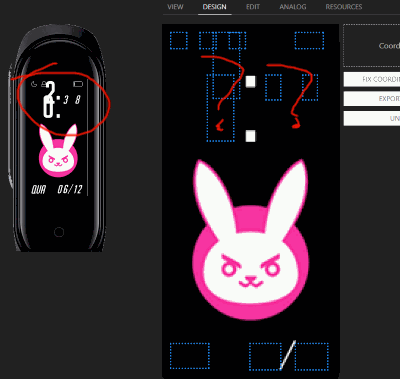
Image

p.s this post is not for helping, create new topic.
mellps

Post by mellps »

lvpokka wrote: 04 Aug 2019, 21:37
@mellps
Your not even trying)) hope you can figure it by yourself.
I switched the X and Y values on the first number, and the minutes images to the small ones, I forgot to change it back before uploading... The numbers won't appear at all, not even in the wrong place, like in your image, so I was changing anything in the hopes something would happen to help me figure out what was wrong...

But thanks for looking at it, anyway
User avatar
Urimu
WF maker
Posts: 8
Joined: 02 Aug 2019, 23:18
Has thanked: 1 time
Contact:

Post by Urimu »

lvpokka wrote: 04 Aug 2019, 18:28
You should follow the order in json.. each next image index set should be HIGHER then index used above(or you can reuse already used indexes from above)... i will add this feature in 1.3.8.

Its simple to follow only two rules
Hi again, I do follow those two rules. Here are the files I don't know what am I doing wrong
Removed the link
There is a space before .com I coudln't post it any other way. BTW both versions return the same error.
And I want to ask you, what is that program in the screenshot you sent to mellps?
Last edited by Urimu on 07 Aug 2019, 11:07, edited 1 time in total.
lvpokka
Posts: 178
Joined: 07 Jul 2019, 20:22
Location: L1
Has thanked: 19 times
Been thanked: 152 times
Contact:

Post by lvpokka »

Urimu wrote: 05 Aug 2019, 08:53
Hi again, I do follow those two rules. Here are the files I don't know what am I doing wrong
https://drive.google.com/folderview?id= ... i6RhPExqma
There is a space before .com I coudln't post it any other way. BTW both versions return the same error.
And I want to ask you, what is that program in the screenshot you sent to mellps?
remove 22-42 images. your not using them!!!!! you have gap in images because of not using them.
Battery -> Text why there is 0 everywhere??? remove if not using it
your animation images weight is more than 300... after builing bin you should have <320kb for valid watchface

p.s. just builded this wface, size is 781) it will never work. also images of animation is TOO heavy and it cannot be stored in palette mode
p.p.s "that program in the screenshot" it's only for debugging, not for public release for now.
User avatar
Urimu
WF maker
Posts: 8
Joined: 02 Aug 2019, 23:18
Has thanked: 1 time
Contact:

Post by Urimu »

lvpokka wrote: 05 Aug 2019, 09:15
Urimu wrote: 05 Aug 2019, 08:53
Hi again, I do follow those two rules. Here are the files I don't know what am I doing wrong
https://drive.google.com/folderview?id= ... i6RhPExqma
There is a space before .com I coudln't post it any other way. BTW both versions return the same error.
And I want to ask you, what is that program in the screenshot you sent to mellps?
remove 22-42 images. your not using them!!!!! you have gap in images because of not using them.
Battery -> Text why there is 0 everywhere??? remove if not using it
your animation images weight is more than 300... after builing bin you should have <320kb for valid watchface

p.s. just builded this wface, size is 781) it will never work. also images of animation is TOO heavy and it cannot be stored in palette mode
p.p.s "that program in the screenshot" it's only for debugging, not for public release for now.
I have had the feeling that it has to be something with the size of the files, thank you for clearing that up. Maybe the error should have said something like images too big, but again thnak you I will try to re-do it correctly
Alby128

Post by Alby128 »

Hi, thanks for this amazing software. Is there a way to switch the date format from MM/DD to DD/MM if the date is set using MonthAndDay->OneLine? This would be of great help for all the languages with this date format.

Alberto
lvpokka
Posts: 178
Joined: 07 Jul 2019, 20:22
Location: L1
Has thanked: 19 times
Been thanked: 152 times
Contact:

Post by lvpokka »

Check other working WF as an example, there is two ways how to define Dataformat
Alby128

Post by Alby128 »

Yeah, I know about the Separate structure, but I would still like to use the automatic separator (which is also movable in case you want to use one digit months). Would that be possible?
lvpokka
Posts: 178
Joined: 07 Jul 2019, 20:22
Location: L1
Has thanked: 19 times
Been thanked: 152 times
Contact:

Post by lvpokka »

No idea about this) if you will get this information somehow, please let me know )
User avatar
yinas
WF maker
Posts: 13
Joined: 19 Oct 2018, 13:40
Location: Austria
Has thanked: 6 times
Contact:

Post by yinas »

lvpokka wrote: 04 Aug 2019, 15:10
Weather is not supported by Miband4 itself, at all, for watchface...
You wanna tell that you have working weather watchface?
well at least the generated preview shows the weather icon and temperature number. one would assume that if that is shown, it would also reflect on the actual installed watchface...

also
What's new
added animation support
fixed pulse and weather
removed color restrictions for images
analog clock support
(from your headline post)

what does "fixed weather" mean in this context then?
lvpokka
Posts: 178
Joined: 07 Jul 2019, 20:22
Location: L1
Has thanked: 19 times
Been thanked: 152 times
Contact:

Post by lvpokka »

Preview)) we suppose that it will be supported in future.
terminal

Post by terminal »

I'm having trouble with the preview not matching what shows on the watch itself. Everything looks fine in the preview, but on the watch, the battery bars, weekdays, and flags for DND, BT, and lock are missing. Any idea what's going on here?

Here's the preview, directly from the tool, v1.38:
Clarity 2.0_packed_animated.gif
Clarity 2.0_packed_animated.gif (97.32 KiB) Viewed 21621 times
Here's what actually shows up on the watch:
Spoiler
messed up clarity2a.jpg
messed up clarity2a.jpg (121.21 KiB) Viewed 21621 times
Attachments
Clarity 2.0_packed.bin
(100.06 KiB) Downloaded 160 times
fprietog
WF maker
Posts: 6
Joined: 01 Jul 2019, 18:46
Has thanked: 10 times
Been thanked: 1 time
Contact:

Post by fprietog »

terminal wrote: 06 Aug 2019, 19:34
I'm having trouble with the preview not matching what shows on the watch itself. Everything looks fine in the preview, but on the watch, the battery bars, weekdays, and flags for DND, BT, and lock are missing. Any idea what's going on here?
Try changing Y coordinates to 1 instead of 0.
terminal

Post by terminal »

fprietog wrote: 06 Aug 2019, 20:16
Try changing Y coordinates to 1 instead of 0.
Thx for the hint, but it didn't change anything.

Also, it's odd that rebooting the device messes up the display even more:
messed up clarity2c1.jpg
messed up clarity2c1.jpg (231.69 KiB) Viewed 21613 times
lvpokka
Posts: 178
Joined: 07 Jul 2019, 20:22
Location: L1
Has thanked: 19 times
Been thanked: 152 times
Contact:

Post by lvpokka »

[mention]terminal[/mention] wtf? Weekdays should be 21 in stead of 7... first seven is China next 7 is Norml China and next 7 images is english or all other languages

Battery json object missing first block
"BatteryConfig": {
"BoxWidth": 0,
"Alignment": 0,
"Order": 0
},

+ battery images count is 9 not 10

... never mind
you have ALLOT of errors, please take different or read manuals how to work with jsons
This is not a good topic for your question, create separate one
terminal

Post by terminal »

lvpokka wrote: 06 Aug 2019, 21:46
@terminal wtf? Weekdays should be 21 in stead of 7... first seven is China next 7 is Norml China and next 7 images is english or all other languages

Battery json object missing first block
"BatteryConfig": {
"BoxWidth": 0,
"Alignment": 0,
"Order": 0
},

+ battery images count is 9 not 10

... never mind
you have ALLOT of errors, please take different or read manuals how to work with jsons
This is not a good topic for your question, create separate one
Thx for the info on the battery. This also fixed the status flags. After reading both the readme and your comment, the weekdays are still a bit confusing. Perhaps something is lost in translation. It seemed reasonable to set the WatchFace.exe.config to 0 and use 7 images, as I've seen done elsewhere. The (rather inelegant) fix seems to be padding a total of 21 images with WatchFace.exe.config set to 2.

BTW, the number of battery images is 10 and the topic seems entirely appropriate.

While I recognize that I have a lot to learn about JSONs, perhaps you should also recognize that you have A LOT to learn about communicating in *E*nglish. A good starting point would be googling "polite".
lvpokka
Posts: 178
Joined: 07 Jul 2019, 20:22
Location: L1
Has thanked: 19 times
Been thanked: 152 times
Contact:

Post by lvpokka »

This topic about WFTool, and all messages are looks like that something is not working properly in my tool... so Good behavior is create new topic under English > Mi Band 4 with your question...

Anyone new who get here for Tool read this and trying to copy wrong or mistaken jsons files as an example.
User avatar
Urimu
WF maker
Posts: 8
Joined: 02 Aug 2019, 23:18
Has thanked: 1 time
Contact:

Post by Urimu »

[mention]lvpokka[/mention]
I wan't to ask if there are any plans on implementing "BottomRight/LeftX/Y" as coordinates for the battery meter?
My theory is that you could use imges of different size, thus save space and they would remain aligned, you can do this to some extent now but this would be really helpful
Last edited by Urimu on 09 Aug 2019, 21:00, edited 1 time in total.
User avatar
osmat
Admin
Posts: 278
Joined: 22 Mar 2018, 10:09
Location: Ukraine
Has thanked: 35 times
Been thanked: 73 times
Contact:

Post by osmat »

Discussion topic created all the questions regarding watch faces will be moved here viewtopic.php?f=25&t=797
lazimk
WF maker
Posts: 27
Joined: 27 Jul 2019, 09:30
Location: India
Has thanked: 5 times
Been thanked: 4 times
Contact:

Post by lazimk »

I would like to ask what does 'Order' parameter for Status Icon , battery bar and other elements mean.
What are the changes if i change them.

Second question, does order (in json) of elements affect rendering of watchface, i mean element mentioned on bottom of code rendered(drawn) as a top layer compared to element mentioned on top in the code?
-Laz

*Have a great day*
User avatar
Urimu
WF maker
Posts: 8
Joined: 02 Aug 2019, 23:18
Has thanked: 1 time
Contact:

Post by Urimu »

lazimk wrote: 18 Aug 2019, 03:07
I would like to ask what does 'Order' parameter for Status Icon , battery bar and other elements mean.
What are the changes if i change them.

Second question, does order (in json) of elements affect rendering of watchface, i mean element mentioned on bottom of code rendered(drawn) as a top layer compared to element mentioned on top in the code?
IDK about the "order" parameter, but the order of elements in the json does nothing
Titerinho

Post by Titerinho »

Hey guys, I'm having trouble with temperature on my watchface. I have a font that's 12 pixels high, so I created images with "-" and "°C" that are also 12 pixels high, but for some reason this is how the watchface is rendered (left is actual, right is how I want it to be):
temp-bug.png
temp-bug.png (13.13 KiB) Viewed 22199 times
It looks like the images are aligned to top left (always) and even though they take up space as if they were normal, they are shrunk to 3rd of their size... This is my JSON:

Code: Select all

  "Weather": {
    "Icon": {
      "CustomIcon": {
        "X": 26,
        "Y": 51,
        "ImageIndex": 95,
        "ImagesCount": 26
      }
    },
    "Temperature": {
      "Current": {
        "Number": {
          "TopLeftX": 63,
          "TopLeftY": 60,
          "BottomRightX": 0,
          "BottomRightY": 0,
          "Alignment": "TopLeft",
          "Spacing": 1,
          "ImageIndex": 52,
          "ImagesCount": 10
        },
        "MinusImageIndex": 121,
        "DegreesImageIndex": 122
      }
    }
  },
  
I tried changing the BottomRightX/Y, Alignment, Spacing and nothing works...

Does anyone have any idea what may be wrong? Tool version 1.3.8. Thanks!
User avatar
TXK
Posts: 299
Joined: 10 Apr 2018, 05:15
Location: china
Has thanked: 149 times
Been thanked: 97 times
Contact:

Post by TXK »

copy the [font that's 12 pixels]PIC, Paste Into "-" and "°C" and ...... edit it

Make them("-" and "°C" ) the same height and width as the font
Titerinho

Post by Titerinho »

You're right - I don't know how, but I created those images again and now they work, the preview is fine.

But before I put temperature there, my Mi Band was displaying the weather icon. Now when the temperature is fixed in preview, my Mi Band doesn't display the weather icon or the temperature at all... Any ideas?
lvpokka
Posts: 178
Joined: 07 Jul 2019, 20:22
Location: L1
Has thanked: 19 times
Been thanked: 152 times
Contact:

Post by lvpokka »

Weather was not supported by MiBand4 for now
Post Reply

Return to “Watchfaces tools”

Who is online

Users browsing this forum: No registered users and 4 guests