
Hello everyone. I have a question: when I use a full AOD watch face, many of them display distorted, greenish colors, and even show flickering. Is there any way to fix this? My watch is the Amazfit Balance, running version 3.28.8.1. I would appreciate it if anyone could help.
Thanks.
-
- Administrator
-
-
Support Ukraine
If you experience any problems with the forum (it is not visible, there is no way to post messages, or some functionality does not work), please let us know. If you have problems with registration or you did not receive confirmation letter, let us know and we will activate your account manually.
If you get an "The submitted form was invalid. Try submitting again" error, delete cookies, then try again.
AOD flickering and greenish.
Forum rules
When adding a new topic, use the template: Topic title [device name]
For example: Screen timeout question [Falcon]
All communication in this branch should only be in English.
When adding a new topic, use the template: Topic title [device name]
For example: Screen timeout question [Falcon]
All communication in this branch should only be in English.
-
asoo
- Posts: 2177
- Joined: 03 Jan 2019, 01:48
- Location: ͼͽ Thailand ͼͽ
- Has thanked: 418 times
- Been thanked: 2099 times

As far as I know, this issue is a screen problem in the Balance 1 and models released around that time. It's not something that can be fixed on the device itself. To fix it, the AOD would need to have a black background and avoid gray tones, because when entering AOD mode, gray tones will appear green and flicker. The brighter the screen brightness is low, the more visible the green and the flickering will be.ricma2011 wrote: 27 Jul 2026, 18:58Hello everyone. I have a question: when I use a full AOD watch face, many of them display distorted, greenish colors, and even show flickering. Is there any way to fix this? My watch is the Amazfit Balance, running version 3.28.8.1. I would appreciate it if anyone could help.
Thanks.
Alternatively, if you want to use an AOD with a gray background and want to avoid that problem, you need to turn off the auto brightness adjustment and set the brightness to a constant level above 50%. The problem of the AOD displaying gray as green and flickering will then improve (the brighter the better).
Preview Set Bright to use AOD
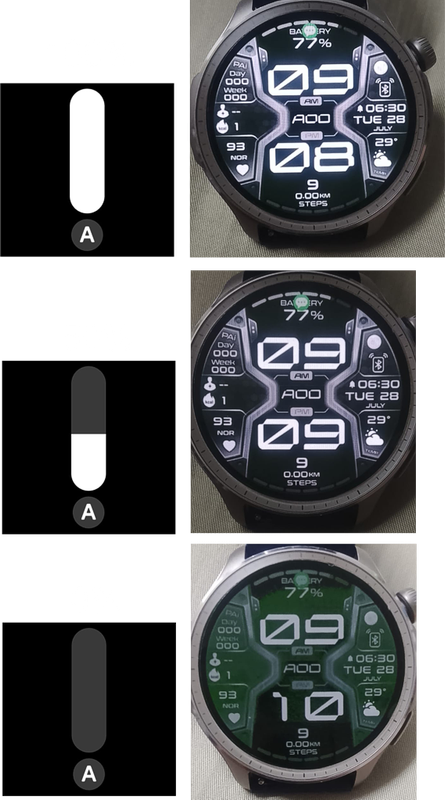
One example of using a script to solve a problem.
Alternatively, you can modify it to be usable by adding commands to the
resume_call and pause_call sections to set the auto brightness to turn off when the screen is off or not on the main watchface screen, and set the brightness yourself, such as 60%, to make the AOD display consistently bright, reducing green tint and flickering. However, the drawback is... This affects all screens that don't use the primary watchface. The brightness will be set to 60% on all of them until you enter the primary watchface screen, at which point auto-brightness will activate.
This is just a temporary workaround. There may be others who have found a better solution.
Hopefully this is helpful to you.
resume_call and pause_call sections to set the auto brightness to turn off when the screen is off or not on the main watchface screen, and set the brightness yourself, such as 60%, to make the AOD display consistently bright, reducing green tint and flickering. However, the drawback is... This affects all screens that don't use the primary watchface. The brightness will be set to 60% on all of them until you enter the primary watchface screen, at which point auto-brightness will activate.
Code: Select all
resume_call:
// enable Auto Brightness
hmSetting.setScreenAutoBright(true);


pause_call:
// Disable Auto Brightness
hmSetting.setScreenAutoBright(false);
// set brightness to 60%
hmSetting.setBrightness(60);
This is just a temporary workaround. There may be others who have found a better solution.
Hopefully this is helpful to you.
ͼͽ To request please use the interrelated forum in action ͼͽ
Please do not PM to me for requests ported watchface.
Please do not PM to me for requests ported watchface.
@asoo Thank you for your reply. Do newer models, like the Balance 2, have this problem? I ask because I have the option of returning the Balance 1 and buying the Balance 2. Thank you.
-
asoo
- Posts: 2177
- Joined: 03 Jan 2019, 01:48
- Location: ͼͽ Thailand ͼͽ
- Has thanked: 418 times
- Been thanked: 2099 times
I can't answer that. I don't have a Balance 2.ricma2011 wrote: 28 Jul 2026, 11:20@asoo Thank you for your reply. Do newer models, like the Balance 2, have this problem? I ask because I have the option of returning the Balance 1 and buying the Balance 2. Thank you.
I think , You have to wait for a Balance2 user to answer this question.
But newer models like the Bip MAX don't have this problem.
ͼͽ To request please use the interrelated forum in action ͼͽ
Please do not PM to me for requests ported watchface.
Please do not PM to me for requests ported watchface.
-
SleepyHollow
- Posts: 67
- Joined: 07 May 2022, 14:10
- Location: Europe
- Has thanked: 23 times
- Been thanked: 2 times
- Contact:
Hello, Having previously owned balance 1 and now owning balance 2, I can assure you that the screen on balance 2 is far superior. Many watchfaces in balance 1 have this problem and the same watchfaces in balance 2 don't. The screen is much better in 2 incontrast and to brightness.ricma2011 wrote: 28 Jul 2026, 11:20@asoo Thank you for your reply. Do newer models, like the Balance 2, have this problem? I ask because I have the option of returning the Balance 1 and buying the Balance 2. Thank you.
@SleepyHollow
Thank you for your reply. But do you find watch faces on the Balance 2 that still exhibit this problem, or has the error been definitively fixed by Amazfit?
Thank you for your reply. But do you find watch faces on the Balance 2 that still exhibit this problem, or has the error been definitively fixed by Amazfit?
-
SleepyHollow
- Posts: 67
- Joined: 07 May 2022, 14:10
- Location: Europe
- Has thanked: 23 times
- Been thanked: 2 times
- Contact:
Since have the balance two i don't find any watchface with this problem. And many watchfaces from balance one looks better in balance 2. The balance 2 may have in specs the same resolution with balance one but in reality balance two have better screen.ricma2011 wrote: 29 Jul 2026, 12:57@SleepyHollow
Thank you for your reply. But do you find watch faces on the Balance 2 that still exhibit this problem, or has the error been definitively fixed by Amazfit?
Who is online
Users browsing this forum: No registered users and 0 guests