• Administrator
  •  
    Support Ukraine
    If you experience any problems with the forum (it is not visible, there is no way to post messages, or some functionality does not work), please let us know. If you have problems with registration or you did not receive confirmation letter, let us know and we will activate your account manually.
    If you get an "The submitted form was invalid. Try submitting again" error, delete cookies, then try again.
     

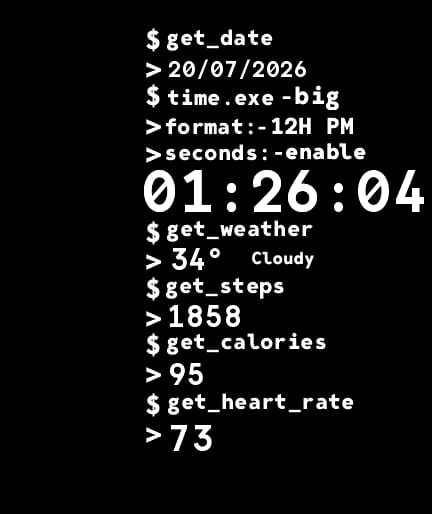
Terminal watchface request

Topics for the request of watch faces development.

Moderators: asoo, Watchmens

Forum rules
When adding a new topic, use the template: Topic title [device name]
For example: Requesting creation of watch face [GTR 3 Pro]
All communication in this branch should only be in English.
Post Reply
User avatar
Wahwah
Posts: 293
Joined: 27 Mar 2023, 19:09
Location: denver
Has thanked: 106 times
Been thanked: 3 times
Contact:

Terminal watchface request

Post by Wahwah »

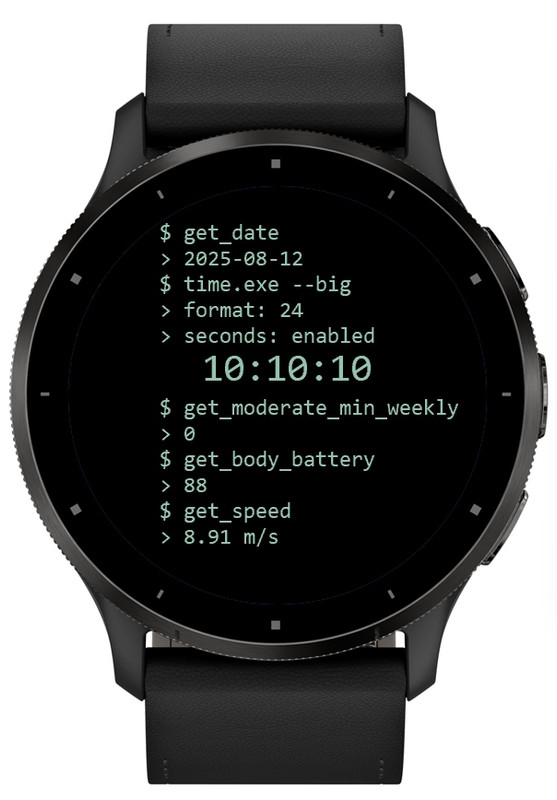
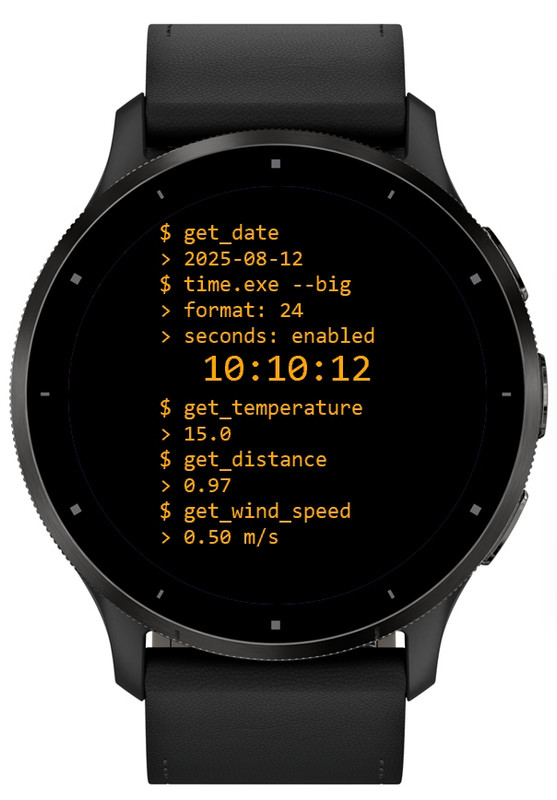
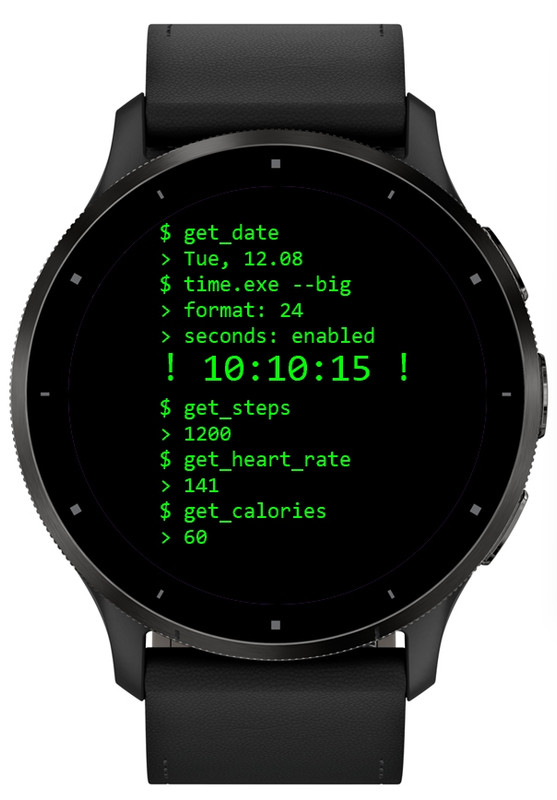
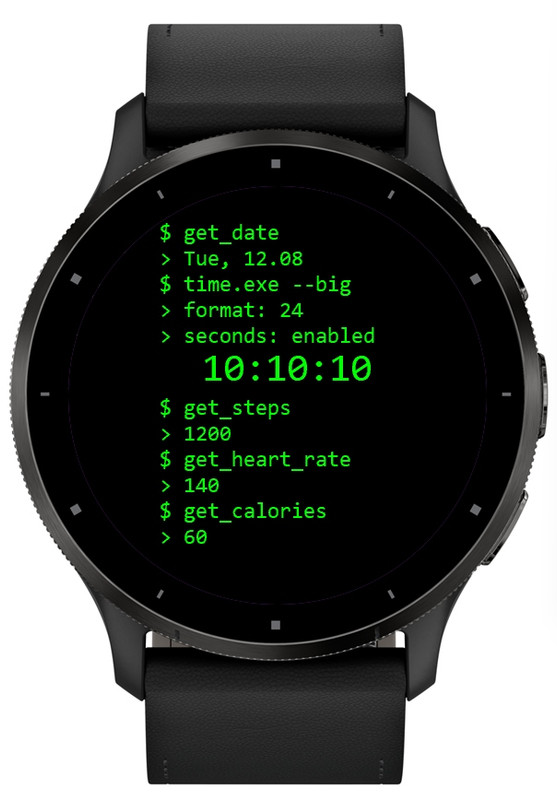
Hi, would someone please make this watchface for gtr4?

Can it include the ability to change data color?
No bezel just open black background
If possible with weather temperature please in Fahrenheit
No animation needed just the digital seconds please
Thank you

https://apps.garmin.com/es-ES/apps/7871 ... d32a8fc6bb
Spoiler
Image

Image

Image

Image

Image
Last edited by Wahwah on 20 Jul 2026, 02:24, edited 1 time in total.
User avatar
asoo
Posts: 2153
Joined: 03 Jan 2019, 01:48
Location: ͼͽ Thailand ͼͽ
Has thanked: 415 times
Been thanked: 2075 times

Post by asoo »

Wahwah wrote: 19 Jul 2026, 12:23
Hi, would someone please make this watchface for gtr4?

Can it include the ability to change data color?
No bezel just open black background
If possible with weather temperature please in Fahrenheit
No animation needed just the digital seconds please
Thank you

https://apps.garmin.com/es-ES/apps/7871 ... d32a8fc6bb
Spoiler
Image

Image

Image

Image

Image
Understand before downloading
This watch face I made will not accept any further edit requests.
This dial has some elements that are different from the original.
You can bring this watchface to upload it on the web,
But if this dial has an original on this website, please request permission from the owner of the work before proceeding.
I will not take any responsibility. regarding actions that have not yet received consent from the owner of the work .
And please do not give credit to me
and please take responsibility for the work you upload yourself.
This watch face was not test on real device .
Therefore, users please manage the risk yourself.

How to install watchface to your device ( ZeppOS )
viewtopic.php?p=17161#p17161

If anyone wants to make additional changes to be compatible with your existing device, please do so yourself.

PS.
If the requester has not yet asked for permission from the owner of the work to adapt it. If the owner requests deletion, I will delete it immediately.

Preview and Download
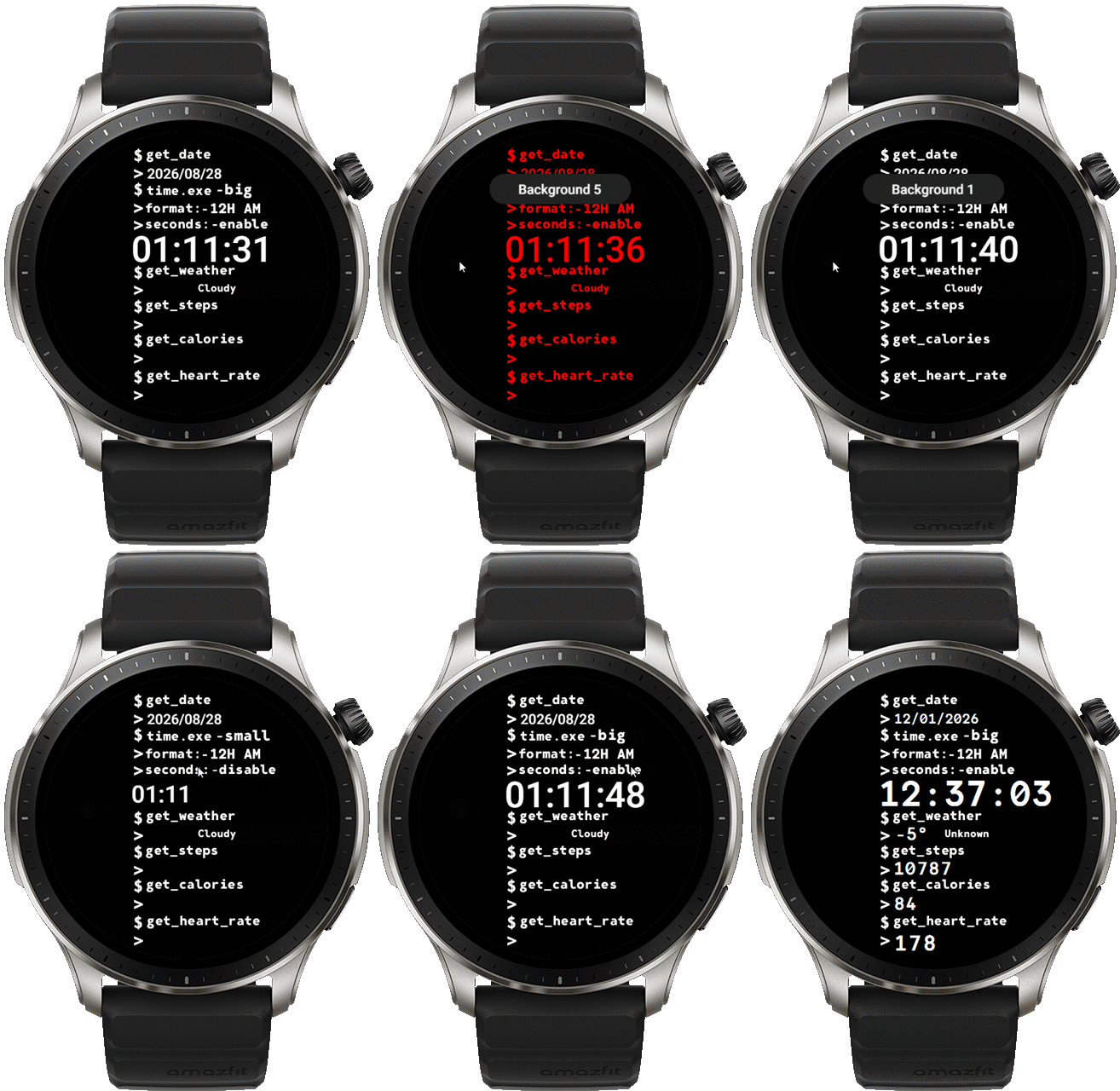
The sample image in the font display option section may not match the actual watch face because it uses TTF fonts, and the simulator cannot display this section correctly.
Image

Try to fix issue layout
Terminal_fixed_BS_L.zip
(185.93 KiB) Downloaded 2 times
AOD no seconds :
Terminal_fixed_BS_L_AOD_NO_S.zip
(185.93 KiB) Downloaded 1 time
ͼͽ To request please use the interrelated forum in action ͼͽ
Please do not PM to me for requests ported watchface.
User avatar
Wahwah
Posts: 293
Joined: 27 Mar 2023, 19:09
Location: denver
Has thanked: 106 times
Been thanked: 3 times
Contact:

Post by Wahwah »

Wow impressive as always thank you
User avatar
Wahwah
Posts: 293
Joined: 27 Mar 2023, 19:09
Location: denver
Has thanked: 106 times
Been thanked: 3 times
Contact:

Post by Wahwah »

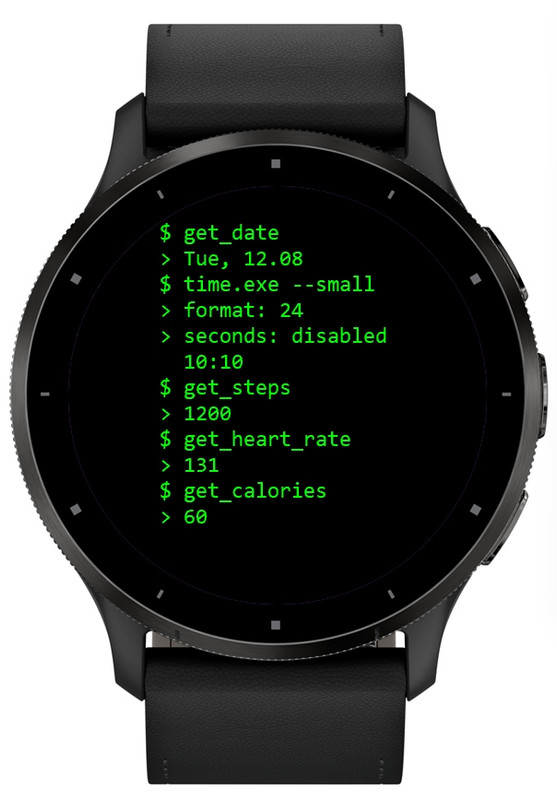
When I change the clock to the small option, which is very cool by the way, it doesn’t stay small it goes back to the bigger digital on its own. Just wondering is this how it should be?
User avatar
asoo
Posts: 2153
Joined: 03 Jan 2019, 01:48
Location: ͼͽ Thailand ͼͽ
Has thanked: 415 times
Been thanked: 2075 times

Post by asoo »

Wahwah wrote: 19 Jul 2026, 20:22
When I change the clock to the small option, which is very cool by the way, it doesn’t stay small it goes back to the bigger digital on its own. Just wondering is this how it should be?
Thank for your report , now fixed that issue please download again
viewtopic.php?p=22499#p22499
ͼͽ To request please use the interrelated forum in action ͼͽ
Please do not PM to me for requests ported watchface.
User avatar
Wahwah
Posts: 293
Joined: 27 Mar 2023, 19:09
Location: denver
Has thanked: 106 times
Been thanked: 3 times
Contact:

Post by Wahwah »

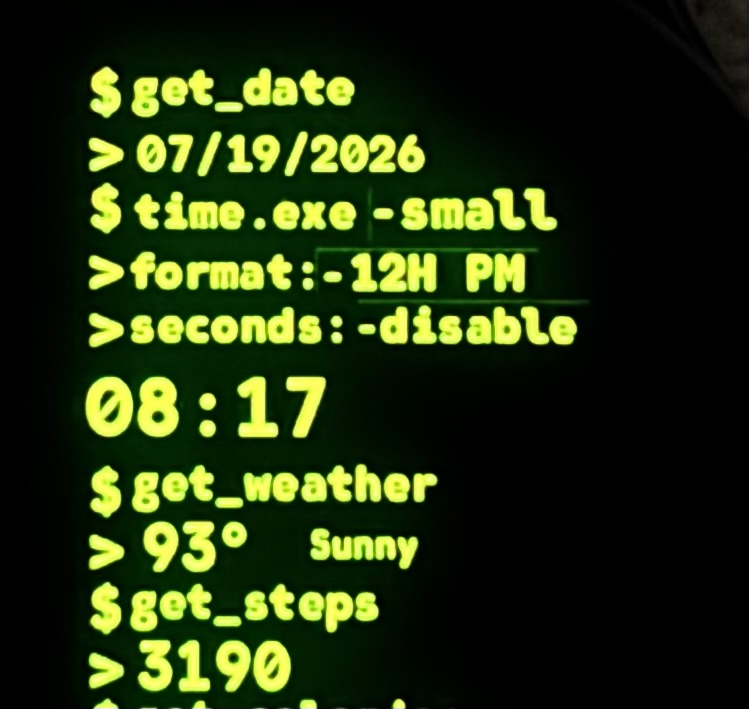
Sorry to bother you again the clock issue is fixed thank you for that but some lines are shown in all the colors i attached a picture to show them next and under the word small and above the word disable

I couldn’t attach the picture for some reason

I added a picture to the main request post
image
Image
User avatar
asoo
Posts: 2153
Joined: 03 Jan 2019, 01:48
Location: ͼͽ Thailand ͼͽ
Has thanked: 415 times
Been thanked: 2075 times

Post by asoo »

Wahwah wrote: Yesterday, 02:22
Sorry to bother you again the clock issue is fixed thank you for that but some lines are shown in all the colors i attached a picture to show them next and under the word small and above the word disable

I couldn’t attach the picture for some reason

I added a picture to the main request post
Actually, I can't fix this part because I don't have a GTR4 to test with. The issue lies in the object layout, which varies by 1-2 pixels between models.
Therefore, to resolve this, you'll have to try it yourself.
For example, try moving the images or resizing them.

I tested all the display faces on Bipmax and didn't find the problem you described.
I also didn't find the problem in the editor. Therefore, I cannot properly fix it without a GTR4, which I don't have. So, you'll have to try fixing it yourself and test it with your GTR4.

However, I do have a Balance, but I'm not at home right now. When I get home, I will test it on the Balance to see if the problem you described exists. If it does, I will try to fix it. But if I don't find the problem you reported, I can't help you with this issue.
ͼͽ To request please use the interrelated forum in action ͼͽ
Please do not PM to me for requests ported watchface.
User avatar
asoo
Posts: 2153
Joined: 03 Jan 2019, 01:48
Location: ͼͽ Thailand ͼͽ
Has thanked: 415 times
Been thanked: 2075 times

Post by asoo »

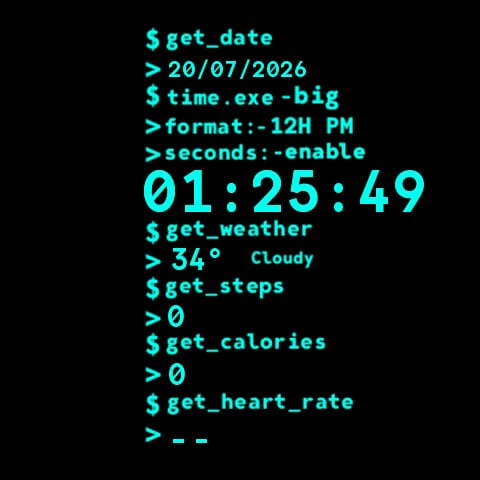
In summary, the issue lies in the layout image of different device types, which will vary by 1-2 pixels, as I mentioned earlier.
I tested it with a "Amazfit Balanced" and encountered the same problem you reported.
Therefore, I have adjusted the settings to resolve the issue.
Fixed and tested on real device BipMAX and Balance1
Balnace1 :
Image
BipMAX:
Image
However, I do not have a GTR4, so I cannot confirm if it fixes the problem on the GTR4. But It can displays correctly on the "Amazfit Balance", So if the issue persists on the GTR4, you will need to perform the necessary adjustments yourself, as I cannot test it.

viewtopic.php?p=22499#p22499
ͼͽ To request please use the interrelated forum in action ͼͽ
Please do not PM to me for requests ported watchface.
User avatar
Wahwah
Posts: 293
Joined: 27 Mar 2023, 19:09
Location: denver
Has thanked: 106 times
Been thanked: 3 times
Contact:

Post by Wahwah »

It is all fixed thank you so much 🙏
Post Reply

Return to “Watchfaces creation (order table)”

Who is online

Users browsing this forum: Baidu [Spider] and 0 guests