• Administrador
  •  
    Support Ukraine
    If you experience any problems with the forum (it is not visible, there is no way to post messages, or some functionality does not work), please let us know. If you have problems with registration or you did not receive confirmation letter, let us know and we will activate your account manually.
    If you get an "The submitted form was invalid. Try submitting again" error, delete cookies, then try again.
     

About Request Watchface for Bip Max

Topics for the request of watch faces development.

Moderadores: asoo, Watchmens

Regras do fórum
When adding a new topic, use the template: Topic title [device name]
For example: Requesting creation of watch face [Bip U]
All communication in this branch should only be in English.
Avatar do usuário
asoo
Mensagens: 2153
Registrado em: 03 Jan 2019, 01:48
Localização: ͼͽ Thailand ͼͽ
Has thanked: 415 times
Been thanked: 2075 times

About Request Watchface for Bip Max

Mensagem por asoo »

@Xphyle1971

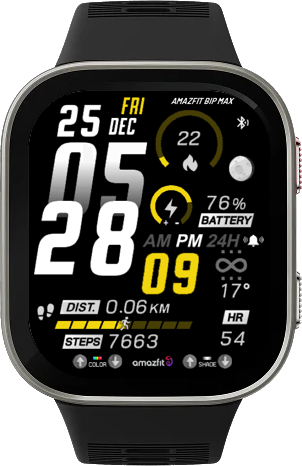
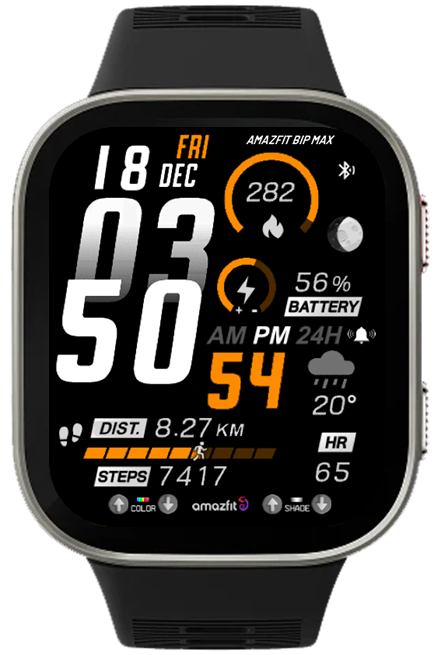
Since Xphyle1971 requested a conversion of the watch face https://amazfitwatchfaces.com/bip/view/44659 to Bip MAX,
I tried to find information about Bip Max PNG images, but I couldn't find any. What I know for sure is that it only supports a screen resolution of 432x514. Therefore, this watch face will use the same PNG format as Bip6.

So, if anyone uses this watchface with Bip Max and encounters incorrect image display, I cannot fix it at this time until I know for sure what PNG format Bip Max uses.

But if it works, please let me know.
QR Code for install
Imagem
QR code can user only 1 week ( 22-05-2026 )
QRCode_File_v1.0.0.png
QRCode_File_v1.0.0.png (30.36 KiB) Exibido 2444 vezes
Sasha's editor cannot open this file correctly.
This is because BipMax is not present in the model_config, and this zip file uses the bip6 configuration for packing. Therefore, when unpacked, the editor will see it as Bip6.
multiple_data_BipMax.zip
(375.1 KiB) Baixado 42 vezes
ͼͽ To request please use the interrelated forum in action ͼͽ
Please do not PM to me for requests ported watchface.
Avatar do usuário
SashaCX75
Mensagens: 820
Registrado em: 26 Out 2019, 15:18
Localização: Ukraine
Has thanked: 13 times
Been thanked: 1030 times
Contato:

Mensagem por SashaCX75 »

If anyone owns a Bip Max, please let us know the watch’s “Device Source”. You can find this in Zepp under developer mode. We need this information to add this model to the watch face editor.
Avatar do usuário
GIK-Team
root
Mensagens: 1020
Registrado em: 22 Mar 2018, 10:00
Localização: Ukraine
Has thanked: 1138 times
Been thanked: 276 times
Contato:

Mensagem por GIK-Team »

By the way, while you’re discussing the Bip MAX — do you think it’s already worth adding support for it on the site?

At the moment we still don’t see any official information about this model in the Zepp developer documentation, so we’re not sure how “official” or technically finalized it is yet. That’s why we’ve been a bit cautious about creating a separate filter for it.

Would be interesting to hear your thoughts and experiences with it
"sometimes it's scary but it's still just you and me” — Leaving Laurel
Avatar do usuário
asoo
Mensagens: 2153
Registrado em: 03 Jan 2019, 01:48
Localização: ͼͽ Thailand ͼͽ
Has thanked: 415 times
Been thanked: 2075 times

Mensagem por asoo »

GIK-Team escreveu: 21 Mai 2026, 21:50
By the way, while you’re discussing the Bip MAX — do you think it’s already worth adding support for it on the site?

At the moment we still don’t see any official information about this model in the Zepp developer documentation, so we’re not sure how “official” or technically finalized it is yet. That’s why we’ve been a bit cautious about creating a separate filter for it.

Would be interesting to hear your thoughts and experiences with it
As for me, I'm still not sure, because even now, the official editing program doesn't have this model yet.
But what's certain is that the device will already on sale. In my region, it will officially went on sale on May 25th, 2026.

In this case, increasing the 'bip max' area seems like a good idea, but to be absolutely sure, I think , it would be best to wait for an official editor's approval, or at least wait until we know more about the watch face components.
ͼͽ To request please use the interrelated forum in action ͼͽ
Please do not PM to me for requests ported watchface.
Avatar do usuário
asoo
Mensagens: 2153
Registrado em: 03 Jan 2019, 01:48
Localização: ͼͽ Thailand ͼͽ
Has thanked: 415 times
Been thanked: 2075 times

Mensagem por asoo »

GIK-Team escreveu: 21 Mai 2026, 21:50
By the way, while you’re discussing the Bip MAX — do you think it’s already worth adding support for it on the site?

At the moment we still don’t see any official information about this model in the Zepp developer documentation, so we’re not sure how “official” or technically finalized it is yet. That’s why we’ve been a bit cautious about creating a separate filter for it.

Would be interesting to hear your thoughts and experiences with it
SashaCX75 escreveu: 21 Mai 2026, 19:16
If anyone owns a Bip Max, please let us know the watch’s “Device Source”. You can find this in Zepp under developer mode. We need this information to add this model to the watch face editor.

Código: Selecionar todos

{
  "configVersion": "v2",
  "app": {
    "appId": 10013,
    "appName": "Empty",
    "appType": "watchface",
    "version": {
      "code": 1,
      "name": "1.0"
    },
    "vender": "zepp",
    "description": "Empty watchface",
    "icon": "icon.png"
  },
  "permissions": [],
  "runtime": {
    "apiVersion": {
      "compatible": "1.0.0",
      "target": "1.0.1",
      "minVersion": "1.0.0"
    }
  },
  "targets": {
    "432x514-amazfit-bip-max": {
      "module": {
        "watchface": {
          "path": "watchface/index",
          "main": 1,
          "editable": 0,
          "lockscreen": 1
        }
      },
      "platforms": [
        {
          "name": "PikeW",
          "deviceSource": 11206915
        }
      ],
      "designWidth": 432
    }
  },
  "i18n": {
    "en-US": {
      "appName": "Empty"
    }
  },
  "defaultLanguage": "en-US",
  "debug": false
}
Now Zeus support create bip max

This is a file created by Zeus.
app.rar
(478 Bytes) Baixado 39 vezes

In terms of PNG, it appears to use the same encoding as Bip6.
icon.rar
(12.83 KiB) Baixado 37 vezes
ͼͽ To request please use the interrelated forum in action ͼͽ
Please do not PM to me for requests ported watchface.
Avatar do usuário
SashaCX75
Mensagens: 820
Registrado em: 26 Out 2019, 15:18
Localização: Ukraine
Has thanked: 13 times
Been thanked: 1030 times
Contato:

Mensagem por SashaCX75 »

asoo escreveu: 22 Mai 2026, 03:50
Now Zeus support create bip max
That’s good news. I checked a couple of days ago and it wasn’t supported yet.

The official editor doesn’t support the Bip Max because no other model has the same screen resolution as this one. That’s why the developers need time to add support for this model. That was their response.
Since this model is already available in official stores, I think it’s worth adding support for it.
awrun
WF maker
Mensagens: 9
Registrado em: 10 Out 2019, 14:35
Has thanked: 3 times
Been thanked: 1 time
Contato:

Mensagem por awrun »

I'm really looking forward to the Bip Max having a watchface editor. As soon as it arrives, I'll start creating my own custom watchface. I hope many people will like it. Thank you for making the editor.
Xphyle1971
Mensagens: 25
Registrado em: 15 Out 2021, 15:56
Localização: USA
Has thanked: 4 times
Been thanked: 7 times
Contato:

Mensagem por Xphyle1971 »

SashaCX75 escreveu: 21 Mai 2026, 19:16
If anyone owns a Bip Max, please let us know the watch’s “Device Source”. You can find this in Zepp under developer mode. We need this information to add this model to the watch face editor.
My Bip Max device source is 11206915. Please let me know if I can give you any more information. I'm also happy to test any watch faces you create or convert to test for compatibility.
Editado pela última vez por Xphyle1971 em 22 Mai 2026, 11:18, em um total de 1 vez.
Xphyle1971
Mensagens: 25
Registrado em: 15 Out 2021, 15:56
Localização: USA
Has thanked: 4 times
Been thanked: 7 times
Contato:

Mensagem por Xphyle1971 »

asoo escreveu: 21 Mai 2026, 18:39
@Xphyle1971

Since Xphyle1971 requested a conversion of the watch face https://amazfitwatchfaces.com/bip/view/44659 to Bip MAX,
I tried to find information about Bip Max PNG images, but I couldn't find any. What I know for sure is that it only supports a screen resolution of 432x514. Therefore, this watch face will use the same PNG format as Bip6.

So, if anyone uses this watchface with Bip Max and encounters incorrect image display, I cannot fix it at this time until I know for sure what PNG format Bip Max uses.

But if it works, please let me know.
QR Code for install
Imagem
QR code can user only 1 week ( 22-05-2026 )
QRCode_File_v1.0.0.png

Sasha's editor cannot open this file correctly.
This is because BipMax is not present in the model_config, and this zip file uses the bip6 configuration for packing. Therefore, when unpacked, the editor will see it as Bip6.
multiple_data_BipMax.zip
Thank you! The converted watch face seems to look and render correctly!
Xphyle1971
Mensagens: 25
Registrado em: 15 Out 2021, 15:56
Localização: USA
Has thanked: 4 times
Been thanked: 7 times
Contato:

Mensagem por Xphyle1971 »

SashaCX75 escreveu: 22 Mai 2026, 04:56
asoo escreveu: 22 Mai 2026, 03:50
Now Zeus support create bip max
That’s good news. I checked a couple of days ago and it wasn’t supported yet.

The official editor doesn’t support the Bip Max because no other model has the same screen resolution as this one. That’s why the developers need time to add support for this model. That was their response.
Since this model is already available in official stores, I think it’s worth adding support for it.
Whatever @asoo did above to convert his Bip 6 watch face to Max format... it worked perfectly. I was able to add it to my Bip Max without issue and it works perfectly.
Xphyle1971
Mensagens: 25
Registrado em: 15 Out 2021, 15:56
Localização: USA
Has thanked: 4 times
Been thanked: 7 times
Contato:

Mensagem por Xphyle1971 »

GIK-Team escreveu: 21 Mai 2026, 21:50
By the way, while you’re discussing the Bip MAX — do you think it’s already worth adding support for it on the site?

At the moment we still don’t see any official information about this model in the Zepp developer documentation, so we’re not sure how “official” or technically finalized it is yet. That’s why we’ve been a bit cautious about creating a separate filter for it.

Would be interesting to hear your thoughts and experiences with it
Yes, please add support for the Bip Max. The model is freely for sale everywhere now and mine arrived yesterday. Many on the Amazfit reddit have also received theirs as well.
Avatar do usuário
SashaCX75
Mensagens: 820
Registrado em: 26 Out 2019, 15:18
Localização: Ukraine
Has thanked: 13 times
Been thanked: 1030 times
Contato:

Mensagem por SashaCX75 »

Xphyle1971 escreveu: 22 Mai 2026, 10:44
My Bip Max device source is 11206915. Please let me know if I can give you any more information. I'm also happy to test any watch faces you create or convert to test for compatibility.
Here is a watch face to check that the images are being converted correctly
QR
Imagem
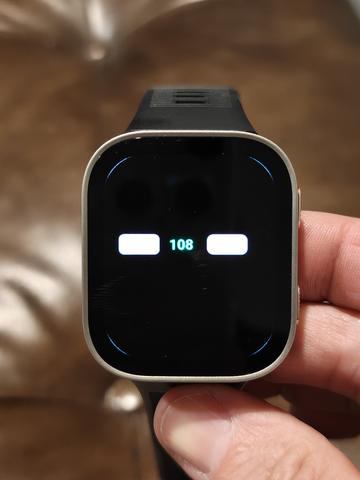
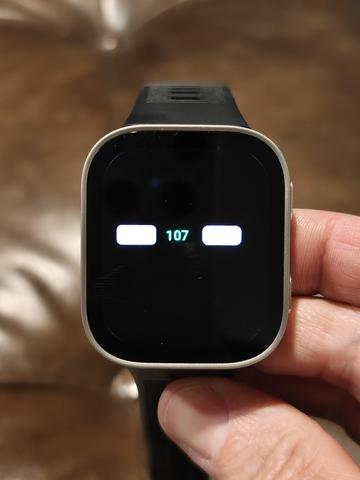
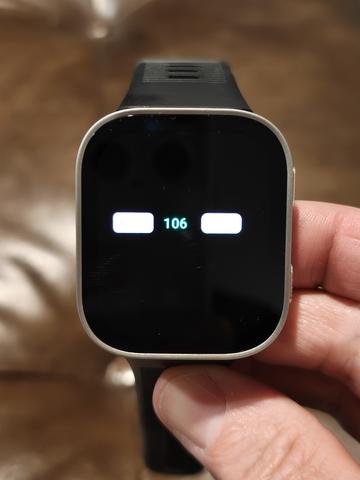
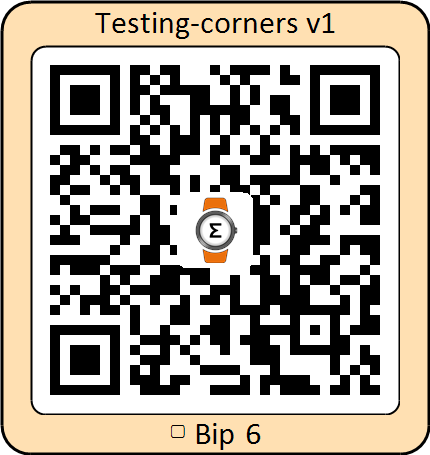
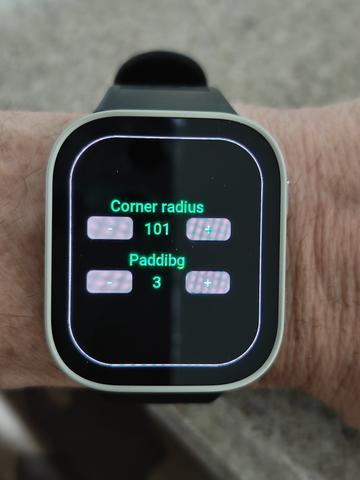
Test watch face for determining corner rounding. Use the buttons to set the minimum corner rounding at which the frame does not extend beyond the screen. Please take a photo of the result so that we can see how the watch face will look on the watch and what the frame looks like.
QR
Imagem
Xphyle1971
Mensagens: 25
Registrado em: 15 Out 2021, 15:56
Localização: USA
Has thanked: 4 times
Been thanked: 7 times
Contato:

Mensagem por Xphyle1971 »

SashaCX75 escreveu: 22 Mai 2026, 15:06
Xphyle1971 escreveu: 22 Mai 2026, 10:44
My Bip Max device source is 11206915. Please let me know if I can give you any more information. I'm also happy to test any watch faces you create or convert to test for compatibility.
Here is a watch face to check that the images are being converted correctly
QR
Imagem
Test watch face for determining corner rounding. Use the buttons to set the minimum corner rounding at which the frame does not extend beyond the screen. Please take a photo of the result so that we can see how the watch face will look on the watch and what the frame looks like.
QR
Imagem
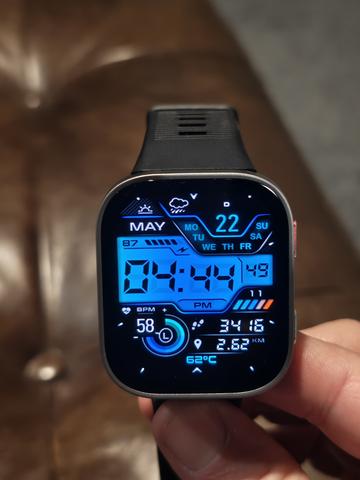
Here you go! Sorry for the delay! Borders are visible at 108. Less visible at 107. And they completely disappear at 106, as seen in the photos. The watch face example you uploaded looks fine to me.
Spoiler
Imagem

Imagem

Imagem

Imagem
Avatar do usuário
SashaCX75
Mensagens: 820
Registrado em: 26 Out 2019, 15:18
Localização: Ukraine
Has thanked: 13 times
Been thanked: 1030 times
Contato:

Mensagem por SashaCX75 »

@Xphyle1971
Thank you. That’s exactly what I needed. It’s odd, though, that the border isn’t visible around the edges of the screen on the test dial. I’ve tweaked the test dial a little. You need to use the ‘Padding’ setting to make the border visible around the screen, and then adjust the corner rounding.
QR
Imagem
Xphyle1971
Mensagens: 25
Registrado em: 15 Out 2021, 15:56
Localização: USA
Has thanked: 4 times
Been thanked: 7 times
Contato:

Mensagem por Xphyle1971 »

SashaCX75 escreveu: 24 Mai 2026, 11:46
@Xphyle1971
Thank you. That’s exactly what I needed. It’s odd, though, that the border isn’t visible around the edges of the screen on the test dial. I’ve tweaked the test dial a little. You need to use the ‘Padding’ setting to make the border visible around the screen, and then adjust the corner rounding.
QR
Imagem
I'm sorry. I think I misunderstood what you were looking for. I thought you wanted to know the number when the border was no longer visible. I'll give it another go and report back with what I see and images.
Xphyle1971
Mensagens: 25
Registrado em: 15 Out 2021, 15:56
Localização: USA
Has thanked: 4 times
Been thanked: 7 times
Contato:

Mensagem por Xphyle1971 »

SashaCX75 escreveu: 24 Mai 2026, 11:46
@Xphyle1971
Thank you. That’s exactly what I needed. It’s odd, though, that the border isn’t visible around the edges of the screen on the test dial. I’ve tweaked the test dial a little. You need to use the ‘Padding’ setting to make the border visible around the screen, and then adjust the corner rounding.
QR
Imagem
Here you go!
Image
Imagem
awrun
WF maker
Mensagens: 9
Registrado em: 10 Out 2019, 14:35
Has thanked: 3 times
Been thanked: 1 time
Contato:

Mensagem por awrun »

Hello.
I saw in the downloads that asoo wrote that there is already "Editor version 17.2 final".
Where can I download it?
On the site under "Main menu->Tools->Watch Face Editor" there is only 17.1, which does not support the Bip Max.
Thank you.
Avatar do usuário
asoo
Mensagens: 2153
Registrado em: 03 Jan 2019, 01:48
Localização: ͼͽ Thailand ͼͽ
Has thanked: 415 times
Been thanked: 2075 times

Mensagem por asoo »

awrun escreveu: 26 Mai 2026, 11:51
Hello.
I saw in the downloads that asoo wrote that there is already "Editor version 17.2 final".
Where can I download it?
On the site under "Main menu->Tools->Watch Face Editor" there is only 17.1, which does not support the Bip Max.
Thank you.
I apologize for make you misunderstanding. The Bip Max watch face I created is still using Editor 17.2 Beta, but there may be typos in the description section because I copied from Bip 6. Some parts used 17.1 final, and I forgot to change "final" to "beta." I only changed 17.1 to 17.2. My apologies are due.

17.2 beta is still under testing and, as far as I know, has not yet been released to the public.
For more information, please see the thread "Watch face editor for Amazfit watch on ZeppOS" by SashaCX75:
viewtopic.php?p=11643#p11643

PS. Based on my testing of the 17.2 beta, in my personal opinion, it works well and has many new options added. For example, the sample images I used were created by capturing using an option added in the 17.2 beta, and many other things.
As for the release final version, we'll have to wait for SahasCX75 to decide.
ͼͽ To request please use the interrelated forum in action ͼͽ
Please do not PM to me for requests ported watchface.
awrun
WF maker
Mensagens: 9
Registrado em: 10 Out 2019, 14:35
Has thanked: 3 times
Been thanked: 1 time
Contato:

Mensagem por awrun »

Thanks for the answer.
I last made a watch face for my mom for the GTS 4 Mini. Now we are waiting for the new Bip Max (it is only available for pre-order here) and I am very excited to see what the watch will be able to do and what the editing program will be able to do.
Avatar do usuário
asoo
Mensagens: 2153
Registrado em: 03 Jan 2019, 01:48
Localização: ͼͽ Thailand ͼͽ
Has thanked: 415 times
Been thanked: 2075 times

Mensagem por asoo »

awrun escreveu: 26 Mai 2026, 14:50
Thanks for the answer.
I last made a watch face for my mom for the GTS 4 Mini. Now we are waiting for the new Bip Max (it is only available for pre-order here) and I am very excited to see what the watch will be able to do and what the editing program will be able to do.
In my country, the Bip Max was just launched on the 25/05/26
I ordered it and received it the same day.
So I started creating a watch face to test it on a real device. As you can see on the web, I've tested all the watch faces that I made on my BipMax and haven't found any issues with the functions and widgets in the watchface section.
ͼͽ To request please use the interrelated forum in action ͼͽ
Please do not PM to me for requests ported watchface.
Responder

Voltar para “Watchfaces creation (order table)”

Quem está online

Usuários navegando neste fórum: Nenhum usuário registrado e 1 visitante