If you experience any problems with the forum (it is not visible, there is no way to post messages, or some functionality does not work), please let us know.
If you have problems with registration or you did not receive confirmation letter, let us know and we will activate your account manually.
If you get an "The submitted form was invalid. Try submitting again" error, delete cookies, then try again.
If you have problems with registration or you did not receive confirmation letter, let us know and we will activate your account manually.
If you get an "The submitted form was invalid. Try submitting again" error, delete cookies, then try again.
PER18 watch face to be Farenheit
Forum rules
When adding a new topic, use the template: Topic title [device name]
For example: How to create watch face [Bip U]
All communication in this branch should only be in English.
When adding a new topic, use the template: Topic title [device name]
For example: How to create watch face [Bip U]
All communication in this branch should only be in English.
PER18 watch face to be Farenheit
I have downloaded PER18 watch face for BIP 6. I am looking on how to change to farenheit. In the Zepp app, I have already set units to be farenheit but watch face is still showing in Celsius. Anyone know how to change?
-
asoo
- Posts: 2225
- Joined: 03 Jan 2019, 01:48
- Location: ͼͽ Thailand ͼͽ
- Has thanked: 441 times
- Been thanked: 2142 times
- Contact:

When you change from Celsius to Fahrenheit, the temperature unit will not change until you reset the watch or switch to another watch face and then return to the original watch face.nesnews wrote: 30 Dec 2025, 16:10I have downloaded PER18 watch face for BIP 6. I am looking on how to change to farenheit. In the Zepp app, I have already set units to be farenheit but watch face is still showing in Celsius. Anyone know how to change?
Only then will the temperature unit change to the temperature unit you selected.
ͼͽ To request please use the interrelated forum in action ͼͽ
Please do not PM to me for requests ported watchface.
Please do not PM to me for requests ported watchface.
Thank you. So the number is using the correct metric but it shows the C for celsius and I wanted it to show an F. Also the date format is not honoring my setting of MM/DAY/YEAR
-
asoo
- Posts: 2225
- Joined: 03 Jan 2019, 01:48
- Location: ͼͽ Thailand ͼͽ
- Has thanked: 441 times
- Been thanked: 2142 times
- Contact:
To change the unit from Celsius to Fahrenheit, follow the steps I previously outlined to achieve the desired result.nesnews wrote: 30 Dec 2025, 17:51Thank you. So the number is using the correct metric but it shows the C for celsius and I wanted it to show an F. Also the date format is not honoring my setting of MM/DAY/YEAR
This is my tested on real device and it definitely works.
Preview
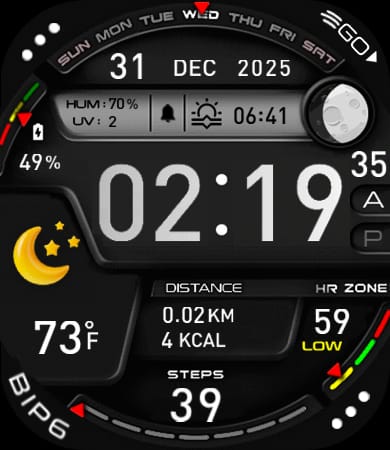
The date format on this watch face is not dependent on your settings.
It's determined by the watchface script. If you want it to have your preferred format, you need to edit the script. Watch settings have no effect on this.
ͼͽ To request please use the interrelated forum in action ͼͽ
Please do not PM to me for requests ported watchface.
Please do not PM to me for requests ported watchface.
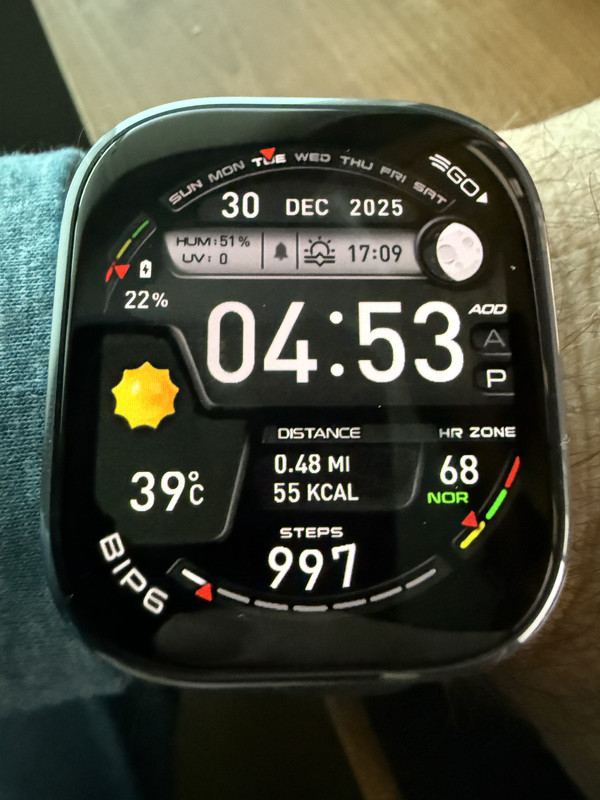
Thank you so much for your patience. I have tried what you have said multiple times. I have tried to restart the watch as well as changing the watch face to something else. The number is getting updated correctly as you can see but it is still showing a C instead of the F.
Spoiler
-
asoo
- Posts: 2225
- Joined: 03 Jan 2019, 01:48
- Location: ͼͽ Thailand ͼͽ
- Has thanked: 441 times
- Been thanked: 2142 times
- Contact:
nesnews wrote: 30 Dec 2025, 23:56Thank you so much for your patience. I have tried what you have said multiple times. I have tried to restart the watch as well as changing the watch face to something else. The number is getting updated correctly as you can see but it is still showing a C instead of the F.Spoiler
First, we're talking about the PER-18 watch face
https://amazfitwatchfaces.com/bip/view/43850
that I ported. Is it?
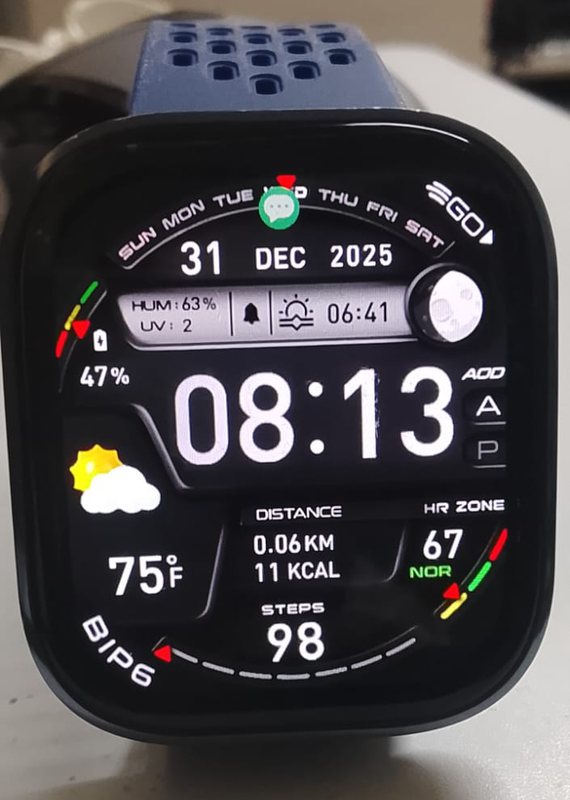
If yes, I've tested it on my Bip6 as I suggested.
The result is that watchface will correctly displays the temperature unit in Fahrenheit (F).
See the attached image.
Preview attached image
ͼͽ To request please use the interrelated forum in action ͼͽ
Please do not PM to me for requests ported watchface.
Please do not PM to me for requests ported watchface.
-
asoo
- Posts: 2225
- Joined: 03 Jan 2019, 01:48
- Location: ͼͽ Thailand ͼͽ
- Has thanked: 441 times
- Been thanked: 2142 times
- Contact:
I think I've found your problem.
The problem isn't with the watchface.
The issue is, if you selection to use Imperial units.
The temperature unit display will be incorrect.
I think it's a firmware issue; I probably can't fix it.
However, I've modified the watch face to display only temperature units without F and C.
Try it out; it should look better than the incorrect display.
and change format date to Month / Day / Year
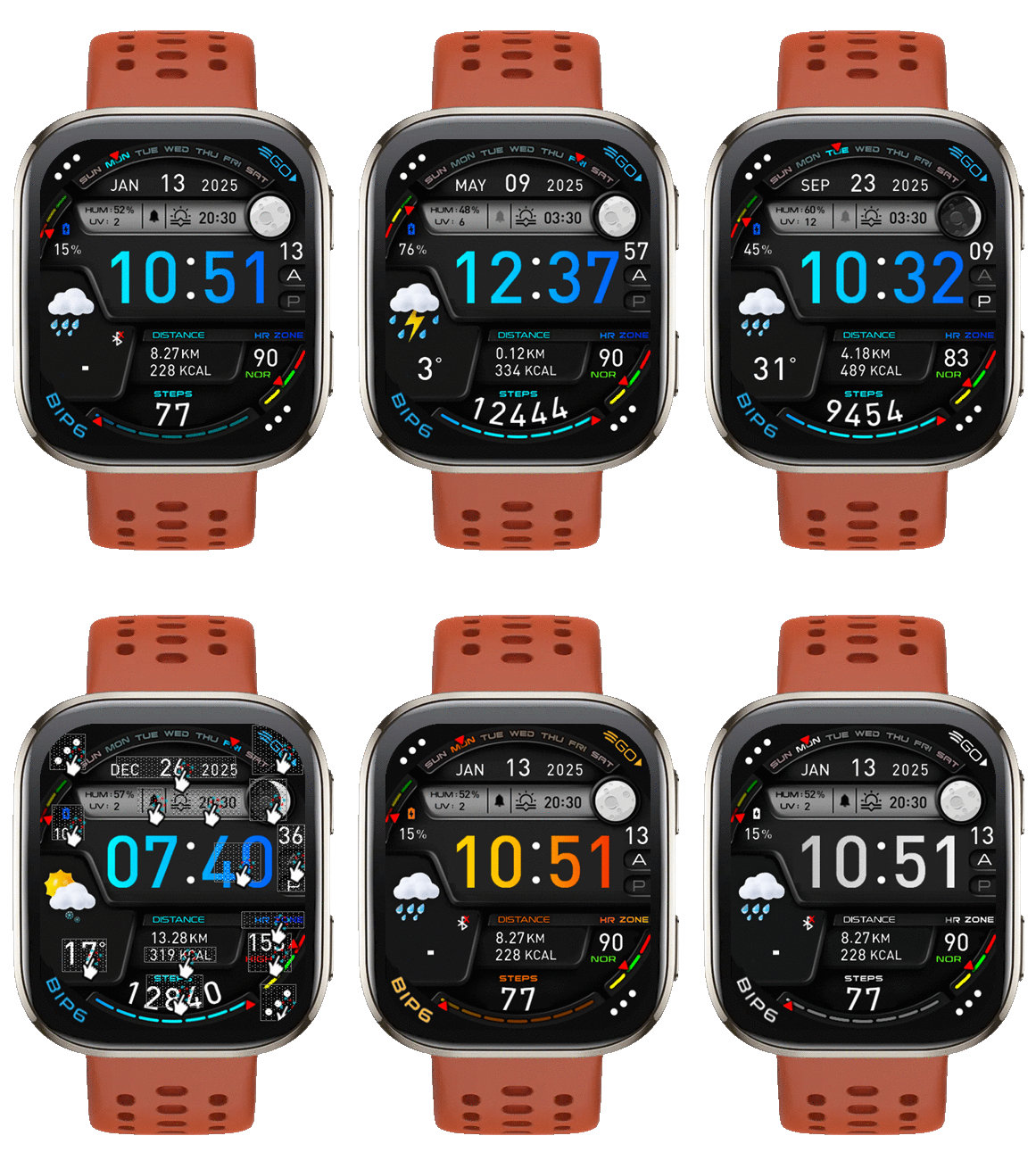 Or you can download it again at
https://amazfitwatchfaces.com/bip/view/43850
I've added Version " Month / Day / Year and Temp. Unit Without C/F " to my collection.
The problem isn't with the watchface.
The issue is, if you selection to use Imperial units.
The temperature unit display will be incorrect.
I think it's a firmware issue; I probably can't fix it.
However, I've modified the watch face to display only temperature units without F and C.
Try it out; it should look better than the incorrect display.
and change format date to Month / Day / Year
Preview and Download
 PER18_Bip6_TempUnit_NO_CF_MDY.zip
- (710.24 KiB) Downloaded 93 times
https://amazfitwatchfaces.com/bip/view/43850
I've added Version " Month / Day / Year and Temp. Unit Without C/F " to my collection.
ͼͽ To request please use the interrelated forum in action ͼͽ
Please do not PM to me for requests ported watchface.
Please do not PM to me for requests ported watchface.
Thank you so much asoo!! That was exactly it. I have downloaded the face in your collection and it works great. Appreciate the efforts!
Who is online
Users browsing this forum: No registered users and 1 guest