Hi
I created a watch face with SashaCX75's software for Amazfit with ZeppOS, specifically for Balance.
I'd like to hide the weather, the icon, and the city using a button on the watch display...
I can't seem to create the JSscript code to hide the weather icon. I don't know what to write in the function, and I can't get to the weather icon, which I can do perfectly well with the watch hands.
Can anyone help me?
Thanks
-
- Administrator
-
-
Support Ukraine
If you experience any problems with the forum (it is not visible, there is no way to post messages, or some functionality does not work), please let us know. If you have problems with registration or you did not receive confirmation letter, let us know and we will activate your account manually.
If you get an "The submitted form was invalid. Try submitting again" error, delete cookies, then try again.
How to hide weather Icon
Forum rules
All communication in this branch should only be in English.
All communication in this branch should only be in English.
-
asoo
- Posts: 2194
- Joined: 03 Jan 2019, 01:48
- Location: ͼͽ Thailand ͼͽ
- Has thanked: 420 times
- Been thanked: 2118 times

If you would like to hide a widget, you can usexpdev wrote: 01 Oct 2025, 11:25Hi
I created a watch face with SashaCX75's software for Amazfit with ZeppOS, specifically for Balance.
I'd like to hide the weather, the icon, and the city using a button on the watch display...
I can't seem to create the JSscript code to hide the weather icon. I don't know what to write in the function, and I can't get to the weather icon, which I can do perfectly well with the watch hands.
Can anyone help me?
Thanks
.setProperty(hmUI.prop.VISIBLE, false); to hide the widget.
For example, if you want to hide (Weather icon , temp high , temp low , temp curent , City name)
Code: Select all
normal_weather_image_progress_img_level.setProperty(hmUI.prop.VISIBLE, false);

normal_temperature_high_text_img.setProperty(hmUI.prop.VISIBLE, false);

normal_temperature_low_text_img.setProperty(hmUI.prop.VISIBLE, false);

normal_temperature_current_text_img.setProperty(hmUI.prop.VISIBLE, false);

normal_city_name_text.setProperty(hmUI.prop.VISIBLE, false);
Code: Select all
normal_weather_image_progress_img_level.setProperty(hmUI.prop.VISIBLE, true);

normal_temperature_high_text_img.setProperty(hmUI.prop.VISIBLE, true);

normal_temperature_low_text_img.setProperty(hmUI.prop.VISIBLE, true);

normal_temperature_current_text_img.setProperty(hmUI.prop.VISIBLE, true);

normal_city_name_text.setProperty(hmUI.prop.VISIBLE, true);Or, you can define it as a function to call it through the button.
I hope this helps you.
PS: If you create a project and encounter a problem, we recommend attaching the project. This will make it easier to investigate the issue.
ͼͽ To request please use the interrelated forum in action ͼͽ
Please do not PM to me for requests ported watchface.
Please do not PM to me for requests ported watchface.
Thanks for your help, I'll do my tests.
normal_temperature_current_text_img.setProperty(hmUI.prop.VISIBLE, false);
This isn't working.
On my watch face, the current temperature is displayed using characters and not an image. I don't know if that's the cause.
Can you help me further?
Thanks
Project:
normal_temperature_current_text_img.setProperty(hmUI.prop.VISIBLE, false);
This isn't working.
On my watch face, the current temperature is displayed using characters and not an image. I don't know if that's the cause.
Can you help me further?
Thanks
Project:
- Attachments
-
 AIO_Simply_16.zip
- (194.43 KiB) Downloaded 53 times
-
asoo
- Posts: 2194
- Joined: 03 Jan 2019, 01:48
- Location: ͼͽ Thailand ͼͽ
- Has thanked: 420 times
- Been thanked: 2118 times
if you use ttf or system font to display temp.
you can try this script :
You can actually find the name of the widget you want to take action with in the index.js file, inside your ".zip" file.
Example of editing :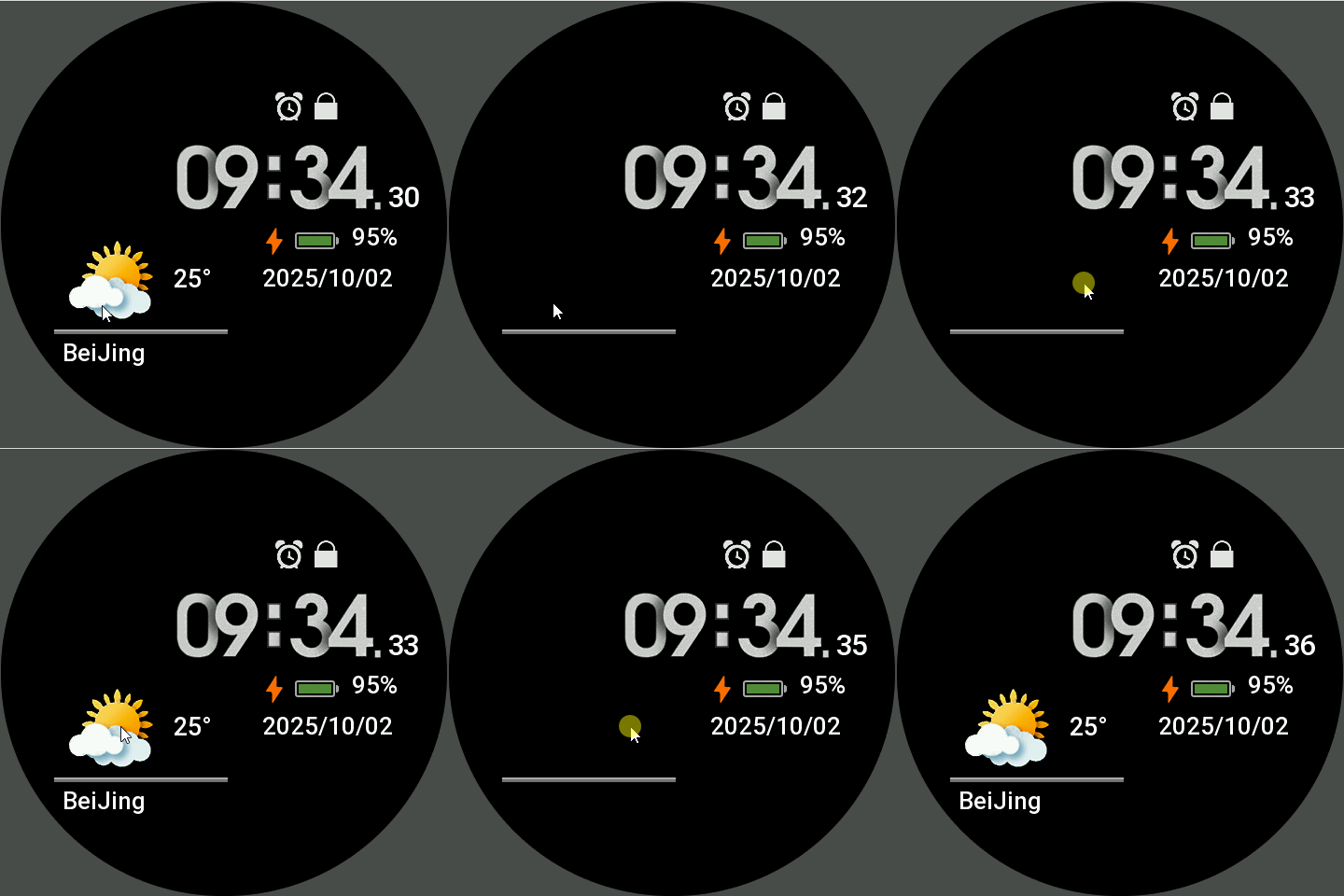
you can try this script :
Code: Select all
normal_temperature_current_text_font.setProperty(hmUI.prop.VISIBLE, false);Example of editing :
Image
- AIO_Simply_16.zip
- (193.67 KiB) Downloaded 55 times
ͼͽ To request please use the interrelated forum in action ͼͽ
Please do not PM to me for requests ported watchface.
Please do not PM to me for requests ported watchface.
Sorry, I still need your help.
Why doesn't this code entered directly into a button work?
Thanks
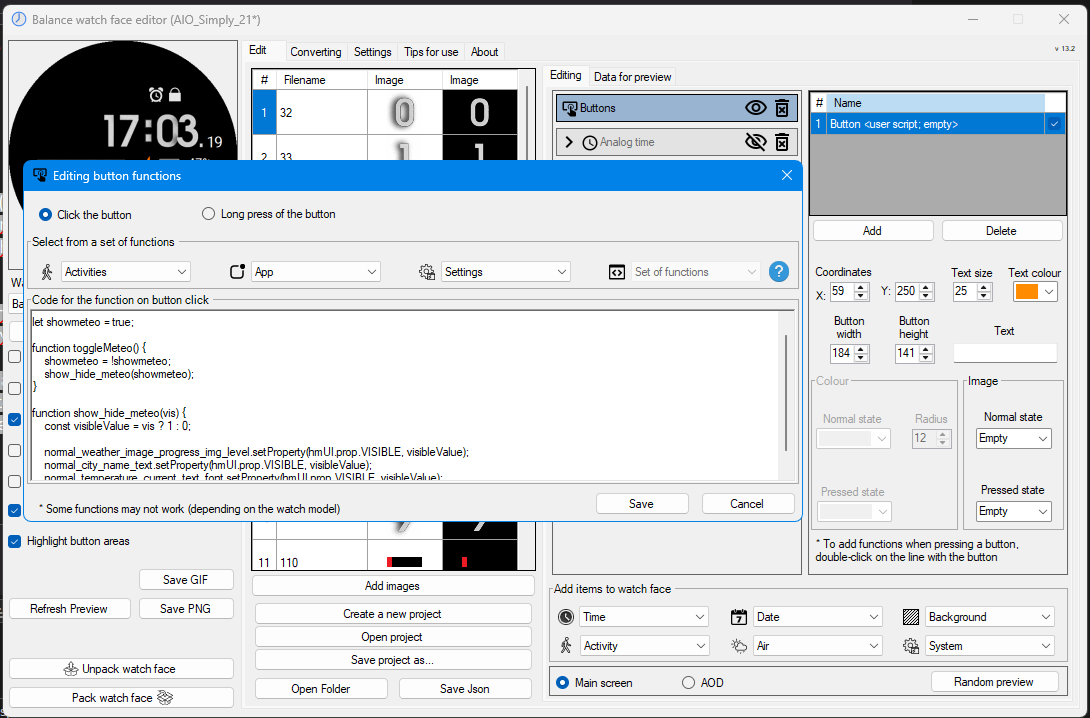
Why doesn't this code entered directly into a button work?
Thanks
Code: Select all
let showmeteo = true;

function toggleMeteo() {
    showmeteo = !showmeteo;
    show_hide_meteo(showmeteo);
}

function show_hide_meteo(vis) {
    const visibleValue = vis ? 1 : 0;

    normal_weather_image_progress_img_level.setProperty(hmUI.prop.VISIBLE, visibleValue);
    normal_city_name_text.setProperty(hmUI.prop.VISIBLE, visibleValue);
    normal_temperature_current_text_font.setProperty(hmUI.prop.VISIBLE, visibleValue);
}
Spoiler
-
asoo
- Posts: 2194
- Joined: 03 Jan 2019, 01:48
- Location: ͼͽ Thailand ͼͽ
- Has thanked: 420 times
- Been thanked: 2118 times
xpdev wrote: 03 Oct 2025, 07:01Sorry, I still need your help.
Why doesn't this code entered directly into a button work?
Thanks
Code: Select all
let showmeteo = true;

function toggleMeteo() {
    showmeteo = !showmeteo;
    show_hide_meteo(showmeteo);
}

function show_hide_meteo(vis) {
    const visibleValue = vis ? 1 : 0;

    normal_weather_image_progress_img_level.setProperty(hmUI.prop.VISIBLE, visibleValue);
    normal_city_name_text.setProperty(hmUI.prop.VISIBLE, visibleValue);
    normal_temperature_current_text_font.setProperty(hmUI.prop.VISIBLE, visibleValue);
}
Spoiler
The script you created is in function form, so
when you place it inside a button, nothing happens. Since no functions are being called, you should put all the function scripts in the Scirpt section in the (User-defined...) section. ( user_function.js )
user_functions.js
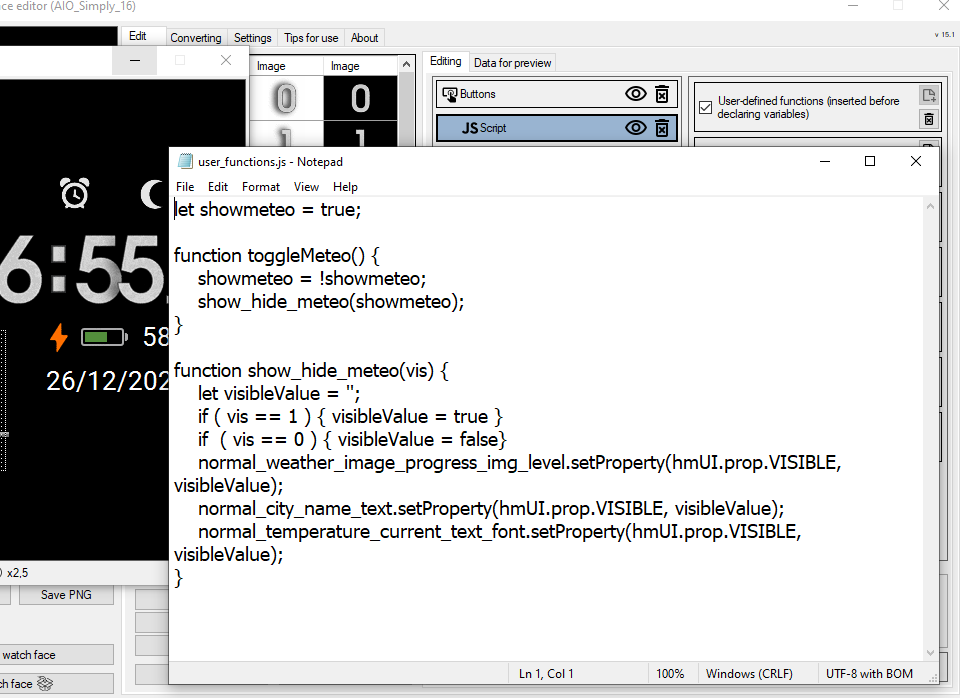
Code: Select all
toggleMeteo()
show_hide_meteo()
Button
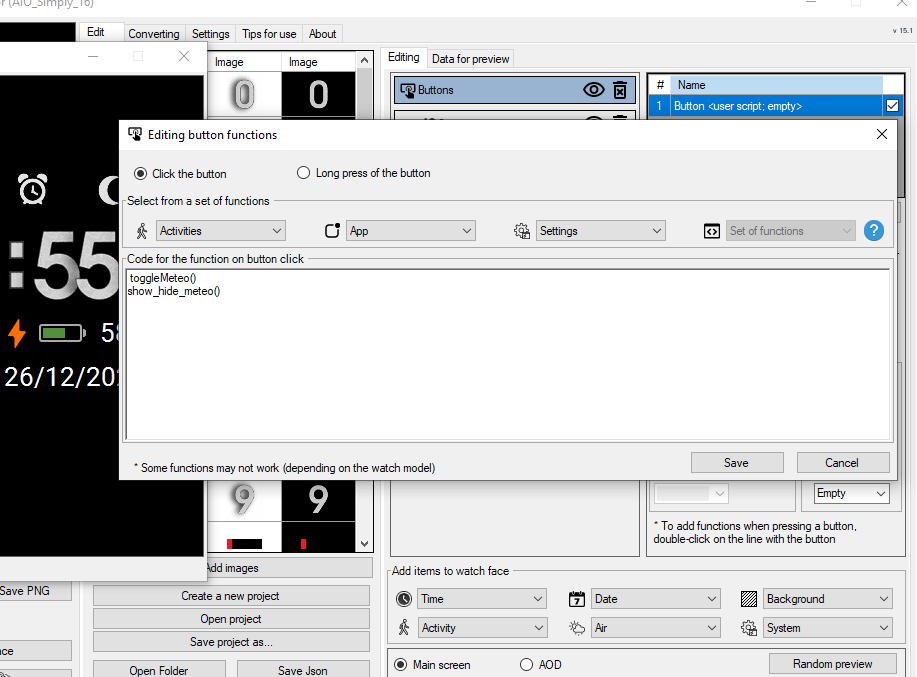 [/url]
Code: Select all
let showmeteo = true;

function toggleMeteo() {
showmeteo = !showmeteo;
show_hide_meteo(showmeteo);
}

function show_hide_meteo(vis) {
let visibleValue = '';
if ( vis == 1 ) { visibleValue = true }
if ( vis == 0 ) { visibleValue = false}
normal_weather_image_progress_img_level.setProperty(hmUI.prop.VISIBLE, visibleValue);
normal_city_name_text.setProperty(hmUI.prop.VISIBLE, visibleValue);

normal_temperature_current_text_font.setProperty(hmUI.prop.VISIBLE, visibleValue);
}
Or this
Code: Select all
let showmeteo = true;

function toggleMeteo() {
    showmeteo = !showmeteo;
    show_hide_meteo(showmeteo);
}

function show_hide_meteo() {
    let visibleValue = showmeteo;
    normal_weather_image_progress_img_level.setProperty(hmUI.prop.VISIBLE, visibleValue);
    normal_city_name_text.setProperty(hmUI.prop.VISIBLE, visibleValue);
    normal_temperature_current_text_font.setProperty(hmUI.prop.VISIBLE, visibleValue);
}
Or this
Code: Select all
let showmeteo = true;
function toggleMeteo() {
    showmeteo = !showmeteo;
    let visibleValue = showmeteo;
    normal_weather_image_progress_img_level.setProperty(hmUI.prop.VISIBLE, visibleValue);
    normal_city_name_text.setProperty(hmUI.prop.VISIBLE, visibleValue);
    normal_temperature_current_text_font.setProperty(hmUI.prop.VISIBLE, visibleValue);
}Code: Select all
toggleMeteo()I've attached a sample project. You can open it and test it with an editor.
This file isn't a watchface, it's just a project file.
- AIO_Simply_16.rar
- (404.45 KiB) Downloaded 54 times
Preview for Tested
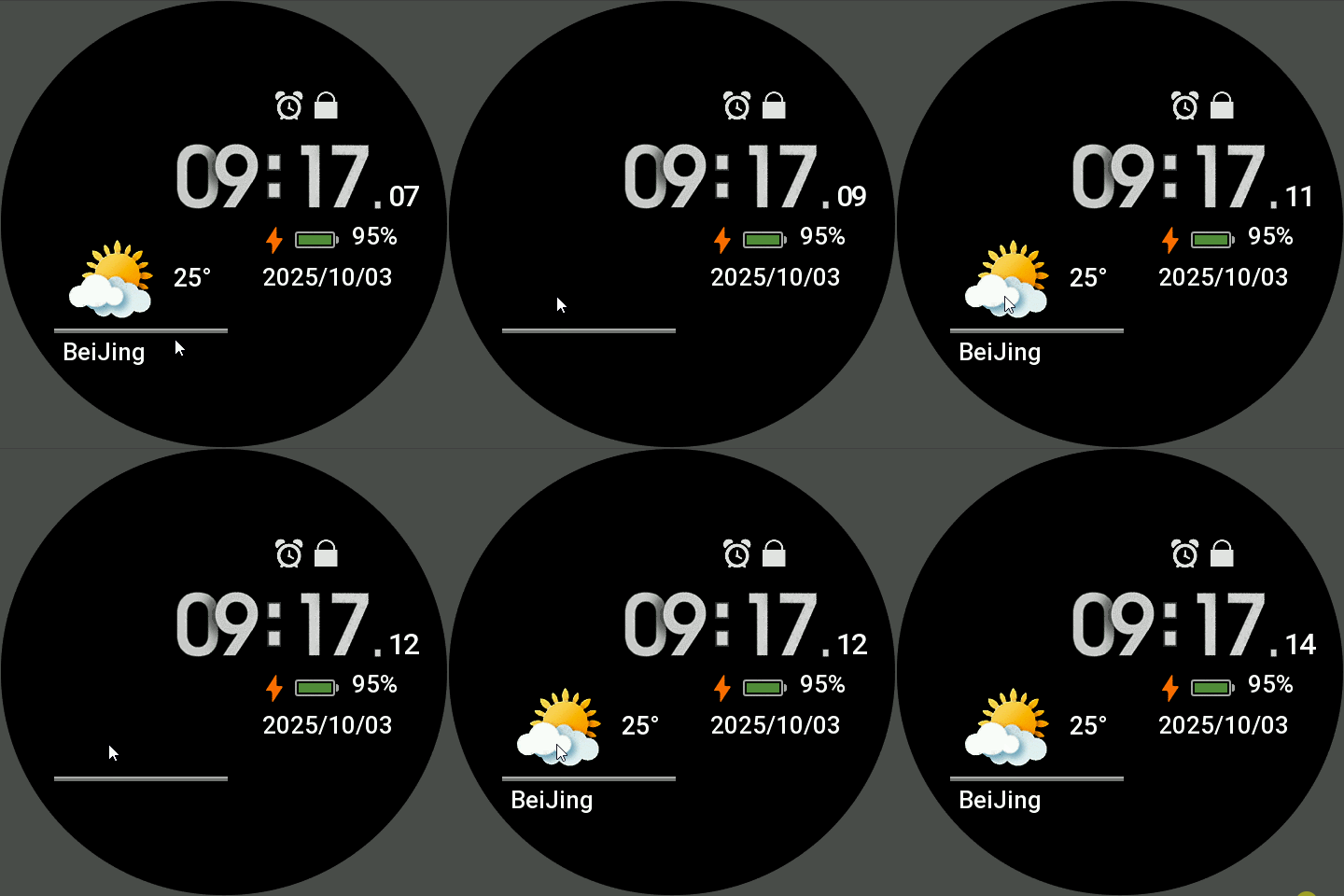
I recommend understanding the structure before proceeding.
Otherwise, you might get confused.
ͼͽ To request please use the interrelated forum in action ͼͽ
Please do not PM to me for requests ported watchface.
Please do not PM to me for requests ported watchface.
@asoo
Sorry mate
I still need your help.
Two questions:
1) How can I test the .rar files you're sending me? They can't be tested with SashaCX75's software for Amazfit with ZeppOS.
What can I use directly on PC instead of compiling WF and uploading it to Watch to see if it works?
2) I can't hide the digital seconds.
In my watchface design, they're built directly from text, not images.
Thanks again and sorry for the constant inconvenience I cause you.
Sorry mate
I still need your help.
Two questions:
1) How can I test the .rar files you're sending me? They can't be tested with SashaCX75's software for Amazfit with ZeppOS.
What can I use directly on PC instead of compiling WF and uploading it to Watch to see if it works?
2) I can't hide the digital seconds.
In my watchface design, they're built directly from text, not images.
Thanks again and sorry for the constant inconvenience I cause you.
-
asoo
- Posts: 2194
- Joined: 03 Jan 2019, 01:48
- Location: ͼͽ Thailand ͼͽ
- Has thanked: 420 times
- Been thanked: 2118 times
The .rar file contains the project used with Sasha's editor. You can simply uncompress it with WinRAR and bring it to use with sasha's editor . I don't understand why you can't use it.xpdev wrote: 15 Oct 2025, 08:04@asoo
Sorry mate
I still need your help.
Two questions:
1) How can I test the .rar files you're sending me? They can't be tested with SashaCX75's software for Amazfit with ZeppOS.
What can I use directly on PC instead of compiling WF and uploading it to Watch to see if it works?
2) I can't hide the digital seconds.
In my watchface design, they're built directly from text, not images.
Thanks again and sorry for the constant inconvenience I cause you.
As for hiding the digital seconds, if you want to hide them, just look in the index.js file and see what the digital seconds widget is, and then use
.setProperty(hmUI.prop.VISIBLE, false); to disable the display.
Here, if you're using a font, it's called normal_time_second_text_font.
To disable the display, use
normal_time_second_text_font.setProperty(hmUI.prop.VISIBLE, false);.
I think I've already explained it.
As for testing watchfaces, you can use a simulator without syncing to the watch.
However, simulators sometime work not correctly simulate the functionality. Therefore, if you use a simulator such as ZeppPlayer or an official simulator, sometimes the simulation may not be accurate, or some scripts may not run. ZeppPlayer, in particular, can only simulate about 90% of the time, as ZeppPlayer can only support ZeppOS1. https://mmk.pw/zepp_player/
If you want a high-quality simulator, you need to use an official simulator.
https://docs.huami.com/docs/1.0/guides/ ... tor/setup/
However, installation is more complicated.
I won't go into details about the simulator itself, as it requires you to understand the steps yourself before you can use it. So, for the use and installation of the simulator, I will not explain anything.
You can find more information at the links I've attached, as well as some on this website.
ͼͽ To request please use the interrelated forum in action ͼͽ
Please do not PM to me for requests ported watchface.
Please do not PM to me for requests ported watchface.
I'm embarrassed to ask you for help again.
I managed to do everything you suggested.
Two problems remain.
1 - Hiding the date from .js file
2 - Changing the background directly from the .js file
I'm attaching the project with the changes.
Can you help me again?
Thanks
I managed to do everything you suggested.
Two problems remain.
1 - Hiding the date from .js file
2 - Changing the background directly from the .js file
I'm attaching the project with the changes.
Can you help me again?
Thanks
- Attachments
-
- Super Simply Face - AIO.zip
- (198.1 KiB) Downloaded 55 times
-
asoo
- Posts: 2194
- Joined: 03 Jan 2019, 01:48
- Location: ͼͽ Thailand ͼͽ
- Has thanked: 420 times
- Been thanked: 2118 times
Change Background: I don't understand what you're trying to do here. The editor already has a widget available, and I see you've already used it. From what I've seen, I haven't found any errors.xpdev wrote: 16 Oct 2025, 09:10I'm embarrassed to ask you for help again.
I managed to do everything you suggested.
Two problems remain.
1 - Hiding the date from .js file
2 - Changing the background directly from the .js file
I'm attaching the project with the changes.
Can you help me again?
Thanks
Regarding the date, I don't understand why you can't fix it. I've already explained how.
Just find the name of the date widget in index.js and disable it
in this case name is "normal_day_month_year_font" , So you can following script: "normal_day_month_year_font.setProperty(hmUI.prop.VISIBLE, visibleValue);" for hidden it. This is no different than hiding the seconds, as I explained earlier.
If the next time it is the same problem , I won't respond.
Next time, if you have any questions about creating a Balance watch face, I recommend posting in the forums:
Balance : Watchfaces discussion
viewforum.php?f=178
or
Balance : Watchfaces creation (order table)
viewforum.php?f=179
It should be area for the problem you are asking about.
Please see the example and understand.
I've changed the function call from the button (because from what you provided, it probably wouldn't work properly).
I've added a button to hide the date by clicking on the Dateline.
Example
- PreviewScreen2Gif.gif (65.55 KiB) Viewed 1783 times
- Super-Simply-Face---AIO.zip
- (196.57 KiB) Downloaded 59 times
ͼͽ To request please use the interrelated forum in action ͼͽ
Please do not PM to me for requests ported watchface.
Please do not PM to me for requests ported watchface.
Who is online
Users browsing this forum: No registered users and 0 guests