-
- Administrator
-
-
Support Ukraine
If you experience any problems with the forum (it is not visible, there is no way to post messages, or some functionality does not work), please let us know. If you have problems with registration or you did not receive confirmation letter, let us know and we will activate your account manually.
If you get an "The submitted form was invalid. Try submitting again" error, delete cookies, then try again.
Smooth seconds hand animation BIP 6
Forum rules
When adding a new topic, use the template: Topic title [device name]
For example: How to create watch face [Bip U]
All communication in this branch should only be in English.
When adding a new topic, use the template: Topic title [device name]
For example: How to create watch face [Bip U]
All communication in this branch should only be in English.
-
asoo
- Posts: 2200
- Joined: 03 Jan 2019, 01:48
- Location: ͼͽ Thailand ͼͽ
- Has thanked: 420 times
- Been thanked: 2121 times

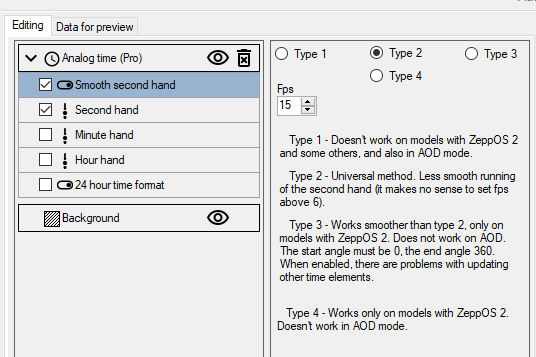
The function smooth seconds hand that you mentioned can be created using sasha's Editor.
Watch face editor for Amazfit watch on ZeppOS :
viewtopic.php?p=11643#p11643
ͼͽ To request please use the interrelated forum in action ͼͽ
Please do not PM to me for requests ported watchface.
Please do not PM to me for requests ported watchface.
I know how it is generally realised, my question is if Bip 6 has that feature, because I tried downloading some GTS3/4 watchfaces with native smooth second hand (since they are compatible) but on Bip 6 the second hand is not moving at all so I don't know if this is a compatible problem or if it is because Bip 6 has not that feature
-
asoo
- Posts: 2200
- Joined: 03 Jan 2019, 01:48
- Location: ͼͽ Thailand ͼͽ
- Has thanked: 420 times
- Been thanked: 2121 times
The problem is, watch faces that use Smooth Second Type 1 won't work on ZeppOS 2 or higher.K22 wrote: 15 Sep 2025, 10:43I know how it is generally realised, my question is if Bip 6 has that feature, because I tried downloading some GTS3/4 watchfaces with native smooth second hand (since they are compatible) but on Bip 6 the second hand is not moving at all so I don't know if this is a compatible problem or if it is because Bip 6 has not that feature
If you want to use these faces, you'll need to convert them to Type 2 or another supported type. You can see the "Type" option In image the previous post
ͼͽ To request please use the interrelated forum in action ͼͽ
Please do not PM to me for requests ported watchface.
Please do not PM to me for requests ported watchface.
I tried using type 2 and it's working. As suggested in its description the animation is not "totally" smooth but better than nothing. So there is no way to get a 60fps smooth animation with zeppOS 3/4/5?asoo wrote: 15 Sep 2025, 10:49The problem is, watch faces that use Smooth Second Type 1 won't work on ZeppOS 2 or higher.K22 wrote: 15 Sep 2025, 10:43I know how it is generally realised, my question is if Bip 6 has that feature, because I tried downloading some GTS3/4 watchfaces with native smooth second hand (since they are compatible) but on Bip 6 the second hand is not moving at all so I don't know if this is a compatible problem or if it is because Bip 6 has not that feature
If you want to use these faces, you'll need to convert them to Type 2 or another supported type. You can see the "Type" option In image the previous post
-
asoo
- Posts: 2200
- Joined: 03 Jan 2019, 01:48
- Location: ͼͽ Thailand ͼͽ
- Has thanked: 420 times
- Been thanked: 2121 times
I'm not sure about this part either.K22 wrote: 15 Sep 2025, 11:26
I tried using type 2 and it's working. As suggested in its description the animation is not "totally" smooth but better than nothing. So there is no way to get a 60fps smooth animation with zeppOS 3/4/5?
You can try increasing the FPS or switching to Type 3 or 4. It might be better up . However, I've never really tested it because I primarily use digital.
If I remember correctly, the default settings in the program are the best in every aspect. Changing the FPS value may make the movement look smoother, but you may encounter the problem of the time display being inaccurate due to the calculations that have been rounded.
ͼͽ To request please use the interrelated forum in action ͼͽ
Please do not PM to me for requests ported watchface.
Please do not PM to me for requests ported watchface.
Who is online
Users browsing this forum: Matinm and 0 guests