SupportUkraine
If you experience any problems with the forum (it is not visible, there is no way to post messages, or some functionality does not work), please let us know. If you have problems with registration or you did not receive confirmation letter, let us know and we will activate your account manually.
If you get an "The submitted form was invalid. Try submitting again" error, delete cookies, then try again.
Ad blocker detected: Our website is made possible by displaying online advertisements to our visitors. Please consider supporting us by disabling your ad blocker on our website.
Forum rules
All communication in this branch should only be in English.
To discuss tools that are not in this section, use the “Watchfaces tools (discussion)” forum.
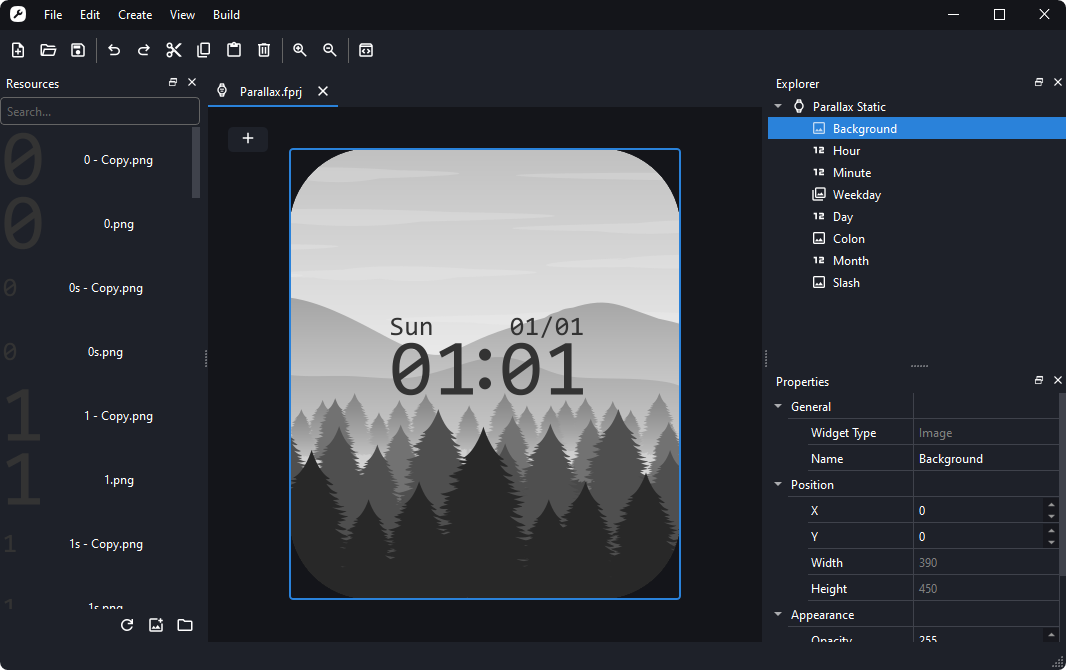
Mi Create Open source watchface editor for Xiaomi wearables made ~2021 and above
Modern watchface creator for new Mi Bands, Xiaomi Watches and Redmi Watches. Spiritual successor to EasyFace, with compatibility for EasyFace .fprj projects.
Simple & good looking
Easy to learn (especially for EasyFace users)
Support for .fprj projects
Experimental support for Chinese GMF (wfDef.json) projects
Quick AOD creation
Live watchface preview
Multilingual
Runs on Windows (and Linux if you run from source code)
Requires 64-bit versions of Windows 10 (1809 and later) or Windows 11
I have designed a dynamic face for mi banfd 9 on mi create, but mi create only allows importing fprj files and exporting json files but not exporting bin files. So how can I export bin files to upload to amazfitwatchfaces?
@Xaobaco The easiest way is to use Notify for Mi Band or Gadgetbridge, but if you want to share it with others other than using AmazfitWatchFaces you can follow the steps on https://ooflet.github.io/docs/quickstart/publishing/ to publish them onto m0tral's servers.
Hi. In the latest version, is there no option for 'distance in kilometers'? Or I just can't find it. I'm using the smart band 10. By the way, how many digits should there be in the Appearance settings - digits? regarding distance?
@Mario7643 The source simply hasn't been added to Mi Create's data files yet, you should be able to manually add it in by replacing Mi Create's source file (%LocalAppData%\Mi Create\data\sources.json) with this one https://github.com/user-attachments/fil ... urces.json which has the Current Steo (kilometer) data source.
The digits need to be set manually to multiples of 10 depending on how many decimals you want, 20 for 1 decimal point, 40 for two. The digit count has a hard limit of 20 digits, so refer to this comment https://github.com/ooflet/Mi-Create/iss ... 3097570014 to change the limit (the file should be in Mi Create's data folder as well in data\fprj)
Users browsing this forum: No registered users and 4 guests
Cookie Consent
This website uses cookie or similar technologies, to enhance your browsing experience and provide personalised recommendations. By continuing to use our website, you agree to our Privacy Policy