I have a T-Rex 2 and thought only watchfaces with the same resolution would work on it but I have discovered that watchfaces for quite a few watch models with different resolutions will work.
So far I've been able to install watchfaces for Balance, Falcon, GTR4, GTR3 Pro and Cheetah Pro watches without issue. I've even installed square watchfaces from the Amazfit GTS 4 mini but they're not a great fit.
Some people like T_5 use a filter to prevent installation on "unsupported" devices but that's been the only obstacle I've found so far.
If you experience any problems with the forum (it is not visible, there is no way to post messages, or some functionality does not work), please let us know.
If you have problems with registration or you did not receive confirmation letter, let us know and we will activate your account manually.
If you get an "The submitted form was invalid. Try submitting again" error, delete cookies, then try again.
If you have problems with registration or you did not receive confirmation letter, let us know and we will activate your account manually.
If you get an "The submitted form was invalid. Try submitting again" error, delete cookies, then try again.
FYI: watchfaces for many other models work on T-Rex 2
Forum rules
When adding a new topic, use the template: Topic title [device name]
For example: Requesting creation of watch face [T-Rex Pro]
All communication in this branch should only be in English.
When adding a new topic, use the template: Topic title [device name]
For example: Requesting creation of watch face [T-Rex Pro]
All communication in this branch should only be in English.
-
asoo
- Posts: 2224
- Joined: 03 Jan 2019, 01:48
- Location: ͼͽ Thailand ͼͽ
- Has thanked: 438 times
- Been thanked: 2142 times
- Contact:

If correct, I must say Watchfaces based on ZeppOS and using the same image encoding as the Trex-2 can be launched on the Trex-2, but the problem is that the watchface size may not fit on the Trex-2 and if the watchface has motion and rotation animations. that uses the script of Zepp OS 1.0 when used with Trex-2 which now uses zeppos 2.x will cause the Animation mentioned above to not work including Smooth analog seconds if the dial is Type 1 which is the format of Zepp OS 1.0 Will result,it not working as well.taw_bip wrote: 26 Feb 2024, 19:34Spoiler
I have a T-Rex 2 and thought only watchfaces with the same resolution would work on it but I have discovered that watchfaces for quite a few watch models with different resolutions will work.
So far I've been able to install watchfaces for Balance, Falcon, GTR4, GTR3 Pro and Cheetah Pro watches without issue. I've even installed square watchfaces from the Amazfit GTS 4 mini but they're not a great fit.
ͼͽ To request please use the interrelated forum in action ͼͽ
Please do not PM to me for requests ported watchface.
Please do not PM to me for requests ported watchface.
-
asoo
- Posts: 2224
- Joined: 03 Jan 2019, 01:48
- Location: ͼͽ Thailand ͼͽ
- Has thanked: 438 times
- Been thanked: 2142 times
- Contact:
Please give an example of a dial that automatically scale up or scale down for me. I'm interested, don't look at the script for that dial.taw_bip wrote: 27 Feb 2024, 12:00Aside from the non-round watchfaces, the ones I have tried worked well. It's interesting that the watch will automatically scale up or scale down the watchface to make it fit the screen.
Because as far as I know, I have never encountered a dial like that, except that the dial is the same size, for example Trex2 and GTR3 and T-Rex Ultar are the same size.
Anyway, please help me, I want to study the scritp of that dial. Because I think it very useful.
ͼͽ To request please use the interrelated forum in action ͼͽ
Please do not PM to me for requests ported watchface.
Please do not PM to me for requests ported watchface.
-
taw_bip
- WF maker
- Posts: 136
- Joined: 12 Apr 2018, 16:29
- Has thanked: 134 times
- Been thanked: 21 times
- Contact:
I don't think it's a script in the dial. I think it is a function in the watch. As I said before, the only round watchfaces on newer models that did not work were the ones by T_5.asoo wrote: 27 Feb 2024, 12:18Please give an example of a dial that automatically scale up or scale down for me. I'm interested, don't look at the script for that dial.taw_bip wrote: 27 Feb 2024, 12:00Aside from the non-round watchfaces, the ones I have tried worked well. It's interesting that the watch will automatically scale up or scale down the watchface to make it fit the screen.
Because as far as I know, I have never encountered a dial like that, except that the dial is the same size, for example Trex2 and GTR3 and T-Rex Ultar are the same size.
Anyway, please help me, I want to study the scritp of that dial. Because I think it very useful.
I tried these Balance watchfaces and they loaded properly:
https://amazfitwatchfaces.com/balance/view/241
https://amazfitwatchfaces.com/balance/view/173
The following Cheetah Pro watchface worked. It was the only one I tried.
https://amazfitwatchfaces.com/cheetah/view/43
I tried this Falcon watchface and it worked:
https://amazfitwatchfaces.com/falcon/view/57
This GTR4 watchface worked:
https://amazfitwatchfaces.com/gtr/view/38064
-
asoo
- Posts: 2224
- Joined: 03 Jan 2019, 01:48
- Location: ͼͽ Thailand ͼͽ
- Has thanked: 438 times
- Been thanked: 2142 times
- Contact:
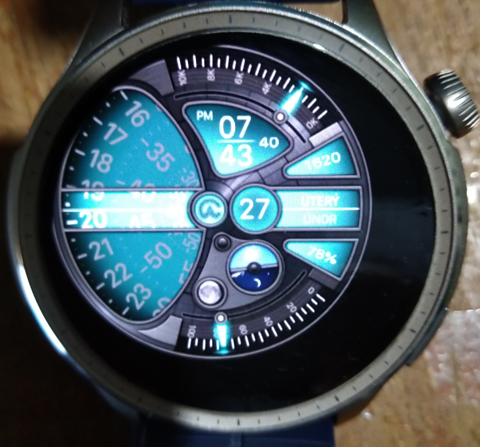
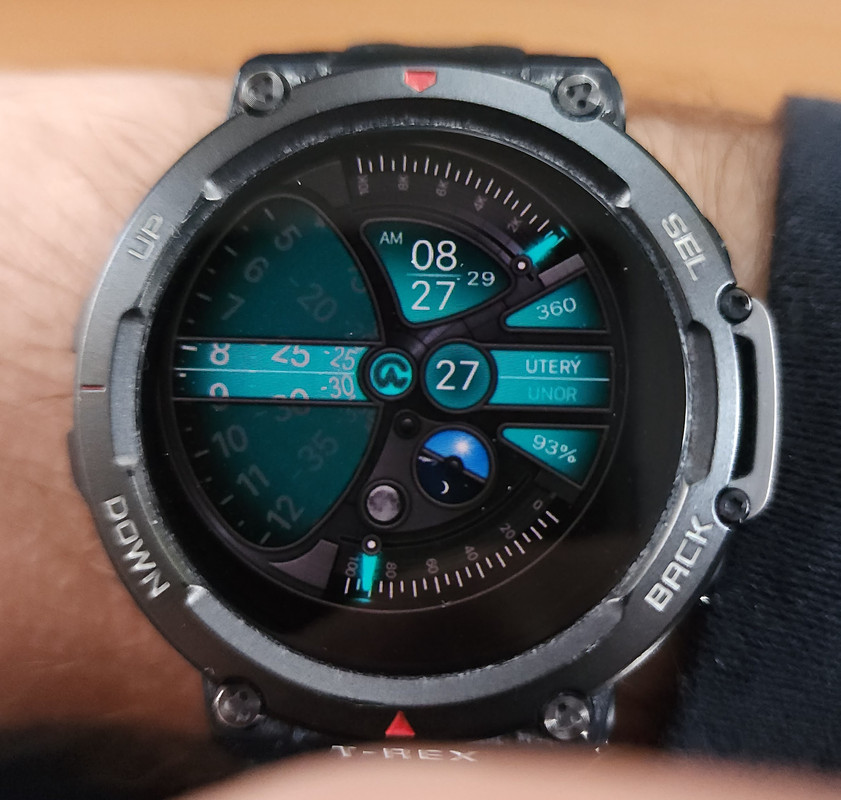
This is probably a feature unique to Trex2. Which I'm not sure about either.taw_bip wrote: 27 Feb 2024, 12:25
I don't think it's a script in the dial. I think it is a function in the watch. As I said before, the only round watchfaces on newer models that did not work were the ones by T_5.
I tried this Falcon watchface and it worked:
https://amazfitwatchfaces.com/falcon/view/57
I didn't have Trex2 for testing.
As far as testing on the " Amazfit Balance ", it doesn't have the capabilities you mentioned.
Spoiler
ͼͽ To request please use the interrelated forum in action ͼͽ
Please do not PM to me for requests ported watchface.
Please do not PM to me for requests ported watchface.
-
taw_bip
- WF maker
- Posts: 136
- Joined: 12 Apr 2018, 16:29
- Has thanked: 134 times
- Been thanked: 21 times
- Contact:
For anyone who wants to try to load a watchface from another model, these are the steps that have worked for me. I am using an Android device.
Directly from the AmazFaces app:
Hit the gear icon and the Amazfitwatches app will pop up "Connected devices" and how your T-Rex 2. Click to the side of that popup to clear it from the screen. Then you can go to "Select your device" and choose "Amazfit GTR series" and select one of the newer models, like GTR 4. Then hit "apply."
This will list the watchfaces for that model. Select a watchface and scroll down to "Install watch face" after the ads selectr the T-Rex 2 from the "Connected devices" screen. You might have to do the same sequence of "Install watch face" and "see ads" and "Choose the version" again. But this time the app should connect to your watch and start the transfer process.
From a .zip downloaded to phone:
Use your phone browser to download the watchface .zip file. Go into your phone file manager and the downloads folder. Select the .zip file and use the "share" feature and select AmazFaces then hit "Install watch face". Sometimes it can take a little while for the transfer to start, but just be patient.
Directly from the AmazFaces app:
Hit the gear icon and the Amazfitwatches app will pop up "Connected devices" and how your T-Rex 2. Click to the side of that popup to clear it from the screen. Then you can go to "Select your device" and choose "Amazfit GTR series" and select one of the newer models, like GTR 4. Then hit "apply."
This will list the watchfaces for that model. Select a watchface and scroll down to "Install watch face" after the ads selectr the T-Rex 2 from the "Connected devices" screen. You might have to do the same sequence of "Install watch face" and "see ads" and "Choose the version" again. But this time the app should connect to your watch and start the transfer process.
From a .zip downloaded to phone:
Use your phone browser to download the watchface .zip file. Go into your phone file manager and the downloads folder. Select the .zip file and use the "share" feature and select AmazFaces then hit "Install watch face". Sometimes it can take a little while for the transfer to start, but just be patient.
-
SashaCX75

- Posts: 831
- Joined: 26 Oct 2019, 15:18
- Location: Ukraine
- Has thanked: 15 times
- Been thanked: 1044 times
- Contact:
If I'm not mistaken several such watch faces were made by leXxiR. But such watch faces do not use images. Text is displayed using font, other elements are drawn by code. All sizes of elements are bound to the screen size.asoo wrote: 27 Feb 2024, 12:18Please give an example of a dial that automatically scale up or scale down for me. I'm interested, don't look at the script for that dial.
All watch faces that use images are made to fit a specific screen size. But sometimes it is not immediately obvious that the watch face is not the right size. This depends on the design of the watch face.
Who is online
Users browsing this forum: No registered users and 0 guests