Hello fellows.
I'm new but I want to learn.
Can someone explain to me how to create faces with the graphic - heart rate.
I intend to create for the Amazefit GTR 3.
Thank you very much!
Best Regards
If you experience any problems with the forum (it is not visible, there is no way to post messages, or some functionality does not work), please let us know.
If you have problems with registration or you did not receive confirmation letter, let us know and we will activate your account manually.
If you get an "The submitted form was invalid. Try submitting again" error, delete cookies, then try again.
If you have problems with registration or you did not receive confirmation letter, let us know and we will activate your account manually.
If you get an "The submitted form was invalid. Try submitting again" error, delete cookies, then try again.
Create chart with heart rate
Moderators: asoo, lvpokka, Internal error, Watchmens
Forum rules
All communication in this branch should only be in English.
All communication in this branch should only be in English.
-
GiovanniJr
- Posts: 7
- Joined: 21 Mar 2023, 12:11
- Location: Ferrara
- Been thanked: 1 time
- Contact:
Create chart with heart rate
Last edited by GiovanniJr on 11 Aug 2023, 12:38, edited 1 time in total.
-
asoo
- Posts: 2226
- Joined: 03 Jan 2019, 01:48
- Location: ͼͽ Thailand ͼͽ
- Has thanked: 441 times
- Been thanked: 2142 times
- Contact:

As far as i see you didn't specify the device you want to ask, so
I think maybe no one can answer the question for you. It is advisable to specify the device you want to inquire about. You maybe got the right answer.
I think maybe no one can answer the question for you. It is advisable to specify the device you want to inquire about. You maybe got the right answer.
ͼͽ To request please use the interrelated forum in action ͼͽ
Please do not PM to me for requests ported watchface.
Please do not PM to me for requests ported watchface.
-
GiovanniJr
- Posts: 7
- Joined: 21 Mar 2023, 12:11
- Location: Ferrara
- Been thanked: 1 time
- Contact:
Is truth! You're absolutely right...
I intend to create for the Amazefit GTR 3.

Sorry...
I intend to create for the Amazefit GTR 3.
Sorry...
-
asoo
- Posts: 2226
- Joined: 03 Jan 2019, 01:48
- Location: ͼͽ Thailand ͼͽ
- Has thanked: 441 times
- Been thanked: 2142 times
- Contact:
I'm not sure you mean graphic or graph.GiovanniJr wrote: 11 Aug 2023, 11:44Hello fellows.
I'm new but I want to learn.
Can someone explain to me how to create faces with the graphic - heart rate.
I intend to create for the Amazefit GTR 3.
Thank you very much!
Best Regards
If you mean graphic, you probably mean a picture used to show the heart rate zone.
In GTR3 there are 6 images to show different heart rate zones.
If you mean graph ( heart rate graph )
In this section, you need to create a custom script by adding it yourself to the file.
index.js with a text editor
In the editor will not have this section
An example of a dial with a heart rate graph.
 G-test.zip
- (157.55 KiB) Downloaded 161 times
Code specific to the part related to the heart rate graph.
Some variable names may not be the same as in the example watchface.
Code: Select all
   /*
    ** Watch_Face_Editor tool
    ** watchface js version v2.1.1
    ** Copyright © SashaCX75. All Rights Reserved
    */

    try {
    (() => {
        //start of ignored block
        const __$$app$$__ = __$$hmAppManager$$__.currentApp;
        function getApp() {
            return __$$app$$__.app;
        }
        function getCurrentPage() {
            return __$$app$$__.current && __$$app$$__.current.module;
        }
        const __$$module$$__ = __$$app$$__.current;
        const h = new DeviceRuntimeCore.WidgetFactory(new DeviceRuntimeCore.HmDomApi(__$$app$$__, __$$module$$__));
        const {px} = __$$app$$__.__globals__;
        const logger = Logger.getLogger('watchface_SashaCX75');
        //end of ignored block

        //dynamic modify start


        let normal_background_bg_img = ''
        let normal_g_heart = ''


        //dynamic modify end

        __$$module$$__.module = DeviceRuntimeCore.WatchFace({
            init_view() {
                //dynamic modify start


            normal_background_bg_img = hmUI.createWidget(hmUI.widget.IMG, {
              x: 0,
              y: 0,
              w: 454,
              h: 454,
              src: 'main.png',
              show_level: hmUI.show_level.ONLY_NORMAL,
            });


/////////////////////  Show graph heart rate  /////////////////////

normal_g_heart=hmUI.createWidget(hmUI.widget.GRADKIENT_POLYLINE,{
x: 50,
y: 100,
w: 350,
h: 100,
line_color:16738816,
line_width:2,
type:hmUI.data_type.HEART,
show_level:hmUI.show_level.ONLY_NORMAL
});


                                    let heartArr = hmSensor.createSensor(hmSensor.id.HEART).today;
                                    let min_heart = Math.min(...heartArr)
                                    let max_heart = Math.max(...heartArr)


///////////////////////  show value  main , max , min /////////////////////////

              let heart_num = hmUI.createWidget(hmUI.widget.TEXT_IMG, {
                                        x: 198,
                                        y: 410,
                                 type: hmUI.data_type.HEART,
                                font_array:["Act_font_0.png","Act_font_1.png","Act_font_2.png","Act_font_3.png","Act_font_4.png","Act_font_5.png","Act_font_6.png","Act_font_7.png","Act_font_8.png","Act_font_9.png"],
                                h_space: 0,
                                align_h: hmUI.align.CENTER_H,
                                padding: false,
                                isCharacter: true,
                                invalid_image: "Act_font_0.png",
                                isCharacter: true,
                                unit_sc:"bpm.png",
                                unit_tc: "bpm.png",
                                unit_en: "bpm.png",
});


                         let maxText = hmUI.createWidget(hmUI.widget.TEXT_IMG, {
                                        x: 300,
                                        y: 372,
                                text: max_heart,
                                type: hmUI.data_type.HEART,
                                font_array:["Act_font_0.png","Act_font_1.png","Act_font_2.png","Act_font_3.png","Act_font_4.png","Act_font_5.png","Act_font_6.png","Act_font_7.png","Act_font_8.png","Act_font_9.png"],
                                h_space: 2,
                                align_h: hmUI.align.LEFT,
                                padding: false,
                                isCharacter: true,
                            });


                            let minText = hmUI.createWidget(hmUI.widget.TEXT_IMG, {
                                        x: 300,
                                        y: 372,
                                text: min_heart,
                                type: hmUI.data_type.HEART,
                                font_array:["Act_font_0.png","Act_font_1.png","Act_font_2.png","Act_font_3.png","Act_font_4.png","Act_font_5.png","Act_font_6.png","Act_font_7.png","Act_font_8.png","Act_font_9.png"],
                                h_space: 2,
                                align_h: hmUI.align.LEFT,
                                padding: false,
                                isCharacter: true,
  });

////////////////// End /////////////////////////


            normal_image_img = hmUI.createWidget(hmUI.widget.IMG, {
              x: 202,
              y: 196,
              src: 'Act_font_1.png',
              show_level: hmUI.show_level.ONLY_NORMAL,
            });


////////////////////  resume_Call ////////////////////


                           const widgetDelegate = hmUI.createWidget(hmUI.widget.WIDGET_DELEGATE, {

                                   resume_call: (function () {

                                   var jstime = hmSensor.createSensor(hmSensor.id.TIME);
                                    var is24 = jstime.is24Hour;

                                     if (is24){ normal_image_img.setProperty(hmUI.prop.SRC, "Act_font_1.png");
                                        } else { normal_image_img.setProperty(hmUI.prop.SRC, "Act_font_2.png");
                                     }


                                    let heartArr = hmSensor.createSensor(hmSensor.id.HEART).today;
                                    let min_heart = Math.min(...heartArr)
                                    let max_heart = Math.max(...heartArr)

                                    heart_num.setProperty(hmUI.prop.MORE, {
                                        x: 198,
                                        y: 410,
                                        type: hmUI.data_type.HEART,
                             font_array:["Act_font_0.png","Act_font_1.png","Act_font_2.png","Act_font_3.png","Act_font_4.png","Act_font_5.png","Act_font_6.png","Act_font_7.png","Act_font_8.png","Act_font_9.png"],
                                        h_space: 2,
                                        align_h: hmUI.align.CENTER_H,
                                        padding: false,
                                        isCharacter: true,
                                        invalid_image: "Act_font_0.png",
                                unit_sc:"bpm.png",
                                unit_tc: "bpm.png",
                                unit_en: "bpm.png",
                                    });


                                    maxText.setProperty(hmUI.prop.MORE, {
                                        x: 300,
                                        y: 322,
                                        text: max_heart,
                                        type: hmUI.data_type.HEART,
                              font_array:["Act_font_0.png","Act_font_1.png","Act_font_2.png","Act_font_3.png","Act_font_4.png","Act_font_5.png","Act_font_6.png","Act_font_7.png","Act_font_8.png","Act_font_9.png"],
                                        h_space: 2,
                                        align_h: hmUI.align.LEFT,
                                        padding: false,
                                        isCharacter: true,
                                    });

                                    minText.setProperty(hmUI.prop.MORE, {
                                        x: 300,
                                        y: 372,
                                        text: min_heart,
                                        type: hmUI.data_type.HEART,
                               font_array:["Act_font_0.png","Act_font_1.png","Act_font_2.png","Act_font_3.png","Act_font_4.png","Act_font_5.png","Act_font_6.png","Act_font_7.png","Act_font_8.png","Act_font_9.png"],
                                        h_space: 2,
                                        align_h: hmUI.align.LEFT,
                                        padding: false,
                                        isCharacter: true,
                                    });

                                }),
                                pause_call: (function () {
                                   console.log('ui pause');
                              }),
                            });


                //dynamic modify end
            },
            onInit() {
                logger.log('index page.js on init invoke');
            },
            build() {
                this.init_view();
                logger.log('index page.js on ready invoke');
            },
            onDestroy() {
                logger.log('index page.js on destroy invoke');
            }
        });
        ;
    })();
} catch (e) {
    console.log('Mini Program Error', e);
    e && e.stack && e.stack.split(/\n/).forEach(i => console.log('error stack', i));
    ;
}
ͼͽ To request please use the interrelated forum in action ͼͽ
Please do not PM to me for requests ported watchface.
Please do not PM to me for requests ported watchface.
-
GiovanniJr
- Posts: 7
- Joined: 21 Mar 2023, 12:11
- Location: Ferrara
- Been thanked: 1 time
- Contact:
Hello.
I wanted to say graph ( heart rate graph ) and that's exactly what I wanted to know. Thank you very much!
I will explore, I still have a lot to learn.
A special thanks to the master asoo!
I wanted to say graph ( heart rate graph ) and that's exactly what I wanted to know. Thank you very much!
I will explore, I still have a lot to learn.
A special thanks to the master asoo!
-
GiovanniJr
- Posts: 7
- Joined: 21 Mar 2023, 12:11
- Location: Ferrara
- Been thanked: 1 time
- Contact:
Hello.
I managed to do what I wanted. Thank you very much!
This face is a copy of an original from Ultra. It will only be to explore the potentialities. The next ones will be my creation.
Best regards
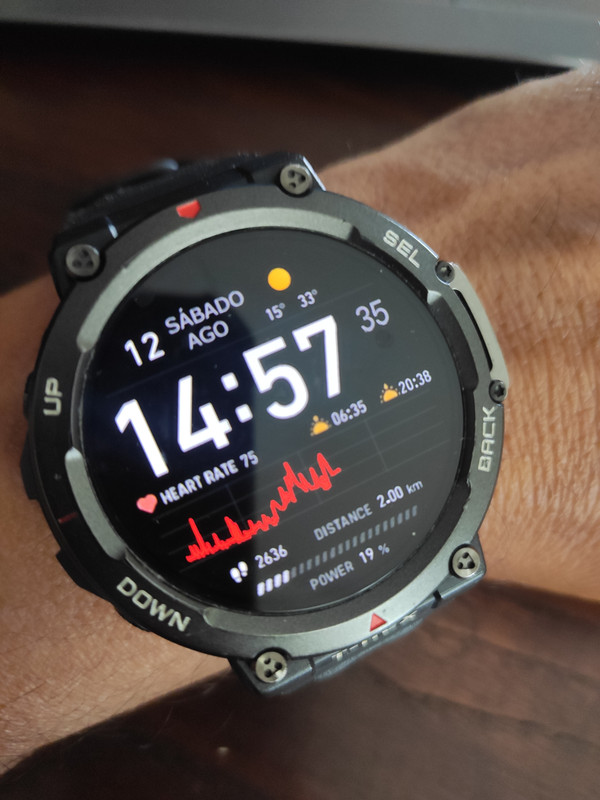
I managed to do what I wanted. Thank you very much!
This face is a copy of an original from Ultra. It will only be to explore the potentialities. The next ones will be my creation.
Best regards
Spoiler
Who is online
Users browsing this forum: No registered users and 1 guest