Looking for someone who would be willing to take my favorite watch face and invert the colors. It’s a simple analog design with day and date. Currently it is white over black background. I would like to have it with black hands and date/day over a white background. Too big a learning curve for me.
Thanks!
-
- Administrator
-
-
Support Ukraine
If you experience any problems with the forum (it is not visible, there is no way to post messages, or some functionality does not work), please let us know. If you have problems with registration or you did not receive confirmation letter, let us know and we will activate your account manually.
If you get an "The submitted form was invalid. Try submitting again" error, delete cookies, then try again.
Help reversing colors on Bip watch face
Moderators: Internal error, Watchmens
The dial can be seen on the AmazTools site; apparently it is not a bin file. But the name is One_Eng_v1.1
Here is a screenshot... Thanks!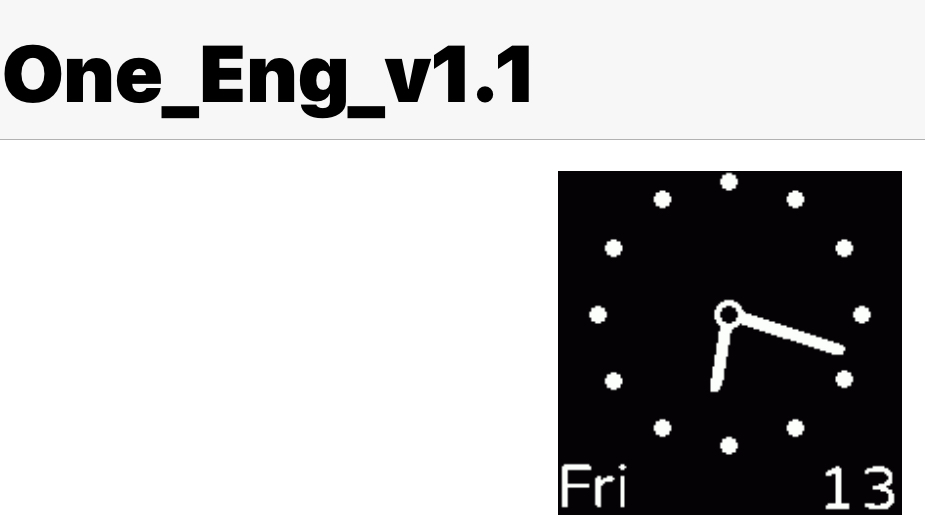
Here is a screenshot... Thanks!
Spoiler
-
TXK

- Posts: 299
- Joined: 10 Apr 2018, 05:15
- Location: china
- Has thanked: 149 times
- Been thanked: 97 times
- Contact:
download [AmazfitBipTools]KARK wrote: 26 Mar 2019, 13:22The dial can be seen on the AmazTools site; apparently it is not a bin file. But the name is One_Eng_v1.1
Here is a screenshot... Thanks!
https://bitbucket.org/valeronm/amazfitb ... downloads/
1. unpacking dial with [AmazfitBipTools]
2.Learn to modify with me:
- ppt1.PNG (237.94 KiB) Viewed 2873 times
- ppt2.PNG (281.28 KiB) Viewed 2873 times
- ppt3.PNG (267.07 KiB) Viewed 2873 times
- ppt4.PNG (208.23 KiB) Viewed 2873 times
- ppt5.PNG (225.14 KiB) Viewed 2873 times
- ppt6.PNG (218.22 KiB) Viewed 2873 times
- ppt7.PNG (227.2 KiB) Viewed 2873 times
3.packing dial with [AmazfitBipTools]
here:
- one_eng.gif (16.1 KiB) Viewed 2877 times
Thanks a billion!! Got it installed and this will be an enormous help to me. And thanks for the tutorial; I will study it and learn how to do this.
Who is online
Users browsing this forum: No registered users and 1 guest