• Administrator
  •  
    Support Ukraine
    If you experience any problems with the forum (it is not visible, there is no way to post messages, or some functionality does not work), please let us know. If you have problems with registration or you did not receive confirmation letter, let us know and we will activate your account manually.
    If you get an "The submitted form was invalid. Try submitting again" error, delete cookies, then try again.
     

AmazFit WatchFace editor for Windows by SashaCX75

This forum is designed to discuss and develop tools creating watch faces.

Moderators: asoo, lvpokka, Internal error, Watchmens

Forum rules
All communication in this branch should only be in English.
To discuss tools that are not in this section, use the “Watchfaces tools (discussion)” forum.
User avatar
SashaCX75
Posts: 819
Joined: 26 Oct 2019, 15:18
Location: Ukraine
Has thanked: 13 times
Been thanked: 1028 times
Contact:

AmazFit WatchFace editor for Windows by SashaCX75

Post by SashaCX75 »

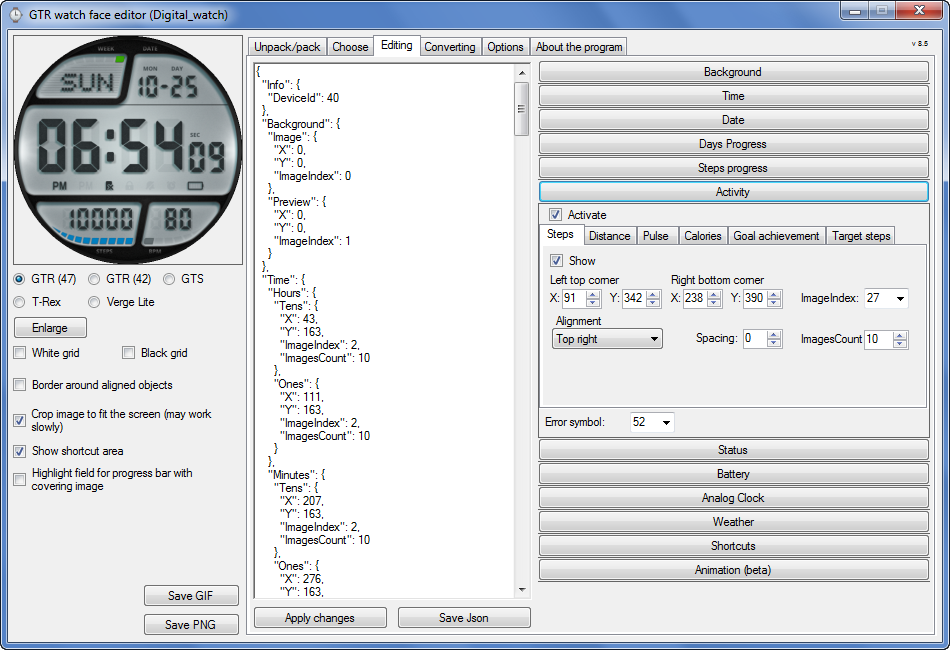
Graphics editor for working with dials Amazfit
The editor supports watch faces from GTR 47, GTR 42, GTS, T-Rex, Verge Lite.
Screenshot
Image
Note: the path to the program should not contain spaces, it is advisable to unpack it to the root of the disk.
Not all dials can be unpacked.
You can reduce the size of the bin file only by reducing the size of the images (height * width) or by reducing the number of images.

The drawing order of elements cannot be changed. The only exception is if you move the second hand from the center, it will be drawn under the hour and minute hands.

If the .bin file is not created, then you need to look for errors in the .log file. Most often this happens when images have the wrong format.

If the bin file is not created, and the log file contains the entry “bad transparency mask”, this means that the format of one or more images is incorrect (most often it occurs if you save the image in Photoshop without transparent pixels). You can fix it as follows:
- in Photoshop - add at least one transparent pixel
- in GIMP exported to PNG 16 bit RGBA
- in XnView - Image -> 32 bits

Version 10.0
List of changes
Added the ability to display the distance traveled in kilometers and miles.
Updated translation.
v 9.0
Fixed display of date if pictures have different sizes (often pictures for "1" are narrower than others)
Added new warnings about possible errors.
Fixed the order of displaying items.
Added a button to refresh the preview image.
Fixed bugs when converting watch faces.
Updated Chinese and Italian translations.
v 8.5
Fixed work with Verge Lite
v 8.4
Fixed Italian translation.
Added Chinese manual.
v 8.3
Bugs fixed.
Added a manual in English.
v 8.2
Added the display of the target steps (StepsGoal)
Added preliminary calculation of the size of the .bin file.
v 8.1
Fixed work on monitors with high resolution.
Updated translation (French, Italian, Chinese, Spanish).
v 8.0
Added the ability to convert dials between different watch models (GTR / T-Rex / Verge Lite).
v 7.1
Italian language added.
Minor fixes.
v 7.0
Added animation support
Verge Lite Support Added
Added the ability to quickly save the project (Ctrl + S)
Added support for languages (French, Chinese).
v 6.1
Added support for T-Rex.
Added the ability to auto-correct image files (error "bad transparency mask").
Added a reminder to save the project when it is closed.
v 6.0
Added support for shortcuts.
Added background image support for circular indicator.
Added display of a set of icons (segments) for the progress of steps.
Added display of a set of icons (segments) for the battery.
Added display of a set of icons (segments) for the pulse.
Added display of an indicator (arrow) for a pulse.
Added display of indicator (arrows) for calories.
Added display of a circular indicator for the pulse.
Added display of a circular indicator for calories.
Added the ability to crop the image to fit the screen.
Added support for languages ​​(Portuguese, Czech, Slovak, Hungarian).
v 5.2
Added support for a set of icons (icons and a set of coordinates for them) for the progress of steps and battery.
Added the ability to crop the preview according to the shape of the screen.
Bugs fixed in the English version.
v 5.1
Fixed incorrect display of the distance traveled.
Added the ability to adjust the speed of gif animation.
Added the ability to work with compressed bin files.
Updated bin file packer.
Added display of the year.
Added display of a charge indicator (arrow).
Added display of indicator (arrow) of steps.
Added display of the indicator (arrow) of the date.
Added display of indicator (arrow) of the day of the week.
Added display of indicator (arrow) of the month.
Added the ability to paste copied coordinates into offset fields from the center (for arrows).
English support added.
Old versions
If you want to supplement the missing translation, write to the PM.

Beta version of the editor with support for Amazfit X

AmazFit WatchFace editor 2 with support for GTR 2, GTS 2, T-Rex Pro

My editor doesn't work with GTR2 (GTS2) watch faces and I have no plans to add support for these models anytime soon. I don't know any other programs that can work with these dials. I have no information if anyone is working in this direction.

Because I bought a GTR 2e, the program will no longer be updated.

Donate to the author
PayPal: [email protected].
Last edited by SashaCX75 on 01 Jun 2022, 07:20, edited 25 times in total.
rooooi
WF maker
Posts: 4
Joined: 16 Dec 2020, 13:56
Location: portugal
Has thanked: 1 time
Contact:

Post by rooooi »

Hello, hope someone still uses this!

I was able to make a Watchface from scratch using the program but once I try packing it nothing happens, a black window appears and shortly vanishes with no .bin in sight.

On the bottom right corner of the index thing it said 3.3MBs so I thought it was the size but even after lowering it to 1.75 the results were the same, black window and nothing.
User avatar
Guydu91
Posts: 59
Joined: 06 Oct 2019, 18:49
Location: Bretagne / France
Has thanked: 55 times
Been thanked: 10 times
Contact:

Post by Guydu91 »

rooooi wrote: 23 Jan 2022, 02:27
Hello, hope someone still uses this!

I was able to make a Watchface from scratch using the program but once I try packing it nothing happens, a black window appears and shortly vanishes with no .bin in sight.

On the bottom right corner of the index thing it said 3.3MBs so I thought it was the size but even after lowering it to 1.75 the results were the same, black window and nothing.
The maximum size is 1.5...
I think it's your problem. 😉
User avatar
SashaCX75
Posts: 819
Joined: 26 Oct 2019, 15:18
Location: Ukraine
Has thanked: 13 times
Been thanked: 1028 times
Contact:

Post by SashaCX75 »

The maximum size depends on the watch model.
Exceeding the maximum size affects the operation of the watch face on the watch, but does not affect the created bin file. Look for errors in the log file.
User avatar
FeRu
Posts: 39
Joined: 06 May 2021, 11:46
Location: Poland
Has thanked: 14 times
Been thanked: 8 times
Contact:

Post by FeRu »

rooooi wrote: 23 Jan 2022, 02:27
Hello, hope someone still uses this!

I was able to make a Watchface from scratch using the program but once I try packing it nothing happens, a black window appears and shortly vanishes with no .bin in sight.

On the bottom right corner of the index thing it said 3.3MBs so I thought it was the size but even after lowering it to 1.75 the results were the same, black window and nothing.
Check if the png files are numbered consecutively from 0000 to last . Even when only one is missing or when you have mistake with one file name, your WF file will not be created. Check the log file.
rooooi
WF maker
Posts: 4
Joined: 16 Dec 2020, 13:56
Location: portugal
Has thanked: 1 time
Contact:

Post by rooooi »

I umm.. I don't think I have a log file...

I'm sorry i'm really really new to this.. I have the PNG's, the .JSON file and the preview states but no log... How do I get it?

I've also numbered the PNGs nicely and have no errors when loading the .JSON on the app. I've since lowered the size down to a nice 1.6MBs but nothing. Black window, and nothing..

Edit. I'm challenged... I made sure to note that every folder leading to the files but not the folder on which the files were actually on... thank you so much for all your help! I'll finally be able to move on to trying it on the watch!
User avatar
SashaCX75
Posts: 819
Joined: 26 Oct 2019, 15:18
Location: Ukraine
Has thanked: 13 times
Been thanked: 1028 times
Contact:

Post by SashaCX75 »

rooooi
The log file should appear next to the .JSON file when the watch face is created.
User avatar
FeRu
Posts: 39
Joined: 06 May 2021, 11:46
Location: Poland
Has thanked: 14 times
Been thanked: 8 times
Contact:

Post by FeRu »

Spoiler
rooooi wrote: 23 Jan 2022, 17:41
I umm.. I don't think I have a log file...

I'm sorry i'm really really new to this.. I have the PNG's, the .JSON file and the preview states but no log... How do I get it?

I've also numbered the PNGs nicely and have no errors when loading the .JSON on the app. I've since lowered the size down to a nice 1.6MBs but nothing. Black window, and nothing..

Edit. I'm challenged... I made sure to note that every folder leading to the files but not the folder on which the files were actually on... thank you so much for all your help! I'll finally be able to move on to trying it on the watch!
(-‸ლ) 😆

I'm glad that you found a solution...I'm sure that every WF maker from this community made some simple, idiotic and funny mistake that took a lot of nerves :lol:
rooooi
WF maker
Posts: 4
Joined: 16 Dec 2020, 13:56
Location: portugal
Has thanked: 1 time
Contact:

Post by rooooi »

I come to you with another ridiculous issue.. This time I have no issues with the files themselves.

It's the animations I'm having trouble with, I set an icon to move between the bottom of the screen up a tiny bit, looks fine in the app but doesn't work on the watch..

I have the animation speed set to 1000 and timer to 1, so it's not incredibly fast. It's also not the last PNG which I know is an issue
User avatar
SashaCX75
Posts: 819
Joined: 26 Oct 2019, 15:18
Location: Ukraine
Has thanked: 13 times
Been thanked: 1028 times
Contact:

Post by SashaCX75 »

If I remember correctly, the animation time should be 0 or a multiple of the animation speed.
Animation speed is the duration of one animation cycle in milliseconds.
rooooi
WF maker
Posts: 4
Joined: 16 Dec 2020, 13:56
Location: portugal
Has thanked: 1 time
Contact:

Post by rooooi »

I have finally made it work. I tinkered with a lot of different animation speed and animation time combinations and multiples but nothing worked, only after trying to use both animations at once (movement and frame animations) did I actually get it to work...

It happened last time I tried this too so maybe you need to export one with both for them to work? and then you take the one you don't want out? Definitely seems like it, i'll be doing another final watchface soon and will do the same thing to check if having both works right away
YNOVAD
Posts: 2
Joined: 24 Jan 2022, 20:07
Location: Cali valle
Contact:

Post by YNOVAD »

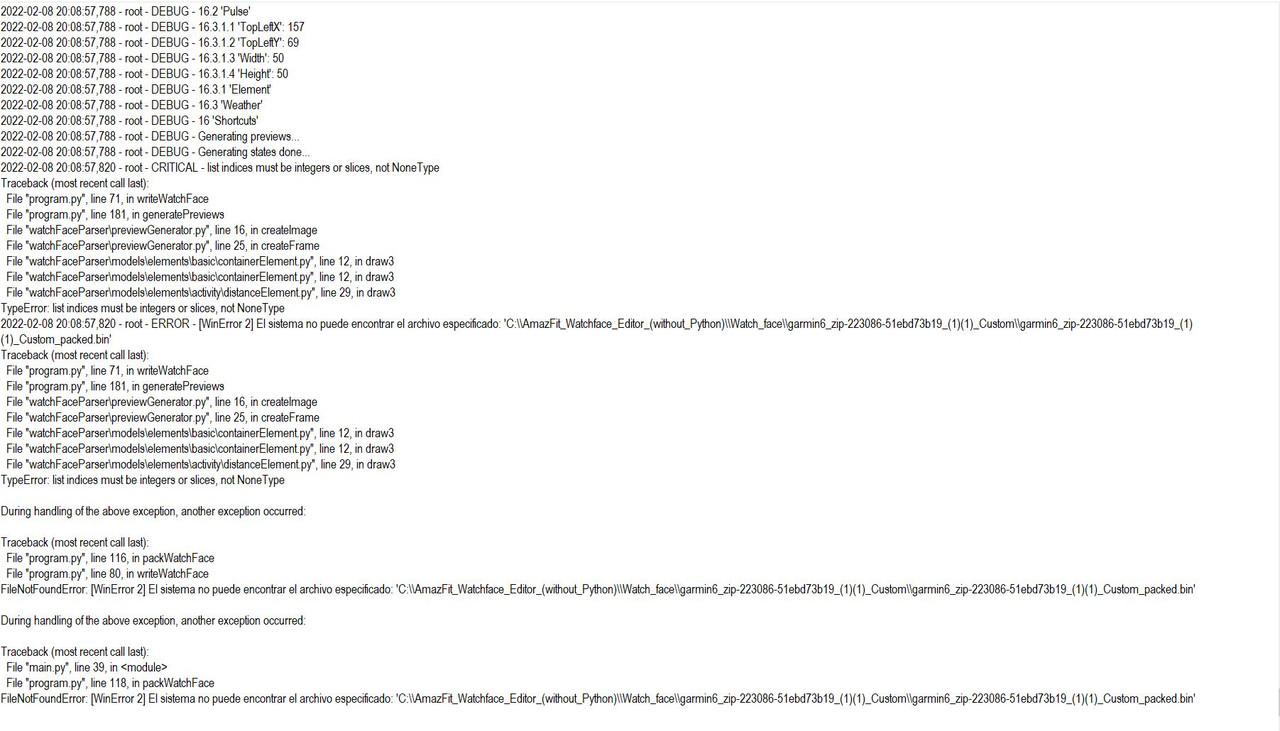
Tengo este problema al querer empaquetar y comprimir el bin para una esfera del trex
Image
User avatar
SashaCX75
Posts: 819
Joined: 26 Oct 2019, 15:18
Location: Ukraine
Has thanked: 13 times
Been thanked: 1028 times
Contact:

Post by SashaCX75 »

YNOVAD
It's hard to say without seeing the project. It seems that the "distance" parameter does not contain all the necessary parameters.
YNOVAD
Posts: 2
Joined: 24 Jan 2022, 20:07
Location: Cali valle
Contact:

Post by YNOVAD »

Thanks so much. You are so acerted. I fix the problem with a png dot for decimals. Thanks Genius!
demieg
WF maker
Posts: 2
Joined: 13 Sep 2021, 19:01
Location: Rotterdam
Contact:

Post by demieg »

Hi All,

I'm very happy with this editor. Big thumbs upp for Sasha ;D

I have a problem with icons for the battery. I've designed 6 icons for the battery. When I test the icon in the editor it works fine. When I test in with my GTS watch the battery icon doesnt match the percentage. (the icon displays a lower percentage). Anyone knows how to fix this? Thanks in advance! 8-)

ps. I've included the compressed Bin-file.
Attachments
Spongebob_Watch_NL.bin
(473.88 KiB) Downloaded 299 times
User avatar
SashaCX75
Posts: 819
Joined: 26 Oct 2019, 15:18
Location: Ukraine
Has thanked: 13 times
Been thanked: 1028 times
Contact:

Post by SashaCX75 »

demieg
No way.
Huami recommends using 10 images to display the battery charge. The preview in the editor was checked for exactly 10 images. If you use fewer images then it will work, but it may not match what is displayed in the editor.
demieg
WF maker
Posts: 2
Joined: 13 Sep 2021, 19:01
Location: Rotterdam
Contact:

Post by demieg »

SashaCX75 Thx, I'll try again with 10 images!
tsvettydjs74
Posts: 1
Joined: 20 Jan 2022, 05:14
Location: Bulgaria
Contact:

Post by tsvettydjs74 »

With this program can I change an already existing face for t-rex pro who is with .bin? And how does this happen?
User avatar
Guydu91
Posts: 59
Joined: 06 Oct 2019, 18:49
Location: Bretagne / France
Has thanked: 55 times
Been thanked: 10 times
Contact:

Post by Guydu91 »

tsvettydjs74 wrote: 02 Apr 2022, 06:43
With this program can I change an already existing face for t-rex pro who is with .bin? And how does this happen?
To open and create watchfaces for T-Rex Pro you must use this editor:
viewtopic.php?f=29&t=1888
Read the whole post carefully. It's a bit long but very useful...
Best regards
demiurg1
WF maker
Posts: 114
Joined: 23 Feb 2020, 22:49
Location: Poland
Has thanked: 23 times
Been thanked: 17 times
Contact:

Post by demiurg1 »

Please, make a donation to the developer of the software (SashaCX75) for creating watch faces. Who cannot do more, should give him even a small, only symbolic amount of money.
He really needs any such payment now.
I already did it via PayPal using his e-mail address: [email protected].
Giraz82
Posts: 2
Joined: 28 Aug 2022, 22:01
Location: Padua
Contact:

Post by Giraz82 »

Hello to everyone!
I'm new to WF editing, so please be patient if my question is stupid.
I want to edit an existing WF, but when I download it, I just get a zip file, not a bin file.
I tried to add bin extension and to unpack with this tool, but it didn't work.
How should I proceed?
The WF is this one: https://amazfitwatchfaces.com/gtr/view/25903

Thank you in advance.
User avatar
asoo
Posts: 2126
Joined: 03 Jan 2019, 01:48
Location: ͼͽ Thailand ͼͽ
Has thanked: 410 times
Been thanked: 2044 times

Post by asoo »

Giraz82 wrote: 08 Sep 2022, 23:59
Hello to everyone!
I'm new to WF editing, so please be patient if my question is stupid.
I want to edit an existing WF, but when I download it, I just get a zip file, not a bin file.
I tried to add bin extension and to unpack with this tool, but it didn't work.
How should I proceed?
The WF is this one: https://amazfitwatchfaces.com/gtr/view/25903
Thank you in advance.
"AmazFit WatchFace editor for Windows by SashaCX75"
That you can't unpack because the tool you are using It's a GTR tool. It's not for GTR3

But that WF link you talk about is GTR3 watchface
Normally, the watchface of the GTR3,4 already has a zip extension.
If you want to unpack and edit GTR 3 you must to use this program
"Amazfit GT3 Series Watch Face Editor (GTR 3, GTR 3 Pro, GTS 3)"
viewtopic.php?p=11643#p11643

!! Watchfaces of GTR , GTR2 , GTR3 have different format and cannot sync across models !!
So after unpacking, you can only use the unpack image to create a new watch face.
ͼͽ To request please use the interrelated forum in action ͼͽ
Please do not PM to me for requests ported watchface.
Giraz82
Posts: 2
Joined: 28 Aug 2022, 22:01
Location: Padua
Contact:

Post by Giraz82 »

Thank you so much!
ziramog777
Posts: 1
Joined: 29 Dec 2022, 10:24
Location: cordoba
Contact:

Post by ziramog777 »

Its valid for Trex2?
User avatar
asoo
Posts: 2126
Joined: 03 Jan 2019, 01:48
Location: ͼͽ Thailand ͼͽ
Has thanked: 410 times
Been thanked: 2044 times

Post by asoo »

ziramog777 wrote: 13 Jan 2023, 12:27
Its valid for Trex2?
Program for editor or create T-Rex 2 watchface , you can found in this link :
viewtopic.php?p=11643#p11643
ͼͽ To request please use the interrelated forum in action ͼͽ
Please do not PM to me for requests ported watchface.
HenriiTT
Posts: 1
Joined: 12 Feb 2023, 02:22
Location: Itapicuru
Contact:

Post by HenriiTT »

Amazfit Band 7?
Post Reply

Return to “Watchfaces tools”

Who is online

Users browsing this forum: No registered users and 1 guest