• 管理员
  •  
    Support Ukraine
    If you experience any problems with the forum (it is not visible, there is no way to post messages, or some functionality does not work), please let us know. If you have problems with registration or you did not receive confirmation letter, let us know and we will activate your account manually.
    If you get an "The submitted form was invalid. Try submitting again" error, delete cookies, then try again.
     

Amazfit watchfaces Tool

Archive closed topics

版主: Internal errorWatchmens

w0mbat
WF maker
帖子: 9
注册时间: 13 7月 2019, 15:37
来自: France
Has thanked: 3 time
Been thanked: 1 time
联系:

帖子 w0mbat »

manelto 写了: 24 8月 2019, 20:34
Pasos que he seguido para poder editar los ficheros del reloj GTR:
Steps that I have followed to be able to edit the GTR clock files:
...
Thx for the recap!

In the previewGenerator python file (watchFaceParser directory), change the size to 454 also.
glenan
帖子: 10
注册时间: 24 8月 2019, 16:35
来自: France
Has thanked: 2 time
Been thanked: 2 time
联系:

帖子 glenan »

Hi

I downloaded and used AmazTool All 0.1.0.11.zip with an Amazfit GTR
unpack and packed (after adding a logo on one existing watchface)
I installed new bin file with Notify and Fitness for Amazfit
It worked but with problems of colors as said above.

Thanks a lot for your job and I hope you will solved it.

[EDIT] I don't know what is the use of Watchface.exe because I only used pack.cmd and repack.cmd
Bhoken
WF maker
帖子: 3
注册时间: 22 8月 2019, 16:40
联系:

帖子 Bhoken »

[mention]manelto[/mention]Thank you ! A couple of questions. Why you modify the header? Works also for verge lite? I use image that I create with illustrator in the same resolution of a watchface that I have use as a model, it works fine?
manelto

帖子 manelto »

Kolomnych 写了: 25 8月 2019, 07:30
manelto, good instruction! But i have error while i unpack bin file:

代码: 全选

G:\Clock\amazfit_verge_lite_tools-master>py main py 01.bin
  File "main py", line 28, in <module>
    program.Parser.unpackWatchFace(inputFileName)
  File "G:\Clock\amazfit_verge_lite_tools-master\program py", line 123, in unpackWatchFace
    reader = Parser.readWatchFace(inputFileName)
  File "G:\Clock\amazfit_verge_lite_tools-master\program py", line 89, in readWatchFace
    traceback.print_stack()
Done
Also included log file. What's wrong?

P.S. i remove here "." in code "main py" and "program py", because: "You can’t post image, email or url links that are external to this domain. Please remove main py"


I can't understand you. You don't put points between main and py?
I do. I need to put them so that the instruction is recognized. At least in windows.


图片
manelto

帖子 manelto »

Bhoken 写了: 25 8月 2019, 10:43
@maneltoThank you ! A couple of questions. Why you modify the header? Works also for verge lite? I use image that I create with illustrator in the same resolution of a watchface that I have use as a model, it works fine?
The author of the program is afwafwafw. And the original program is to work directly with the verge lite. So, if you have that watch you don't have to change anything.
The modification that I detail above is to adapt the code for the GTR watch
manelto

帖子 manelto »

w0mbat 写了: 25 8月 2019, 08:21
manelto 写了: 24 8月 2019, 20:34
Pasos que he seguido para poder editar los ficheros del reloj GTR:
Steps that I have followed to be able to edit the GTR clock files:
...
Thx for the recap!

In the previewGenerator python file (watchFaceParser directory), change the size to 454 also.
Thanks!

Muchas gracias!
PavlinBecks
WF maker
帖子: 3
注册时间: 13 7月 2019, 12:04
联系:

帖子 PavlinBecks »

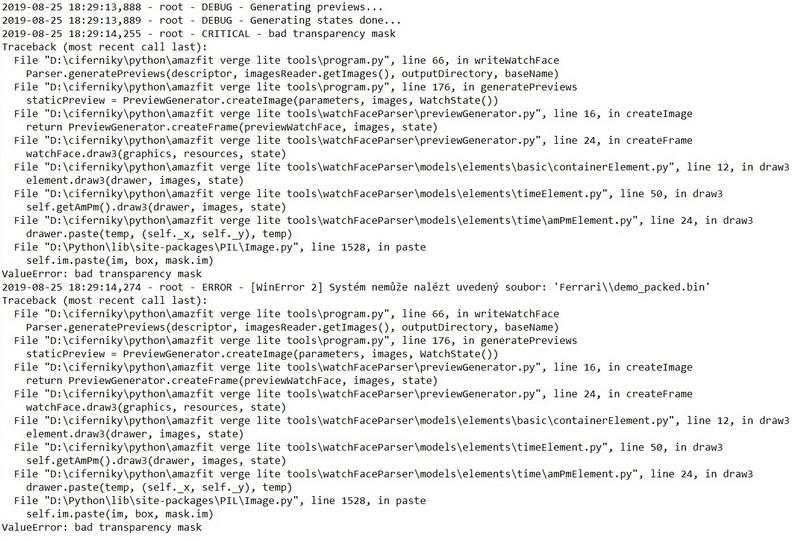
Please help me, when using Python tool from GitHub, I always get this error. What am I doing wrong? In Log I found a bug about transparency but I don't know how to fix it. Thank you.
图片
上次由 PavlinBecks 在 25 8月 2019, 16:46,总共编辑 1 次。
manelto

帖子 manelto »

Another change (remember : these changes are only for GTR):

代码: 全选

temp = Image.new('RGBA', (360, 360))
temp.paste(bitmap, (180 - x, 180 - y), bitmap)
for...

代码: 全选

temp = Image.new('RGBA', (454, 454))
temp.paste(bitmap, (227 - x, 227 - y), bitmap)
These changes are in ...\watchFaceParser\models\elements\common\imageElement.py
manelto

帖子 manelto »

PavlinBecks 写了: 25 8月 2019, 16:41
Please help me, when using Python tool from GitHub, I always get this error. What am I doing wrong? In Log I found a bug about transparency but I don't know how to fix it. Thank you.

图片
I can't see the image :?
koolgao
WF maker
帖子: 16
注册时间: 15 4月 2018, 06:25
Has thanked: 2 time

帖子 koolgao »

manelto 写了: 25 8月 2019, 16:45
Another change (remember : these changes are only for GTR):

代码: 全选

temp = Image.new('RGBA', (360, 360))
temp.paste(bitmap, (180 - x, 180 - y), bitmap)
for...

代码: 全选

temp = Image.new('RGBA', (454, 454))
temp.paste(bitmap, (227 - x, 227 - y), bitmap)
These changes are in ...\watchFaceParser\models\elements\common\imageElement.py
una pregunta esto para que vale? hay algo para que se vea bien el gif que crea? ya q no me sale el reloj entero
PavlinBecks
WF maker
帖子: 3
注册时间: 13 7月 2019, 12:04
联系:

帖子 PavlinBecks »

manelto 写了: 25 8月 2019, 16:47
PavlinBecks 写了: 25 8月 2019, 16:41
Please help me, when using Python tool from GitHub, I always get this error. What am I doing wrong? In Log I found a bug about transparency but I don't know how to fix it. Thank you.

图片
I can't see the image :?
Sorry, I can't insert
Spoiler
图片
manelto

帖子 manelto »

koolgao 写了: 25 8月 2019, 17:54
manelto 写了: 25 8月 2019, 16:45
Another change (remember : these changes are only for GTR):

代码: 全选

temp = Image.new('RGBA', (360, 360))
temp.paste(bitmap, (180 - x, 180 - y), bitmap)
for...

代码: 全选

temp = Image.new('RGBA', (454, 454))
temp.paste(bitmap, (227 - x, 227 - y), bitmap)
These changes are in ...\watchFaceParser\models\elements\common\imageElement.py
una pregunta esto para que vale? hay algo para que se vea bien el gif que crea? ya q no me sale el reloj entero
Una cosa es el gif que se crea a modo de previsualización y otra el bin que instalas en el reloj.
El bin funciona correctamente sin necesidad de este cambio ni del que ha descrito w0mba más arriba.
Pero para que el gif y las otras imágenes que se generan a modo de previews estén completos necesitas el cambio descrito por w0mbat. Y para centrar las agujas de los relojes y otras imágenes en la esfera tienes que hacer el cambio que he modificado.
The Matrix

帖子 The Matrix »

Hello,
I've made a modification from other watchface, but when I upload to my Verge lite, colors are inverted and I do not know how to solve it.
I have tried to unpack then repack again but no luck...
Spoiler
IMG_20190825_231027.jpg
IMG_20190825_231027.jpg (155.61 KiB) 查看 231779 次
附件
vermillion_20190919_packed-17820-563021d504.zip
sources
(898.76 KiB) 已下载 635 次
hall
WF maker
帖子: 7
注册时间: 15 8月 2019, 09:07
Been thanked: 1 time
联系:

帖子 hall »

glenan 写了: 25 8月 2019, 10:20
Hi

I downloaded and used AmazTool All 0.1.0.11.zip with an Amazfit GTR
unpack and packed (after adding a logo on one existing watchface)
I installed new bin file with Notify and Fitness for Amazfit
It worked but with problems of colors as said above.

Thanks a lot for your job and I hope you will solved it.

[EDIT] I don't know what is the use of Watchface.exe because I only used pack.cmd and repack.cmd
[mention]glenan[/mention] if you click edit or open .cmd file in text editor you will know that it call watchface.exe to process it. cmd just command set like batch file.
koolgao
WF maker
帖子: 16
注册时间: 15 4月 2018, 06:25
Has thanked: 2 time

帖子 koolgao »

manelto 写了: 25 8月 2019, 20:45
koolgao 写了: 25 8月 2019, 17:54
manelto 写了: 25 8月 2019, 16:45
Another change (remember : these changes are only for GTR):

代码: 全选

temp = Image.new('RGBA', (360, 360))
temp.paste(bitmap, (180 - x, 180 - y), bitmap)
for...

代码: 全选

temp = Image.new('RGBA', (454, 454))
temp.paste(bitmap, (227 - x, 227 - y), bitmap)
These changes are in ...\watchFaceParser\models\elements\common\imageElement.py
una pregunta esto para que vale? hay algo para que se vea bien el gif que crea? ya q no me sale el reloj entero
Una cosa es el gif que se crea a modo de previsualización y otra el bin que instalas en el reloj.
El bin funciona correctamente sin necesidad de este cambio ni del que ha descrito w0mba más arriba.
Pero para que el gif y las otras imágenes que se generan a modo de previews estén completos necesitas el cambio descrito por w0mbat. Y para centrar las agujas de los relojes y otras imágenes en la esfera tienes que hacer el cambio que he modificado.
Y que tengo que hacer para lo del gif este ultimo que has puesto aquí ya lo tengo hecho pero el gif we sigue saliendo medio reloj
pallbearer

帖子 pallbearer »

[mention]manelto[/mention] why not use the avialable github-fork of "amazfit_verge_lite_tools" from "ghbhaha" for the gtr, for your work. => ghbhaha/amazfit_gtr_tools

kr, pallbearer

ps: sorry i'm prohibited from posting links
manelto

帖子 manelto »

koolgao 写了: 26 8月 2019, 11:14
manelto 写了: 25 8月 2019, 20:45
koolgao 写了: 25 8月 2019, 17:54


una pregunta esto para que vale? hay algo para que se vea bien el gif que crea? ya q no me sale el reloj entero
Una cosa es el gif que se crea a modo de previsualización y otra el bin que instalas en el reloj.
El bin funciona correctamente sin necesidad de este cambio ni del que ha descrito w0mba más arriba.
Pero para que el gif y las otras imágenes que se generan a modo de previews estén completos necesitas el cambio descrito por w0mbat. Y para centrar las agujas de los relojes y otras imágenes en la esfera tienes que hacer el cambio que he modificado.
Y que tengo que hacer para lo del gif este ultimo que has puesto aquí ya lo tengo hecho pero el gif we sigue saliendo medio reloj
A mí me sale completo.

Tienes este código en el fichero previewGenerator.py de la carpeta ...\watchFaceParser? Originalmente, en lugar de los valores 454 había 464.

代码: 全选

    def createFrame(watchFace, resources, state):
        from PIL import Image, ImageDraw

        graphics = Image.new('RGBA', (454, 454))
        watchFace.draw3(graphics, resources, state)
        return graphics
Esa es la modificación que permite ver los gif's completos y es la descrita por w0mbat. Insisto: la que yo puse era para centrar los elementos gráficos en la esfera.
manelto

帖子 manelto »

pallbearer 写了: 26 8月 2019, 12:42
@manelto why not use the avialable github-fork of "amazfit_verge_lite_tools" from "ghbhaha" for the gtr, for your work. => ghbhaha/amazfit_gtr_tools

kr, pallbearer

ps: sorry i'm prohibited from posting links
I haven't a github user.
pallbearer

帖子 pallbearer »

manelto 写了: 26 8月 2019, 13:12
.......

I haven't a github user.
[mention]manelto[/mention]
no i meant that there is already a tools version for the gtr watch from "ghbhaha" that is avialable on github as a fork from the tools "afwafwafw" posted.
The Matrix

帖子 The Matrix »

On my Verge Lite StepsProgress doesn't work at all. The animated gif is displaying correctly the circle but in the watch isn't displayed.
manelto

帖子 manelto »

pallbearer 写了: 26 8月 2019, 13:36
manelto 写了: 26 8月 2019, 13:12
.......

I haven't a github user.
@manelto
no i meant that there is already a tools version for the gtr watch from "ghbhaha" that is avialable on github as a fork from the tools "afwafwafw" posted.
I find nothing better than the afwafwafw program with the changes described here. It works and it is easy to use.
The Matrix

帖子 The Matrix »

In my watchface, I'm trying to display date in format MMDD instead of DDMM.
To do that, I'm using this code:

代码: 全选

  "Date": {
    "MonthAndDay": {
      "Separate": {
        "Day": {
          "TopLeftX": 233,
          "TopLeftY": 79,
          "BottomRightX": 254,
          "BottomRightY": 94,
          "Alignment": "TopLeft",
          "Spacing": 1,
          "ImageIndex": 13,
          "ImagesCount": 10
        },
        "Month": {
          "TopLeftX": 264,
          "TopLeftY": 79,
          "BottomRightX": 285,
          "BottomRightY": 94,
          "Alignment": "TopLeft",
          "Spacing": 1,
          "ImageIndex": 13,
          "ImagesCount": 10
        }
      },
      "TwoDigitsMonth": true,
      "TwoDigitsDay": true
    },
instead of this code

代码: 全选

  "Date": {
    "MonthAndDay": {
      "OneLine": {
        "Number": {
          "TopLeftX": 233,
          "TopLeftY": 79,
          "BottomRightX": 285,
          "BottomRightY": 94,
          "Alignment": "BottomLeft",
          "Spacing": 1,
          "ImageIndex": 13,
          "ImagesCount": 10
        },
		"DelimiterImageIndex": 32
      },
      "TwoDigitsMonth": true,
      "TwoDigitsDay": true
    },
But when I use the code that displays the month and day separated, the month and day are displayed at the same position and the digits are overlapped (see image).

Isn't possible to use the "Separate" modifier?
(Is there a way to obtain a list of the available modifiers?)
附件
IMG_20190826_194723.jpg
IMG_20190826_194723.jpg (61.03 KiB) 查看 422581 次
Red Art Studio
WF maker
帖子: 2
注册时间: 11 7月 2019, 01:44
联系:

帖子 Red Art Studio »

This tool is only for unpack/pack?

So which tool to edit?
manelto

帖子 manelto »

Red Art Studio 写了: 27 8月 2019, 00:33
This tool is only for unpack/pack?

So which tool to edit?
A text editor for json (I use Notepad++) and a program for create/modify png (GIMP, photoshop, paintnet,...).
hall
WF maker
帖子: 7
注册时间: 15 8月 2019, 09:07
Been thanked: 1 time
联系:

帖子 hall »

some watch face not show weekday. check .json and png also correct. Anyone know where the problem?
主题已锁定

回到 “Closed topics”

在线用户

正浏览此版面之用户: 没有注册用户 和 1 访客