ha ... still had time. ;-)
Got out of bed very early today. I looked at your watch face, sorted and commented the code a bit. The changes run fine for me.
Some of the elements doesn't works - I commented it out.
I am currently writing a collection of instructions with all the information and ...
Search found 8 matches
- 05 Oct 2020, 11:46
- Jump to forum
- Jump to topic
[Tutorial] How to create WFZ watchfaces for Stratos 3 (new style / GTRWidget)
Hello community,
I've been asked several times how I do it with the watch faces and what software I use. The Software-question is easy to answer: Paint Shop Pro 2020 for the graphics, Notepad ++ for the code and 7zip to pack / unpack. Nothing else.
For the HOW-question - I sat down and wrote the ...
I've been asked several times how I do it with the watch faces and what software I use. The Software-question is easy to answer: Paint Shop Pro 2020 for the graphics, Notepad ++ for the code and 7zip to pack / unpack. Nothing else.
For the HOW-question - I sat down and wrote the ...
- 05 Oct 2020, 11:47
- Jump to forum
- Jump to topic
Re: [Tutorial] How to create WFZ watch faces for Stratos 3 (new style / GTRWidget)
Table of contents
THE BASICS
Structure of the basic files
Special configurations in the base files
Structure of the "font.xml" file for displaying digits and characters
THE ELEMENTS
WatchFaceItem elements
WatchFaceComponent elements
Explanations of the parameters for the ...
THE BASICS
Structure of the basic files
Special configurations in the base files
Structure of the "font.xml" file for displaying digits and characters
THE ELEMENTS
WatchFaceItem elements
WatchFaceComponent elements
Explanations of the parameters for the ...
- 07 Oct 2020, 08:55
- Jump to forum
- Jump to topic
Re: [Tutorial] How to create WFZ watchfaces for Stratos 3 (new style / GTRWidget)
Update 07/10
New information about: WatchFaceComponent "background" and "timehand".
Update 08/10
Corrected an error in the code for the graphical display of the step counter. The parameters are case sensitive! Additiveimage changed to AdditiveImage
<WatchFaceComponent type="gtrwidget ...
New information about: WatchFaceComponent "background" and "timehand".
Update 08/10
Corrected an error in the code for the graphical display of the step counter. The parameters are case sensitive! Additiveimage changed to AdditiveImage
<WatchFaceComponent type="gtrwidget ...
- 20 Oct 2020, 10:38
- Jump to forum
- Jump to topic
Re: Question about the xml components
I looked at the code on your "Chronos00" watch face. There you commented out the line with the "year", with the remark that the clock freezes when it goes into standby mode. I've stumbled across it, but there is a solution.
I had already written about this in my tutorial:
++ Definition year ...
I had already written about this in my tutorial:
++ Definition year ...
- 05 Jan 2021, 10:47
- Jump to forum
- Jump to topic
Re: Show your current watchface on the watch
I like the tubes, but in locked mode it shows not so good, because the color limitation.
- 05 Jan 2021, 19:53
- Jump to forum
- Jump to topic
Re: Show your current watchface on the watch
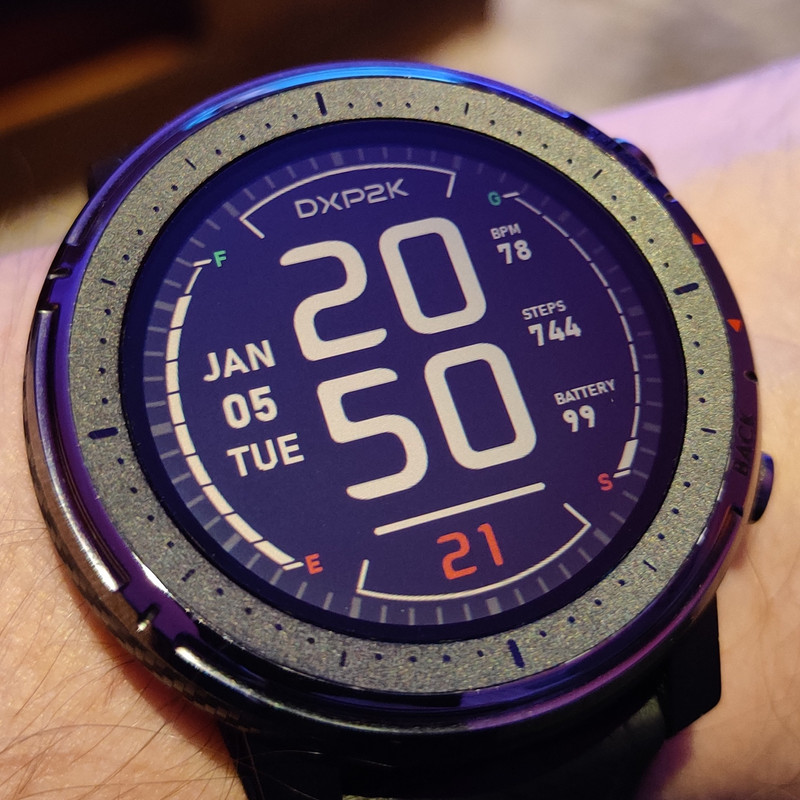
This is mine at the moment....
- 26 Jan 2021, 06:05
- Jump to forum
- Jump to topic
Re: [Tutorial] How to create WFZ watchfaces for Stratos 3 (new style / GTRWidget)
As far as I can tell, the heart rate doesn't work with the AdditiveImages. I haven't managed to do that either, so I'm not using it. The ItemType "Arc" works with the heart rate. Maybe this will help you.
The SAWB only uses the original Huami widgets that also run on the Stratos 2 and the PACE ...
The SAWB only uses the original Huami widgets that also run on the Stratos 2 and the PACE ...