青春版1代表盘(BIP) 非常多,很多人想转成青春版1s表盘(BIP S),由于没有完整的修改方法,一直困扰着大家。
现在,我把完整的转换方法和工具,写成一个教程,希望能够帮助到大家:
1、新建两个文件夹,一个文件夹命名为 1 ,另一个文件夹命名为 1s 。
001.png
2、分别在 1 和 1s这两个的文件夹里,存入不同的解包和打包工具(1 和 1s 各自的专用工具)。并且把主程序重命名为 w.exe 如图所示:
002.png
003.png
3、找到并下载好自己喜欢的青春版1代(BIP)表盘,放到 1 这个文件夹里,用青春版1代的[解包工具]解包。如图所示 ...
Search found 418 matches
- 04 Sep 2025, 14:16
- Jump to forum
- Jump to topic
Re: 请问有zeppz系列的表盘吗
I'm not sure that will work. As far as I remember, the watch faces were assembled for a specific model and could not be installed on another model. Several bytes in the watch face file header were changed to encode the model. I don't remember there being a watch face assembler for Zepp Z ...
- 13 Oct 2022, 15:40
- Jump to forum
- Jump to topic
Re: Huawei watchface extractor
As far as I know, Huawei watch faces can be created in the usual form and in encrypted form. If the author decided to encrypt his watch face, then it will not work to extract resources from it. Most of the new watch faces are created in encrypted form and therefore it is impossible to extract ...
- 02 Jul 2023, 11:21
- Jump to forum
- Jump to topic
Re: Is it possible to code a mode switch in a watchface?
Yes, it is possible. You can activate and deactivate the visibility of individual elements at set times or during sunrise and sunset. But you would actually have to make two dials and turn one of them off under a tedious condition.
- 20 Sep 2023, 10:22
- Jump to forum
- Jump to topic
Need opinions for my new application
Mi Create is a simple to use watchface designer made for non Huami manufactured Xiaomi wearables (Xiaomi watch series, any Xiaomi band newer than the Band 7 & Redmi Watch series)
It's made to be as easy to use as possible, no pitfalls or nasty caveats, no sluggish UI and no fancy excessive features ...
It's made to be as easy to use as possible, no pitfalls or nasty caveats, no sluggish UI and no fancy excessive features ...
- 03 May 2024, 22:24
- Jump to forum
- Jump to topic
Re: Need opinions for my new application
rfenix15 False positive, compiled python projects get flagged by antiviruses because beginner virus devs use python to make their viruses and antivirus companies cut the time and money required to detect these viruses so they outright flag every python app that has a shred of resemblance to these ...
- 17 Aug 2024, 18:47
- Jump to forum
- Jump to topic
Re: A program to reduce the size of a graphic file
It makes no sense to reduce image quality to reduce file size. Because if I remember correctly, in GTR 1 images are converted to a BMP-like format. So the only way to reduce the watch face is to reduce the width and height of the image. 1 pixel of the image requires 4 bytes.
- 19 Sep 2024, 10:17
- Jump to forum
- Jump to topic
Re: Watchfaces Editor does not recognize some watchface
This is "Watch face editor for Amazfit watch on ZeppOS" Versin 11.2 that I added data of T-Rex 3 to
model_config by myself (not official update from Sasha) can select device T-REX 3 in the editor
T-Rex 3 users who are interested can try to use it temporarily before the official update from Sasha ...
- 22 Sep 2024, 13:43
- Jump to forum
- Jump to topic
Re: Resources bank
Vector icon(png and svg):
https://www.flaticon.com/icons
Font download:
https://font.download/
Palette generator:
https://coolors.co/
Weather icon:
https://www.hongkiat.com/blog/free-weather-iconsets/
Weather icon2:
https://bas.dev/work/meteocons
https://www.flaticon.com/icons
Font download:
https://font.download/
Palette generator:
https://coolors.co/
Weather icon:
https://www.hongkiat.com/blog/free-weather-iconsets/
Weather icon2:
https://bas.dev/work/meteocons
- 24 Sep 2024, 17:42
- Jump to forum
- Jump to topic
Re: Resources bank
Vector black and white icons
https://fonts.google.com/icons?icon.platform=web
https://pictogrammers.com/library/mdi/
https://fonts.google.com/icons?icon.platform=web
https://pictogrammers.com/library/mdi/
- 17 Oct 2024, 16:02
- Jump to forum
- Jump to topic
Re: What is your coding environment and workflow?
In my editor you can make a template for such watch faces. And then you can add necessary functions yourself using this documentation and basic knowledge of JS.
- 16 Jan 2025, 15:55
- Jump to forum
- Jump to topic
Re: Help with simulating watchface for the balance
The sequence of actions is correct. You have an error somewhere in your code.
- 17 Jan 2025, 07:27
- Jump to forum
- Jump to topic
Re: Help with simulating watchface using Zepp OS [ balance]
Of course it's going to cause an error. Because if you look at the structure of the files before changing them, you will see that it is different. In the best case you can copy the init_view() function from one file to another. But you also need to m,eltn copy other elements besides the function.
- 17 Jan 2025, 19:18
- Jump to forum
- Jump to topic
Re: Help with simulating watchface using Zepp OS [ balance]
piotarock
1. The editor makes watch faces on API 1. In Zeus CLI you have created code on API 2. They have fundamentally different code and cannot be copied. Create a watch face on API 1. If it is important for your design to use functions that are available only on API 2, you can take only ...
1. The editor makes watch faces on API 1. In Zeus CLI you have created code on API 2. They have fundamentally different code and cannot be copied. Create a watch face on API 1. If it is important for your design to use functions that are available only on API 2, you can take only ...
- 06 Feb 2025, 19:43
- Jump to forum
- Jump to topic
Re: SashaCX75 V.12.2: mile per km
It seems to be a specific feature of this model. You can try to use ‘Numeric values’ image set instead of font. It might help.
- 19 Feb 2025, 17:46
- Jump to forum
- Jump to topic
Re: Add Floor and Calendar event element
Because there's no such thing in the editor. You have to edit the code of the finished watch face.
You cannot display calendar events on the watch face. You can only add a shortcut to the calendar.
You cannot display calendar events on the watch face. You can only add a shortcut to the calendar.
- 02 Mar 2025, 09:16
- Jump to forum
- Jump to topic
Re: How to package in .zab?
I think they make a blank watch face in the official editor and export it to .zab. Then in it they change the existing .zpk file to the .zpk file created in my editor.
When using Zeus CLI, it also creates an empty watch face and then pastes the code from the watch face created in the editor into it ...
When using Zeus CLI, it also creates an empty watch face and then pastes the code from the watch face created in the editor into it ...
- 20 Jun 2025, 16:37
- Jump to forum
- Jump to topic
Re: Watchface Maker: Help With 3 Issues
It seems that if you select a custom preview instead of a generated preview when exporting, it works faster. But I'm not sure.
- 23 Feb 2026, 19:12
- Jump to forum
- Jump to topic
Re: Seonds progress (linear mode) and also step
This is an example I've created; it's the simplest method I can think of.
But you need to create a 60-frame image to show this progress.
This is the simplest option and the easiest to adapt to different models.
But you can also make one image with the background as a mask. And under it, place ...
- 19 Apr 2026, 07:06
- Jump to forum
- Jump to topic
Re: I make a tool to push the zpk into official simulator, but have little problems
I find the issue caused by, and I can push some watchfaces to the official simulator :D
(Example watchface: Marc F18 Golf FR V1 ( https://amazfitwatchfaces.com/active/view/1737 ) made by markillers ( https://amazfitwatchfaces.com/ucp/871122 ))
https://i.postimg.cc/pTPLZ7ph/ying-mu-xie-qu-hua-mian ...
(Example watchface: Marc F18 Golf FR V1 ( https://amazfitwatchfaces.com/active/view/1737 ) made by markillers ( https://amazfitwatchfaces.com/ucp/871122 ))
https://i.postimg.cc/pTPLZ7ph/ying-mu-xie-qu-hua-mian ...
- 19 Apr 2026, 17:20
- Jump to forum
- Jump to topic
Re: I make a tool to push the zpk format watchface into official simulator, but have little problems(Fixed)
A useful utility.
If you’re interested, we could discuss the possibility of integrating it into the editor. That way, you wouldn’t need to go through the process of unpacking the dial; you could simply work with the pre-prepared files.
If you’re interested, we could discuss the possibility of integrating it into the editor. That way, you wouldn’t need to go through the process of unpacking the dial; you could simply work with the pre-prepared files.
- 20 Apr 2026, 16:57
- Jump to forum
- Jump to topic
Re: I make a tool to push the zpk format watchface into official simulator, but have little problems(Fixed)
After dive in the JSON file, I discovered that the simulator uses socket.io to communication with the CLI.
Fortunately, NuGet has the package uses the same protocol, is available for C#.
https://github.com/doghappy/socket.io-client-csharp
Using that NuGet package, along with my limited C ...
Fortunately, NuGet has the package uses the same protocol, is available for C#.
https://github.com/doghappy/socket.io-client-csharp
Using that NuGet package, along with my limited C ...
- 21 Apr 2026, 10:33
- Jump to forum
- Jump to topic
Re: I make a tool to push the zpk format watchface into official simulator, but have little problems(Fixed)
I uploaded the polished version here:
https://github.com/Bob-YsPan/zepp-os-pu ... mulator-cs
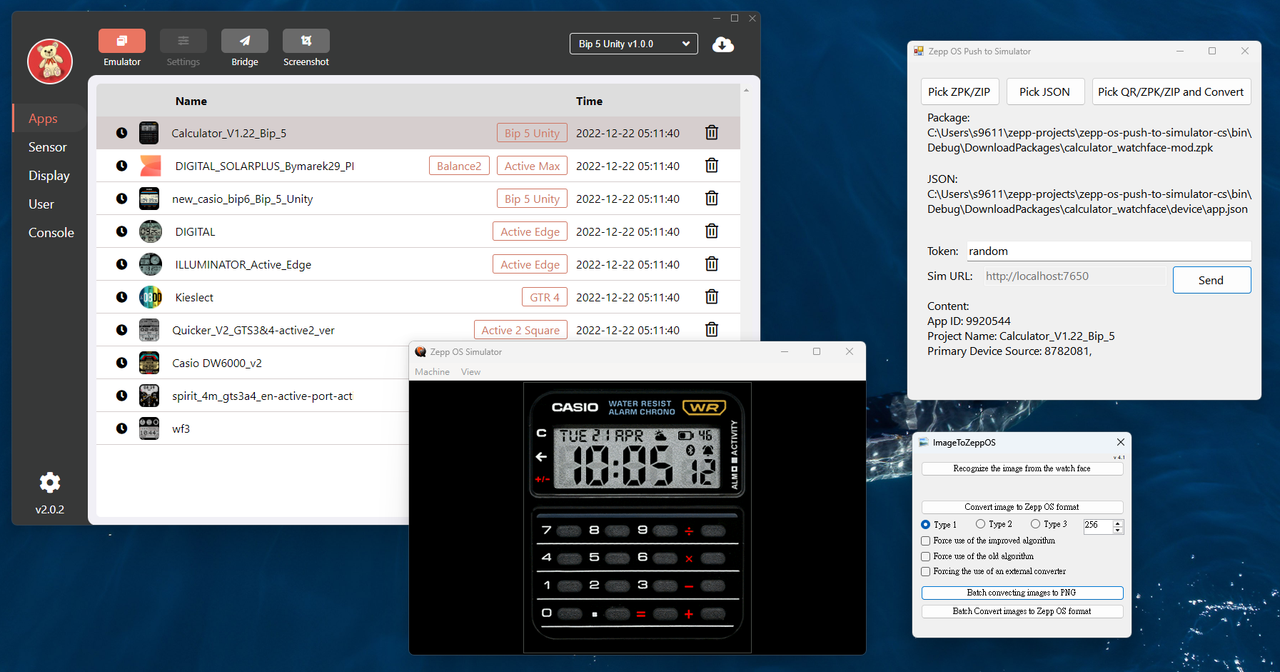 Maybe this version is easier to merge into the Editor, it eliminates the dependency on Node.js.
https://github.com/Bob-YsPan/zepp-os-pu ... mulator-cs
Spoiler
- 21 Apr 2026, 10:56
- Jump to forum
- Jump to topic
Re: I make a tool to push the zpk format watchface into official simulator, but have little problems(Fixed)
I find out the package exported by the SashaCX75's WatchFace editor, can push into the simulator with little modification:
Edit: I added the flow into the C#'s version of the program, just open the exported watchface package like the zpk!
(Steps 1~2 can see the instruction in this README https ...
Edit: I added the flow into the C#'s version of the program, just open the exported watchface package like the zpk!
(Steps 1~2 can see the instruction in this README https ...
- 21 Apr 2026, 16:51
- Jump to forum
- Jump to topic
Re: I make a tool to push the zpk format watchface into official simulator, but have little problems(Fixed)
I successfully imported the dial I created in the editor into the simulator.
I honestly didn't understand the point of step 2 in your instructions. I just replaced the images in the dial file with standard PNG files and everything worked.
Since you’ve rewritten the code in C#, I should probably be ...
I honestly didn't understand the point of step 2 in your instructions. I just replaced the images in the dial file with standard PNG files and everything worked.
Since you’ve rewritten the code in C#, I should probably be ...