Delete the bin file downloaded in Files (blue app), restart your phone and also your watch.
After restarting both devices, open the Zepp app and connect your watch once again, open the Amazfaces app and choose GTR2 or GTR3.
Search for an WF using the ID-Number, look for your device (GTR4), connect ...
Se encontraron 5 coincidencias
- 27 Nov 2022, 21:00
- Foro: AmazFaces app
- Tema: AmazFaces for iOS [Support]
- Respuestas: 235
- Vistas: 370267
- 20 Nov 2022, 15:11
- Foro: AmazFaces app
- Tema: AmazFaces for iOS [Support]
- Respuestas: 235
- Vistas: 370267
Re: AmazFaces for iOS [Support]
You can, using the ID-Number option,
you put the number and you’ll find the WF for the GTR4 you want to install.
Cheers
you put the number and you’ll find the WF for the GTR4 you want to install.
Cheers
- 18 Nov 2022, 09:14
- Foro: Watchfaces tools
- Tema: AmazFit WatchFace editor 2 for Windows
- Respuestas: 485
- Vistas: 729408
Re: AmazFit WatchFace editor 2 for Windows
Big thanks to SashaCX75 for this awesome tool.
Keep it up with the great work.
Cheers buddy!!!
Keep it up with the great work.
Cheers buddy!!!
- 18 Nov 2022, 09:13
- Foro: Watchfaces tools
- Tema: Watch face editor for Amazfit watch on ZeppOS
- Respuestas: 1213
- Vistas: 2718219
Re: Amazfit GT3 Series Watch Face Editor (GTR 3, GTR 3 Pro, GTS 3)
Big thanks to SashaCX75 for this awesome tool.
Keep it up with the great work.
Cheers buddy!!!
Keep it up with the great work.
Cheers buddy!!!
- 18 Nov 2022, 09:12
- Foro: AmazFaces app
- Tema: AmazFaces for iOS [Support]
- Respuestas: 235
- Vistas: 370267
Re: AmazFaces for iOS [Support]
Good morning AMAZFACES-Team,
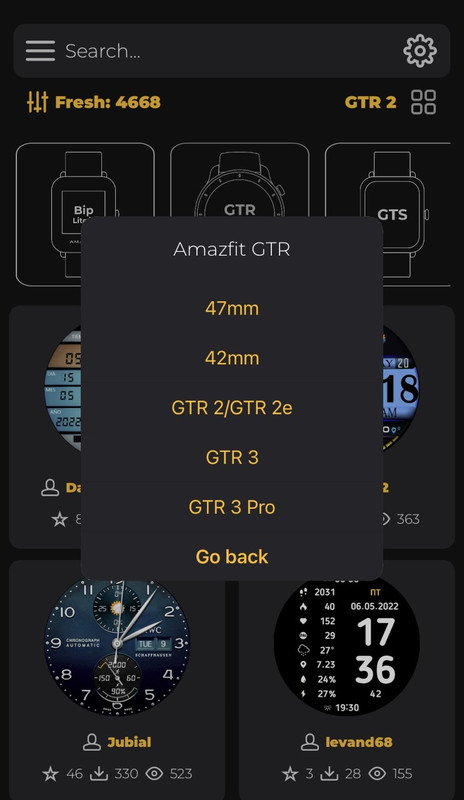
for a future update for iOS, please include the GTR4 in the list of gadgets (GTR-List),
because now the only way to install WFs is using the ID-Number.
Thank you in advance for the nice work!!
 Have a great day!!
for a future update for iOS, please include the GTR4 in the list of gadgets (GTR-List),
because now the only way to install WFs is using the ID-Number.
Thank you in advance for the nice work!!
Spoiler