Page 1 of 1
Mi Smart Band 4
Posted: 07 Oct 2019, 17:14
by richiev4
Hi All
I'm new to this and could use some help
I have created a watch face for destiny but cannot see it when I upload it to my phone (Nokia 8)
I have used the MiBandWFTool_1.4.1 version and packaged the files using the RAWImageMode version - i did not get any errors - however the preview looks wrong
I've tried copying the file directly to the Xiaomi folder :-
\Internal shared storage\Android\data\com.xiaomi .hm.health\files\watch_skin_local
and using the MiBand4 watch faces app but with no luck
I've attached my .bin file if that helps
Please help
Thanks
Richard
Re: Mi Smart Band 4
Posted: 08 Oct 2019, 06:35
by mysiak
Hi Richard, I use Notify & Fitness for custom WFs. It's much easier to upload them to the band and you also see a correct preview on the phone (even if somehow broken - HR doesn't show for example). I'm not sure how your WF should look like, but the preview looks ok to me. I strongly advise to use this tool
viewtopic.php?f=29&t=890, WF editing and creation is much easier ("pack as is" = raw).
When you build a WF and it's severely wrong (images out of place etc.), check DPI of your source images (96x96 works best for me). Some imaging apps create higher DPI and this can cause issues.
Re: Mi Smart Band 4
Posted: 08 Oct 2019, 16:02
by richiev4
Hi mysaik
That worked brilliantly, thanks. However when I load the watch face certain elements appear then disappear. The charge indicator and the date to be exact, any idea why this might happen?
I have uploaded an image showing what it look like and highlighting what disappears.
Thanks again
Rich
Re: Mi Smart Band 4
Posted: 09 Oct 2019, 07:06
by mysiak
Disable seconds, there is a bug (in Mi Band FW?) which removes some of the elements when seconds update - this is why you see everything when you turn screen on/return from menu, but they disappear after a second.
Re: Mi Smart Band 4
Posted: 09 Oct 2019, 16:05
by richiev4
Hi mysiak
That worked a treat, your help is very much appreciated.
One more question if I may - my steps indicator is not working, the number are fine but the images don't appear as I progress.
Any ideas, I have attached my json file.
Many thanks
Rich
Re: Mi Smart Band 4
Posted: 10 Oct 2019, 05:30
by mysiak
Not sure what modifications have you done, but it was enough to remove section "Seconds": { .... } (either directly from JSON or in Watchface editor). JSON from the previous post has all image indexes shifted, so it's hard to tell what exactly is wrong without actually seeing all images. I've attached a bin file where I only removed seconds, everything else is kept untouched and looks to be working fine.
Re: Mi Smart Band 4
Posted: 10 Oct 2019, 17:33
by richiev4
Hi
Thanks again, but the steps progress still doesn't work, I've attached before and after images to show what it should look like
Before:
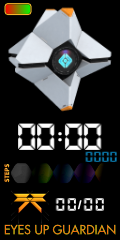
- Before.png (24.39 KiB) Viewed 3306 times
After:
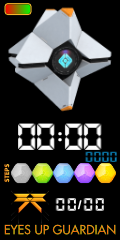
- After.png (26.14 KiB) Viewed 3306 times
Please let me know if you want me to upload all the images
Thanks again
Rich
Re: Mi Smart Band 4
Posted: 11 Oct 2019, 11:00
by mysiak
Please upload the packed BIN file, I don't see anything wrong with your JSON, progress bar for steps seems to be working fine for me.
Re: Mi Smart Band 4
Posted: 11 Oct 2019, 16:24
by mysiak
Oh sorry, I did not realize that you are using two steps progress indicators (circle + linear), I only noticed the linear one. You are probably hitting the same issue as this guy
viewtopic.php?p=3178#p3178
Re: Mi Smart Band 4
Posted: 11 Oct 2019, 21:34
by richiev4
Hi
I removed the circle progress indicator and it's now working perfectly
Many thanks
Rich
Re: Mi Smart Band 4
Posted: 19 Oct 2019, 23:07
by richiev4
Hi Again
I've created a new face but cant get the 'day' to appear
I've attached the bin file.
I would be very grateful if someone could take a look
I used WF_Builder1.0.1
Thanks
Rich
Re: Mi Smart Band 4
Posted: 19 Oct 2019, 23:56
by richiev4
Hi
Ok, I think I figured it out.
I assigned 21 images to the days and all seems fine now. not sure if this is the correct way, but it seems to have worked.
Rich
Re: Mi Smart Band 4
Posted: 20 Oct 2019, 09:38
by mysiak
Yes, that's the correct way. I saw it mentioned somewhere in one of the WF tools, but can't find it right now. Basically Mi Band needs 3 sets of weekdays, Chinese (simplified?), Chinese and International. First two sets can be replaced with empty PNG files (1x1 pixel dimension) to generate smaller BIN file. A lot of WFs use this approach.