Page 1 of 1
Is any step by step Guide how to protect your watchfaces?
Posted: 15 Mar 2026, 07:36
by g-rex69
Im using Watch Face Editor (ZeppOS), is there any option to protect the zip file before pressing "pack watch face"?
i have few more questions:
1. Can you supply a step by step guide how to protect the "js" folder, pictures etc...
2. if converting the zip to bin protects the watchface on a certain level?
What can u recommend?
Thanks.
Re: Is any step by step Guide how to protect your watchfaces?
Posted: 15 Mar 2026, 16:37
by frankh93
As far as I know, there isn't a way to protect your watchfaces more than "uglify" the index.js but still anyone can have access to the images and replicate the design if they are skilled enough
Re: Is any step by step Guide how to protect your watchfaces?
Posted: 16 Mar 2026, 08:04
by g-rex69
frankh93 wrote: 15 Mar 2026, 16:37
As far as I know, there isn't a way to protect your watchfaces more than "uglify" the index.js but still anyone can have access to the images and replicate the design if they are skilled enough
can you refer me to a guide how to use "uglify"?
Thanks
Re: Is any step by step Guide how to protect your watchfaces?
Posted: 16 Mar 2026, 08:31
by asoo
g-rex69 wrote: 16 Mar 2026, 08:04
can you refer me to a guide how to use "uglify"?
Thanks
If you want to 'uglify' JavaScript, I recommend checking out:
https://github.com/mishoo/UglifyJS
The website provides step-by-step instructions on usage and installation.
However, if excessive uglifiy with index.js might that index.js will not run on device normally.
The command line I've used to "uglify" the index.js and still get tworking on the device normally is:
Code: Select all
uglifyjs index.js -m -c -o index.js
Note: Before using the uglifyjs command, you must have uglifyjs installed. As mentioned earlier, you can find more information at this link:
https://github.com/mishoo/UglifyJS
Re: Is any step by step Guide how to protect your watchfaces?
Posted: 16 Mar 2026, 08:48
by MarioLie
The user still does not understand that there is no way to prevent someone who purchases his work from passing it on for free to another user. And even encrypted works can be copied. Perhaps it would be better to always create one's own works and either offer them freely or for a fee, knowing that it will make someone happy. The best approach is to create works directly for individuals, and those are then not copied.
Re: Is any step by step Guide how to protect your watchfaces?
Posted: 16 Mar 2026, 15:24
by g-rex69
i have tried "uglify" and i didnt understand yet how to work with it. i will try again. MarioLie, i do understand, as a watchface builder perspective, and im talking about my self in this case. im working hours on my watchfaces, thinking about ideas how to build new watchfaces. its not come easy. specially the JS programing(im not a programmer). it will be much easier for me to give them for free if i could protect them better. anyway, i appreciate the reply.
Re: Is any step by step Guide how to protect your watchfaces?
Posted: 17 Mar 2026, 08:24
by g-rex69
asoo wrote: 16 Mar 2026, 08:31
g-rex69 wrote: 16 Mar 2026, 08:04
can you refer me to a guide how to use "uglify"?
Thanks
If you want to 'uglify' JavaScript, I recommend checking out:
https://github.com/mishoo/UglifyJS
The website provides step-by-step instructions on usage and installation.
However, if excessive uglifiy with index.js might that index.js will not run on device normally.
The command line I've used to "uglify" the index.js and still get tworking on the device normally is:
What is the "index.js"?
are u talking about the prime "json" file in the root folder or the files inside the JS folder.
so i understand i need to use the UglifyJS before im packing a watchface to zip file
Re: Is any step by step Guide how to protect your watchfaces?
Posted: 17 Mar 2026, 09:20
by asoo
g-rex69 wrote: 17 Mar 2026, 08:24
What is the "index.js"?
are u talking about the prime "json" file in the root folder or the files inside the JS folder.
so i understand i need to use the UglifyJS before im packing a watchface to zip file
"index.js" is not included in the project's boundary package.
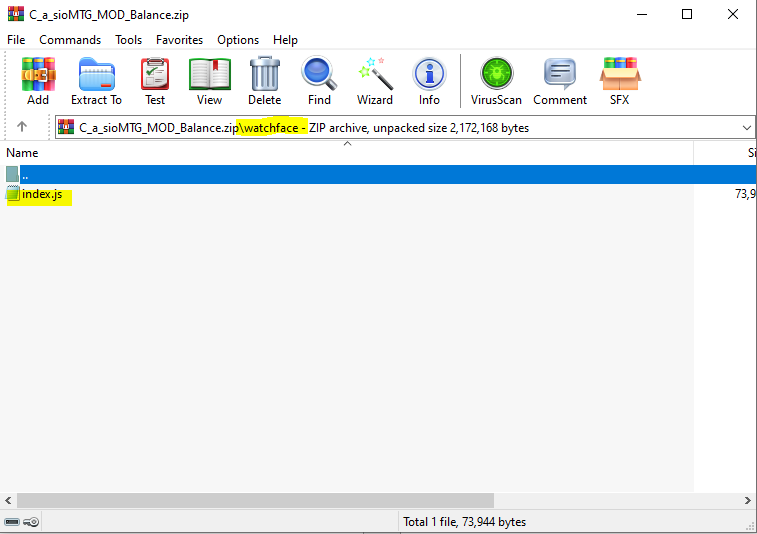
To implement UglifyJS, you need to work with the index.js file. This file is located in the watchface .zip file that you received after unzipping. After unzipping, you will see index.js in the watchface folder. Then, unglify that index.js file and place it back in the same .zip file.
In short, Uglify is do on the index.js file located within the watchface (.zip) file.
It's not done during project creation. You must first create the watchface file to obtain the .zip file, then unzip and Uglify the index.js file that inside the .zip and zip it into its original location.
Re: Is any step by step Guide how to protect your watchfaces?
Posted: 17 Mar 2026, 09:59
by g-rex69
i got it.
Thank you for clearify.