Pagina 1 di 1
Balance 2: Change button access
Inviato: 19 feb 2026, 09:29
da Qsi
Is there a possibility to change the access of the buttons on the amazfit balance 2?
Means to switch:
--> Rotary button to Menu access
--> Lower button to workout access
Re: Balance 2: Change button access
Inviato: 19 feb 2026, 10:20
da asoo
Qsi ha scritto: 19 feb 2026, 09:29
Is there a possibility to change the access of the buttons on the amazfit balance 2?
Means to switch:
--> Rotary button to Menu access
--> Lower button to workout access
First, I'm not sure if Balance 2 uses the same menu as Bip 6, but it should be similar since they both run ZeppOS 5.
Regarding the Rotary button, I'm not sure if it's changeable.
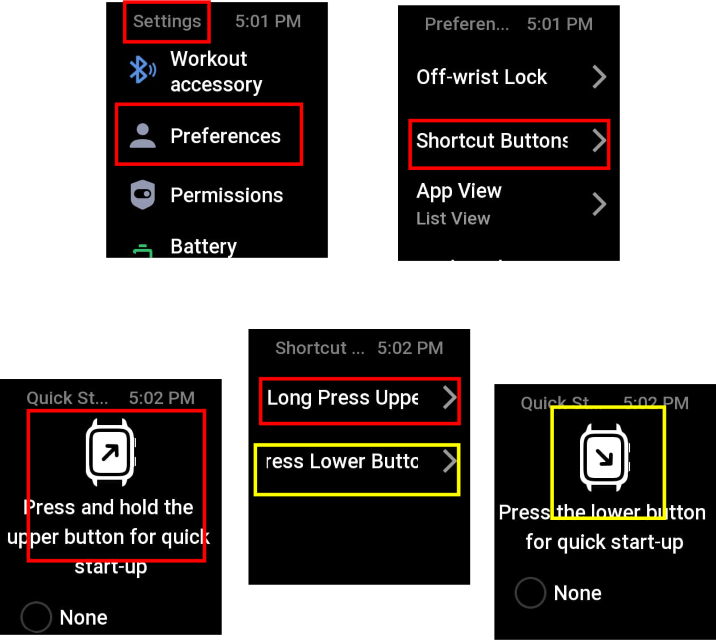
ิbut you press and hold the Rotary button, you can change the shortcut's function. The same applies to the lower button. You can change it through the watch's settings menu:
Settings --> Preferences ---> Shortcut buttons
Now you can select "Long press Upper" or "press lower button"
After selecting, you'll see list shortcut that you can select to change.
However, I'm not sure if Balance 2 has this setting.
I'm just assuming it probably does.