Page 1 of 1

Watch Face Upload Error

Posted: 18 Sep 2025, 20:46
by Edi
Hi,

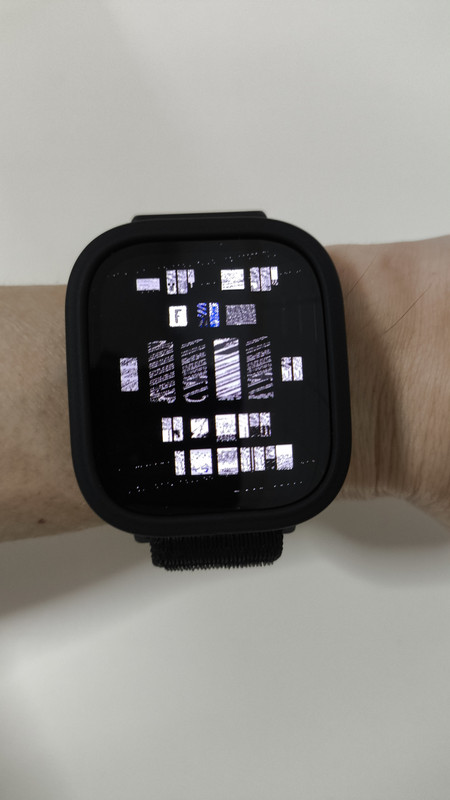
I have converted a watch face from t-rex3 to bip 6 form, but it has issues after uploading it to amazfaces.com. It appears distorted after I test downloading it via scanning mode after uploading it to the site.

The link is at https://amazfitwatchfaces.com/bip/view/44159

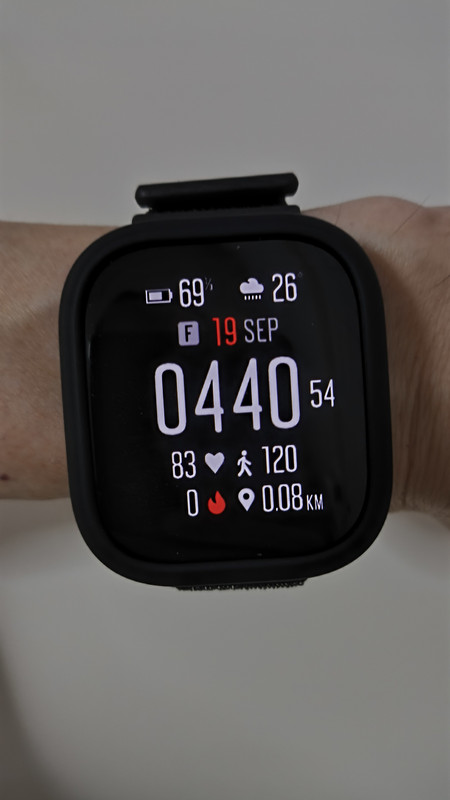
I made the watch face from zepp OS site watchface.zepp.com and have installed it to my bip 6 watch via direct install from the zepp OS site with no issues. The wf appears normal and functional.

I also have downloaded and installed various watch faces from amazfaces and other sites to my bip 6 with no issues with all the them except my own uploaded one.

Attached are the pictures of the distorted error and how it should look like after direct install from zepp OS site.
Spoiler
Image

Image

Re: Watch Face Upload Error

Posted: 19 Sep 2025, 01:02
by asoo
Edi wrote: 18 Sep 2025, 20:46
Hi,

I have converted a watch face from t-rex3 to bip 6 form, but it has issues after uploading it to amazfaces.com. It appears distorted after I test downloading it via scanning mode after uploading it to the site.

The link is at https://amazfitwatchfaces.com/bip/view/44159

I made the watch face from zepp OS site watchface.zepp.com and have installed it to my bip 6 watch via direct install from the zepp OS site with no issues. The wf appears normal and functional.

I also have downloaded and installed various watch faces from amazfaces and other sites to my bip 6 with no issues with all the them except my own uploaded one.

Attached are the pictures of the distorted error and how it should look like after direct install from zepp OS site.

Spoiler
Image

Image
The problem is not caused by the web upload.
I've downloaded your file for review.
The problem you're having aftre installed to Bip6 and the image not displaying properly is due to the image file you installed being encoded in "Active" format, which is different from "Bip6".
I'm not sure what the problem is. It could be that you didn't select Bip6 when you imported the file from watchface.zepp.com , or something else.
However, I converted it to Bip6 using the program:
"Watch face editor for Amazfit watch on ZeppOS"
viewtopic.php?p=11643#p11643
Version 15.1 on Ms Store
viewtopic.php?p=21173#p21173
Tested on my Bip6, it works properly.
Suunto7_Fix_For_Bip6.zip
(236.92 KiB) Downloaded 65 times

PS.
If you're using Windows, I recommend using
"Watch face editor for Amazfit watch on ZeppOS"
viewtopic.php?p=11643#p11643
Version 15.1 on Ms Store
viewtopic.php?p=21173#p21173
to create a watch face. It should be more convenient.

Re: Watch Face Upload Error

Posted: 19 Sep 2025, 06:03
by Edi
Hi asoo, thanks for your help. I realized the issue was from the exporting of the file from the watchface.zepp.com site, although it stated bip6 option when exporting but it actually gave me the active-390 version, so it shows the screen error when installed in my watch. Also the exported file didn't show the 4 icons but the 4 icons shows up when I installed the wf directly from the zeppOS site to my watch. I will also use the watch editor that you mentioned in the future instead of the zeppOS website. Thank you again!