Page 1 of 1
Open Watchface from WatchfaceMaker in V14.1.1
Posted: 13 Aug 2025, 22:17
by marrud12
I've created a Watchface in Zepp WatchfaceMaker and exported as Test.zab. How can I open it as project in this "Watch face editor for Amazfit watch on ZeppOS V14.1.1"?
When I unpack it I have:
.ip-package
default-target-MHS-466x466.zpk
manifest.json
When I unpack default-target-MHS-466x466.zpk, I have:
app-side.zip
device.zip
When I unpack device.zip, I have:
assets\
watchface\
app.js
app.json
I convert assets to png with ImageToZeppOS
When I open app.json in "Watch face editor for Amazfit watch on ZeppOS V14.1.1" as project, I only see all images, but not the created Watchface. What is wrong?
Re: Open Watchface from WatchfaceMaker in V14.1.1
Posted: 14 Aug 2025, 00:50
by asoo
You can unpack the watch face file using the "Watch Face Editor for Amazfit Watch on ZeppOS V14.1.1" program. You don't need to convert the image. The program will convert image immediately when you unpack it.
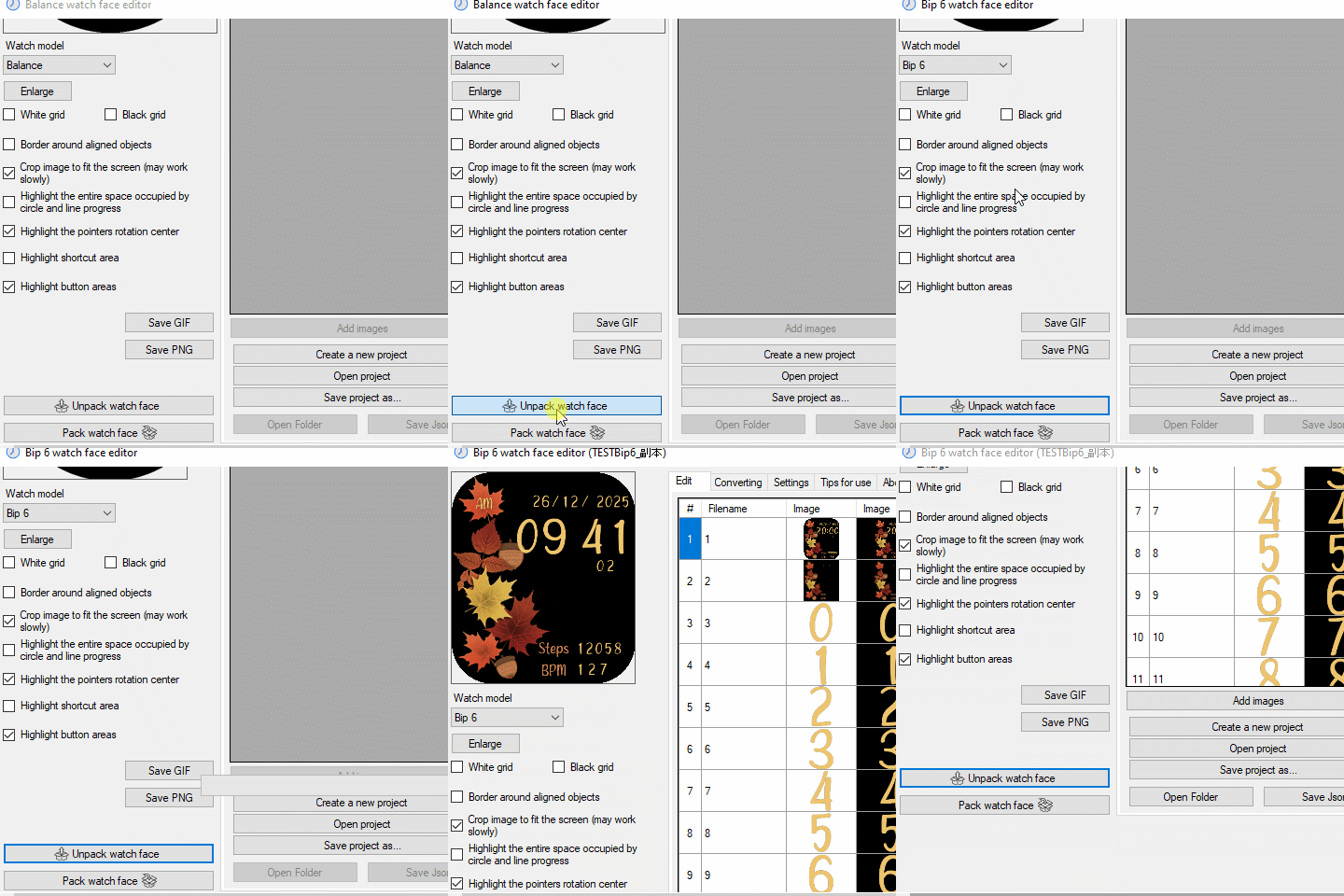
- Animation.gif (741.82 KiB) Viewed 3360 times
The program will also read the watch face's index.js file and create a .json file in the program's own format (the app.json file is not the watch face's script file). However, the watch face must be an unencrypted watch face, and the watch face's index.js format must be in a format the program can understand. Otherwise, the unpacking will only yield a standard PNG image.
If this is the case, you will need to manually create a new watchface from the resulting image.
However, as far as I've tested, the "Watch Face Editor for Amazfit Watch on ZeppOS V14.1.1" program can unpack the device.zip file created with Watchfacemaker. Therefore, if Watchfacemaker hasn't changed the script format, the device.zip file should unpack normally.
Re: Open Watchface from WatchfaceMaker in V14.1.1
Posted: 14 Aug 2025, 08:03
by marrud12
Thanks, but I can't find a button or menu to open/convert *.zab-files (or *.zip). Open project only finds +.json. Where is this menupoint?
Re: Open Watchface from WatchfaceMaker in V14.1.1
Posted: 14 Aug 2025, 08:11
by asoo
marrud12 wrote: 14 Aug 2025, 08:03
Thanks, but I can't find a button or menu to open/convert *.zab-files (or *.zip). Open project only finds +.json. Where is this menupoint?
Program "Watch Face Editor for Amazfit Watch on ZeppOS V14.1.1" does not have a .zap file manager.
.zab is the pack you get from Watchface Maker.
If you want to unpack the watch face files on 14.1.1, uncompress the .zab file with WinRAR or WinZip.
Once you uncompress it, you'll find a .zpk file.
Uncompress the .zpk file with WinRAR or WinZip.
You'll then find a Device.zip file. you can bring this file to "Unpack" on "Watch Face Editor for Amazfit Watch on ZeppOS V14.1.1" .
Re: Open Watchface from WatchfaceMaker in V14.1.1
Posted: 14 Aug 2025, 09:46
by marrud12
I was so far with Device.zip file, but where ist this "Unpack" on "Watch Face Editor for Amazfit Watch on ZeppOS V14.1.1" ?
Re: Open Watchface from WatchfaceMaker in V14.1.1
Posted: 14 Aug 2025, 12:51
by asoo
marrud12 wrote: 14 Aug 2025, 09:46
I was so far with Device.zip file, but where ist this "Unpack" on "Watch Face Editor for Amazfit Watch on ZeppOS V14.1.1" ?
?????????????????????
I already answered this question in a previous thread.
I also provided a picture of the unpacking process in that thread.
You can see where the unpack button is located by looking at the picture in that post.
Click on the link to return to the previous post.:
viewtopic.php?p=20988#p20988
Please see the image by clicking on the image icon.
Re: Open Watchface from WatchfaceMaker in V14.1.1
Posted: 14 Aug 2025, 16:15
by marrud12
Sorry I did'nt see the Video... It works and I also managed it by open with command line.
Now I get an error when I use Editable Components in Zepp WatchfaceMaker, and I think it could be a problem with Component Mask (I don't need, but export is only possible when both are imported).
Can somebody tell me the structure of these Masks (100% and 70%) or send me an example for Active 2 (466*466px)?
Re: Open Watchface from WatchfaceMaker in V14.1.1
Posted: 21 Aug 2025, 22:37
by marrud12
Can somebody explain, why most watchfaces from this side, I can convert problem-free with V 14.1.1. But some like "Elegant Active 2 GTR 4" from Avoska1988 only the pictures are converted, it does not read correctly the index.js and create a working json? The result is a json with only 384 bit, not working.
Re: Open Watchface from WatchfaceMaker in V14.1.1
Posted: 22 Aug 2025, 00:17
by asoo
marrud12 wrote: 21 Aug 2025, 22:37
Can somebody explain, why most watchfaces from this side, I can convert problem-free with V 14.1.1. But some like "Elegant Active 2 GTR 4" from Avoska1988 only the pictures are converted, it does not read correctly the index.js and create a working json? The result is a json with only 384 bit, not working.
When unpacking using the Sasha's editor, the watchface's index.js file must comply with the program's specifications. Otherwise, the unpacking will fail or the unpacking will not be performed correctly.
The index.js file must be as follows:
1. Index.js must use the program's standard script that program know.
2. Index.js must not be encrypted to prevent copying.
3. Index.js must not include "custom scripts" that do not comply with the program's specifications.
The watch face you're referring to uses a "custom script" that does not comply with the program's specifications. So when you extract it, it can't read the index.js file properly, and so it can't unpack.
However, I think the watchface that cannot be unpacked is because the creators may not want their watchface to be copied. Therefore, if you want to unpack these dials, it is recommended to ask the creators directly for advice and permission to modify their work. It's probably the best way for you to get the correct answer.
Re: Open Watchface from WatchfaceMaker in V14.1.1
Posted: 22 Aug 2025, 10:43
by marrud12
Thanks, but can you tell me, what part of the index.js file is "custom script"? I am still learning, and it is best zo learn from working scripts.
Re: Open Watchface from WatchfaceMaker in V14.1.1
Posted: 22 Aug 2025, 13:36
by asoo
marrud12 wrote: 22 Aug 2025, 10:43
Thanks, but can you tell me, what part of the index.js file is "custom script"? I am still learning, and it is best zo learn from working scripts.
It's hard to explain. The first thing you need to know is what standard scripts look like. You can create a watchface with sasha's program, then package it and look at the index.js output to see what standard scripts each element has. Once you understand all the scripts for an element, you'll understand what line is "custom scripts" that add in index.js.
However, I can't explain about "custom scripts", as they depend on individual scripting. If you're interested, I recommend reading about how to write scripts with JavaScript, as the scripts in index.js are JavaScript.
You can find more information at
https://docs.zepp.com/docs/intro/
PS.
If you want to know, The watchface where is "custom scripts" buried?, as I've already mentioned, it's best to ask the watchface owner.