Page 1 of 1
How to upload watch faces to this site?
Posted: 10 Aug 2025, 00:54
by Rda0001
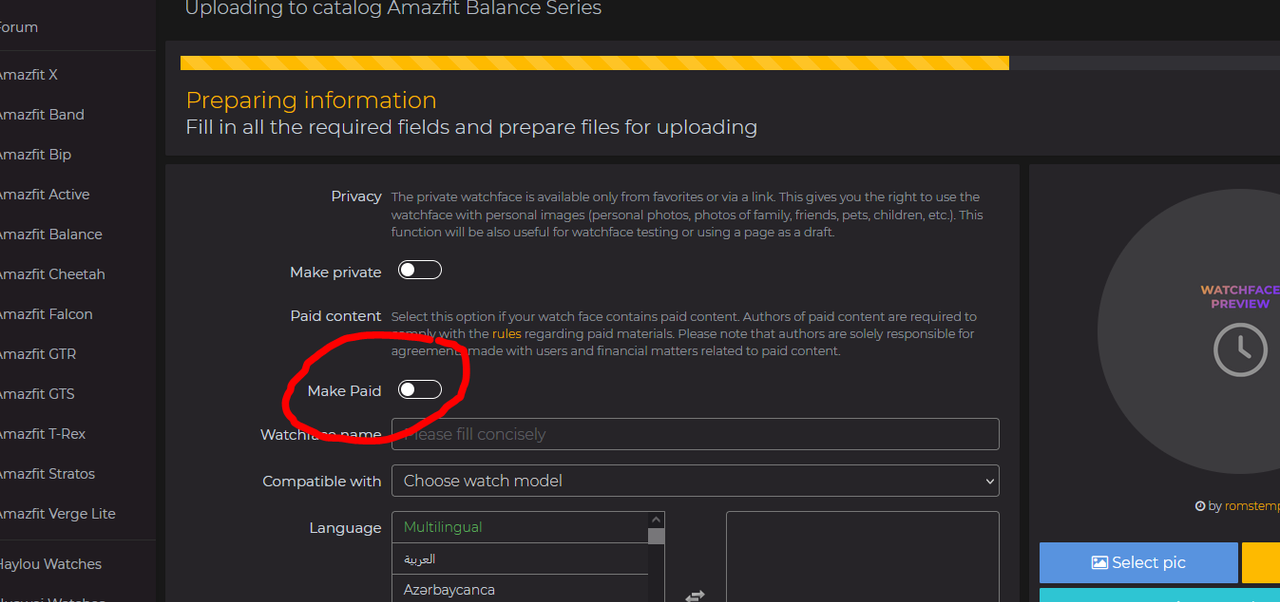
I recently uploaded a watchface to this site, but now it seems like the option is gone for me. Can someone please tell me how to upload to this site? Also, how do I make the faces for a price?
Re: How to upload watch faces to this site?
Posted: 10 Aug 2025, 01:21
by asoo
Rda0001 wrote: 10 Aug 2025, 00:54
I recently uploaded a watchface to this site, but now it seems like the option is gone for me. Can someone please tell me how to upload to this site? Also, how do I make the faces for a price?
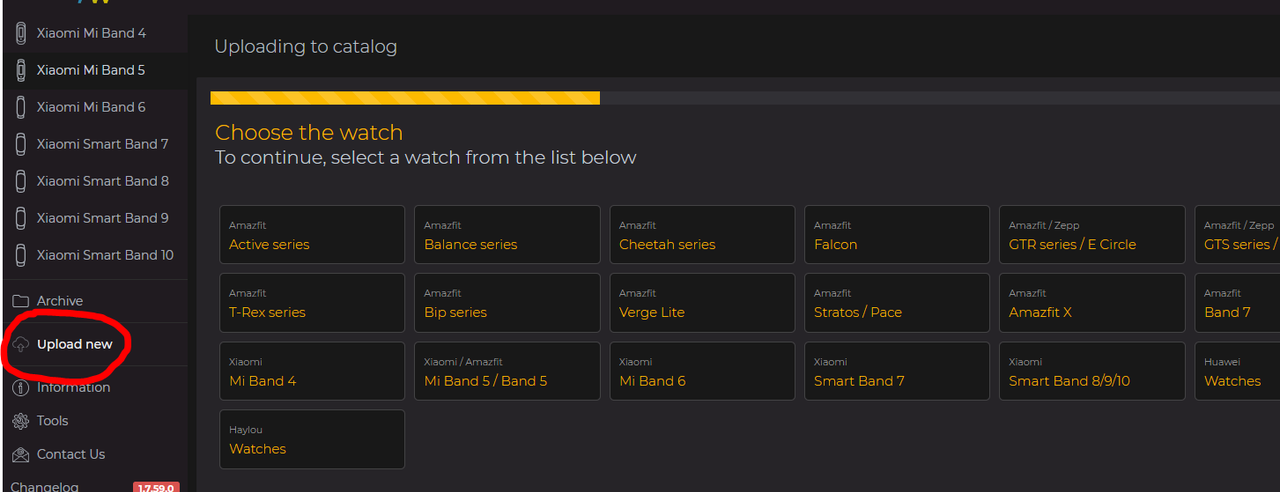
To upload, click "Upload New" on the HOME page.
Note : If you are a beginner user, once you upload a watch face, it may need to be reviewed by an administrator before if watchface have pass reviewed, your watch face will be displayed on the web.
To enable paid watch faces, if I remember correctly, you must upload a certain number of standard watch faces that have been published on the web. Once you reach the "Watchface Maker" level, you can activate this function.
You can read more here:
https://amazfitwatchfaces.com/rules
Re: How to upload watch faces to this site?
Posted: 10 Aug 2025, 08:48
by GIK-Team
Rda0001 wrote: 10 Aug 2025, 00:54
Also, how do I make the faces for a price?
As for making watch faces for a price — this option isn’t available for new users right away. You first need to upload a certain number of watch faces (the exact number is decided by a moderator) so we can be sure you’re following all the site rules. Once you meet the requirements, the paid content option will be unlocked for your account.
Re: How to upload watch faces to this site?
Posted: 26 Sep 2025, 23:16
by Mkmck
Hey guys. I don't want to create new topic, so I'll ask here
What is the best way to upload WH for different watches to this site. I.e. I made a WF for my Balance, so I uploaded it for Balance. But it can be use on another wathes with the same resolution, but if I upload WF for Balance, it will not show up, if I have chosen Balance 2 or TRex3 device. So should I add the same package to the same WF catalog but maybee with different name even if this is the same package or upload completly new WF? I am confused. Why it's assignet for specific model, and not for specific resolution?
Re: How to upload watch faces to this site?
Posted: 27 Sep 2025, 01:59
by asoo
Mkmck wrote: 26 Sep 2025, 23:16
Hey guys. I don't want to create new topic, so I'll ask here
What is the best way to upload WH for different watches to this site. I.e. I made a WF for my Balance, so I uploaded it for Balance. But it can be use on another wathes with the same resolution, but if I upload WF for Balance, it will not show up, if I have chosen Balance 2 or TRex3 device. So should I add the same package to the same WF catalog but maybee with different name even if this is the same package or upload completly new WF? I am confused. Why it's assignet for specific model, and not for specific resolution?
The reason for this is that each model maybe has certain functions that are not available on other models, even if the watch faces have the same screen resolution.
For example, the BioCharge feature on the Amazfit Balance 2 may not work on some devices with a 480x480 resolution. Therefore, if you install a watch face with BioCharge functionality on another device with a 480x480 screen that not spported, BioCharge , It may cause an error or not display BioCharge.
And there may be cases where some devices have different image encodings, which causes the display to be incorrect immediately when used with other devices.
And if you look closely, the data in the app.json file for each Device has some different data .
Therefore, in my personal opinion, separating each device model makes sense, even if they have the same screen resolution.
However, if you believe your watchface can be used on all devices with the same screen size, you can upload it to other devices that you think will work with your watchface.
Or, you can post in comment area about which devices your watchface is compatible with