Pagina 1 di 1
Installing watchfaces directly from phone with QR code
Inviato: 14 dic 2024, 00:47
da Alan_SP
I see that now you use new QR code app - QR Card 3. I have T-Rex 3.
Before, you used QR list app, and I could install watchfaces easily with it. Now, I need to enter pin, but pin I get for watchfaces on my phone is "52b1557c9d", and I can't enter it in new QR code app, as it allows only numbers, without letters.
Is there are workaround, so I'm able to install my watchfaces from my phone with your app again?
Re: Installing watchfaces directly from phone with QR code
Inviato: 14 dic 2024, 12:47
da Stas
Hi! The QR List app is still working as it always has. The new QR Card app is designed for simpler use, and your PIN should consist of numbers only. If the PIN code doesn’t appear in the app, please let us know. If you don’t see QR Card, you can continue using QR List as usual.
Alan_SP ha scritto: 14 dic 2024, 00:47
I see that now you use new QR code app - QR Card 3. I have T-Rex 3.
Before, you used QR list app, and I could install watchfaces easily with it. Now, I need to enter pin, but pin I get for watchfaces on my phone is "52b1557c9d", and I can't enter it in new QR code app, as it allows only numbers, without letters.
Is there are workaround, so I'm able to install my watchfaces from my phone with your app again?
Re: Installing watchfaces directly from phone with QR code
Inviato: 14 dic 2024, 17:16
da Alan_SP
It's good to know old QR app still works, but it doesn't work for me.
What link (or code) I should use to get it working with old QR app? I get pin code that I can't enter (25b1557c9d) in new QR app. And I tried to use old link with old QE code app, add 25 before b1557c9d, it still doesn't work.
And, I did found a way to work with new QR code app, correct PIN code for new QR app is in instructions, but not immediately visible when I try to install watchface, which was confusing for me at first. Only when looking at instructions, I realized that I'm getting PIN code there. It might be useful if we immediately see the correct PIN code, both for new, and for old QE code app.
Re: Installing watchfaces directly from phone with QR code
Inviato: 14 dic 2024, 19:57
da Stas
Thanks for your feedback! We'll work on making the PIN code more visible and easier to use in both the new and old QR apps in future updates.
Alan_SP ha scritto: 14 dic 2024, 17:16
It's good to know old QR app still works, but it doesn't work for me.
What link (or code) I should use to get it working with old QR app? I get pin code that I can't enter (25b1557c9d) in new QR app. And I tried to use old link with old QE code app, add 25 before b1557c9d, it still doesn't work.
And, I did found a way to work with new QR code app, correct PIN code for new QR app is in instructions, but not immediately visible when I try to install watchface, which was confusing for me at first. Only when looking at instructions, I realized that I'm getting PIN code there. It might be useful if we immediately see the correct PIN code, both for new, and for old QE code app.
Re: Installing watchfaces directly from phone with QR code
Inviato: 14 dic 2024, 20:28
da Alan_SP
Thanks, that would be really useful.
Can you tell me what would be the correct code for old QE code app?
At the moment I have:
zpkd1://amazfitwatchfaces.com/app/zpk?get=b1557c9d
I also edited it, as I have mentioned to get this code:
zpkd1://amazfitwatchfaces.com/app/zpk?get=25b1557c9d
It didn't install watchface, but new QR code app with PIN works, so I know that app works.
Re: Installing watchfaces directly from phone with QR code
Inviato: 15 dic 2024, 08:47
da Stas
Do you have the ability to install the QR Card app on your watch?
Alan_SP ha scritto: 14 dic 2024, 20:28
Thanks, that would be really useful.
Can you tell me what would be the correct code for old QE code app?
At the moment I have:
zpkd1://amazfitwatchfaces.com/app/zpk?get=b1557c9d
I also edited it, as I have mentioned to get this code:
zpkd1://amazfitwatchfaces.com/app/zpk?get=25b1557c9d
It didn't install watchface, but new QR code app with PIN works, so I know that app works.
Re: Installing watchfaces directly from phone with QR code
Inviato: 15 dic 2024, 15:33
da Alan_SP
I have now both new (QR card), and old QR code app.
New one works, and I can install watchfaces with it now that I know correct PIN code for it.
Old one worked with older version in sense I could install watchfaces, but now it doesn't work when I use it, although the app itself works in sense I see QR code, and if I put some numbers, Zepp app recognizes those numbers etc (I tried to put 25b1557c9d as a PIN in it).
So, both apps itself work, it's just that I can't install watchfaces with old one, I guess code is wrong (I wrote exact code I use in my previous post), or there's some bug with your app, not sure.
Re: Installing watchfaces directly from phone with QR code
Inviato: 15 dic 2024, 19:49
da Stas
The old QR List app is now outdated and no longer supports downloading watchfaces via QR codes, making it harder to use and understand. Instead, the new QR Card app is designed to be a much simpler and more reliable way to install not only watchfaces but also apps. If you have any difficulties using QR Card, we’re happy to help!
Alan_SP ha scritto: 15 dic 2024, 15:33
I have now both new (QR card), and old QR code app.
New one works, and I can install watchfaces with it now that I know correct PIN code for it.
Old one worked with older version in sense I could install watchfaces, but now it doesn't work when I use it, although the app itself works in sense I see QR code, and if I put some numbers, Zepp app recognizes those numbers etc (I tried to put 25b1557c9d as a PIN in it).
So, both apps itself work, it's just that I can't install watchfaces with old one, I guess code is wrong (I wrote exact code I use in my previous post), or there's some bug with your app, not sure.
Re: Installing watchfaces directly from phone with QR code
Inviato: 15 dic 2024, 22:20
da Alan_SP
Okay, no problem, but you have mentioned that old QR code app is still working.
I don't have problems with using the new one, now that I know it's working. Only thing that I would change then is that first screen shows correct PIN code, and not that it's buried in help, which confused me at first.
Re: Installing watchfaces directly from phone with QR code
Inviato: 15 dic 2024, 22:38
da GIK-Team
Alan_SP ha scritto: 15 dic 2024, 22:20
Okay, no problem, but you have mentioned that old QR code app is still working.
I don't have problems with using the new one, now that I know it's working. Only thing that I would change then is that first screen shows correct PIN code, and not that it's buried in help, which confused me at first.
The old QR Code app (“QR List”) is still functional because older versions of our app continue to rely on it. However, newer versions of the app work exclusively with the updated “QR Card” feature. If you’re using the latest version, we recommend switching to QR Card for the best experience.
Re: Installing watchfaces directly from phone with QR code
Inviato: 15 dic 2024, 23:14
da Alan_SP
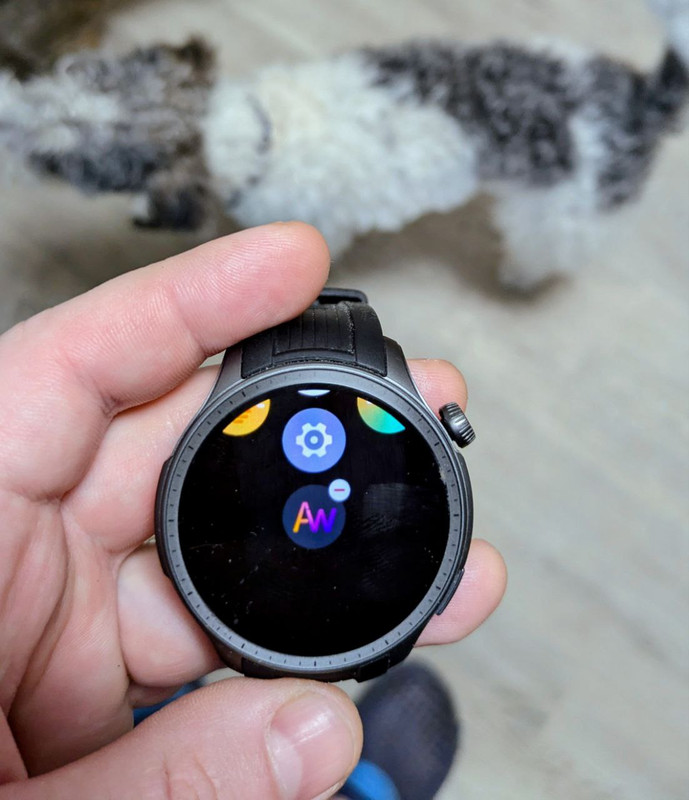
I'm talking about this:
Icon is of new QR code app, and PIN code is not working with new app, or old app.
That was confusing to me. I guess, it might be confusing to other people too. Now that I know how to use new QR code app, I'm okay, but it would be nice to have correct PIN code in this place.
Re: Installing watchfaces directly from phone with QR code
Inviato: 16 dic 2024, 08:23
da GIK-Team
Alan_SP ha scritto: 15 dic 2024, 23:14
Icon is of new QR code app, and PIN code is not working with new app, or old app.
That was confusing to me. I guess, it might be confusing to other people too. Now that I know how to use new QR code app, I'm okay, but it would be nice to have correct PIN code in this place.
Thank you for clarifying and for bringing this to our attention! We’re glad everything is clear now. This issue with the incorrect PIN code is a bug in the transitional version, and it will be fixed in the upcoming update, which is already in progress. We appreciate your patience and your feedback!
Re: Installing watchfaces directly from phone with QR code
Inviato: 16 dic 2024, 16:47
da Alan_SP
Thank you.
Re: Installing watchfaces directly from phone with QR code
Inviato: 06 mag 2025, 09:14
da Masanijey
Hello, sorry, stupid question. I installed the app directly on the watch following the instructions in the dedicated page (via developer tool).
My question is.. how do I uninstall in case?
I don't find the app in any part of the watch/Zepp app.
Thanks
Re: Installing watchfaces directly from phone with QR code
Inviato: 06 mag 2025, 10:53
da GIK-Team
Masanijey ha scritto: 06 mag 2025, 09:14
Hello, sorry, stupid question. I installed the app directly on the watch following the instructions in the dedicated page (via developer tool).
My question is.. how do I uninstall in case?
I don't find the app in any part of the watch/Zepp app.
Thanks
Re: Installing watchfaces directly from phone with QR code
Inviato: 06 mag 2025, 11:27
da Masanijey
GIK-Team ha scritto: 06 mag 2025, 10:53
Masanijey ha scritto: 06 mag 2025, 09:14
Hello, sorry, stupid question. I installed the app directly on the watch following the instructions in the dedicated page (via developer tool).
My question is.. how do I uninstall in case?
I don't find the app in any part of the watch/Zepp app.
Thanks
Thanks. My question was not how to remove watchfaces, but how to remove the app
Re: Installing watchfaces directly from phone with QR code
Inviato: 06 mag 2025, 13:14
da Stas
Just to understand better — which watch model are you using, and how exactly did you install the app?
Masanijey ha scritto: 06 mag 2025, 09:14
Hello, sorry, stupid question. I installed the app directly on the watch following the instructions in the dedicated page (via developer tool).
My question is.. how do I uninstall in case?
I don't find the app in any part of the watch/Zepp app.
Thanks
Re: Installing watchfaces directly from phone with QR code
Inviato: 06 mag 2025, 14:06
da Masanijey
Stas ha scritto: 06 mag 2025, 13:14
Just to understand better — which watch model are you using, and how exactly did you install the app?
Masanijey ha scritto: 06 mag 2025, 09:14
Hello, sorry, stupid question. I installed the app directly on the watch following the instructions in the dedicated page (via developer tool).
My question is.. how do I uninstall in case?
I don't find the app in any part of the watch/Zepp app.
Thanks
Hello,
my watch is the Amazfit Balance (sorry, I didn't mention before), and I installed it scanning the qr code that I can find here on the website (
https://amazfitwatchfaces.com/awapp) via developer tool -> mini program.
Now the application is in the list of application, but I cannot find any way to eventually uninstall it.
Hope it's more clear now.
Thanks
Re: Installing watchfaces directly from phone with QR code
Inviato: 07 mag 2025, 05:37
da Stas
Masanijey ha scritto: 06 mag 2025, 14:06
Hello,
my watch is the Amazfit Balance (sorry, I didn't mention before), and I installed it scanning the qr code that I can find here on the website (
https://amazfitwatchfaces.com/awapp) via developer tool -> mini program.
Now the application is in the list of application, but I cannot find any way to eventually uninstall it.
Hope it's more clear now.
Thanks
Try long-pressing the app icon on your watch — it should enter edit mode, where you’ll see the option to delete the app.
Re: Installing watchfaces directly from phone with QR code
Inviato: 12 giu 2025, 19:53
da GT@AW
hi, i have the same question.
my watch is T-Rex 2, i didnot found the way to remove the app "qr faces" on my watch.
i tried long-pressing the app icon on my T-Rex 2, but it is different from Balance.
Thanks
Re: Installing watchfaces directly from phone with QR code
Inviato: 14 giu 2025, 16:19
da taw_bip
I don't use QR codes.
I download the .zip files on my phone then install them with the Notify for Amazfit app. (On Android, you have to clear data/cache for the Zepp app -- or just uninstall it then reinstall it when finished -- first because both apps can't run at the same time.)