Página 1 de 1
Re: SashaCX75 - Hourly Alarm App
Publicado: 18 Nov 2023, 12:45
por Giffyfaces
I'm so glad I found the app for hourly alarm that you can configure really well for every 15 minutes etc.. brilliant. My only request is that there be an invisible mode added so I can feel the vibe when the alarm goes off but when I look at my watch it takes about 5 seconds for the screen to change back to the normal watch face. If there was a just vibrate option that didn't have a screen that popped up I would be very very happy.
That is my feature request for the hourly alarm app.
I thank you very much for making it.
Re: Re: SashaCX75 - Hourly Alarm App
Publicado: 21 Nov 2023, 19:42
por SashaCX75
It is impossible to start vibration from the programme without opening the programme window. It is possible to close the window immediately after the end of vibration, but it looks ugly and I will not do it.
In your case it would be better to add vibration to the watch face you are using.
Re: Re: SashaCX75 - Hourly Alarm App
Publicado: 23 Nov 2023, 10:25
por BigBlind68
SashaCX75 escribió: 21 Nov 2023, 19:42
It is impossible to start vibration from the programme without opening the programme window. It is possible to close the window immediately after the end of vibration, but it looks ugly and I will not do it.
In your case it would be better to add vibration to the watch face you are using.
Is it possible to add a chime and the option to choose between vibration and/or chime?
Re: Re: SashaCX75 - Hourly Alarm App
Publicado: 23 Nov 2023, 12:39
por SashaCX75
The audible alarm can only be triggered on the Amazfit Balance. And since I don't have this model, I can't test the function. Therefore, I do not plan to add this function.
Re: Re: SashaCX75 - Hourly Alarm App
Publicado: 23 Nov 2023, 12:46
por BigBlind68
SashaCX75 escribió: 23 Nov 2023, 12:39
The audible alarm can only be triggered on the Amazfit Balance. And since I don't have this model, I can't test the function. Therefore, I do not plan to add this function.
I can test it for you if you like
Re: Re: SashaCX75 - Hourly Alarm App
Publicado: 24 Nov 2023, 12:41
por Giffyfaces
BigBlind68 escribió: 23 Nov 2023, 10:25
SashaCX75 escribió: 21 Nov 2023, 19:42
It is impossible to start vibration from the programme without opening the programme window. It is possible to close the window immediately after the end of vibration, but it looks ugly and I will not do it.
In your case it would be better to add vibration to the watch face you are using.
Is it possible to add a chime and the option to choose between vibration and/or chime?
If it is an option I could use whereby the window closes immediately after the vibration occurs then why is it something you won't do. When you go into the options menu in the app it could be something a person like me could use but you would never have to use that option because you don't like it. If you don't like it then don't use it but to deny a feature request because you don't like it is something I find a bit weird to be honest. I don't like most of the options in nova launcher on my phone that have to do with icons and there shapes etc so I just don't use them but they are there because the developer added them as feature requests. If you can add an option to do a vibrate then close the window straight afterwards then that would be awesome for me. Not for you but for me. But you wouldn't have to use it as its just an option. After writing this message I get the feeling that you will deny the request because I'm being a bit rude but my philosophy is If you don't ask you don't get and if you do ask you might not get but there might be a possibility if you use the words "pretty please with sugar on top"... please please with sugar on top add the option for me. I'll love you a bit more than I did yesterday
Re: Re: SashaCX75 - Hourly Alarm App
Publicado: 24 Nov 2023, 17:29
por SashaCX75
I don't think you were rude. It's fine to express your wishes.
But this is not a commercial product. I do it when I have free time and when I am interested. Perhaps sometime I will decide to take up this project again and then I will remember the wishes of users and implement something of them in the programme. Recently I have updated the programme and now I don't know if I will continue to do this programme.
Initially I made the programme without vibrations during animation. But since you still need to launch the programme window, it looked strange. It looked like the programme tries to start but closes because of an error. So I gave up this idea and added animation.
Re: Re: SashaCX75 - Hourly Alarm App
Publicado: 07 Dic 2023, 19:47
por SashaCX75
@Giffyfaces
I plan to make some fixes to the programme. And I'll probably add the ability to vibrate without animation. I still don't want to display an empty window. It will probably just display the time of the next alarm. The display time will be minimal and will depend on the duration of the vibration.
Tell me if this is something you are still interested in. Would you like to get a test version?
Re: Re: SashaCX75 - Hourly Alarm App
Publicado: 07 Dic 2023, 21:23
por Giffyfaces
Yes please. Defo defo defo. I look forward to trying it out. Huge thanks
Re: Re: SashaCX75 - Hourly Alarm App
Publicado: 10 Dic 2023, 15:05
por SashaCX75
@Giffyfaces
This is a new beta version of the programme
Added a longer vibration. Added an option to disable animation. Settings in a separate window.
I don't know what model of watch you have. This version should work on models with ZeppOS 2. It is recommended to uninstall the version from the shop before installation. Install through developer mode, how to enable it is written here
https://docs.zepp.com/docs/v2/guides/tools/zepp-app/
Re: Re: SashaCX75 - Hourly Alarm App
Publicado: 10 Dic 2023, 15:20
por Giffyfaces
Thanks I shall try it today. I'm using t rex ultra. I'm let you know how I get on. Many thanks.
Re: Re: SashaCX75 - Hourly Alarm App
Publicado: 10 Dic 2023, 15:32
por Giffyfaces
I switched on developer mode and deleted app from watch. Then reinstalled it but its still the same app. The animation appears for 10 seconds then slides off the screen to reveal the watch face. I'm not sure how to install through developer mode. My assumption is that in developer mode I just reinstall it as normal but negate developer mode is enabled that's what you are referring to. If I'm missing something key me know. Tyvm
Re: Re: SashaCX75 - Hourly Alarm App
Publicado: 10 Dic 2023, 15:38
por Giffyfaces
I got into developer mode and see that I'm on version 2.1 api and I see the options for mini program with the qr code scanner etc. This is where I'm stuck. How do I scan a code for the app for hourly alarm
Re: Re: SashaCX75 - Hourly Alarm App
Publicado: 10 Dic 2023, 16:24
por Giffyfaces
Found the QR Code just installing it now
Re: Re: SashaCX75 - Hourly Alarm App
Publicado: 10 Dic 2023, 16:28
por Giffyfaces
yes, thats perfect. it installed perfectly and when the vibrate happened it showed very quickly a NEXT with the time message and dissapeared super quick. this is perfect. just what i was looking for. very happy with this. thank you so much for making this. cant thank you enough.
Re: Re: SashaCX75 - Hourly Alarm App
Publicado: 10 Dic 2023, 18:55
por SashaCX75
I'm glad I helped you.
This is only a beta version and in the final version the design of the notification window will probably change. But without animation it will also close quickly after vibration.
Re: Re: SashaCX75 - Hourly Alarm App
Publicado: 10 Dic 2023, 20:04
por Giffyfaces
You could please both sides by having an option for animation or none. The way it is now if perfect when my watch vibrates by the time I've lifted my wrist and look at the watch the screen has gone back to the watch face and it feels very much like a natural vibrate alarm or hourly signal that I've had with other watches in the past. I'm super made up with how it is now. It's the icing on the cake for my t rex ultra and I'm even going to make a watch face that has "powered by sasha tech" in the design. You are a brilliant programmer and I admire that. If you have a donate button I'd like to buy you a coffee at the very least to say thanks

Re: SashaCX75 - Hourly Alarm App
Publicado: 30 Nov 2024, 16:18
por veresimre
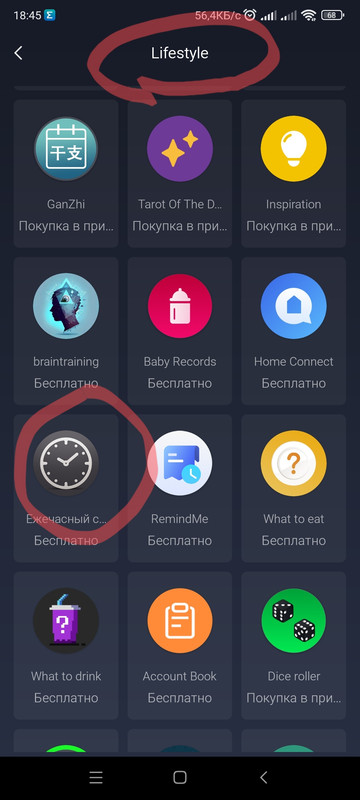
Hello! Where can I find the hourly alarm (amazfit balance) in the zepp application, or what is its name? Thank you for your help!
Re: Re: SashaCX75 - Hourly Alarm App
Publicado: 30 Nov 2024, 16:47
por SashaCX75
Re: Re: SashaCX75 - Hourly Alarm App
Publicado: 01 Dic 2024, 05:29
por veresimre
Thank you
Re: Re: SashaCX75 - Hourly Alarm App
Publicado: 01 Dic 2024, 06:12
por veresimre
There is no sound or vibration, can I adjust it somehow?
Re: Re: SashaCX75 - Hourly Alarm App
Publicado: 23 Sep 2025, 15:55
por Darek1969
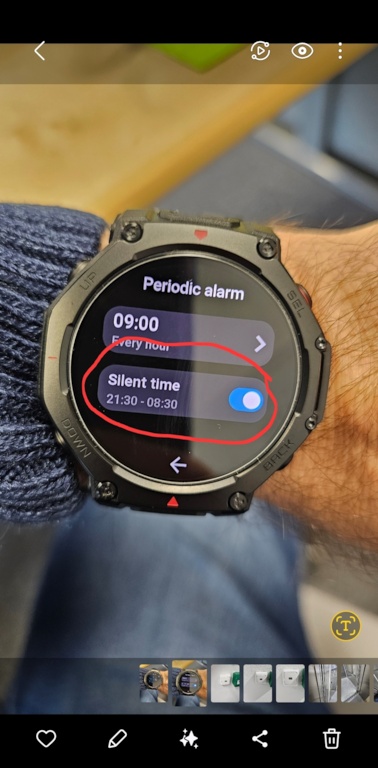
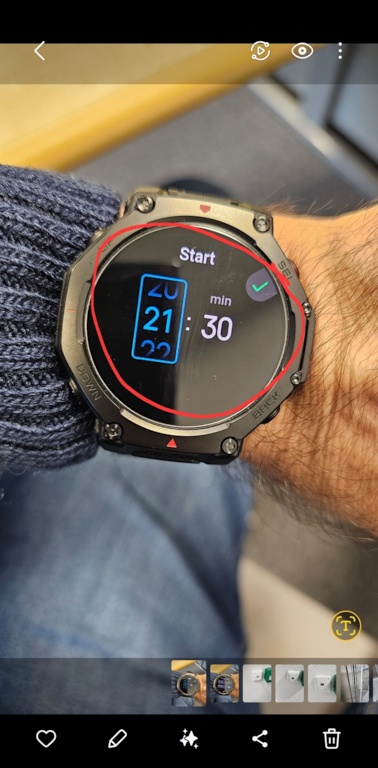
Hello, I need help. I have a T-REX 3 Pro, and after installing the app, I can't activate silent mode. When I try to set the silent mode hours, after setting the initial time and confirming it, the screen goes black for a moment, and I have to re-enter the silent mode settings, but the time remains unchanged, and this happens over and over again. I can't even set the end time for the feature. Please help. Regards.
Re: Re: SashaCX75 - Hourly Alarm App
Publicado: 23 Sep 2025, 18:38
por SashaCX75
@Darek1969 Please send screenshots of each step so we can understand exactly which settings you are trying to access and at what stage the error occurs.
Re: Re: SashaCX75 - Hourly Alarm App
Publicado: 24 Sep 2025, 05:44
por Darek1969
Good morning, I am sending photos of the problematic option. Please help because the application is very useful

I simply cannot set the end time in Silent Mode.