GTS 4 Mini watchface AoD flickers and offset from primary version
Inviato: 25 dic 2022, 05:25
I'm fairly new to watch face design and recently upgraded from my Bip to the GTS 4 Mini.
On the GTS 4 Mini's, is it a common issue to see a minor light flicker/strobing effect on the always on display? It's most apparent on the digital clock numbers, but not other aspects, like the heart icon- its at maybe ~10Hz and looks as if it's just not getting sufficient voltage, oscillating ~20% brightness. Perhaps using less pixels dampens the effect?
And is there any logic to how the coordinate systems differ in the AoD vs Primary watchface? When I change modes it seems the graphics shift by ~2 pixels, but in the watchface editor all the assets are in the same size/position. Or, perhaps its just an optical illusion with the brightness bump.
Any insights or tips and tricks are welcome. Thanks.
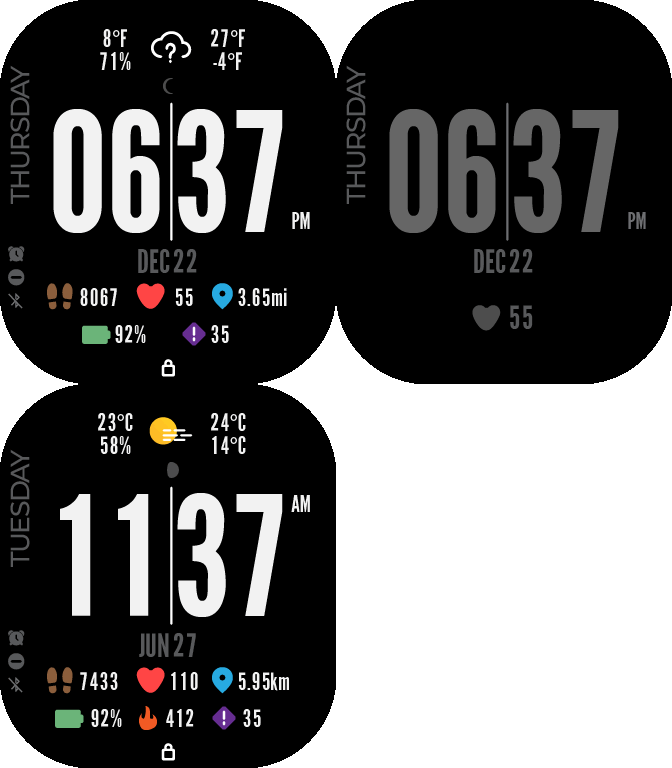
My watch face in question: https://amazfitwatchfaces.com/gts/view/10128
If it matters, I'm using the "AmazFit WatchFace editor for Windows by SashaCX75", version 6.0, from the Watchface tools board. (viewtopic.php?t=1076)
On the GTS 4 Mini's, is it a common issue to see a minor light flicker/strobing effect on the always on display? It's most apparent on the digital clock numbers, but not other aspects, like the heart icon- its at maybe ~10Hz and looks as if it's just not getting sufficient voltage, oscillating ~20% brightness. Perhaps using less pixels dampens the effect?
And is there any logic to how the coordinate systems differ in the AoD vs Primary watchface? When I change modes it seems the graphics shift by ~2 pixels, but in the watchface editor all the assets are in the same size/position. Or, perhaps its just an optical illusion with the brightness bump.
Any insights or tips and tricks are welcome. Thanks.
My watch face in question: https://amazfitwatchfaces.com/gts/view/10128
If it matters, I'm using the "AmazFit WatchFace editor for Windows by SashaCX75", version 6.0, from the Watchface tools board. (viewtopic.php?t=1076)