Página 1 de 1
I cant change face. [Verge Lite]
Publicado: 08 Abr 2021, 13:48
por Atia
Hello!
I haven’t been able to change faces on my watch (Verge Lite) since the last phone (Samsung A40) update.
I get this message: "You do not have any standard watch face installed. Go to the service app and install the first watch face"
I did what's in the tutorial video (i install first watch face in the Mi-Fit and i try Zepp), but it didn't help either.
What the problem? Please help me.
Have A Nice Day!
Re: I cant change face.
Publicado: 08 Abr 2021, 19:34
por GIK-Team
Atia escribió: 08 Abr 2021, 13:48
Hello!
I haven’t been able to change faces on my watch (Verge Lite) since the last phone (Samsung A40) update.
I get this message: "You do not have any standard watch face installed. Go to the service app and install the first watch face"
I did what's in the tutorial video (i install first watch face in the Mi-Fit and i try Zepp), but it didn't help either.
What the problem? Please help me.
Have A Nice Day!
What application are we talking about?
Re: I cant change face.
Publicado: 09 Abr 2021, 02:09
por Atia
I select the face with the AMAZFACES app, and I exchange it using the Mi-Fit app. I tried now the Zepp too but does not work. It worked until the phone was updated (yesterday).
Re: I cant change face.
Publicado: 09 Abr 2021, 07:33
por Stas
Can you describe the problem in more detail and how do you use direct install or replace?
Atia escribió: 09 Abr 2021, 02:09
I select the face with the AMAZFACES app, and I exchange it using the Mi-Fit app. I tried now the Zepp too but does not work. It worked until the phone was updated (yesterday).
Re: I cant change face.
Publicado: 09 Abr 2021, 09:34
por Atia
So far:
1. I run AmazFaces app on phone
2. I select Verge Lite face
3. Download... (Replacing the standard dial)
The face to be replaced and the service application have been released ... I launched the Mi-Fit application and changed the selected face ...
Now:
1. I run AmazFaces app on phone
2. I select Verge Lite face
3: The service application and the message "You do not have any standard watch faces installed. Go to the service app and install the first watch face" are displayed... I go the service app and install first face, but It does not solve the problem
I reinstalled the apps (Mi-Fit, AmazFaces) but that didn't solve the problem either ...
Re: I cant change face.
Publicado: 09 Abr 2021, 15:35
por Stas
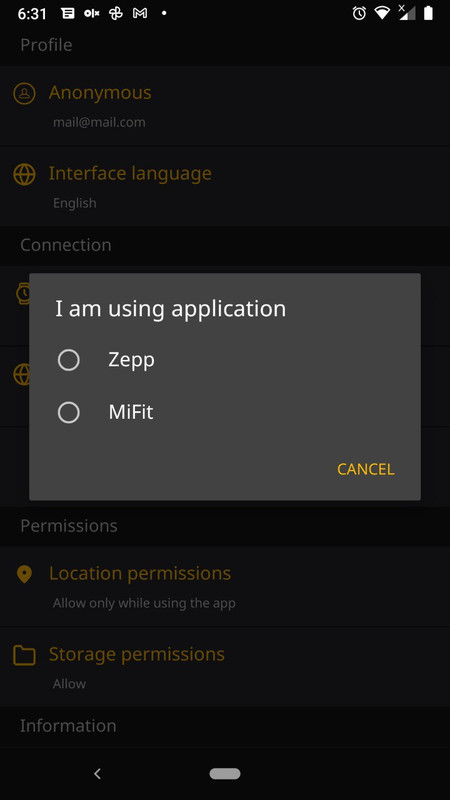
Try to enable using the Mi Fit application in the setting and
update the app to version 2.5.149 beta
Atia escribió: 09 Abr 2021, 09:34
So far:
1. I run AmazFaces app on phone
2. I select Verge Lite face
3. Download... (Replacing the standard dial)
The face to be replaced and the service application have been released ... I launched the Mi-Fit application and changed the selected face ...
Now:
1. I run AmazFaces app on phone
2. I select Verge Lite face
3: The service application and the message "You do not have any standard watch faces installed. Go to the service app and install the first watch face" are displayed... I go the service app and install first face, but It does not solve the problem
I reinstalled the apps (Mi-Fit, AmazFaces) but that didn't solve the problem either ...
Re: I cant change face.
Publicado: 10 Abr 2021, 04:19
por Atia
It doesn't work that way either. But it's not a problem. I can replace faces without AmazFaces application.
Thanks!
Re: I cant change face.
Publicado: 16 Jun 2021, 03:59
por maslo1979
Turn off adb blocker.