Page 1 of 4

[4.0] XMI Watch - Mi Band 4 | 5 | 6 (Editor + Converter)

Posted: 25 Nov 2020, 14:16
by jefoce
lvpokka thanks a lot for *.bin support
My WatchFaces


XMI Watch
Image

Download

Version: 4.0 Release (auto-update)
Platform: Windows (.NET Core 3.1)
Developer: jefoce
Official site: xmi
Documentation: docs
✅ Updates Plan
🟡 4.x.0.0
New:
  • Saving format for app *.xmi (contains styles and all series)
🟢 4.0.0.0
New:
  • Mi Band 6 support (only json open for now)
  • Add background option in the left side
Update:
  • Converting engine
🟢 3.2.0.1
New:
  • Styled messages
🟢 3.2.0.0
New:
  • GIF support with speed
🟢 3.1.0.3
New:
  • Split creating and opening project
🟢 3.1.0.2
Fix:
  • Battery status (showing on Mi Band 4)
🟢 3.1.0.1
New:
  • Margin for project buttons
🟢 3.1.0.0
New:
  • Styling
  • Image DPI correction
Update:
  • Previewer adaptation
🟢 3.0.0.0 - Important
New:
  • Global core (changed more than 50% code)
  • Update preview images on import/paste
Update:
  • Previewer adaptation
  • Date Inline → Date Separate
  • Image managing system
  • Smart converting system (save positions for elements and resize background by screen size)
Optimize:
  • Open
  • Convert
  • Build
  • Weeks saving
🟢 2.1.0.0
New:
  • Screen adaptation for 1366x768
  • Series converting (Mi Band 4/5)
Fix:
  • Images scrolling
  • Distance suffix for Mi Band 5
🟢 2.0.0.0
New:
  • Mi Band 5 support
  • Optimized speed open/build for Bin and Json formats
  • Preview image after build for Bin format
  • Tooltip with full name on project button mouse hover
Update:
  • Saving system
  • Image compressing
Fix:
  • Closing last project
  • Temp clearing
🟢 1.0.0.3
New:
  • Simplify weekdays edit
Fix:
  • Images preview changing, when select other project
🟢 1.0.0.2
New:
  • Optimizing saving system
  • Notify for closing projects, app
Fix:
  • Localization
🟢 1.0.0.1
Fix:
  • Opening file with spacing name. (example: "xmi watch.exe")
⚠️ Running Problem

If system notify about installation .NET Core - download x86 version

Microsoft wrote:
Full support for Windows 10 (1607, 1709+)

Additional dependencies are required if you're installing the .NET Core:
  • Windows Vista (SP2)
  • Windows 7 (SP1)
  • Windows 8.1
Install the following:


Description

Design program for Mi Band watchfaces
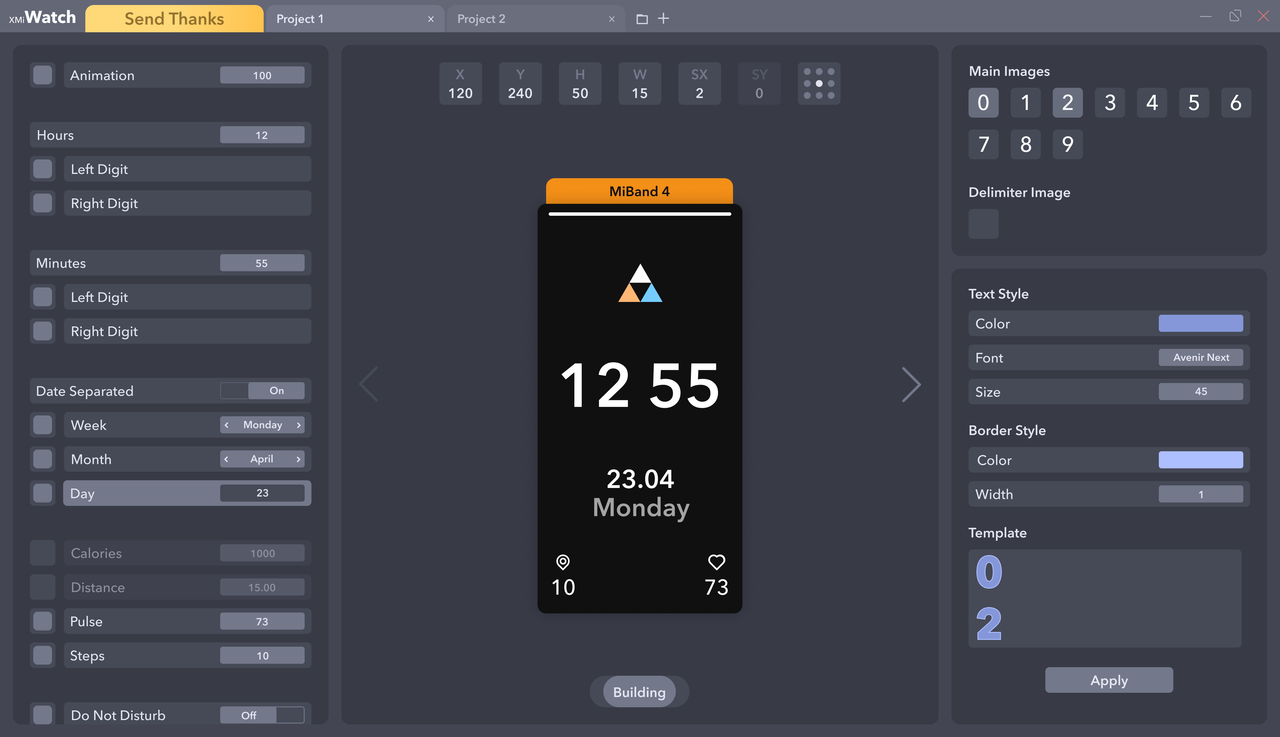
  • You can easily open, edit and build:
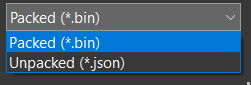
    • Json - folder must contains 0000.png → screen sized
    • Bin
  • On / off watch elements (even not include)
  • Copy or import images from opened projects or files
  • Watchfaces converting
  • Text styling
  • Dev: Presets
🖼️ Screenshots
Image


Watch series
  • Mi Band 4
  • Mi Band 5
  • Mi Band 6


Elements support
  • Time
    • Hours
    • Minutes
  • Date
    • Inline / Separate
    • Week
    • Month
    • Day
  • Activity
    • Calories
    • Distance
    • Pulse
    • Steps
  • Widgets
    • Do Not Disturb
    • Bluetooth
    • Lock
    • Battery
  • Other
    • Animation
    • Background


Controls
  • Change value - ↑↓ keys
  • Move - WASD or ↑←↓→ keys and mouse
  • Unselect - Escape key
  • Unvisible - Delete key
  • Selecting in Previewer or Elements bar


Previewer - render on change
  • Previewer limits
    • H, Y (+-Screen height)
    • W, X (+-Screen width)
    • SX (+-20)
  • Render limits
    • Activity (99999)
    • Real time
    • Real date
    • Battery (100)


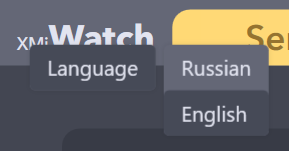
Languages
  • Russian
  • English (default)
* Right button click on opened app name
Image

Re: XMI Watch (WatchFace Editor - Mi Band)

Posted: 25 Nov 2020, 14:26
by TXK
cool~~~~~~~!

Re: XMI Watch (WatchFace Editor - Mi Band)

Posted: 25 Nov 2020, 14:35
by valeriyabobko
WOW! Cool app with appealing intuitive design! Great functionality and high performance! Finally I don't need to waste a lot of time creating interfaces for my Mi Band 4 :D Love it! Looking forward to new products jefoce!

Re: XMI Watch (WatchFace Editor - Mi Band)

Posted: 26 Nov 2020, 04:14
by arthurking521
必须支持一下,加油

Re: XMI Watch (WatchFace Editor - Mi Band)

Posted: 26 Nov 2020, 04:31
by arthurking521
Hope you can add shortcuts function, refer to GTR or GTS

Re: XMI Watch (WatchFace Editor - Mi Band)

Posted: 26 Nov 2020, 04:46
by arthurking521
prolem:
when i open this tool,Pop up dialog box prompt:

“To run this application, you must install .NET Core. Would you like to download it now?”

then,I download and install it ,But problem also

Re: XMI Watch (WatchFace Editor - Mi Band)

Posted: 26 Nov 2020, 10:42
by jefoce
arthurking521 wrote: 26 Nov 2020, 04:31
Hope you can add shortcuts function, refer to GTR or GTS
Maybe far in the future :)

Re: XMI Watch (WatchFace Editor - Mi Band)

Posted: 26 Nov 2020, 10:43
by jefoce
arthurking521 wrote: 26 Nov 2020, 04:46
prolem:
when i open this tool,Pop up dialog box prompt:

“To run this application, you must install .NET Core. Would you like to download it now?”

then,I download and install it ,But problem also
Do you run on Windows 7?

Re: XMI Watch (WatchFace Editor - Mi Band)

Posted: 26 Nov 2020, 10:53
by arthurking521
jefoce wrote: 26 Nov 2020, 10:43
arthurking521 wrote: 26 Nov 2020, 04:46
prolem:
when i open this tool,Pop up dialog box prompt:

“To run this application, you must install .NET Core. Would you like to download it now?”

then,I download and install it ,But problem also
Do you run on Windows 7?
yes,it runs well on win10?

Re: XMI Watch (WatchFace Editor - Mi Band)

Posted: 26 Nov 2020, 11:05
by arthurking521
jefoce wrote: 26 Nov 2020, 10:43
arthurking521 wrote: 26 Nov 2020, 04:46
prolem:
when i open this tool,Pop up dialog box prompt:

“To run this application, you must install .NET Core. Would you like to download it now?”

then,I download and install it ,But problem also
Do you run on Windows 7?
Just tried it on win10, the problem is the same, the tool cannot be opened

Re: XMI Watch (WatchFace Editor - Mi Band)

Posted: 26 Nov 2020, 11:10
by jefoce
arthurking521
Microsoft wrote:
Additional dependencies are required if you're installing the .NET Core:
  • Windows Vista (SP2)
  • Windows 7 (SP1)
  • Windows 8.1
Install the following:

Re: XMI Watch (WatchFace Editor - Mi Band)

Posted: 26 Nov 2020, 11:19
by arthurking521
jefoce wrote: 26 Nov 2020, 11:10
@arthurking521
Microsoft wrote:
Additional dependencies are required if you're installing the .NET Core:
  • Windows Vista (SP2)
  • Windows 7 (SP1)
  • Windows 8.1
Install the following:
What is KB2533623? Does the windows system update files? Your requirements for this software are not suitable for ordinary people, haha, I hope anyone can download and use it, thank you for your reply

Re: XMI Watch (WatchFace Editor - Mi Band)

Posted: 26 Nov 2020, 11:25
by jefoce
arthurking521 wrote: 26 Nov 2020, 11:19
Thanks) I did hope too, however new technology need to install new updates.. :cry:

Re: XMI Watch (WatchFace Editor - Mi Band)

Posted: 26 Nov 2020, 11:35
by arthurking521
jefoce wrote: 26 Nov 2020, 11:25
arthurking521 wrote: 26 Nov 2020, 11:19
Thanks) I did hope too, however new technology need to install new updates.. :cry:
Looking forward to your dumb version of the software, I can’t figure this out at the moment, thank you for your job ;)

Re: XMI Watch (WatchFace Editor - Mi Band)

Posted: 30 Nov 2020, 23:04
by jefoce
arthurking521 wrote: 26 Nov 2020, 11:35

Hi, arthurking521, maybe you will be able to run after installing .NET Core x86

It's simply😉

Re: XMI Watch - Tools Mi Band 4 | 5

Posted: 01 Dec 2020, 19:14
by Uncagedphoenix
Anyone else get a virus/trojan warning on this?

Re: XMI Watch - Tools Mi Band 4 | 5

Posted: 01 Dec 2020, 19:48
by jefoce
Uncagedphoenix wrote: 01 Dec 2020, 19:14
Only one person messaged me about Trojan.Msil for version 2.0 (but i don't know how to fix it :( )

Program don't contain any viruses and use without request admin permissions.
Trust or not only your choice!

Re: XMI Watch (WatchFace Editor - Mi Band)

Posted: 02 Dec 2020, 14:12
by arthurking521
jefoce wrote: 30 Nov 2020, 23:04
arthurking521 wrote: 26 Nov 2020, 11:35

Hi, arthurking521, maybe you will be able to run after installing .NET Core x86

It's simply😉
it can work now,thx!
no seconds in the Time plate?and can’t see the Json files

Re: XMI Watch (WatchFace Editor - Mi Band)

Posted: 02 Dec 2020, 17:55
by jefoce
arthurking521 wrote: 02 Dec 2020, 14:12
Seconds element not supporting in app now.

You can open Json/Bin optional:
Image

Re: XMI Watch (WatchFace Editor - Mi Band)

Posted: 03 Dec 2020, 00:01
by arthurking521
jefoce wrote: 02 Dec 2020, 17:55
arthurking521 wrote: 02 Dec 2020, 14:12
Seconds element not supporting in app now.

You can open Json/Bin optional:
Image
I mean I can't see the code in the software, will it show in the future

Re: XMI Watch (WatchFace Editor - Mi Band)

Posted: 03 Dec 2020, 00:06
by jefoce
arthurking521 wrote: 03 Dec 2020, 00:01
App have other format for editing and every build it's converting to Mi Band format, you can't see code, but you can edit every existing field for elements in previewer

Re: XMI Watch - Mi Band 4 | 5 (WF Designer + Converter)

Posted: 04 Dec 2020, 00:19
by Belens
This is awesome! Will it support animations in the future? Great Job!

Re: XMI Watch - Mi Band 4 | 5 (WF Designer + Converter)

Posted: 04 Dec 2020, 13:42
by jefoce
Belens wrote: 04 Dec 2020, 00:19
Thank you :D
Will plan to add new elements in next updates

Re: XMI Watch - Mi Band 4 | 5 (WF Designer + Converter)

Posted: 05 Dec 2020, 00:40
by shirumitsu
work animation gif?

Re: XMI Watch (WatchFace Editor - Mi Band)

Posted: 05 Dec 2020, 06:41
by ixijimixi
jefoce wrote: 30 Nov 2020, 23:04
arthurking521 wrote: 26 Nov 2020, 11:35

Hi, arthurking521, maybe you will be able to run after installing .NET Core x86

It's simply😉
Gah...I installed the x64 version, and it didn't work (running Windows 10 64 bit). Installed x86 version, and it loaded right up.