Watchface bug!!!
Inviato: 07 ago 2020, 09:50
Hi friends ,
I am CAVOLI , I have all the versions of mi bands . So yeah , I have a Mi band 4 CN / global version and also a Mi band 4 NFC version .
I have been using it for almost 7 months . In my Mi band 4 NFC , two weeks ago I synced one watchface .
You can check the watchface below , Its also available in bandbbs.cn
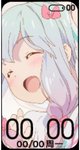
4days ago I updated my Mi band 4 NFC to v96 , in v93 it was all good. But this update really sucks . I also yesterday helped one of my freind [mention]hakpoid[/mention] .
Please help me , I am helpless .
The problem with this watchface is that I have used it in my Mi band 4 global version , it worked perfectly
Check this -
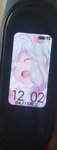
That awesome but in my Mi band 4 NFC I also synced that watchface but it comes black and white . Can anyone please help me ?? I know someday any one will help
Thanks
Regards
CAVOLI ( Cavrio )
I am CAVOLI , I have all the versions of mi bands . So yeah , I have a Mi band 4 CN / global version and also a Mi band 4 NFC version .
I have been using it for almost 7 months . In my Mi band 4 NFC , two weeks ago I synced one watchface .
You can check the watchface below , Its also available in bandbbs.cn
4days ago I updated my Mi band 4 NFC to v96 , in v93 it was all good. But this update really sucks . I also yesterday helped one of my freind [mention]hakpoid[/mention] .
Please help me , I am helpless .
The problem with this watchface is that I have used it in my Mi band 4 global version , it worked perfectly
Check this -
That awesome but in my Mi band 4 NFC I also synced that watchface but it comes black and white . Can anyone please help me ?? I know someday any one will help
Thanks
Regards
CAVOLI ( Cavrio )