Watch face editor for Amazfit watch on ZeppOS
Posted: 07 Jan 2022, 14:16
Alternative watch face editor for Amazfit watch on ZeppOS.
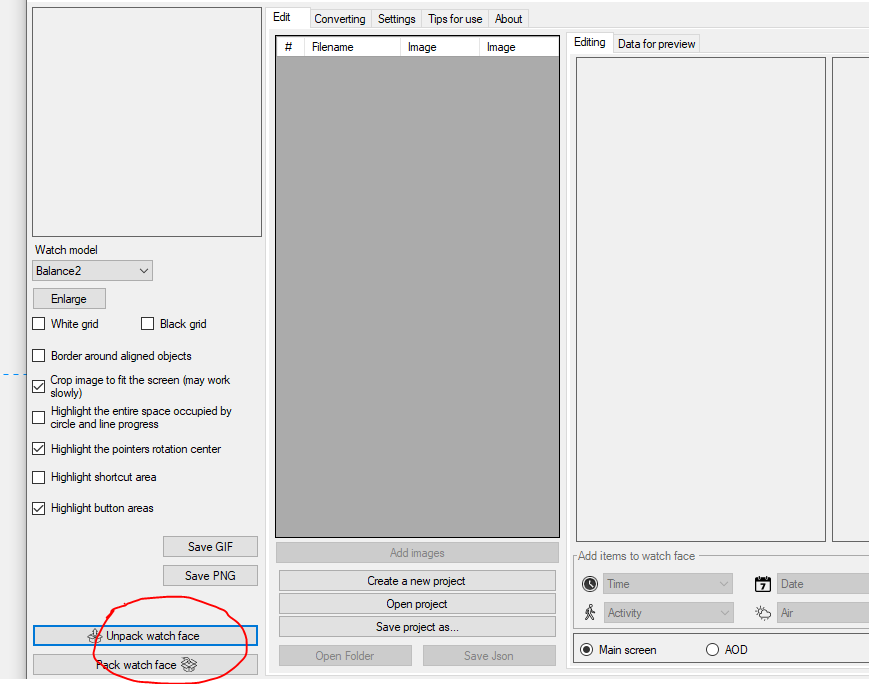
When unpacking the watch faces, it is advisable to immediately select the correct watch model, otherwise the colors may be distorted.
It is desirable to create a new project in a separate folder. Image names do not have to consist only of numbers, you can add short prefixes (for example, date_01, time_01).
Watch faces created in the editor and on Huami's website should unpack normally. Watch faces from Zepp and those created based on them will not be unpacked.
In a set of images for displaying one parameter (for example, images for displaying the day of the week), all images should preferably be the same size. If the size of the images is different, then the first image in the set should be the largest.
All new features in this and next release will be tested on the GTR4 and may not work on other models.
Version 18.0
Added the ability to create temporary and permanent QR codes.
Added the ability to send a watch face to the simulator for testing.
Added the ability to send a watch face to ZeppPlayer for testing.
Added the ability to record the simulator and ZeppPlayer screens as a GIF file.
Added the ability to download and unzip watch faces via QR code.
Added support for Bip Max
Added support for Balance 3
Added support for Balance Ultra
PS. The interface was translated using an online translator. If someone wants to improve the translation, then write to the PM.
PS2. Many people ask how to install watch faces. For starters, I advise you to read this topic. Personally, I prefer to use this program to install the created watch faces on the GTR 3 (for the GTS 3)
Сollection of code examples for use in watch faces.
Donate to the author - PayPal: [email protected].
Buy me a coffee
Supported watch models
- Amazfit Active
- Amazfit Active 2
- Amazfit Active 2 (Square)
- Amazfit Active Edge
- Amazfit Active Max
- Amazfit Band 7
- Amazfit Balance
- Amazfit Balance 2
- Amazfit Balance 3
- Amazfit Balance Ultra
- Amazfit Bip 5
- Amazfit Bip 5 Unity
- Amazfit Bip 6
- Amazfit Bip Max
- Amazfit Cheetah
- Amazfit Cheetah Pro
- Amazfit Cheetah (Square)
- Amazfit Cheetah 2 Pro
- Amazfit Falcon
- Amazfit GTR 3
- Amazfit GTR 3 Pro
- Amazfit GTR 4
- Amazfit GTR mini
- Amazfit GTS 3
- Amazfit GTS 4
- Amazfit GTS 4 mini
- Amazfit T-Rex 2
- Amazfit T-Rex 3
- Amazfit T-Rex 3 Pro
- Amazfit T-Rex Ultra
- Amazfit T-Rex Ultra 2
- Amazfit Active 2
- Amazfit Active 2 (Square)
- Amazfit Active Edge
- Amazfit Active Max
- Amazfit Band 7
- Amazfit Balance
- Amazfit Balance 2
- Amazfit Balance 3
- Amazfit Balance Ultra
- Amazfit Bip 5
- Amazfit Bip 5 Unity
- Amazfit Bip 6
- Amazfit Bip Max
- Amazfit Cheetah
- Amazfit Cheetah Pro
- Amazfit Cheetah (Square)
- Amazfit Cheetah 2 Pro
- Amazfit Falcon
- Amazfit GTR 3
- Amazfit GTR 3 Pro
- Amazfit GTR 4
- Amazfit GTR mini
- Amazfit GTS 3
- Amazfit GTS 4
- Amazfit GTS 4 mini
- Amazfit T-Rex 2
- Amazfit T-Rex 3
- Amazfit T-Rex 3 Pro
- Amazfit T-Rex Ultra
- Amazfit T-Rex Ultra 2
It is desirable to create a new project in a separate folder. Image names do not have to consist only of numbers, you can add short prefixes (for example, date_01, time_01).
Watch faces created in the editor and on Huami's website should unpack normally. Watch faces from Zepp and those created based on them will not be unpacked.
In a set of images for displaying one parameter (for example, images for displaying the day of the week), all images should preferably be the same size. If the size of the images is different, then the first image in the set should be the largest.
All new features in this and next release will be tested on the GTR4 and may not work on other models.
List of changes
v18.0
Added the ability to create temporary and permanent QR codes.
Added the ability to send a watch face to the simulator for testing.
Added the ability to send a watch face to ZeppPlayer for testing.
Added the ability to record the simulator and ZeppPlayer screens as a GIF file.
Added the ability to download and unzip watch faces via QR code.
Added support for Bip Max
Added support for Balance 3
Added support for Balance Ultra
Added the ability to send a watch face to the simulator for testing.
Added the ability to send a watch face to ZeppPlayer for testing.
Added the ability to record the simulator and ZeppPlayer screens as a GIF file.
Added the ability to download and unzip watch faces via QR code.
Added support for Bip Max
Added support for Balance 3
Added support for Balance Ultra
v17.1
Fixed the bugs that were found.
Added support for Cheetah 2 Pro.
Added support for Cheetah 2 Pro.
v17.0
Added the ability to create a ZAB file for publication in the store (button in settings)
Added wind speed in km/h
Added atmospheric pressure in mm Hg
Added support for T-Rex Ultra 2.
Added wind speed in km/h
Added atmospheric pressure in mm Hg
Added support for T-Rex Ultra 2.
v16.1
The ability to invert time circles has been added.
Active Max support has been added.
Image file name verification has been added.
The behavior of application shortcuts in editable elements has been fixed.
Active Max support has been added.
Image file name verification has been added.
The behavior of application shortcuts in editable elements has been fixed.
v16.0
Added sleep widget.
Added text widgets.
Added text widgets.
v15.1
Added support for new watch models.
Added BioCharge widget.
Added buttons to launch new applications.
Added BioCharge widget.
Added buttons to launch new applications.
v15.0
Time circles added.
Added world time (time, city, time zone, time offset).
Added text display around the circle.
Added the ability to create watch faces in developer mode (for experienced users, allows logs to be displayed in watch faces).
Added world time (time, city, time zone, time offset).
Added text display around the circle.
Added the ability to create watch faces in developer mode (for experienced users, allows logs to be displayed in watch faces).
v14.0
Added support for widgets: ALARM_CLOCK, TRAINING_LOAD, VO2MAX, AQI, BODY_TEMP, FLOOR, READINESS, HRV.
Added support for Balance 2.
Changed the structure of the Preview.States file.
When creating an animated preview, frames with a switchable background have been added.
Added the ability to display the city name in uppercase letters in the weather forecast.
Added links to lessons.
Added support for Balance 2.
Changed the structure of the Preview.States file.
When creating an animated preview, frames with a switchable background have been added.
Added the ability to display the city name in uppercase letters in the weather forecast.
Added links to lessons.
v13.2
Added support for Bip 6.
Fixed the progress display using the image set for most widgets. It should now be more similar to how it is displayed on the watch.
Reworked the code for displaying heart rate with a circular scale. It now uses the standard widget in place of the sensor.
Fixed PAI progress display. Note that the maximum value for the PAI pointer is 525, not 100. This is a feature of the watch, not the editor.
Added warning if files in watch face are in *.bin format.
Fixed the progress display using the image set for most widgets. It should now be more similar to how it is displayed on the watch.
Reworked the code for displaying heart rate with a circular scale. It now uses the standard widget in place of the sensor.
Fixed PAI progress display. Note that the maximum value for the PAI pointer is 525, not 100. This is a feature of the watch, not the editor.
Added warning if files in watch face are in *.bin format.
v13.1
Added ability to make a shortcut to any application in editable items.
Added support for Active 2.
Fixed display of buttons and shortcuts when creating a GIF file.
Added support for Active 2.
Fixed display of buttons and shortcuts when creating a GIF file.
v13.0
Added autosave (enabled in settings).
Added ability to switch background image by tap.
Added ability to switch background colour by tap.
Added ability to switch background image by tap.
Added ability to switch background colour by tap.
v12.1
Added transparency for some widgets. Does not work on all models.
Added support for Amazfit T-Rex 3.
Added support for Amazfit T-Rex 3.
v11.2
Fixing the smooth second hand on the GTR4.
v11.1
Updated the digital time widget.
Updated shortcuts widget.
Added new application launch commands for buttons.
Updated shortcuts widget.
Added new application launch commands for buttons.
v11.0
Completely redesigned the weather widget.
Added weather widget for several days (forecast).
Added support for Bip 5 Unity.
Added weather widget for several days (forecast).
Added support for Bip 5 Unity.
v10.4
Added ability to display month names in a font.
Added Compass widget (works on ZeppOS 2 or later).
Added ability to create *.zpk file (enabled in settings).
Added Compass widget (works on ZeppOS 2 or later).
Added ability to create *.zpk file (enabled in settings).
v10.3
Added display of hours:minutes:seconds in a single line font.
Added display of date/month/year in one line font (order depends on the watch setting).
Added display of the day of the week in font.
Added new presets for button functions.
Added display of date/month/year in one line font (order depends on the watch setting).
Added display of the day of the week in font.
Added new presets for button functions.
v10.2
Added ability to copy widget properties (context menu on the properties field).
v10.1
Added display of time and date in font.
Added widget for adding scripts to watch face.
Fixed bugs in sunrise/sunset operation on circle and at an angle.
Fixed bugs in digital time alignment.
Added widget for adding scripts to watch face.
Fixed bugs in sunrise/sunset operation on circle and at an angle.
Fixed bugs in digital time alignment.
v10.0
]Added support of fonts for data display (after installing such watch faces it is better to restart the watch).
Added possibility to display altitude (in barometer).
Completely redesigned the moon widget.
The arrow pointer for sun and moon should now not be displayed after sunset.
All images are now copied to the watch face, even if they are in folders.
Added possibility to display altitude (in barometer).
Completely redesigned the moon widget.
The arrow pointer for sun and moon should now not be displayed after sunset.
All images are now copied to the watch face, even if they are in folders.
v9.1
Fixed working with Amazfit Balance.
Added support for Amazfit Active.
Added support for Amazfit Active Edge.
Fixed display of distance on a circle.
Fixed displaying sunrise and sunset at an angle.
Added ability to convert images to ARGB format in settings.
Fixed continuous vibration in notifications.
Added support for Amazfit Active.
Added support for Amazfit Active Edge.
Fixed display of distance on a circle.
Fixed displaying sunrise and sunset at an angle.
Added ability to convert images to ARGB format in settings.
Fixed continuous vibration in notifications.
v9.0
Added ability to create shortcuts for a set of images (IMG_LEVEL).
Added support for buttons and presets to launch inbuilt apps.
Added support for Amazfit Balance (not tested).
Added support for buttons and presets to launch inbuilt apps.
Added support for Amazfit Balance (not tested).
v8.2
Added ability to display angled or circumferential data for sunrise/sunset, maximum and minimum temperatures (for weather, separate units of Celsius and Fahrenheit only work on newer models).
Added support for Cheetah / Cheetah Pro.
Added support for Bip 5.
Theoretically it is now possible to add support for new models by editing the file in the model_config folder.
Added support for Cheetah / Cheetah Pro.
Added support for Bip 5.
Theoretically it is now possible to add support for new models by editing the file in the model_config folder.
v8.1
Added ability to display data at an angle or in a circle for date and time.
Fixed found errors when unpacking dials.
Fixed found errors when working with UHD monitors.
Fixed found errors when unpacking dials.
Fixed found errors when working with UHD monitors.
v8.0
Added support for T-Rex Ultra
Added support for GTR Mini
Added the ability to display data at an angle or in a circle (battery, steps, distance, calories, heart rate, PAI, SpO2, stand)
Added support for GTR Mini
Added the ability to display data at an angle or in a circle (battery, steps, distance, calories, heart rate, PAI, SpO2, stand)
v7.3
Fixed problems with icons in editable items.
Fixed problems with circular progress in editable items.
Added ability to set data rotation angle for some models (ZeppOS 2).
Improved algorithm for unpacking dials that contain additional features. Increased probability of partial dial recognition.
Fixed problems with circular progress in editable items.
Added ability to set data rotation angle for some models (ZeppOS 2).
Improved algorithm for unpacking dials that contain additional features. Increased probability of partial dial recognition.
v7.2
Added the ability to change the type of line ending for linear and circular progress.
Added the ability to create shortcuts without using an image.
Added the ability to create shortcuts without using an image.
v7.1
Added independent element with image and top image.
For editable items on the clock, an additional selection in the form of a list is included.
Changed the function of creating an editable element for fat burning.
Fixed motion animation and rotation animation for GTR4 and GTS4.
Added wind direction.
Updated watch face file format.
For editable items on the clock, an additional selection in the form of a list is included.
Changed the function of creating an editable element for fat burning.
Fixed motion animation and rotation animation for GTR4 and GTS4.
Added wind direction.
Updated watch face file format.
v7.0
Added smooth second hand (several types)
Added alert every hour
Added the ability to change the direction of rotation of the hour hands
Added the ability to set the sector in which the hour hands work
Added alert every hour
Added the ability to change the direction of rotation of the hour hands
Added the ability to set the sector in which the hour hands work
v6.4
Improved the stability of the bluetooth connection loss notification function
Updated German and Spanish translation
Updated German and Spanish translation
v6.3
Added the possibility of notifications when the connection is broken and restored
Fixed work progress for fat burning
Fixed work progress for the pulse
Fixed bugs in temperature display
Fixed display of shortcuts in AOD mode
Fixed work progress for fat burning
Fixed work progress for the pulse
Fixed bugs in temperature display
Fixed display of shortcuts in AOD mode
v6.1
Added Falcon support.
Changed the algorithm of shortcuts to eliminate conflicts with editable elements.
The configuration of created watch faces has been updated to version 2.
Changed the algorithm of shortcuts to eliminate conflicts with editable elements.
The configuration of created watch faces has been updated to version 2.
v6.0
Added support for editable background.
Added support for editable arrows.
Added support for editable elements.
Added German translation.
Added support for editable arrows.
Added support for editable elements.
Added German translation.
v5.0
Added support for GTR 4
Added support for GTS 4 Mini
Added support for Amazfit Band 7 (not to be confused with Mi Band 7)
Added support for GTS 4 Mini
Added support for Amazfit Band 7 (not to be confused with Mi Band 7)
v4.1
Fixed bugs when creating and unpacking GTR 3 Pro watch faces
v4.0
Added animation support.
Added Ukrainian language.
Added a tab with some tips on working with the editor.
Added the ability to display the distance in miles.
Added Ukrainian language.
Added a tab with some tips on working with the editor.
Added the ability to display the distance in miles.
v 3.0
Added sunrise / sunset
Added barometer
Added stress
Wind added
Added fat burning
Added moon phases
Added barometer
Added stress
Wind added
Added fat burning
Added moon phases
v 2.0
Added weather.
Added workout (stand).
Added oxygen (SpO2).
Added humidity.
Added UV index.
Added the ability to highlight shortcuts when saving gif files (enabled in the settings).
Updated the display of shortcuts in connection with the firmware update on the watch.
Added Italian language.
Added Spanish language.
Added workout (stand).
Added oxygen (SpO2).
Added humidity.
Added UV index.
Added the ability to highlight shortcuts when saving gif files (enabled in the settings).
Updated the display of shortcuts in connection with the firmware update on the watch.
Added Italian language.
Added Spanish language.
v 1.1
Fixed loss of error symbol for pulse.
Fixed errors when unpacking dials.
Fixed bug with incorrect model definition for GTS 3.
Fixed errors when unpacking dials.
Fixed bug with incorrect model definition for GTS 3.
Added the ability to create temporary and permanent QR codes.
Added the ability to send a watch face to the simulator for testing.
Added the ability to send a watch face to ZeppPlayer for testing.
Added the ability to record the simulator and ZeppPlayer screens as a GIF file.
Added the ability to download and unzip watch faces via QR code.
Added support for Bip Max
Added support for Balance 3
Added support for Balance Ultra
Old versions
PS2. Many people ask how to install watch faces. For starters, I advise you to read this topic. Personally, I prefer to use this program to install the created watch faces on the GTR 3 (for the GTS 3)
Сollection of code examples for use in watch faces.
Donate to the author - PayPal: [email protected].
Buy me a coffee