Página 4 de 10
AmazFaces for iOS [Support]
Publicado: 17 Nov 2020, 10:05
por GIK-Team
In this topic, you may report a problem with our AmazFaces app for
iOS.
To do this, please, provide the following information:
App version (Stable or Beta)
Watch model
Phone model
OS version
Description of your problem
Filling example:
Código: Seleccionar todo
App version: 3.0.111 Stable
Watch model: GTR
Phone model: iPhone 11
OS version: iOS 14.2

Not able to sync watch faces to zepp
All information is transmitted to the developer, even if you do not receive a response in this thread.
Re: AmazFaces for iOS [Support]
Publicado: 19 Sep 2021, 06:56
por edu_kuniy
AmazFaces Version 3.6.120
T-Rex
iOS 14.7.1
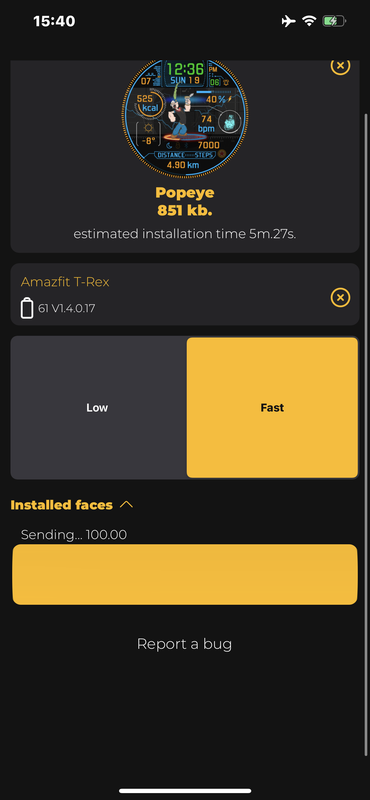
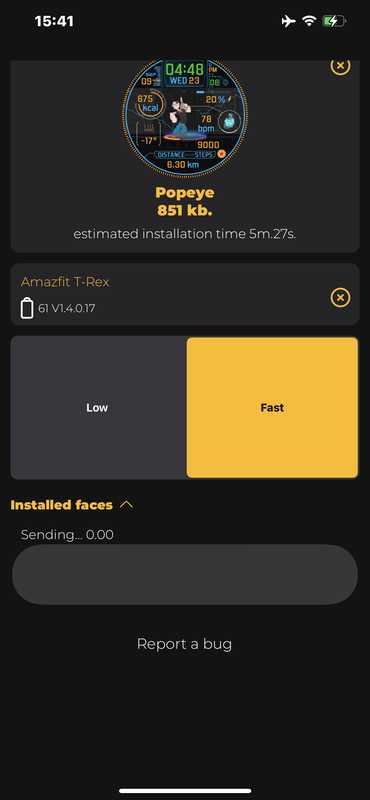
After the last update I cannot change any skin … I keep receiving this Sending status all the time … look at the picture
Re: AmazFaces for iOS [Support]
Publicado: 19 Sep 2021, 08:52
por Stas
Thank you for screenshots, fixes for t-rex try checking beta version 122 and write the test result.
link to beta test TestFlight:
https://testflight.apple.com/join/4hBEKHHg
edu_kuniy escribió: 19 Sep 2021, 06:56
AmazFaces Version 3.6.120
T-Rex
iOS 14.7.1
After the last update I cannot change any skin … I keep receiving this Sending status all the time … look at the picture
Re: AmazFaces for iOS [Support]
Publicado: 21 Sep 2021, 07:16
por extremme
extremme escribió: 19 Sep 2021, 03:15
Hi,
App version: 3.6.120
Watch model: T REX
Phone model: iPhone 11 Pro Max
OS version: iOS 14.8
I have a T-Rex. I was able to download and update my watch faces without issue. The last time I changed was abt 2 months ago.
I am using Iphone 11 pro max and 2 days ago, I updated the IOS to 14.8.
I tried updating the faces to my watch. It will indicate on my watch "Syncing Watch....." and on my phone it will show the progress. When it reached 100%, my watch will show error to upload face. I tried many times and tried to reinstall Amazfaces app but to no avail. (My Zepp app was still running at the background)
I then tried to use the Zepp app to try and see if I can change the face using their default watch faces and it worked. So it not bluetooth connection issue.
This is resolved with the latest update to 124. Thks developers!
Re: AmazFaces for iOS [Support]
Publicado: 23 Sep 2021, 07:54
por click9000
Here is my experience finally how to get watch face uploading to my T-Rex watch again using iOS app on my iPhone7 (since it stopped working three months ago). Thinking it might help some people having same trouble.
1. Make sure Zepp app is not in background. If you found it, kill it. (it causes T-Rex won't show in the device list AmazFaces app for me)
2. Install the latest AmazFaces (3.7.124)
3. Open AmazFaces app, select watch face you like and click download button. You should see T-Rex in display. Click Install button to install.
The reason I got stuck before was that they told us Zepp app needs to in background when using AmazFaces. It turned out to be a show stopper not sure when it started, and I just figured it out after trial and error.
Re: AmazFaces for iOS [Support]
Publicado: 11 Oct 2021, 09:59
por broook
App version :AmazFaces ver.3.7.124
Watch model: t rex
Phone model iPhone 12
OS version iOS 15
Description of your problem: can't discover watch by Amazfaces app
Re: AmazFaces for iOS [Support]
Publicado: 11 Oct 2021, 11:40
por Stas
Check the visibility of the watch in Zepp and restart the bluetooth, in the next update the search for the device will be fixed
broook escribió: 11 Oct 2021, 09:59
App version :AmazFaces ver.3.7.124
Watch model: t rex
Phone model iPhone 12
OS version iOS 15
Description of your problem: can't discover watch by Amazfaces app
Re: AmazFaces for iOS [Support]
Publicado: 11 Oct 2021, 12:10
por broook
Stas escribió: 11 Oct 2021, 11:40
Check the visibility of the watch in Zepp and restart the bluetooth, in the next update the search for the device will be fixed
broook escribió: 11 Oct 2021, 09:59
App version :AmazFaces ver.3.7.124
Watch model: t rex
Phone model iPhone 12
OS version iOS 15
Description of your problem: can't discover watch by Amazfaces app
Hi,
it works flawlessly in Zepp app , the problem is only on Amazfaces, I restarted the bluetooth and I stoped the Zepp app running at the background , but still the watch is not visible. may be its fixed by the next update as you said.
Re: AmazFaces for iOS [Support]
Publicado: 14 Oct 2021, 06:58
por wing0826
big bug...
when i just sync a new watch to GTR2
sync -> error -> auto re-sync ->error -> auto re-sync -> ....
I only can reboot GTR2 to stop the issue
App version: 3.7.124 / 3.8.125
Watch model: GTR2
Phone model: iphone xs max
OS version: iOS 13.5.1
Re: AmazFaces for iOS [Support]
Publicado: 17 Oct 2021, 09:16
por Stas
The reboot of the bluetooth helps, in the next update we will try to solve this problem.
7pixel escribió: 17 Oct 2021, 07:18
App version: 3.7.124
Watch model: T REX
Phone model: iPhone 11
OS version: iOS 15.0.2
Not able to sync watch faces to zepp
Can someone fix it please?
Re: AmazFaces for iOS [Support]
Publicado: 29 Oct 2021, 19:20
por edu_kuniy
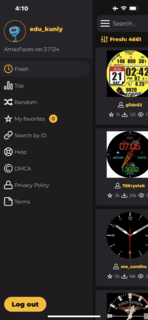
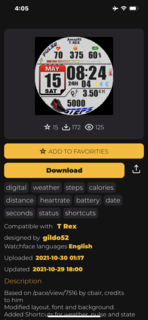
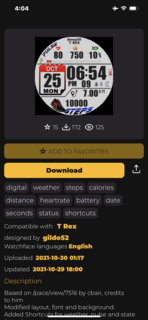
Add to Favorites > Not working … I touch Add to favorite but it doesn’t show on favorites tab … look

at the pictures

iPhone 12 ProMax
iOS 14.8
AmazFaces app 3.7.124
T-Rex ( not the New T-Rex Pro )
Re: AmazFaces for iOS [Support]
Publicado: 29 Oct 2021, 20:28
por Stas
Updates are not done as quickly as we would like, within a few days I think a version with fixes will be available.
edu_kuniy escribió: 29 Oct 2021, 19:20
Add to Favorites > Not working … I touch Add to favorite but it doesn’t show on favorites tab … look
at the pictures
iPhone 12 ProMax
iOS 14.8
AmazFaces app 3.7.124
T-Rex ( not the New T-Rex Pro )
Re: AmazFaces for iOS [Support]
Publicado: 05 Nov 2021, 03:48
por frankhj
App version (Stable or Beta)AmazFaces ver 3.8.126
Watch model Bip S
Phone model iPhoneSE
OS version 15.1
It continuously says connecting after selecting install but it never connects. I can change faces with the Zepp app.
Re: AmazFaces for iOS [Support]
Publicado: 05 Nov 2021, 09:43
por Stas
try to remove the bipS from the app AmazFaces and reconnect through the search, before that, restart the watch and bluetooth on the phone
frankhj escribió: 05 Nov 2021, 03:48
App version (Stable or Beta)AmazFaces ver 3.8.126
Watch model Bip S
Phone model iPhoneSE
OS version 15.1
It continuously says connecting after selecting install but it never connects. I can change faces with the Zepp app.
Re: AmazFaces for iOS [Support]
Publicado: 05 Nov 2021, 13:22
por frankhj
Did all that and issues screen pops up after clicking install.
Re: AmazFaces for iOS [Support]
Publicado: 05 Nov 2021, 14:07
por broook
hi team,
I have Amazfit Trex... is there an option to delete the default watch faces on the trex so that I can upload my favorite watch faces up to three.
thanks,
Re: AmazFaces for iOS [Support]
Publicado: 06 Nov 2021, 19:47
por frankhj
try to remove the bipS from the app AmazFaces and reconnect through the search, before that, restart the watch and bluetooth on the phone
frankhj wrote: ↑04 Nov 2021, 22:48
App version (Stable or Beta)AmazFaces ver 3.8.126
Watch model Bip S
Phone model iPhoneSE
OS version 15.1
It continuously says connecting after selecting install but it never connects. I can change faces with the Zepp app.
I tried correcting the problem by doing the steps you recommended and it still would not connect and the "Issues" screen popped up.
I solved the problem by installing the AmazTools app and uploading the face I wanted to Amaztools. The installation through AmazTools worked without any problems.
Re: AmazFaces for iOS [Support]
Publicado: 24 Nov 2021, 11:48
por Stas
Within a week there will be an update with a fix
7pixel escribió: 23 Nov 2021, 17:04
App version: 3.8.126
Watch model: T REX
Phone model: iPhone 11
OS version: iOS 15.1
Not able to sync watch faces to zepp
Re: AmazFaces for iOS [Support]
Publicado: 24 Nov 2021, 11:49
por Stas
Within a week there will be an update with a fix
frankhj escribió: 06 Nov 2021, 19:47
try to remove the bipS from the app AmazFaces and reconnect through the search, before that, restart the watch and bluetooth on the phone
frankhj wrote: ↑04 Nov 2021, 22:48
App version (Stable or Beta)AmazFaces ver 3.8.126
Watch model Bip S
Phone model iPhoneSE
OS version 15.1
It continuously says connecting after selecting install but it never connects. I can change faces with the Zepp app.
I tried correcting the problem by doing the steps you recommended and it still would not connect and the "Issues" screen popped up.
I solved the problem by installing the AmazTools app and uploading the face I wanted to Amaztools. The installation through AmazTools worked without any problems.
Re: AmazFaces for iOS [Support]
Publicado: 20 Ene 2022, 12:58
por cartina21
App version: 3.9.130
Watch model: Mi Band 6
Phone model: Iphone 13 Pro Max
OS version: 15.2.1
The app is not able to find the device
Re: AmazFaces for iOS [Support]
Publicado: 20 Ene 2022, 15:39
por Stas
Choose watch model
cartina21 escribió: 20 Ene 2022, 12:58
App version: 3.9.130
Watch model: Mi Band 6
Phone model: Iphone 13 Pro Max
OS version: 15.2.1
The app is not able to find the device
Re: AmazFaces for iOS [Support]
Publicado: 22 Ene 2022, 21:15
por cartina21
there isn’t watch model
Re: AmazFaces for iOS [Support]
Publicado: 23 Ene 2022, 08:54
por Stas
If it does not find the clock:
1.Check the visibility of the watch.
2.Reboot the bluetooth module on your phone.
2. Restart your watch.
Downloading the watch face for band6 does not work correctly at the moment, a fix is expected within a month.
Re: AmazFaces for iOS [Support]
Publicado: 22 Feb 2022, 10:56
por jdmf13
For several versions now I have been unable to login to my AmazfitWatchFaces account, I fill in my Username and Password and I get the spinning wheel but 5....10....15min go by and it never logs in.
Is logging in broken?
Re: AmazFaces for iOS [Support]
Publicado: 11 May 2022, 14:00
por Sabryzeeo
I have an iphone Xr ios 15.1 with Zepp and amazfit installed
but i can't install the watchface can't connect with my GTS
plz help!

Re: AmazFaces for iOS [Support]
Publicado: 24 May 2022, 17:44
por NeoSDAP
App version: 3.9 Stable
Watch model: Mi Band 6
Phone model: iPhone 8
OS version: iOS 15.5
It only allows me to download watchfaces, basically without letting me sync them. This does not happen with my Mi Band 4, which allows me to sync¡them correctly.
 at the pictures