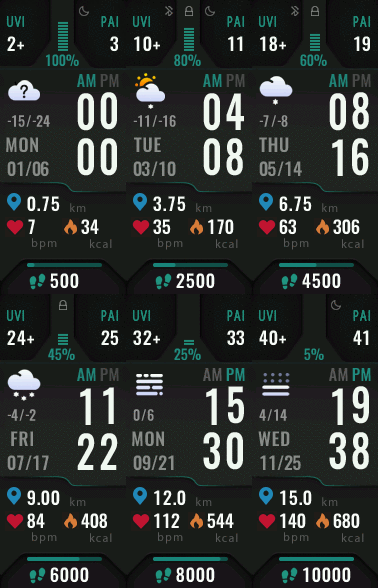
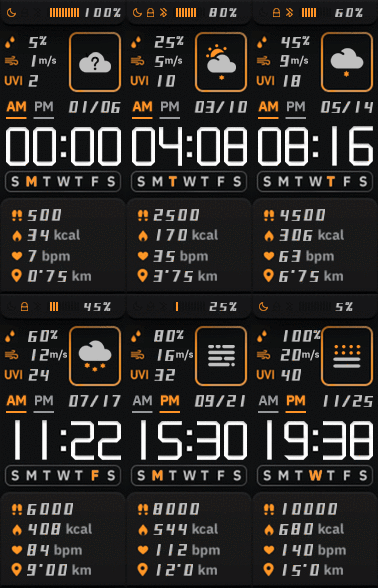
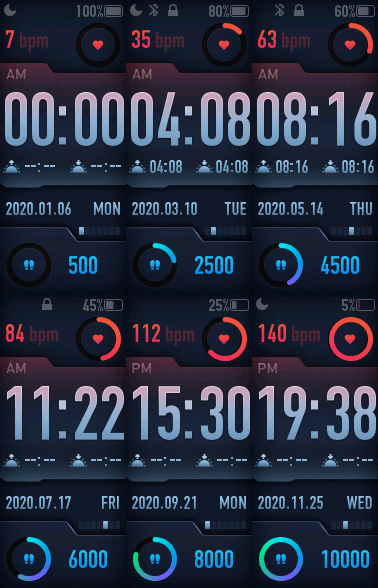
MiBandWFTool
Enviado: 08 Jul 2019, 12:57
Author
lvpokka
Tool Description
1. The tool is based on a modified version of AmazfitBipTools, thanks to the original open source .
2. The tool supports unpacking, packing of the official watch face bin file.
3. Mi band 4 supports 16,581,375 colors.
4. Mi band 5 supports 15,499,008 colors.
How to
1. Unzip MiBandWFTool_X.X.zip.
2. Download .bin file from catalog or get standard watchface file.
3. Drag the .bin file to WatchFace.exe (in step 1. , get the decompressed file)
(if there is only one log file, the decompression failed).
4. There are two ways to modify the dial.
(the file name depends on the name of the bin. If the .bin file is not generated, the package is wrong)
6. Copy the newly generated bin file to the corresponding directory of the mobile phone, and the synchronization will be completed. (This step is not very clear, you can refer to the original tutorial) above, you're done!
Mi Band 4 WF Tool
v1.4.2
- Added miles image support
NOTE:
- if your using image for MilesSuffixImageIndex, then KmSuffixImageIndex is required! you can use the same image for it
Mi Band 5 WF Tool
v2.1.6
- Preview bugfixes
- Watchfaces generating with random header identifier
- Fixed problem with Windows scaling, DPI is tied to 96
- [WFPreview] Removed ability to clone watchface header
Mi Band 6 WF Tool
v4.1.0
- Added Lunar calendar
- Bug fixes
- New preview generator, should be pixel perfect (big thx to Johnson070)
MiBandWFTool_4.1.0.zip
MiBandWFTool_2.1.6.zip [alt url] [alt url 2]
MiBandWFTool_1.4.2.zip [alt url] [alt url 2]
lvpokka
Tool Description
1. The tool is based on a modified version of AmazfitBipTools, thanks to the original open source .
2. The tool supports unpacking, packing of the official watch face bin file.
3. Mi band 4 supports 16,581,375 colors.
4. Mi band 5 supports 15,499,008 colors.
How to
1. Unzip MiBandWFTool_X.X.zip.
2. Download .bin file from catalog or get standard watchface file.
3. Drag the .bin file to WatchFace.exe (in step 1. , get the decompressed file)
(if there is only one log file, the decompression failed).
4. There are two ways to modify the dial.
- is to modify the corresponding image file and replace it with what we want.
- is to modify the corresponding json file and modify the position of the image.
(the file name depends on the name of the bin. If the .bin file is not generated, the package is wrong)
6. Copy the newly generated bin file to the corresponding directory of the mobile phone, and the synchronization will be completed. (This step is not very clear, you can refer to the original tutorial) above, you're done!
History log
What's new
- Added compatibility for Pulse progress bar
ver1.3
- added full support for transparent images
- drawing 20 frames for preview GIF
ver1.3.2
- bug fixes
- added 2 versions, both with transparency but Palette version uses less memory if images are simple.
ver1.3.3
- Added circular/linear step progress on preview
Stable v1.3.6
- locked transparency for palette mode, support only (0 and 255) values
- palette mode fix
Stable v1.3.7
v1.3.7 (cosmetic changes, you can use 1.3.6 if everything suits)
- Fixed GIF preview (Pulse rendering, Step segments, Kilometer drawing, Calories)
- Added the ability to choose which Set of images to use for WeekDays. (Config file WatchFace.exe.config)
- STRONGLY fixed json examples in README.
(to avoid problems, pack 1.3.6 and unpack 1.3.7 for a smooth transition)
Stable v1.3.8
- Removed image order dependency for json (sorting images no longer required)
- Fixed display bugs
Important: the order of the images should be from 0000 to XXXX without gaps.
v1.3.9
- Removed dependence on images order 0000->XXXX
- Calories rendering fixed
- Added ability to change Preview Speed (available from 50ms - 1000ms)
- TimeElement DrawingOrder hardcoded to 1234 (not used by MiBand4)
v1.4.1
- Other bugfixes
- New WF support
- Added new elements (time delimiter / step icon / linear progress )
v2.1.4
- Added support Mi Band 5 wfaces
- Pandafix (new unknown element)
- BugFixes
v2.1.5
- Preview bugfixes
- [WFPreview] Added Copy/Paste/Save ability
- [WFPreview] Added ability to replace watchface header
- added animation support
- fixed pulse and weather
- removed color restrictions for images
- analog clock support
- Added compatibility for Pulse progress bar
ver1.3
- added full support for transparent images
- drawing 20 frames for preview GIF
ver1.3.2
- bug fixes
- added 2 versions, both with transparency but Palette version uses less memory if images are simple.
ver1.3.3
- Added circular/linear step progress on preview
Stable v1.3.6
- locked transparency for palette mode, support only (0 and 255) values
- palette mode fix
Stable v1.3.7
v1.3.7 (cosmetic changes, you can use 1.3.6 if everything suits)
- Fixed GIF preview (Pulse rendering, Step segments, Kilometer drawing, Calories)
- Added the ability to choose which Set of images to use for WeekDays. (Config file WatchFace.exe.config)
- STRONGLY fixed json examples in README.
(to avoid problems, pack 1.3.6 and unpack 1.3.7 for a smooth transition)
Stable v1.3.8
- Removed image order dependency for json (sorting images no longer required)
- Fixed display bugs
Important: the order of the images should be from 0000 to XXXX without gaps.
v1.3.9
- Removed dependence on images order 0000->XXXX
- Calories rendering fixed
- Added ability to change Preview Speed (available from 50ms - 1000ms)
- TimeElement DrawingOrder hardcoded to 1234 (not used by MiBand4)
v1.4.1
- Other bugfixes
- New WF support
- Added new elements (time delimiter / step icon / linear progress )
v2.1.4
- Added support Mi Band 5 wfaces
- Pandafix (new unknown element)
- BugFixes
v2.1.5
- Preview bugfixes
- [WFPreview] Added Copy/Paste/Save ability
- [WFPreview] Added ability to replace watchface header
v1.4.2
- Added miles image support
NOTE:
- if your using image for MilesSuffixImageIndex, then KmSuffixImageIndex is required! you can use the same image for it
Mi Band 5 WF Tool
v2.1.6
- Preview bugfixes
- Watchfaces generating with random header identifier
- Fixed problem with Windows scaling, DPI is tied to 96
- [WFPreview] Removed ability to clone watchface header
Mi Band 6 WF Tool
v4.1.0
- Added Lunar calendar
- Bug fixes
- New preview generator, should be pixel perfect (big thx to Johnson070)
MiBandWFTool_4.1.0.zip
MiBandWFTool_2.1.6.zip [alt url] [alt url 2]
MiBandWFTool_1.4.2.zip [alt url] [alt url 2]