Page 2 of 3
Re: Discussion of watch faces for Mi Band 4
Posted: 15 Aug 2019, 19:21
by lazimk
lvpokka wrote: 15 Aug 2019, 12:16
@lazimk its not visible on miband4 also?
1. In MiBand4 it is visible. But not in Preview (delimiter image for calories)
2. I had forgot to add batteryinfo json part, but had battery bar info. This resulted in showing battery bar and icons in preview. But not in miband4
Re: Discussion of watch faces for Mi Band 4
Posted: 17 Aug 2019, 11:47
by T1MOXA
I created a watch face yesterday, but the app doesn't want to sync it.
Can you tell me why ?
Link -
https://amazfitwatchfaces.com/mi-band-4/view/4108
....
UPD
I think I know what this is.
This is a 320 KB size limit...
...
It was him...
Perhaps you should add a check to the packer ?
Re: Discussion of watch faces for Mi Band 4
Posted: 17 Aug 2019, 14:40
by matrix
Re: Discussion of watch faces for Mi Band 4
Posted: 17 Aug 2019, 14:41
by matrix
Заранее спасибо
Re: Discussion of watch faces for Mi Band 4
Posted: 19 Aug 2019, 07:29
by Odin
Hello at all,
I'm not sure if I am right here.
I figured out that my battery get empty very fast, after I used no original watchfaces. I read in the community that it has something to do with the size of the watchface. And I also figured out the the mi band 4 can not use bigger as 500 kb watchfaces.
Now to my issue.
I download this watchface:
https://amazfitwatchfaces.com/mi-band-4/view/1062
Unpacked it and change the color to red letters. All my pictures are smaller as the original now.
I packed it and my new watchface are 3 times bigger as the original. Original is 210 kb and my created is over 600 kb.
I was wondering how can the be, because all my .png files are smaller as the original.
So my next tried was unpacking the original and repack it without any changes. The result was exactly the same. Original 210 kb and new created over 600 kb.
Does someone know what is wrong?
I tried it with an older version and with the newest mi band 4 version. 1.3.
Hope someone can help me .
Greetings Timo
Re: Discussion of watch faces for Mi Band 4
Posted: 19 Aug 2019, 18:53
by Urimu
lvpokka wrote: 13 Aug 2019, 21:46
please use only 1.3.8! Its have no bugs and fixed all preview problems...
no it's not possible... they drawing in following order which cannot be changed. Overwrite animation can only last json element HeartProgress
"fixed all preview problems" I have been working on WF yesterday and I got really confused because the tool kept shifting the background about 12px up and 4-5 px to the left (in the preview, it works and looks as it should on the Band itself) And yes I use 1.3.8
Re: Discussion of watch faces for Mi Band 4
Posted: 20 Aug 2019, 07:56
by Odin
Odin wrote: 19 Aug 2019, 07:29
Hello at all,
I'm not sure if I am right here.
I figured out that my battery get empty very fast, after I used no original watchfaces. I read in the community that it has something to do with the size of the watchface. And I also figured out the the mi band 4 can not use bigger as 500 kb watchfaces.
Now to my issue.
I download this watchface:
https://amazfitwatchfaces.com/mi-band-4/view/1062
Unpacked it and change the color to red letters. All my pictures are smaller as the original now.
I packed it and my new watchface are 3 times bigger as the original. Original is 210 kb and my created is over 600 kb.
I was wondering how can the be, because all my .png files are smaller as the original.
So my next tried was unpacking the original and repack it without any changes. The result was exactly the same. Original 210 kb and new created over 600 kb.
Does someone know what is wrong?
I tried it with an older version and with the newest mi band 4 version. 1.3.
Hope someone can help me .
Greetings Timo
Odin wrote: 19 Aug 2019, 07:29
Hello at all,
I'm not sure if I am right here.
I figured out that my battery get empty very fast, after I used no original watchfaces. I read in the community that it has something to do with the size of the watchface. And I also figured out the the mi band 4 can not use bigger as 500 kb watchfaces.
Now to my issue.
I download this watchface:
https://amazfitwatchfaces.com/mi-band-4/view/1062
Unpacked it and change the color to red letters. All my pictures are smaller as the original now.
I packed it and my new watchface are 3 times bigger as the original. Original is 210 kb and my created is over 600 kb.
I was wondering how can the be, because all my .png files are smaller as the original.
So my next tried was unpacking the original and repack it without any changes. The result was exactly the same. Original 210 kb and new created over 600 kb.
Does someone know what is wrong?
I tried it with an older version and with the newest mi band 4 version. 1.3.
Hope someone can help me .
Greetings Timo
Does someone have the same problem? No own build Watchface has less than 600 kb. Also when I use a small one. After repacking it its 3 times bigger. Can someone help me?
Ich spreche deutsch und englisch.
Re: Discussion of watch faces for Mi Band 4
Posted: 21 Aug 2019, 09:16
by Maikeldevil
Odin wrote: 20 Aug 2019, 07:56
Odin wrote: 19 Aug 2019, 07:29
Hello at all,
I'm not sure if I am right here.
I figured out that my battery get empty very fast, after I used no original watchfaces. I read in the community that it has something to do with the size of the watchface. And I also figured out the the mi band 4 can not use bigger as 500 kb watchfaces.
Now to my issue.
I download this watchface:
https://amazfitwatchfaces.com/mi-band-4/view/1062
Unpacked it and change the color to red letters. All my pictures are smaller as the original now.
I packed it and my new watchface are 3 times bigger as the original. Original is 210 kb and my created is over 600 kb.
I was wondering how can the be, because all my .png files are smaller as the original.
So my next tried was unpacking the original and repack it without any changes. The result was exactly the same. Original 210 kb and new created over 600 kb.
Does someone know what is wrong?
I tried it with an older version and with the newest mi band 4 version. 1.3.
Hope someone can help me .
Greetings Timo
Odin wrote: 19 Aug 2019, 07:29
Hello at all,
I'm not sure if I am right here.
I figured out that my battery get empty very fast, after I used no original watchfaces. I read in the community that it has something to do with the size of the watchface. And I also figured out the the mi band 4 can not use bigger as 500 kb watchfaces.
Now to my issue.
I download this watchface:
https://amazfitwatchfaces.com/mi-band-4/view/1062
Unpacked it and change the color to red letters. All my pictures are smaller as the original now.
I packed it and my new watchface are 3 times bigger as the original. Original is 210 kb and my created is over 600 kb.
I was wondering how can the be, because all my .png files are smaller as the original.
So my next tried was unpacking the original and repack it without any changes. The result was exactly the same. Original 210 kb and new created over 600 kb.
Does someone know what is wrong?
I tried it with an older version and with the newest mi band 4 version. 1.3.
Hope someone can help me .
Greetings Timo
Does someone have the same problem? No own build Watchface has less than 600 kb. Also when I use a small one. After repacking it its 3 times bigger. Can someone help me?
Ich spreche deutsch und englisch.
Try using palettemode instead of rawimage. This will decrease the file size!
Re: Discussion of watch faces for Mi Band 4
Posted: 21 Aug 2019, 18:48
by thiagoellis
I edited a file that has animation, just as shown in this tutorial (
https://amazfitwatchfaces.com/blog/crea ... hfaces-bin), but when you pack the files it changes the animation images from "png" to ".dat", only the first animation image continues "png". How to solve?!
Re: Discussion of watch faces for Mi Band 4
Posted: 22 Aug 2019, 07:42
by lvpokka
Resave images in different bit rate or program
Re: Discussion of watch faces for Mi Band 4
Posted: 29 Aug 2019, 02:51
by ejyeh
'raw.cfg' does it really work?
I have 11 images, At first I've dragged and dropped the '.json' file to the 'PaletteImageMode/WatchFace.exe', it works, all images has been compressed.
Then I created the file named 'raw.cfg', filled all images' ID in it like '0,1,2,3,4,5,6,7,8,9,10' and saved it nearby '.json', then I dragged and dropped the '.json' file to the 'PaletteImageMode/WatchFace.exe', all images still has been compressed, so am I did something wrong? The images supposed to be uncompressed.
Re: Discussion of watch faces for Mi Band 4
Posted: 29 Aug 2019, 03:13
by lazimk
ejyeh wrote: 29 Aug 2019, 02:51
'raw.cfg' does it really work?
I have 11 images, At first I've dragged and dropped the '.json' file to the 'PaletteImageMode/WatchFace.exe', it works, all images has been compressed.
Then I created the file named 'raw.cfg', filled all images' ID in it like '0,1,2,3,4,5,6,7,8,9,10' and saved it nearby '.json', then I dragged and dropped the '.json' file to the 'PaletteImageMode/WatchFace.exe', all images still has been compressed, so am I did something wrong? The images supposed to be uncompressed.
It does work for me really well.
I used it in majority of WFs i have made (for selectevely forcing certain Image IDs to be used as RAW (high quality) which would otherwise wash out details of that image asset.)
yes add image ids seperated be commas (0,10,11,12,13 ... etc) and save it as "raw.cfg" (make sure it is not raw.cfg.txt) and place it along with ur json/image assets. Drag json into Palette mode watchface.exe
this helped me to reduce build size of WF
Re: Discussion of watch faces for Mi Band 4
Posted: 29 Aug 2019, 03:46
by ejyeh
lazimk wrote: 29 Aug 2019, 03:13
It does work for me really well.
I used it in majority of WFs i have made (for selectevely forcing certain Image IDs to be used as RAW (high quality) which would otherwise wash out details of that image asset.)
yes add image ids seperated be commas (0,10,11,12,13 ... etc) and save it as "raw.cfg" (make sure it is not raw.cfg.txt) and place it along with ur json/image assets. Drag json into Palette mode watchface.exe
this helped me to reduce build size of WF
What's your tool's version? I'm using 'MiBandWFTool_1.3.8'.
I've done exactly what you said, and I've checked 'raw.cfg' didn't have extension. Did I miss something?
Re: Discussion of watch faces for Mi Band 4
Posted: 29 Aug 2019, 04:46
by lazimk
[mention]ejyeh[/mention]
I also used v1.3.8 (now v1.3.9 is released)
Did you try unpacking ur generated bin again and check images files (check quality by visual inspection, not by file size of pngs).
and did u also try ur WF in ur Miband ??
Re: Discussion of watch faces for Mi Band 4
Posted: 29 Aug 2019, 05:39
by lvpokka
ejyeh wrote: 29 Aug 2019, 03:46
lazimk wrote: 29 Aug 2019, 03:13
It does work for me really well.
I used it in majority of WFs i have made (for selectevely forcing certain Image IDs to be used as RAW (high quality) which would otherwise wash out details of that image asset.)
yes add image ids seperated be commas (0,10,11,12,13 ... etc) and save it as "raw.cfg" (make sure it is not raw.cfg.txt) and place it along with ur json/image assets. Drag json into Palette mode watchface.exe
this helped me to reduce build size of WF
What's your tool's version? I'm using 'MiBandWFTool_1.3.8'.
I've done exactly what you said, and I've checked 'raw.cfg' didn't have extension. Did I miss something?
Check logs, it's writing which node its using for each image... And how did you know that it's not working

BTW 1.3.9 have no changes in this functionality, so it work the same.
Is logs is not OK and there is no raw mode, upload all resource file with json and raw.cfg) because your doing something wrong
Re: Discussion of watch faces for Mi Band 4
Posted: 29 Aug 2019, 06:15
by ejyeh
lvpokka wrote: 29 Aug 2019, 05:39
Check logs, it's writing which node its using for each image... And how did you know that it's not working
BTW 1.3.9 have no changes in this functionality, so it work the same.
Is logs is not OK and there is no raw mode, upload all resource file with json and raw.cfg) because your doing something wrong
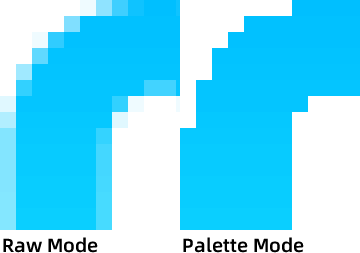
I've uploaded an attachment named 'test.zip', you can try it, the images '1,2,3,4,5' should be uncompressed but they still compressed.
Re: Discussion of watch faces for Mi Band 4
Posted: 29 Aug 2019, 06:52
by lvpokka
Working as expected)) maybe your not drag and drop but using some king of TotalComander?
Check logs
Debug|Encoding resource 5...
Trace|Writing image in Raw mode
Trace|Transparency image...
Trace|Writing image header...
Trace|Width: 20, Height: 44, RowLength: 80
Trace|BPP: 32, PaletteColors: 0, Transaparency: 0
Trace|Writing image...
Trace|Resource 6 offset is 47008...
Debug|Encoding resource 6...
Trace|Writing image in Palette mode
Trace|Extracting palette...
PS> Use cheats! add black background to all numbers and then compress with palette mode

will be better then raw, and quality will be the same!
Re: Discussion of watch faces for Mi Band 4
Posted: 29 Aug 2019, 07:55
by ejyeh
lvpokka wrote: 29 Aug 2019, 06:52
Working as expected)) maybe your not drag and drop but using some king of TotalComander?
Check logs
Debug|Encoding resource 5...
Trace|Writing image in Raw mode
Trace|Transparency image...
Trace|Writing image header...
Trace|Width: 20, Height: 44, RowLength: 80
Trace|BPP: 32, PaletteColors: 0, Transaparency: 0
Trace|Writing image...
Trace|Resource 6 offset is 47008...
Debug|Encoding resource 6...
Trace|Writing image in Palette mode
Trace|Extracting palette...
PS> Use cheats! add black background to all numbers and then compress with palette mode
will be better then raw, and quality will be the same!
Aha, I just figure out why this happened. It's because I've created 'WatchFace.exe' shortcuts on desktop, and then I drag and drop to it, maybe in this way, 'raw.cfg' doesn't work.
So is that a bug or something? Btw, it works when you drag and drop to the '.exe'.
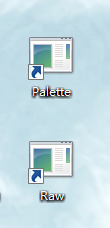
So I'm considering your suggestion to use 8bit png in black background with 'index transparency' instead 'alpha transparency', and it will be the same as you said.

Re: Discussion of watch faces for Mi Band 4
Posted: 06 Sep 2019, 15:07
by Wilco
Nothing works with firmware version 1.0.6.12
Re: Discussion of watch faces for Mi Band 4
Posted: 06 Sep 2019, 15:10
by lvpokka
[mention]Wilco[/mention] WHAT specifically does not work!!!!
Re: Discussion of watch faces for Mi Band 4
Posted: 06 Sep 2019, 15:19
by Wilco
lvpokka wrote: 06 Sep 2019, 15:10
@Wilco WHAT specifically does not work!!!!
You can't load any custom watchfaces anymore with the new firmware.
At least not me.
Re: Discussion of watch faces for Mi Band 4
Posted: 06 Sep 2019, 15:27
by lvpokka
[mention]Wilco[/mention] use MiBandMaster or Notify&Fitness
Re: Discussion of watch faces for Mi Band 4
Posted: 06 Sep 2019, 15:34
by Wilco
lvpokka wrote: 06 Sep 2019, 15:27
@Wilco use MiBandMaster or Notify&Fitness
Tried Notify&Fitness but same result as the original mi-fit app.
Have you tried this software version?
Re: Discussion of watch faces for Mi Band 4
Posted: 06 Sep 2019, 15:36
by lvpokka
MiBandMaster works for me, uploading custom wfaces
Re: Discussion of watch faces for Mi Band 4
Posted: 06 Sep 2019, 15:49
by Wilco
lvpokka wrote: 06 Sep 2019, 15:36
MiBandMaster works for me, uploading custom wfaces
Uploading OK, but does the custom wface work? I'm not seeing the hours en minuts anymore.
 пр! Тимохя я новичок хотим сделать стивену джобса цифры зелено неоновые остальное шаги км
 BTW 1.3.9 have no changes in this functionality, so it work the same.