Page 2 of 2

Re: [Tutorial] How to create WFZ watchfaces for Stratos 3 (new style / GTRWidget)

Posted: 15 Feb 2021, 09:14
by fcaronte
Try to give a check to my last Sam watch V2 for stratos3, we found the dayHands usage with a "mask" and maybe you can update the guide 👍🏻.
DxP

Re: [Tutorial] How to create WFZ watchfaces for Stratos 3 (new style / GTRWidget)

Posted: 15 Feb 2021, 18:54
by COM-D
fcaronte, I also noticed this new code in your watch face.
-<WatchFaceComponent type="datehand">
<Item config="@wfz/dateHands/day.png" type="day" y="125" x="125" a1="348" a0="0" yCenter="3" xCenter="-23"/>
</WatchFaceComponent>
It is very interesting! New opportunities.
Thank you.
DxP, this should definitely be added to your manual.

Re: [Tutorial] How to create WFZ watchfaces for Stratos 3 (new style / GTRWidget)

Posted: 16 Feb 2021, 07:28
by DxP
Thanks guys, Tutorial updated....

Please be so kind and check my changes for errors .... I'm currently on the move and can't try anything


New entrys:
  • WatchFaceComponent "datehand" - (provides pointers to show date)
  • WatchFaceComponent "pointer" - (provides pointer to show various values)
Additional informations added
  • WatchFaceComponent "progress"

Re: [Tutorial] How to create WFZ watchfaces for Stratos 3 (new style / GTRWidget)

Posted: 16 Feb 2021, 17:52
by COM-D
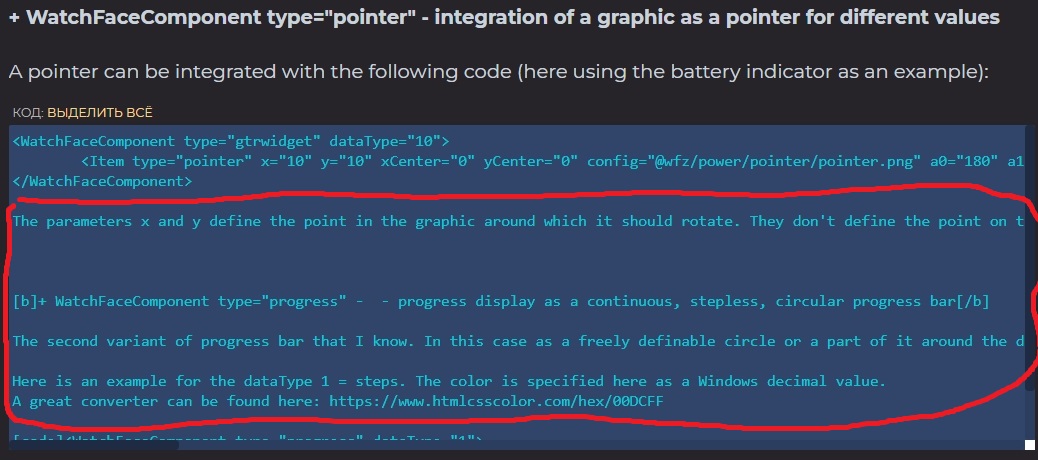
DxP in the WatchFaceComponent "pointer" in the frame with the code, the description text is mixed. And the section <WatchFaceComponent type = "progress"
Should be corrected.

Image

Re: [Tutorial] How to create WFZ watchfaces for Stratos 3 (new style / GTRWidget)

Posted: 17 Feb 2021, 07:38
by DxP
Ups...I forget a tag.... fixed - thanks.

Re: [Tutorial] How to create WFZ watchfaces for Stratos 3 (new style / GTRWidget)

Posted: 22 Mar 2021, 16:00
by COM-D
I want to share my experience.

WatchFaceComponent type="datehand" - displays date with pointers

This pointer can be used only as a last resort. This can be done - when it does not cross other digital pointers. As in the watchface by fcaronte.
I've tried this. I could not cover it so that other numbers were not covered.
The code for the "mask" - WatchFaceComponent type = "icon", doesn't work. It only covers the background.
Code for "mask" - Item type = "colon_hm" covers everything (datehand Digital time, steps)
Or the author needs to do so that the WatchFaceComponent type = "datehand" indicator merges with the background so that it cannot be seen.

Therefore, its application is now very specific, and a little limited.

Re: [Tutorial] How to create WFZ watchfaces for Stratos 3 (new style / GTRWidget)

Posted: 13 Apr 2021, 08:46
fcaronte wrote: 18 Oct 2020, 21:23
About weather, as now is working correctly if you use AmazMod to push the weather to clock (need AmazMod service on watch too). I'm using it on my Stratos 3.
Can you describe? Because for me it doesn't work on Stratos3.
I have my own key from https://openweathermap.org/api in AmazMod / GreatFit / Calendar / Weather, but the weather for new widgets is not displayed
<WatchFaceComponent type = "gtrwidget" id = "5" dataType = "1048584">
I also did not find any dial on the S3 that shows the weather.

The weather works on Verge.

Re: [Tutorial] How to create WFZ watchfaces for Stratos 3 (new style / GTRWidget)

Posted: 27 May 2021, 06:13
by mato
Hi All,

I have an interesting problem.
I'd like to display calories circle progress bar, but the maximum is not the target set in Zepp for Stratos 3, but always permanent 300 cal.

Code: Select all

<WatchFaceComponent type="gtrwidget" dataType="4">
    <Item type="Arc" xCenter="236" yCenter="159" rx="46" ry="46" color="-256" size="4" cap="0" a0="0" a1="360"/>
</WatchFaceComponent>
Do you have any ideas?

Re: [Tutorial] How to create WFZ watchfaces for Stratos 3 (new style / GTRWidget)

Posted: 27 May 2021, 11:20
by fcaronte
mato wrote: 27 May 2021, 06:13
Hi All,

I have an interesting problem.
I'd like to display calories circle progress bar, but the maximum is not the target set in Zepp for Stratos 3, but always permanent 300 cal.

Code: Select all

<WatchFaceComponent type="gtrwidget" dataType="4">
    <Item type="Arc" xCenter="236" yCenter="159" rx="46" ry="46" color="-256" size="4" cap="0" a0="0" a1="360"/>
</WatchFaceComponent>
Do you have any ideas?
I never try, but try to check zepp app under Stratos 3 setting, "activity" there is the "cal" goal to set and I think it will sync with the Wfz

Re: [Tutorial] How to create WFZ watchfaces for Stratos 3 (new style / GTRWidget)

Posted: 27 May 2021, 13:11
by mato
fcaronte wrote: 27 May 2021, 11:20
I never try, but try to check zepp app under Stratos 3 setting, "activity" there is the "cal" goal to set and I think it will sync with the Wfz
I tried, but it doesn't affect it. :(
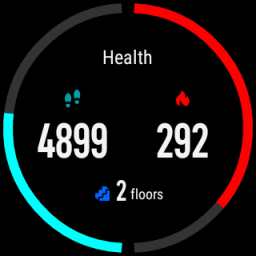
According to the chart, the goal is 300.

But, as I noticed, the Stratos 3’s factory data sheet doesn’t show calorie progress well either.
In Zepp, I set 600 calories as my daily goal, Zepp is syncronized with my watch, yet it’s like the goal is 400.

Image

Maybe it's also a firmware bug?

I have already initiated many bugfix requests about the current firmware of the Stratos 3 at Amazfit Support, but they always close the topic by saying “Since the current firmware of the Stratos 3 now performs stably, so there is no plan for a new OTA update in short term."
Tragic, disappointing attitude from the Amazfit team. :-/

Re: [Tutorial] How to create WFZ watchfaces for Stratos 3 (new style / GTRWidget)

Posted: 27 May 2021, 14:51
by COM-D
I have already faced this problem. This is a watch software bug. On Stratos 3, this value is always 300. And it doesn't sync with Zepp. It is also not possible to change it in the settings.

For some reason, you have a calorie goal in the screenshot - 400
I am surprised.

Re: [Tutorial] How to create WFZ watchfaces for Stratos 3 (new style / GTRWidget)

Posted: 27 May 2021, 15:49
by mato
COM-D wrote: 27 May 2021, 14:51
I have already faced this problem. This is a watch software bug. On Stratos 3, this value is always 300. And it doesn't sync with Zepp. It is also not possible to change it in the settings.
Thanks for the information COM-D, then I won't deal with this dial component because it makes no sense.
It's a waste. :(

Re: [Tutorial] How to create WFZ watchfaces for Stratos 3 (new style / GTRWidget)

Posted: 27 May 2021, 19:56
by fcaronte
Yes, I try to investigate and can confirm is a firmware bug, and yes huami practically discarded our android based watch 😭

Re: [Tutorial] How to create WFZ watchfaces for Stratos 3 (new style / GTRWidget)

Posted: 30 May 2021, 06:50
by DxP
It all seems to be working fine for me. I have set a target of 500 Kcal in the Zepp app and this is also displayed correctly by the watch. Only the values between the clock and the app are never correct. The clock always shows more than the counter in the app.

Re: [Tutorial] How to create WFZ watchfaces for Stratos 3 (new style / GTRWidget)

Posted: 30 May 2021, 09:56
by COM-D
It’s strange.
Can you take a screenshot?
What version of Zepp do you have? Maybe the problem is not with the watch software, but with the Zepp app?

Re: [Tutorial] How to create WFZ watchfaces for Stratos 3 (new style / GTRWidget)

Posted: 06 Jun 2021, 08:29
by DxP
Watch: ROM: 4.2.8.0 + Amazmod
Zepp-App Version: 5.12.2 - Alorithmus: 2.8.10

Re: [Tutorial] How to create WFZ watchfaces for Stratos 3 (new style / GTRWidget)

Posted: 06 Jun 2021, 16:54
by mato
DxP wrote: 06 Jun 2021, 08:29
Watch: ROM: 4.2.8.0 + Amazmod
Zepp-App Version: 5.12.2 - Alorithmus: 2.8.10
Hmm.
All the same at me, but it doesn't work well. :(

Re: [Tutorial] How to create WFZ watchfaces for Stratos 3 (new style / GTRWidget)

Posted: 13 Jun 2021, 06:22
by mato
Well, gentlemen,

I paired the watch with my old iPhone and it turned out a few things.

The Android version of Zepp doesn’t, but the iPhone version can set the daily calorie target on Stratos 3.
The factory data sheet is correct, the diagram shows the situation well.
But on self-made watch faces, the daily target is still 300.

Re: [Tutorial] How to create WFZ watchfaces for Stratos 3 (new style / GTRWidget)

Posted: 13 Jun 2021, 20:39
by fcaronte
Yes probably is one of the ignored bug from Huami Dev team 🤦🏻‍♂️

Re: [Tutorial] How to create WFZ watchfaces for Stratos 3 (new style / GTRWidget)

Posted: 11 Jul 2021, 07:38
by mato
Hi guys,

I feel like the unique dial design of the Stratos 3 watches is exhausted, the big masters can’t bring in a new design either.

Many of my acquaintances say that they chose the GTR watch because it has a nicer dial.

Bullshit.

Lately, I’ve been embroiled in a terribly hard job: popular GTR47 watch faces redisign for Stratos 3.

Okay, there’s a converter known to all of us for this, which is awesome, since we can learn a lot from the converted source code.

However, in most cases, nothing is where it should be, especially the dinamic text areas are misaddressed. These can be reworked, although it is a big job.

The other problem is the 3-bit 8c display.

For me, it is a requirement that a watch face be enjoyable in 3 bit color depth as well.

I use free software to design all the dial surfaces. (Paint dot net, Notepad ++)

There is a poor-looking but more useful web option for converting graphics to 3-bit:

http://mncaudill.github.io/3bitdither/

This, in turn, cannot handle pixel transparency, which is important because Stratos 3 does not know transparency in lo-fi mode.
I have to fix everything for the lo-fi mode pixel by pixel.

How do you solve 3-bit graphics?

Thanks in advance,
mato

Re: [Tutorial] How to create WFZ watchfaces for Stratos 3 (new style / GTRWidget)

Posted: 17 Jul 2021, 17:58
by COM-D
mato
How do you solve 3-bit graphics?
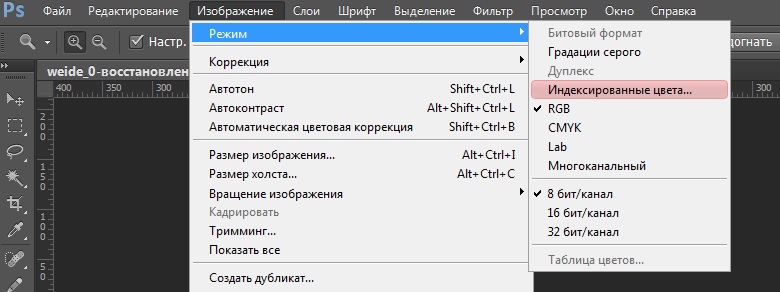
Adobe Photoshop has a feature to convert RGB color mode to Indexed Colors. There you choose the number of flowers - 8. Indexed colors have non-translucent pixels.
See screenshot. Marked in red.
Sorry that he is in Russian.

Image

Re: [Tutorial] How to create WFZ watchfaces for Stratos 3 (new style / GTRWidget)

Posted: 18 Jul 2021, 17:40
by mato
Thanks!
I do not have legal Adobe PS, I use only free softwares, so it is no option for me :(

Re: [Tutorial] How to create WFZ watchfaces for Stratos 3 (new style / GTRWidget)

Posted: 21 Jul 2021, 19:04
by fcaronte
mato wrote: 18 Jul 2021, 17:40
Thanks!
I do not have legal Adobe PS, I use only free softwares, so it is no option for me :(
If you want use free software you can use "gimp" I was using together with Photoshop when I convert PNG to 8c and some time gimp get better results, give it a try!