Page 8 of 26
MiBandWFTool
Posted: 08 Jul 2019, 12:57
by lvpokka
Author
lvpokka
Tool Description
1. The tool is based on a modified version of AmazfitBipTools, thanks to the original open source .
2. The tool supports unpacking, packing of the official watch face bin file.
3. Mi band 4 supports 16,581,375 colors.
4. Mi band 5 supports 15,499,008 colors.
How to
1. Unzip
MiBandWFTool_X.X.zip.
2. Download
.bin file from catalog or get standard watchface file.
3. Drag the
.bin file to
WatchFace.exe (in step 1. , get the decompressed file)
(if there is only one log file, the decompression failed).
4. There are two ways to modify the dial.
- is to modify the corresponding image file and replace it with what we want.
- is to modify the corresponding json file and modify the position of the image.
5. After all the modifications are completed, drag the modified json into
WatchFace.exe in step 1 to get the corresponding bin file
(the file name depends on the name of the bin. If the .bin file is not generated, the package is wrong)
6. Copy the newly generated bin file to the corresponding directory of the mobile phone, and the synchronization will be completed. (This step is not very clear, you can refer to the original tutorial) above, you're done!
What's new
- added animation support
- fixed pulse and weather
- removed color restrictions for images
- analog clock support
ver1.2
- Added compatibility for Pulse progress bar
ver1.3
- added full support for transparent images
- drawing 20 frames for preview GIF
ver1.3.2
- bug fixes
- added 2 versions, both with transparency but Palette version uses less memory if images are simple.
ver1.3.3
- Added circular/linear step progress on preview
Stable v1.3.6
- locked transparency for palette mode, support only (0 and 255) values
- palette mode fix
Stable v1.3.7
v1.3.7 (cosmetic changes, you can use 1.3.6 if everything suits)
- Fixed GIF preview (Pulse rendering, Step segments, Kilometer drawing, Calories)
- Added the ability to choose which Set of images to use for WeekDays. (Config file WatchFace.exe.config)
- STRONGLY fixed json examples in README.
(to avoid problems, pack 1.3.6 and unpack 1.3.7 for a smooth transition)
Stable v1.3.8
- Removed image order dependency for json (sorting images no longer required)
- Fixed display bugs
Important: the order of the images should be from 0000 to XXXX without gaps.
v1.3.9
- Removed dependence on images order 0000->XXXX
- Calories rendering fixed
- Added ability to change Preview Speed (available from 50ms - 1000ms)
- TimeElement DrawingOrder hardcoded to 1234 (not used by MiBand4)
v1.4.1
- Other bugfixes
- New WF support
- Added new elements (time delimiter / step icon / linear progress )
v2.1.4
- Added support Mi Band 5 wfaces
- Pandafix (new unknown element)
- BugFixes
v2.1.5
- Preview bugfixes
- [WFPreview] Added Copy/Paste/Save ability
- [WFPreview] Added ability to replace watchface header
- Added miles image support
NOTE:
- if your using image for MilesSuffixImageIndex, then KmSuffixImageIndex is required! you can use the same image for it
Mi Band 5 WF Tool
v2.1.6
- Preview bugfixes
- Watchfaces generating with random header identifier
- Fixed problem with Windows scaling, DPI is tied to 96
- [WFPreview] Removed ability to clone watchface header
Mi Band 6 WF Tool
v4.1.0
- Added Lunar calendar
- Bug fixes
- New preview generator, should be pixel perfect (big thx to Johnson070)
MiBandWFTool_4.1.0.zip
MiBandWFTool_2.1.6.zip [
alt url] [
alt url 2]
MiBandWFTool_1.4.2.zip [
alt url] [
alt url 2]
Re: MiBandWFTool
Posted: 02 Sep 2019, 02:57
by hyippiemon
[mention]cndjonno[/mention]
I don't know if that's an issue, but there are several examples which prove that it's possible to show all 12 months with 10 images.
Re: MiBandWFTool
Posted: 02 Sep 2019, 04:08
by MonsterDruide1
[mention]cndjonno[/mention]
It expects 10 images because that's still a number. The 12 is built together of 1 and 2, so that's not an error.
The most obvious differences to this system are weekday and dayAmPm.
Re: MiBandWFTool
Posted: 02 Sep 2019, 14:58
by Maikeldevil
Is there any way to create an status icon for "alarm"? I use the alarm a lot, it would be great to quickly see if my alarm is set or not.. Hope to hear from u!
Re: MiBandWFTool
Posted: 02 Sep 2019, 17:17
by lvpokka
No idea, 90% that it not possible.
Re: MiBandWFTool
Posted: 02 Sep 2019, 20:14
by cndjonno
[mention]hyippiemon[/mention] [mention]MonsterDruide1[/mention] Ah, I misunderstood the setting thinking it was to switch from numbers to text. That makes sense, so thank you for the help!
Re: MiBandWFTool
Posted: 04 Sep 2019, 05:13
by hyippiemon
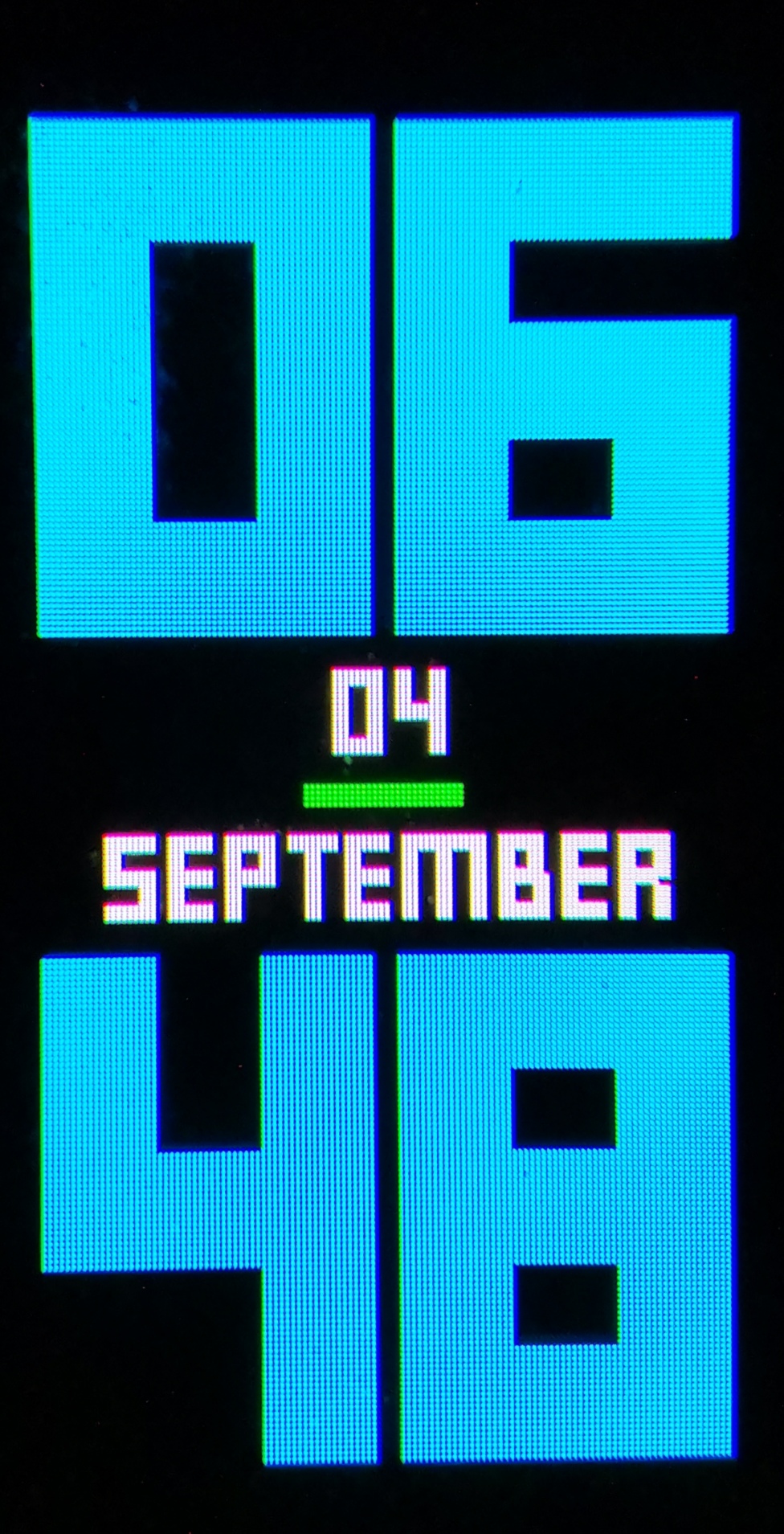
Maybe I found a bug
I have the problem, that in one of my watchfaces i recognize a difference of the
battery icon positions between preview and live picture on the band. I think 2 pixels to the left on the band.
Battery icon is the colored dash in the middle.
Numbers have all the same size.
"Status": {
"Battery": {
"BatteryConfig": {
"BoxWidth": 0,
"Alignment": 0,
"Order": 0
},
"Icon": {
"X": 46,
"Y": 122,
"ImageIndex": 31,
"ImagesCount": 9
}
}
}
The attachments show what I mean.
Maybe an error on my side?
Please take a look!
Thanks
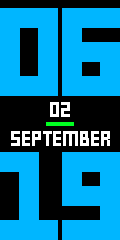
- preview generated with MiBandWFTool
- unnamedbig_blue_german_packed_static.png (2.31 KiB) Viewed 31432 times
- Image took with my smartphone
- IMG_20190904_064921.jpg (699.11 KiB) Viewed 31432 times
Re: MiBandWFTool
Posted: 04 Sep 2019, 08:35
by lvpokka
hyippiemon wrote: 04 Sep 2019, 05:13
I think 2 pixels to the left on the band.
As i see there is shift for 1 px for Date and 1 px shift for battery... didn't saw this previously) maybe it's some miscalculations in alignments.Not critical, probably will shift back in next release.
Thx
Re: MiBandWFTool
Posted: 04 Sep 2019, 17:37
by hyippiemon
thanks, yes, seems to be an alignment (Center) issue
took "Left" now -> no difference between preview and live picture
Re: MiBandWFTool
Posted: 04 Sep 2019, 23:43
by hammad497
Hey I am having a problem. After following the procedure stated above i was able to generate a .bin file. After placing it in the respective folder i tried to sync the watch face in the mi fit app. But the app is stating "could not sync". I feel like i am making a dumb mistake. Can someone guide me? Thanks in advance.
Re: MiBandWFTool
Posted: 05 Sep 2019, 04:07
by MonsterDruide1
[mention]hammad497[/mention]
This error can have many sources, maybe try to add a preview into the folder so that you know it really is the correct watchface.
Also, did you generate the .bin with the Palette-Image mode or with the Raw-Mode? Try to do it with the Palette image mode, so there aren't too big/deep pictures.
Re: MiBandWFTool
Posted: 05 Sep 2019, 05:52
by lvpokka
hammad497 wrote: 04 Sep 2019, 23:43
Hey I am having a problem.
99% size off your watchface is higher then 320kb
Re: MiBandWFTool
Posted: 05 Sep 2019, 08:45
by hammad497
Thanks guys! The problem was the size of the WF. Used the palette mode and it worked. Thanks again!
Re: MiBandWFTool
Posted: 05 Sep 2019, 13:43
by stqcb
Hi there,
I'm having a similar problem as hammad497. I can confirm that for my problem it is indeed the size. But my question is, how do I get the size down.
When I try palette image mode it gives me the following error "This image is using too many palette colors. Please make image less colorful or use RAW". But when I try raw mode the total size with the changes I made is 492kb.
But here's the thing. The original .bin I'm working off of is 233kb. I tried simply dragging that to watchface.exe then immediately dragging the .json file from the uncompressed folder, completely unchanged, back to watchface.exe and the new .bin file is 402kb. How come the new file is so much larger even though there were no changes made to the .json code, or any of the images?
Again, I can't use palette mode because it gives me the above error.
Thanks for the help.
Re: MiBandWFTool
Posted: 05 Sep 2019, 15:51
by lvpokka
README) please check palette mode and raw.cfg
Re: MiBandWFTool
Posted: 05 Sep 2019, 16:09
by stqcb
lvpokka wrote: 05 Sep 2019, 15:51
README) please check palette mode and raw.cfg
I assume you're talking about this part of the readme? "create file raw.cfg with content 1,4,2,5,66 (near .json) to force raw image mode for selected image IDs in raw.cfg"
I don't really know much about coding or anything so I don't know exactly what that means or how to do it.
Re: MiBandWFTool
Posted: 05 Sep 2019, 17:01
by Dario
GIK-Team wrote: 08 Jul 2019, 12:57
.....
Stable v1.3.8
- Removed image order dependency for json (sorting images no longer required)
- Fixed display bugs
Important: the order of the images should be from 0000 to XXXX without gaps.
v1.3.9
- Removed dependence on images order 0000->XXXX
- Calories rendering fixed
- Added ability to change Preview Speed (available from 50ms - 1000ms)
- TimeElement DrawingOrder hardcoded to 1234 (not used by MiBand4)
(the file name depends on the name of the bin. If the .bin file is not generated, the package is wrong)
6. Copy the newly generated bin file to the corresponding directory of the mobile phone, and the synchronization will be completed. (This step is not very clear, you can refer to the original tutorial) above, you're done!
Download
[mention]GIK-Team[/mention] where is it possible to find version 1.3.8 ?
I have read that it is the best version (I have already tried other versions and other modified programs but they are full of bugs

)...
I wanted to change the days (replacing them with those in Italian) in the bluegreen whatchface of [mention]lazimk[/mention] ...
Thank You

Bye
Re: MiBandWFTool
Posted: 05 Sep 2019, 17:41
by lazimk
stqcb wrote: 05 Sep 2019, 13:43
Hi there,
I'm having a similar problem as hammad497. I can confirm that for my problem it is indeed the size. But my question is, how do I get the size down.
When I try palette image mode it gives me the following error "This image is using too many palette colors. Please make image less colorful or use RAW". But when I try raw mode the total size with the changes I made is 492kb.
But here's the thing. The original .bin I'm working off of is 233kb. I tried simply dragging that to watchface.exe then immediately dragging the .json file from the uncompressed folder, completely unchanged, back to watchface.exe and the new .bin file is 402kb. How come the new file is so much larger even though there were no changes made to the .json code, or any of the images?
Again, I can't use palette mode because it gives me the above error.
Thanks for the help.
I have a workround for this. a curvy path. (pack to RAW in 1.3.9, unpack with v1.3.6, then pack same with PALETTE 1.3.6, unpack with 1.3.9, pack again with PALETTE 1.3.9, its just to make sure jsons are in correct format)
I am gonna request this to be included as an option/feature in next version (posterize option)
Re: MiBandWFTool
Posted: 05 Sep 2019, 17:46
by lazimk
[mention]lvpokka[/mention]
In v1.3.8 and v1.3.9 (i think in both) when raw files are packed with PALETTE exe, it gives error (saying it uses too many colors, use raw.cfg), But in 1.3.6 it somehow posterizes/compresses the image to certain number of colors in palette. I have used this as a workaround in my works.
This is my request to add 'Force posterizing / paletting' as an option (0 or 1) for palette mode exe (on .config maybe).
This should not affect images in raw.cfg
This option will be helpful for ppl who want to include animation in wf and optimize size.
Please include this option in next version.
Re: MiBandWFTool
Posted: 05 Sep 2019, 18:26
by GIK-Team
Dario wrote: 05 Sep 2019, 17:01
[mention]GIK-Team[/mention] where is it possible to find version 1.3.8 ?
I have read that it is the best version (I have already tried other versions and other modified programs but they are full of bugs
)...
I wanted to change the days (replacing them with those in Italian) in the bluegreen whatchface of [mention]lazimk[/mention] ...
Thank You
Bye
Re: MiBandWFTool
Posted: 05 Sep 2019, 18:26
by lvpokka
[mention]lazimk[/mention] sooo 1.3.6 just allowing to user more than 256 colors or its making image quality lower? there is certain limit and lag on MiBand4, could you please show background images after 1.3.9 raw and 1.3.6 after your tricks
p.s there is some problems if allow to use more palette colors(its just black, or not showing), did you test on miband4?.
Re: MiBandWFTool
Posted: 05 Sep 2019, 18:28
by lvpokka
[mention]Dario[/mention] i have more then 5 testers which is creating watchfaces on daily bases) could you explain where you have bugs in 1.3.9(better than 1.3.8)
Re: MiBandWFTool
Posted: 05 Sep 2019, 20:33
by lazimk
[mention]lvpokka[/mention]
v1.3.6 palette mode makes image quality lower (it doesn't say user that a particular image cannot be used). I lowers quality by palettizing image to certain number of colors (like Posterizing).
In v1.3.9 palette mode, tool doesn't posterize image, but says user to use an image with less number of colors.
(Mi band 4 can support 16mil colors, But heavy WFs make band laggy)
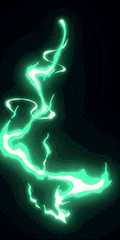
I am attaching 3 pictures here (same frame).
1) RAW (17.5 kb) has many colors
2) Posterized by v1.3.6 (14 kb)- has less number of colors in color palette, (compare both images)
3) Manually Posterized (6 kb) - has very few colors.
The feature i mentioned, if it can give an option to posterize images (on/off), if on, to a number of colors (user inputted number, like 64,128,256), it could be used to optimize WF size.


Re: MiBandWFTool
Posted: 05 Sep 2019, 20:36
by lazimk
[mention]lvpokka[/mention]
Also, In addition (as suggestion),
In generated previews, animations included in WF are repeating again and again even if i set RepeatCount = 1.
If Generated Preview could follow Repeat count , it would be nice
Re: MiBandWFTool
Posted: 05 Sep 2019, 21:32
by lvpokka
[mention]lazimk[/mention] please check in 1.3.6 logs, is there message "[WARN] This image is using too many palette colors" because in 1.3.6 there was only warning but you get lucky, because i think it's cropping needed colors.
Yest it's support 16m colors) BUT In raw mode ;D
Please check how many colors its writed in bin
Trace|Palette item 369: R 78, G 74, B 70
what is the max number
upd.
Your definitely wrong but very lucky!
Just tested and found 1 bug and 1 new solution)) you can try to test and use some random "photo", it will become black)
BUT!!! i found bug, and currently on your example your JUST using 8bit image, so if you will convert in paint.net your image in 8bit, you will get even better result.
Re: MiBandWFTool
Posted: 06 Sep 2019, 03:21
by lazimk
lvpokka wrote: 05 Sep 2019, 21:32
@lazimk please check in 1.3.6 logs, is there message "[WARN] This image is using too many palette colors" because in 1.3.6 there was only warning but you get lucky, because i think it's cropping needed colors.
Yest it's support 16m colors) BUT In raw mode ;D
Please check how many colors its writed in bin
Trace|Palette item 369: R 78, G 74, B 70
what is the max number
upd.
Your definitely wrong but very lucky!
Just tested and found 1 bug and 1 new solution)) you can try to test and use some random "photo", it will become black)
BUT!!! i found bug, and currently on your example your JUST using 8bit image, so if you will convert in paint.net your image in 8bit, you will get even better result.
Ah bro.
Yes.. I always used PNG-8 (8-Bit) images (thinking it would reduce packsize for Raw) . Maybe thats why i got lucky.
So, if it is planned to include that feature, palette exe might want to export pics to PNG 8bit, and apply posterization i guess.